
1. Kupu Whakataki
The Carrera RC Mario Kart Yoshi Quad (Model 370200997X) is a remote-controlled vehicle designed for users aged 6 and up. This manual provides essential information for the safe and optimal use of your RC Yoshi Quad, ensuring an enjoyable experience. Please read all instructions carefully before operating the product.
2. He aha kei roto i te Pouaka
Wewetehia nga waahanga katoa me te whakarite kia whakauruhia nga mea e whai ake nei:
- Carrera RC Yoshi Quad Vehicle
- Mana Mamao
- 3.2V 700 mAh LiFePo4 Battery (for vehicle)
- Tauira Whakatau USB
- Pukapuka Tohutohu

Image: The Carrera RC Mario Kart Yoshi Quad shown in its original retail packaging, indicating included components.
3. Tatūnga
3.1. Te Whakataki i te Pūhiko Waka
Before first use, fully charge the vehicle's 3.2V 700 mAh LiFePo4 battery. The charging process typically takes approximately 50 minutes.
- Connect the USB charging cable to the vehicle's charging port.
- Monohia tetahi pito o te taura USB ki tētahi pūtake hiko USB hototahi (hei tauira, rorohiko, urutau pakitara USB, pēke hiko).
- The charging indicator light on the vehicle or cable will show the charging status (refer to specific indicator behavior in the quick start guide if available).
- Once charging is complete, disconnect the cable.

Image: The Yoshi Quad vehicle, ready for battery charging via its USB cable.
3.2. Mana Mamao Tāuta Pūhiko
The remote control requires batteries for operation. Please ensure you use the correct type and polarity.
- Rapua te wahanga pākahiko kei muri o te mana mamao.
- Whakatuwheratia te uhi o te wahanga pākahiko.
- Insert the required batteries (e.g., AA or AAA, typically 2x) according to the polarity markings (+/-).
- Katia kia mau te uhi o te wahanga pākahiko.
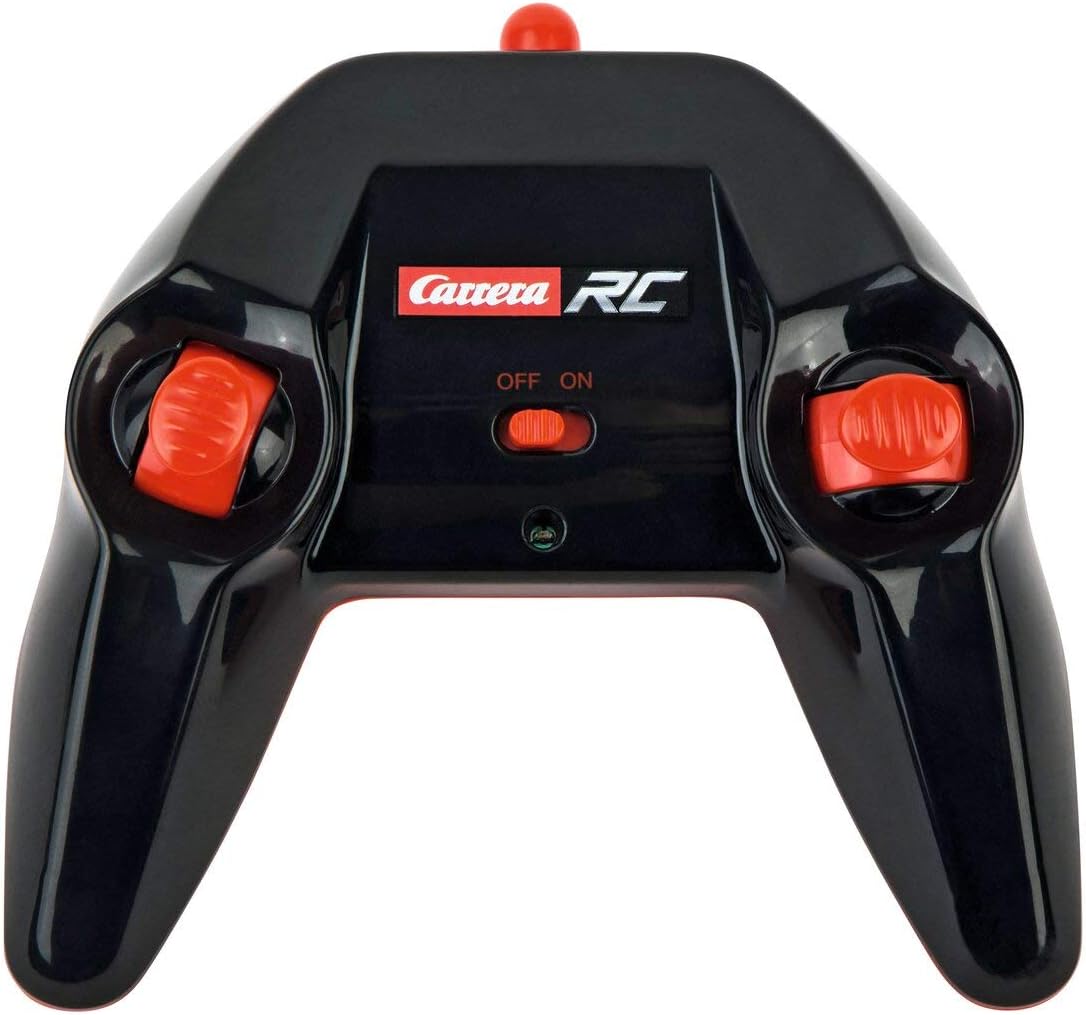
Image: The Carrera RC remote control, showing its design and controls.
3.3. Te hono i te Waka me te Mana Mamao
To establish a connection between the vehicle and the remote control, follow these steps:
- Ensure both the vehicle and the remote control have fresh or fully charged batteries.
- Whakakāhia te waka mā te whakamahi i tana pana hiko.
- Whakakāhia te mana mamao mā te whakamahi i tana pana hiko.
- The vehicle and remote control should automatically pair. A successful connection is usually indicated by a solid light on both devices (refer to your quick start guide for specific light indicators).
Video: This video demonstrates the unboxing, battery installation, and initial pairing process for the Carrera RC Mario Kart Yoshi Quad.
4. Nga Tohutohu Whakahaere
Once paired, you can begin operating your Carrera RC Yoshi Quad.
- Whakamua/Whakamuri: Use the throttle trigger or joystick on the remote control to move the vehicle forward or backward.
- urungi: Use the steering wheel or directional controls on the remote control to turn the vehicle left or right.
- Tere: The Yoshi Quad can reach speeds of up to 9 km/h. Adjust your control input for desired speed.
- Awhe: Operate the vehicle within the specified range of the remote control to maintain connection and avoid loss of control.
Whakatupato Haumaru:
- Always operate in open areas, away from people, pets, and obstacles.
- Kaua e whakamahia ki te taha o te wai, ki ngā wāhi mākū rānei.
- Avoid operating on public roads or near traffic.
- Supervise younger children during operation.
5. Tiaki
5.1. Te horoi
To maintain the appearance and functionality of your RC Yoshi Quad:
- Wipe the vehicle and remote control with a soft, dry cloth after each use.
- Do not use harsh chemicals or solvents, as these can damage the plastic.
- Avoid getting water into electronic components.
5.2. Tiaki Pūhiko me te Rokiroki
- Always remove batteries from the remote control if not in use for extended periods.
- Store the vehicle's LiFePo4 battery in a cool, dry place, away from direct sunlight and extreme temperatures.
- Do not overcharge or completely discharge the battery.
6. Te Raru
If you encounter issues with your RC Yoshi Quad, refer to the following common problems and solutions:
| Raruraru | Take pea | Rongoā |
|---|---|---|
| Kaore te waka e neke. | Low or uncharged vehicle battery. Kua mate ngā pākahiko mana mamao, kua hē rānei te tāutanga. Kāore te waka me te mana mamao i honoa. | Whakakīia te pākahiko o te waka. Replace/install remote control batteries correctly. Re-pair vehicle and remote control. |
| Poor control range or intermittent connection. | Te pokanoa mai i ētahi atu taputapu RC, i ngā hikohiko rānei. Operating beyond effective range. Nga pākahiko iti. | Neke atu ki tētahi atu wāhi. Operate closer to the vehicle. Me utu/whakakapi i nga pākahiko. |
| Ka tere haere te waka, he pohehe ranei. | Pūhiko iti o te waka. Te aukati i roto i ngā wira/tōki. | Whakakīia te pākahiko o te waka. Tirohia, ā, whakakorea ngā arai katoa. |
7. Whakatakotoranga
| Waitohu | Carrera |
| Ingoa Tauira | 370200997X |
| Pūāhua | Yoshi |
| Momo Waka | Tapawhā |
| Rauemi | Kirihou |
| Tae | Multicolor (predominantly Green) |
| Awhe Tau (Whakaahuatanga) | 6+ tau |
| Tere Max | 9 Kiromita ia hāora |
| Puna Mana | Pūhiko Powered |
| Vehicle Battery Type | 1 Lithium-ion (3.2V 700 mAh LiFePo4) - included |
| Waa Whakatau | Approx. 50 meneti |
| Wā Mahi | Tae atu ki te 30 meneti |
| Momo Mana Mamao | Radio Control (2.4 GHz) |
| Ahu (Tuemi) | 36.5 x 20.5 x 23 henimita |
| Taumaha (Tuemi) | 1.06 Kirokaramu |
| Āhuahira Motuhake | Te Marama Tirohanga |
| Whenua Taketake | Haina |
8. Pūtāhui me te Tautoko
8.1. Pūtāhui a te Kaihanga
This Carrera RC product is covered by a 2 tau te whakamana a te kaiwhakanao. Please retain your proof of purchase for any warranty claims. The warranty covers defects in materials and workmanship under normal use.
8.2. Tautoko Kiritaki
For technical assistance, spare parts, or warranty inquiries, please contact Carrera customer support. Refer to the contact information provided on the product packaging or the official Carrera webpae.