
GOKOO B08FMBHSWD
GOKOO Smart Watch B08FMBHSWD User Manual
Kupu Whakataki
This manual provides essential information for the proper setup, operation, and maintenance of your GOKOO Smart Watch B08FMBHSWD. Please read it thoroughly before using the device to ensure optimal performance and longevity.
The GOKOO Smart Watch is a versatile fitness tracker and smartwatch designed to monitor various health metrics and assist with daily activities. It features a full touch screen, heart rate and blood oxygen monitoring, sleep tracking, multiple sports modes, and notification capabilities.
Ka mutu te huaview
The GOKOO Smart Watch B08FMBHSWD is equipped with advanced features to support your active lifestyle and health monitoring needs.
- All-day Activity Tracking: Records steps, calories, and mileage. Supports 10 sports modes including walking, running, yoga, and swimming.
- Te Aroturuki Hauora Matatoa: Continuously monitors heart rate and blood oxygen levels. Features automatic sleep tracking, breathing training, and sedentary reminders.
- Durable and Waterproof Design: IP68 waterproof rating suitable for daily use and swimming.
- Whakaatu Whakaritea: 1.3-inch round high-definition screen with personalized UI interfaces.
- Panui Maama: Synchronizes messages and allows management of incoming calls.
- Roa te Ora o te Pūhiko: Up to 10 days of usage on a single charge (200MA battery).
- Hototahi Whānui: Works with Android 5.0+ and iOS 9.0+ devices.

Figure 1: GOKOO Smart Watch highlighting its design and core functionalities.
Tatūnga
1. Ka tohatohahia te Pūrere
Before initial use, fully charge your GOKOO Smart Watch. Connect the magnetic charging cable to the charging contacts on the back of the watch and plug the USB end into a power adapter (not included) or a computer's USB port. The watch display will indicate charging status.
A full charge typically takes approximately 2 hours and provides up to 10 days of usage, depending on individual use patterns.

Figure 2: Illustration of the watch's IP68 waterproof capability and its extended battery life.
2. Taupānga Tāutanga me te Paihere
- Tikiake i te Taupānga: Rapua the official GOKOO companion app in your smartphone's app store (Apple App Store for iOS, Google Play Store for Android).
- Tāuta me te Rēhita: Tāutahia te taupānga, ka whai i ngā tohutohu kei te mata hei waihanga i tētahi pūkete, hei takiuru rānei.
- Whakahohe Nihokikorangi: Me mohio kei te whakahohea te Nihokikorangi i runga i to waea atamai.
- Whakahoahoa te Mataara: Open the GOKOO app, navigate to the device pairing section, and select your GOKOO Smart Watch from the list of available devices. Confirm the pairing request on both your phone and the watch if prompted.
- Tuku Whakaaetanga: Allow necessary permissions (e.g., notifications, location, health data) for the app to function correctly.
The watch will synchronize its language with your phone upon successful connection.
Nga Tohutohu Whakahaere
1. Whakaterenga Taketake
- Mata Pa: The watch features a full touch screen for interaction.
- Swipe Runga/Whakararo: Panuku i roto i nga tahua me nga whakamohiotanga.
- Swipe Mauī/Matau: Whakauru atu ki ngā widget rerekē, ki ngā mahi tere rānei.
- Tap: Tīpakohia tētahi tūemi, whakaū rānei i tētahi mahi.
- Pātene taha: Typically used to return to the home screen or activate/deactivate the display.

Figure 3: The watch interface displaying multiple functions and touch screen interaction methods.
2. Aroturuki Mahi
The watch automatically tracks your daily steps, calories burned, and distance traveled. For specific activities, you can select from 10 sports modes:
- Te hikoi
- Rere ana
- Yoga
- Kauhoe
- Paihikara
- Te piki
- Poitūkohu
- Whutupaoro
- Badminton
- Te pekepeke
To start a workout, navigate to the 'Sports' menu on your watch, select the desired activity, and tap to begin. The watch will record your exercise data, which can be reviewi roto i te taupānga hoa.

Figure 4: The watch interface showing available sports monitoring modes.

Figure 5: The watch tracking an outdoor run, displaying distance, calories, and a trajectory map.
3. Te Aroturuki Hauora
- Tere Manawa: Ka aroturuki tonu te mataaratanga i to reanga ngakau. View ngā raraunga wā-tūturu i runga i te mataaratanga, ngā raraunga hītori taipitopito rānei i roto i te taupānga.
- Toto hāora (SpO2): Aroturukihia ngā taumata hāora o tō toto puta noa i te rā.
- Aroturuki Moe: The watch automatically records your sleep quality, including deep sleep, light sleep, and wake times. Review sleep patterns in the app to help adjust your habits.
- Whakangungu Manawa: Access guided breathing exercises on the watch to help reduce stress and improve relaxation.
- Whakamaumahara Nohonoho: Set reminders in the app to prompt you to move after periods of inactivity.

Figure 6: The watch displaying real-time heart rate and blood oxygen data during exercise.
4. Whakamōhiotanga me ngā Āhuatanga Maamaa
Once paired with your smartphone, the GOKOO Smart Watch can display notifications for incoming calls, messages, and various app alerts. You can read messages directly on your wrist and manage incoming calls (answer/reject) without reaching for your phone.
- Whakahaere Waea: Swipe on the watch screen to accept or reject incoming calls.
- Message Display: View text messages and app notifications.
- Matapae huarere: Access current weather information.
- Mana Waiata: Whakahaerehia te purei puoro i runga i to waea atamai.
- Mamao o te Kamera: Whakamahia te mātaaratanga hei ārai mamao mō te kāmera o tō waea.
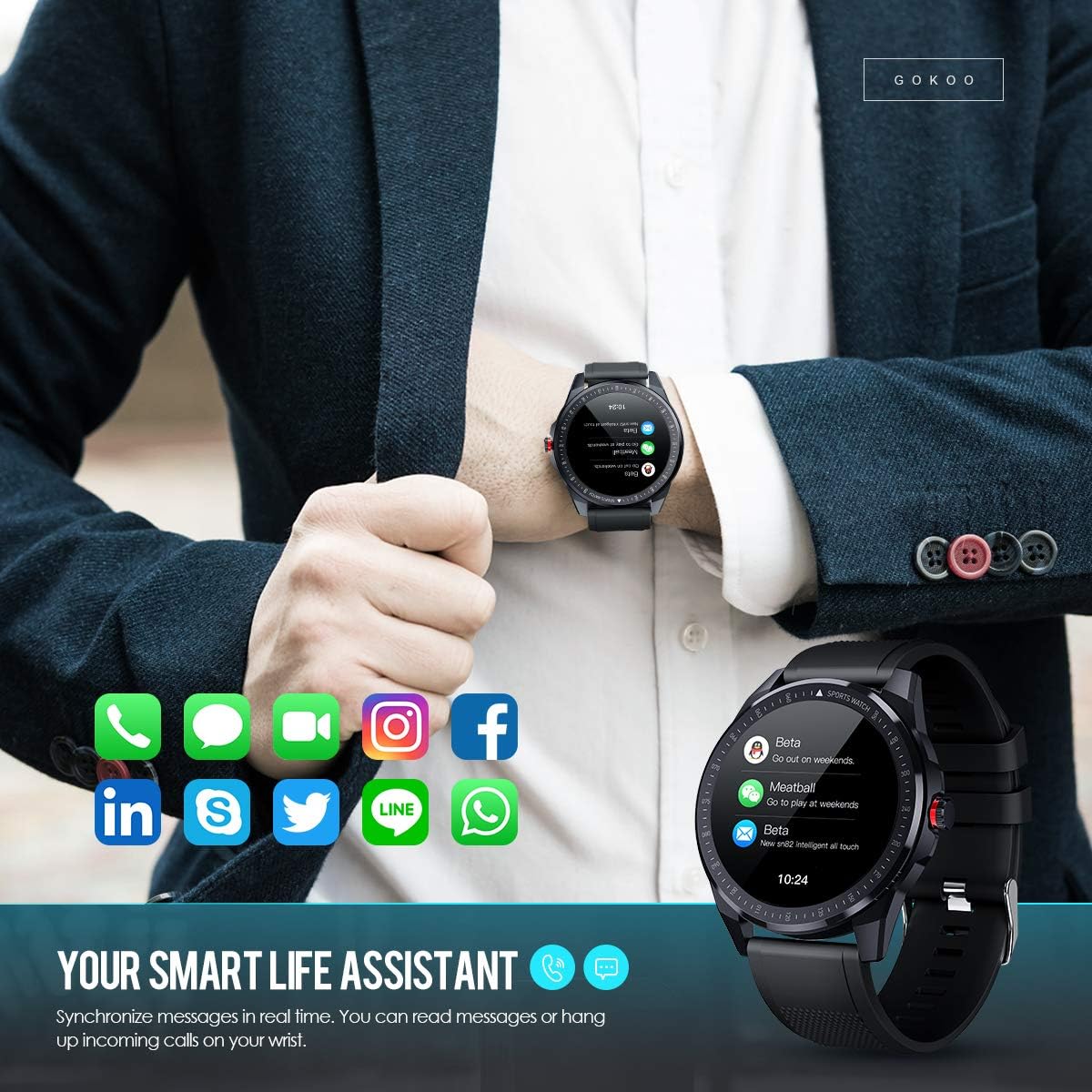
Figure 7: The watch showing synchronized notifications from a smartphone.
5. Whakaritenga
The GOKOO Smart Watch allows for personalization of its interface. You can select from various pre-installed watch faces or download additional styles through the companion app to match your preference.
Te tiaki
1. Te horoi
Regularly clean your watch and strap to prevent skin irritation and maintain device hygiene. Use a soft, lint-free cloth. If necessary, slightly dampHoroia te kakahu ki te wai. Āta karohia te whakamahi i ngā matū kaha, i ngā kaihoroi whakakoi, i ngā rehu hau rānei.
2. Nga Aratohu Atete Wai
The GOKOO Smart Watch has an IP68 waterproof rating, meaning it is resistant to dust and can withstand immersion in water up to 1.5 meters for 30 minutes. It is suitable for daily use, hand washing, rain, and swimming.
Hiranga: Do not use the watch in hot water baths, saunas, or during diving. High temperatures and high pressure can compromise the waterproof seals and cause damage.
3. Tiaki Pūhiko
- A ape i te tino tuku i te pākahiko i nga wa katoa.
- Whakautuhia te mātaaratanga mā te whakamahi i te taura utu aukume kua whakaratohia.
- Whakaorangia te mataaratanga ki te waahi makariri, maroke ka kore e whakamahia mo te wa roa.
Raparongoā
- Kia mataara kia kaua e huri: Me whakarite kua whakakiia te mataaratanga. Honoa ki te rihi mo te iti rawa 30 meneti.
- Kaore e taea te hono ki te waea:
- Me mohio kei te whakahohea te Nihokikorangi ki to waea.
- Me whakarite kei roto te mātaaratanga i te awhe Nihokikorangi o tō waea.
- Tīmataria anō tō waea me te mataaratanga.
- Check if the app has necessary permissions.
- Raraunga hauora hē: Kia mau te mātaaratanga ki tō ringaringa, kia kotahi te whānui o te maihao i runga ake i te wheua o te ringaringa. Horoia te pūoko kei muri o te mātaaratanga.
- Ko nga whakamohiotanga kaore e puta:
- Verify that notification permissions are granted in the app and your phone's settings.
- Me mohio kei te hono te mataaratanga ma te Nihokikorangi.
- Check if 'Do Not Disturb' mode is active on either the watch or phone.
- Ora pūhiko poto: Reduce screen brightness, disable continuous heart rate monitoring if not needed, and limit the number of active notifications.
Whakatakotoranga
| Āhuahira | Taipitopito |
|---|---|
| Waitohu | KOKOO |
| Tauira | B08FMBHSWD |
| Rahi Mata | 1.3 Inihi |
| Pūnaha Mahi | Android 5.0 teitei ake ranei, iOS 9.0 teitei ake ranei |
| Pūrere Hototahi | Waea atamai |
| Ora Pūhiko | Tae atu ki te 10 ra (i runga i te whakamahinga) |
| Momo Pūhiko | Hikahiko Polymer |
| Ātete wai | IP68 |
| Hononga Ahokore | Nihokikorangi |
| Whakauru Atanga Tangata | Mata pa |
| Hunga Hua | 27 x 5 x 1.08cm; 168g |

Figure 8: Detailed product dimensions of the GOKOO Smart Watch.
Pūtāhui me te Tautoko
For warranty information or technical support, please refer to the contact details provided with your purchase or visit the official GOKOO website. If you require a copy of this manual or have any questions regarding your GOKOO Smart Watch B08FMBHSWD, please contact customer service.
Tuhinga e pa ana - B08FMBHSWD
 |
GOKOO Smart Watch Manual Kaiwhakamahi He pukapuka ā-ringa mō te Mataaratanga Atamai GOKOO, e kapi ana i te tango taupānga, te utu, te hononga, ngā āhuatanga, me te whakatau raruraru. |
 |
Smart Watch User Manual - Fitness Tracker, Heart Rate, Sleep Monitoring Comprehensive user guide for the Smart Watch, detailing setup, pairing, app usage, and features like heart rate monitoring, sleep tracking, activity tracking, sports modes, and notifications. Includes IP68 water resistance information. |
 |
AEAC IDW15 Smart Watch User Manual Comprehensive user manual for the AEAC IDW15 Smart Watch, detailing its features, setup, operations, and health tracking capabilities including heart rate, SpO2, sleep, and various sports modes. Learn how to use Alexa, manage notifications, and customize your watch experience. |
 |
FW101 Fitness Tracker User Manual Comprehensive user manual for the FW101 Fitness Tracker by YoYoFit, covering setup, features, notifications, activity tracking, sleep monitoring, exercise analysis, troubleshooting, and technical specifications. |
 |
AGPTEK Smart Watch Aratohu Powhiri He aratohu powhiri matawhānui mo te AGPTEK Smart Watch, e hipoki ana i nga huaview, installation, charging, app download and binding, basic operations, and specifications. Learn how to use your AGPTEK Smart Watch effectively. |
 |
LW29 Smartwatch Manual Tohutohu Instruction manual for the LW29 smartwatch, covering app download, charging, Bluetooth pairing, operation, features like sports tracking, notifications, weather, sleep monitoring, heart rate monitoring, blood pressure monitoring, blood oxygen monitoring, stopwatch, music control, brightness adjustment, dial switching, and system information. Includes product parameters and a warranty card. |
Ask a question about this manual
Ask about setup, troubleshooting, compatibility, parts, safety, or missing instructions. Manuals+ will review the question and use this page’s manual context to help answer it.