
Nga Korero Haumaru Nui
Please read and understand all instructions before beginning assembly and use. Failure to follow these instructions may result in serious injury or property damage. Keep this manual for future reference.
- Raukaha Taumaha: Do not exceed the maximum weight capacity of 220 lbs for the tabletop and 30 lbs for adjustable shelves. Overloading can cause instability and collapse.
- Huihuinga: Assemble the unit on a soft, clean surface to prevent scratches. Ensure all parts are securely fastened before use. Two people are recommended for assembly.
- Pūmautanga: To prevent tipping, especially with children, always place the TV stand on a flat, level surface. Consider using anti-tip hardware (if included or purchased separately) to secure the unit to a wall.
- Haumaru Hiko: Route all cables through the designated cable management holes to prevent pinching or damage. Do not overload electrical outlets.
- Tiaki: Regularly check all fasteners to ensure they remain tight. Loose fasteners can lead to instability.
Ihirangi mokete
Verify that all components listed below are present before starting assembly. If any parts are missing or damaged, please contact customer support.
| Wahi | Whakaahuatanga | Te nui |
|---|---|---|
| Paepae Runga | Main tabletop surface | 1 |
| Paewhiri Taha | Left and Right side supports | 2 |
| Kaiwehewehe Waenganui | Internal vertical supports for shelves | 2 |
| Whata Whakaritea | Shelves for media storage | 2 |
| Ngā Kūaha Whare Paheke | Decorative and functional doors | 2 |
| Door Rails & Hardware | Components for sliding door mechanism | 1 huinga |
| Rauemi Huihuinga | Screws, dowels, cam locks, pins, etc. | 1 huinga |
| Panui Hoki | Rear panels with cable management cut-outs | 2 |
Nga Tohutohu Huihuinga
Follow these steps carefully for proper assembly. An installation video is provided for visual guidance.
Ataata: WAMPAT Farmhouse TV Stand for 65 inch TV Installation Guide. This video provides a step-by-step visual guide for assembling your TV stand.
- Hipanga 1: Whakapaia te turanga
Attach the bottom rail (Part H) to panels (1, 2) using screws (L, M). Ensure the rail is securely fastened and aligned.
- Step 2: Assemble Side and Middle Panels
Screw parts (A) into panels (3, 4). Insert dowels (C) into panel (2) and attach panels (3, 4). Then insert and secure cam lock (B) to lock it.
- Hipanga 3: Whakauruhia te Paewhiri Runga
Insert dowels (C) into panels (3, 4, 5, 6). Attach panel (10) to panels (3, 4, 5, 6) using screws (F). Then secure cam bolts (A) into top panel (10).
- Hipanga 4: Tāutahia ngā Paewhiri Whakamuri
Secure parts (G) to panels (3, 4, 7, 10). Ensure the back panels are flush and the cable management holes are accessible.
- Step 5: Attach Door Hardware
Attach part (E, N) to panels (15, 16). Then screw part (K) to panels (15, 16) using part (J). Do not fix the screws too tight at this stage.
- Step 6: Install Sliding Doors
After installing the doors (15, 16) in position, adjust door height and leveling. Then fix screws tight and slide doors (15, 16) into the designated area. To prevent the TV cabinet from toppling, install the anti-tip parts (O).
Tatūnga me te Whakanoho
Proper setup ensures stability and optimal use of your WAMPAT TV Stand.
- Tauwāhi: Place the TV stand on a flat, stable, and level surface. Avoid placing it in direct sunlight or near heat sources to prevent material damage.
- Whakatakoto pouaka whakaata: This stand is designed for TVs up to 65 inches. Ensure your TV's base fits within the tabletop dimensions (59" L x 15.4" W). The tabletop can support up to 220 lbs.
- Whakaha Uepu: Utilize the multiple round cut-outs in the back panels to route all power cords, HDMI cables, and other media device wires. This keeps cables organized and prevents clutter.
- Whata Whakaritea: The middle section features 3-level adjustable and removable shelves. Customize their height to accommodate your media devices, game consoles, or decorative items.
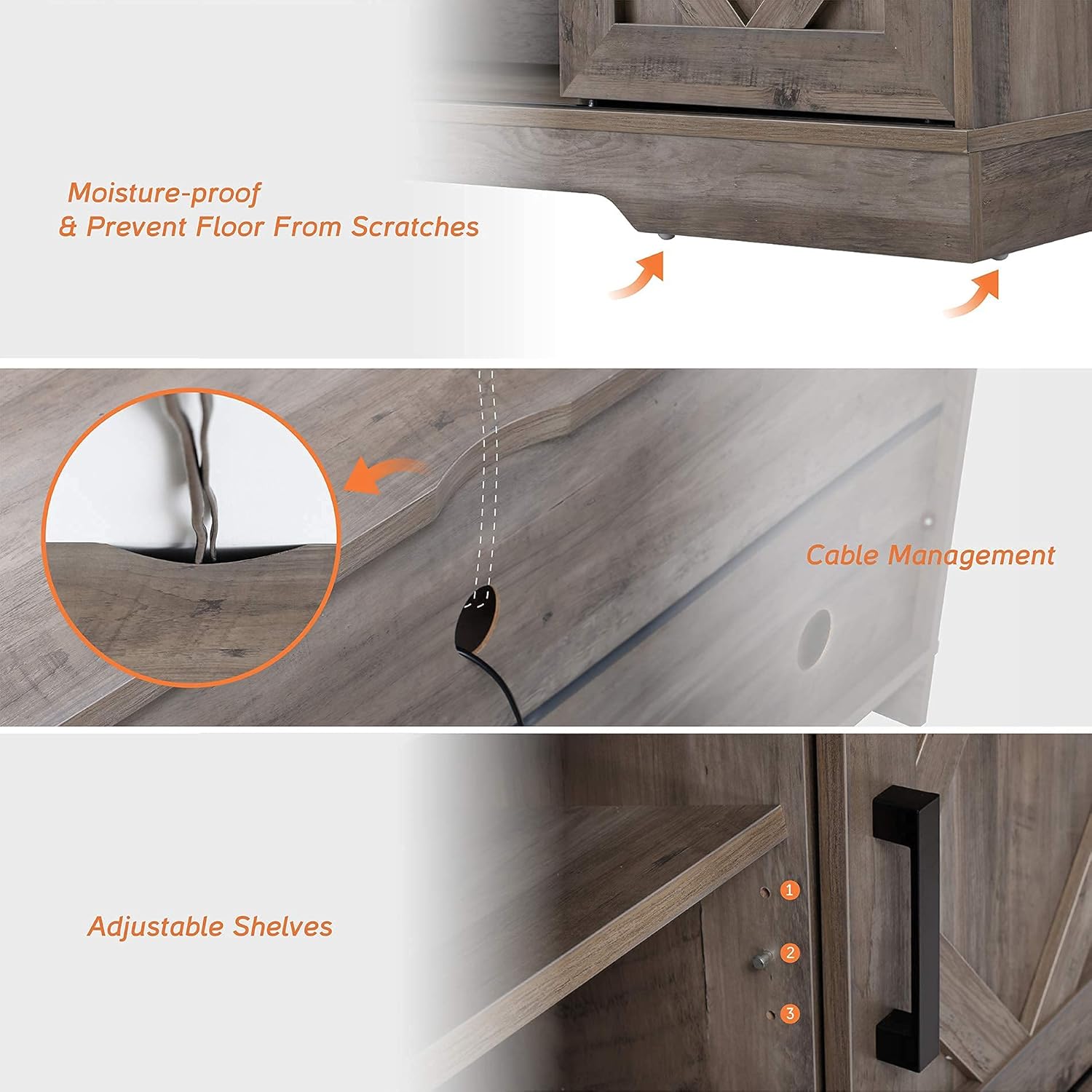
Image: Close-up showing the cable management holes, adjustable shelf positions, and moisture-proof base design.
Operating the Sliding Barn Doors
Ko te WAMPAT TV Stand features smooth-gliding barn doors for flexible storage and display.
- Whakatuwhera/Kati: Gently grasp the handle of either barn door and slide it along the top rail. The doors can be positioned to cover the side cabinets or the central open shelves, allowing you to conceal or display items as desired.
- Mahi Maeneene: The doors are designed to slide easily. If you experience any resistance, check the top rail for obstructions or ensure the door rollers are clean.

Whakaahua: A view of the TV stand highlighting the sliding barn doors, showing how they can conceal storage spaces.
Te Tiaki me te Tiaki
To keep your WAMPAT TV Stand in excellent condition, follow these simple maintenance guidelines:
- Te horoi: Horoia te mata me te panuiamp kakahu. A ape i nga matū kino me nga kai horoi, na te mea ka taea e enei te pakaru te rakau i hangaia.
- Maringi: Horoia nga pakaru kia kore ai e poke te wai.
- Ngā toromoka: Periodically check all screws, cam locks, and dowels to ensure they are tight. Re-tighten if necessary to maintain structural integrity.
- A ape i te utaina nui: Do not place excessively heavy items on the shelves or tabletop beyond the specified weight limits.
Raparongoā
Mena ka raru koe ki to turanga pouaka whakaata, tirohia nga rongoa e whai ake nei:
- Tu Wobbly:
Ensure all cam locks and screws are fully tightened. Check that the stand is on a level surface. If the floor is uneven, use furniture levelers (not included) under the base.
- Sliding Doors Stick:
Inspect the top rail and bottom groove for any debris or obstructions. Ensure the door rollers are clean and moving freely. Verify that the doors are correctly seated on the rails.
- Nga Waahanga Ngaro:
Refer to the "Package Contents" section and the assembly video. If parts are genuinely missing, contact WAMPAT customer support with your product model and part number.
- Damaged During Shipping:
If any components arrived damaged, do not proceed with assembly. Contact WAMPAT customer support immediately for replacement parts or further assistance.
Whakatakotoranga
| Āhuahira | Taipitopito |
|---|---|
| Waitohu | WAMPAT |
| Tau tauira | B-LA |
| Tae | Washed Grey |
| Size (TV Compatibility) | For 32-65 inch TV |
| Rahi Tūemi (L x W x H) | 59.05 x 15.55 x 23.62 inihi |
| Taumaha Tūemi | 80 Pauna |
| Momo Rawa | Rakau Hangaia |
| Kāhua | Whare Paamu Hou |
| Te maha o nga whata | 1 (ka taea te whakarite) |
| Nga waahanga taapiri | Adjustable Shelf, Cable Management |
| Huihuinga e hiahiatia ana | Ae |
| Nga Tohutohu Tiaki Hua | Horoia me Damp kakahu |
Pūtāhui me te Tautoko Kiritaki
WAMPAT is committed to providing high-quality products and excellent customer service.
- Mōhiohio Pūtāhui: For specific warranty details, please refer to the documentation included with your product or visit the official WAMPAT webpae.
- Tautoko Kiritaki: If you have any questions, require assistance with assembly, or need to report missing/damaged parts, please contact WAMPAT customer support.
- Rauemi ipurangi: Tirohia te WAMPAT Store on Amazon mo etahi atu korero hua me te tautoko.