

Kupu Whakataki
Thank you for choosing the XO B24 Foldable Bluetooth Headphones. This manual provides essential information for the safe and efficient use of your device. Please read it carefully before use and retain it for future reference.
The XO B24 headphones are designed for comfort and portability, featuring high-quality materials and a secure fit for an optimal audio experience.
Ka mutu te huaview
The XO B24 headphones offer both wired and wireless connectivity, a built-in microphone for calls, and a foldable design for easy storage and transport.
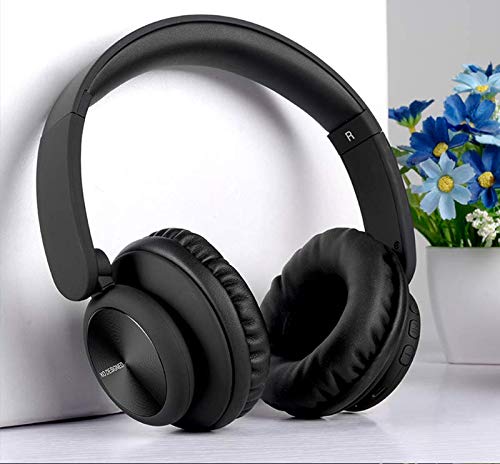
Image: XO B24 Foldable Bluetooth Headphones, showcasing their over-ear design and black color.
Whakatakotoranga
| Āhuahira | Whakaahuatanga |
|---|---|
| Ingoa Waitohu | XO |
| Ingoa Tauira | B24 |
| Tau tauira | XO-B24 |
| Tae | Pango |
| Waea Puka Puka | I-taringa |
| Hangarau Hononga | Waea, Ahokore (Nihokikorangi) |
| Tiki Waeoro | 3.5 mm Jack |
| Hangarau Whakawhitiwhiti Ahokore | Nihokikorangi |
| Nga waahanga motuhake | Includes Microphone, Foldable Design |
| hopuoro | Ae |
| Whakakore Haruru | Kao |
| Momo Mana | Volume Control, Touch Control |
| Pūrere Hototahi | Pūrere-maha |
| E hiahiatia ana te pākahiko | Ae |
Tatūnga
1. Te Whakataki i nga Paneoro
- Honoa te taura utu USB kua whakaratohia ki te tauranga utu i runga i ngā paneoro.
- Monohia tetahi pito o te taura USB ki tetahi puna hiko USB hototahi (hei tauira, rorohiko, urutau pakitara).
- The LED indicator will illuminate during charging and turn off or change color once fully charged.
2. Takirua Nihokikorangi
- Me mohio kei te whakakiia nga taringa.
- Press and hold the Power button on the headphones until the LED indicator flashes rapidly, indicating pairing mode.
- I runga i to taputapu (papa atamai, papa, rorohiko), whakaahei i te Nihokikorangi me te rapu mo nga taputapu e waatea ana.
- Select "XO B24" from the list of found devices.
- Once paired, the LED indicator will stop flashing and may show a solid light or flash slowly.
3. Hononga Waea (Kōwhiringa)
- Insert one end of the 3.5mm audio cable into the headphone jack on the XO B24.
- Plug the other end of the 3.5mm audio cable into the audio output jack of your device.
- The headphones will operate in wired mode, conserving battery life.
Nga Tohutohu Whakahaere
Te Hiko / Whakaweto
- Whakahiko: Pēhia me te pupuri i te pātene Mana mō te 3 hēkona pea kia mura rā anō te tohu LED.
- Weto Whakakore: Pēhia me te pupuri i te pātene Mana mō te 3-5 hēkona pea kia mate rā anō te tohu rama LED.
Purei Waiata
- Purei/Tatari: Pēhia te pātene Maha-mahi (ko te pātene Mana te nuinga o te wā) kotahi.
- Riu Panuku: Press and hold the Volume Up button or a dedicated 'Next' button.
- Riu o mua: Press and hold the Volume Down button or a dedicated 'Previous' button.
Mana Rōrahi
- Whakanuia te Volume: Pēhia te pātene Volume Up.
- Whakaheke Rahi: Pēhia te pātene Volume Raro.
Whakahaa Piiraa
- Whakautu/Whakamutu Waea: Patohia te paatene Maha-mahi kotahi.
- Whakakore Waea: Pēhia me te pupuri i te paatene Maha-mahi mo te 2 hēkona.
Tikanga Kopa
- To fold the headphones for storage, gently rotate the earcups inwards towards the headband until they are compact.
- To unfold, reverse the process, ensuring the earcups click securely into place.
Te tiaki
- Te horoi: Whakamahia he kakahu ngohengohe, maroke hei horoi i nga taringa. Kaua e whakamahi i nga kai horoi me nga whakarewa.
- Rokiroki: Ki te kore e whakamahia, penapenahia nga taringa ki tetahi waahi makariri, maroke, kia matara atu i te ra me te wera nui. Whakamahia te hoahoa kopa mo te rokiroki kiato.
- Tiaki Pūhiko: Hei whakaroa i te ora o te pākahiko, karohia te whakakore i nga taringa i nga wa katoa. Me utu i nga wa katoa, ahakoa kaore i te whakamahia tonu.
- Aukati i te makuku: Puritia ngā paneoro kia matara atu i te wai me te makuku nui.
Raparongoā
| Raruraru | Rongoā |
|---|---|
| Karekau e kaha ana nga waea. | Me mohio kei te whakakiia nga taringa. Tūhono ki tētahi puna hiko ka ngana anō. |
| Kaore e taea te hono ma te Nihokikorangi. | Make sure the headphones are in pairing mode (LED flashing rapidly). Disable and re-enable Bluetooth on your device. Move closer to the headphones. |
| Karekau he oro, he iti te reo. | Check the volume levels on both the headphones and your connected device. Ensure the headphones are properly paired or the 3.5mm cable is securely connected. |
| He ngoikore te kounga tangi. | Ensure there are no obstructions between the headphones and your device. Try moving closer to your device. Disconnect and reconnect the Bluetooth connection. |
| Kaore e mahi ana te hopuoro. | Ensure the headphones are properly connected and selected as the audio input device on your system. Check if the microphone is muted on your device. |
Pūtāhui me te Tautoko
The XO B24 Foldable Bluetooth Headphones come with a standard manufacturer's warranty. Please refer to the warranty card included in your product packaging for specific terms and conditions.
For technical support, troubleshooting assistance, or warranty claims, please contact your retailer or the official XO customer service. Contact information can typically be found on the product packaging or the manufacturer's webpae.