
1. Kupu Whakataki
Welcome to the Itel A46 smartphone user manual. This guide provides essential information on how to set up, operate, maintain, and troubleshoot your device. Please read this manual carefully to ensure optimal performance and longevity of your smartphone.
The Itel A46 is a feature-rich smartphone designed for everyday use, offering a blend of performance, camera capabilities, and security features.
2. Pūrere Neke Atuview

3. Aratohu Tatūnga
3.1 Inserting SIM Cards and Memory Card
The Itel A46 supports dual SIM cards (micro+nano) and expandable memory up to 128GB. Follow these steps to insert your cards:
- Locate the SIM/memory card tray on the side of your device.
- Whakamahia te taputapu ejector SIM kua whakaratohia hei whakatuwhera i te paepae.
- Carefully place your micro and nano SIM cards into their respective slots.
- If using a memory card, insert it into the dedicated memory card slot.
- Pehia atahia te paepae ki roto i te taputapu kia paato noa ki tona waahi.
3.2 Hiko Tuatahi
After inserting your cards, press and hold the power button until the Itel logo appears. Follow the on-screen instructions to complete the initial setup, including language selection, Wi-Fi connection, and Google account setup.
4. Nga Tohutohu Whakahaere
4.1 Whakaaturanga Whakaaturanga
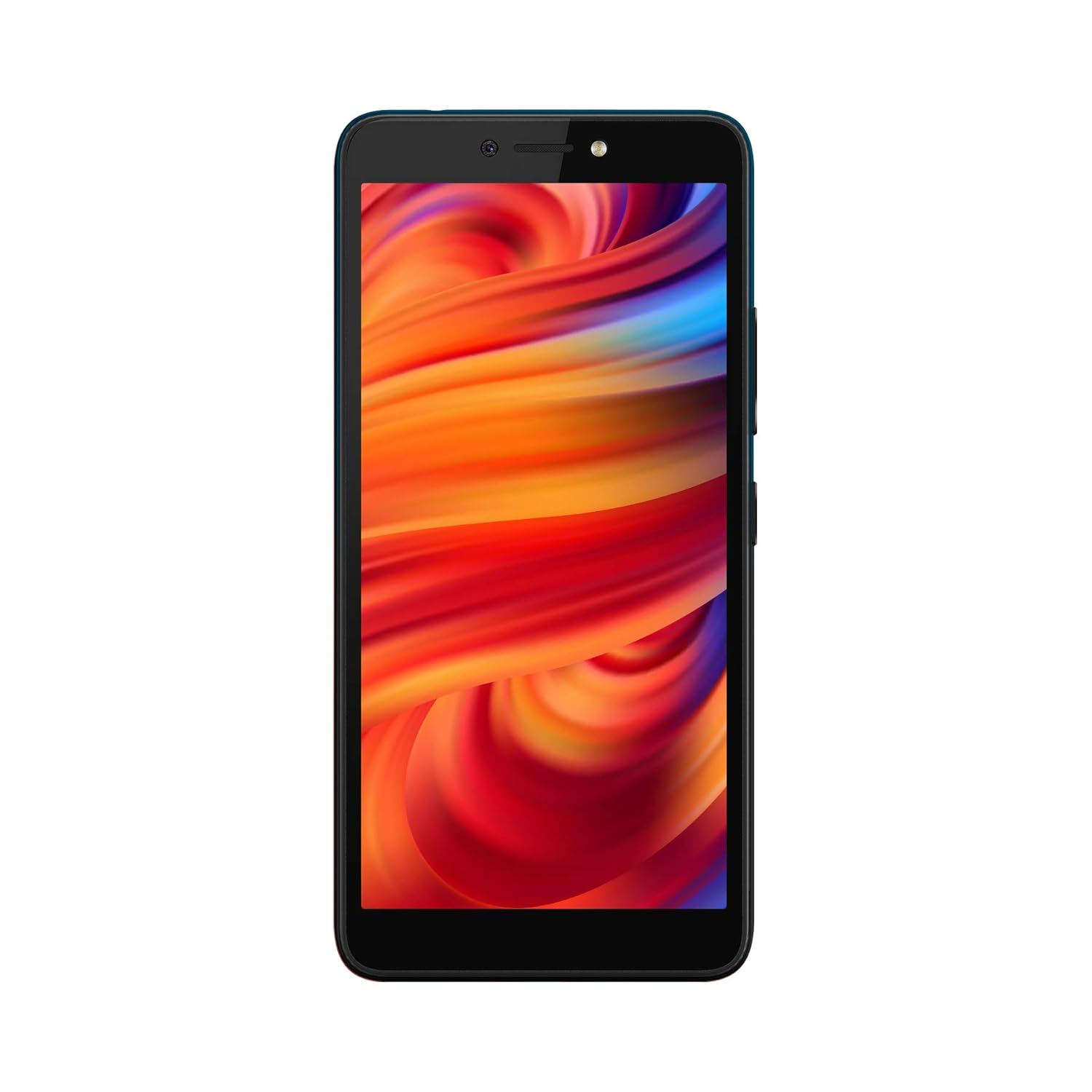
The Itel A46 features a vibrant display for an immersive viewwheako:
- Rahi Mata: 5.45-inch (13.8 centimeters) TFT IPS multi-touch capacitive touchscreen.
- Whakatau: 1440 x 720 pixels with 295 ppi pixel density.
- Tautoko Tae: 16.7 million colors.
- Hoahoa: Full screen with rounded corners and narrow bezels for a modern look.

4.2 Nga waahanga kamera
Capture stunning photos and videos with the Itel A46's advanced camera system:
- Kāmera Whakamuri: 8+0.3MP dual rear camera for detailed shots.
- Kāmera Mua: 5MP front camera for clear selfies.
- AI Beauty Mode: Enhances your portraits for a flawless look.
- AI Super Night: Ka arotau i nga whakaahua ka mau ki nga ahuatanga marama iti.
- AI Scenario Detection: Automatically adjusts camera settings based on the scene (e.g., plant, sky, food).
- Aratau Whakaahua: Creates professional-looking photos with bokeh effects, highlighting your subject against a blurred background.
This video demonstrates the camera features of the Itel A46, including AI Beauty Mode, AI Super Night, and AI Scenario Detection, showcasing how the phone intelligently enhances your photos.
4.3 Mahi
Experience smooth performance with the Itel A46:
- Tukatuka: 1.6GHz Speadtrum octa core processor for efficient multitasking.
- RAM: 2GB RAM ensures smooth application usage.
- Pūnaha Mahi: Runs on Android v9 Pie operating system.
4.4 Hononga
Stay connected with the Itel A46's comprehensive connectivity options:
- Tautoko SIM: Dual SIM (micro+nano) with dual-standby (4G+4G).
- Whatunga: Supports 4G VoLTE for high-speed data and clear calls.
- Ētahi atu āhuatanga: Includes GPS, Wi-Fi, Bluetooth, GPRS, EDGE, HSPA+, LTE.
4.5 Āhuahira Haumarutanga
Protect your data with advanced security options:
- Multi-function Fingerprint Sensor: Unlock your device quickly and securely with your fingerprint.
- Speedy Face Unlock: Conveniently unlock your phone using facial recognition.
This video highlights the key features of the Itel A46, including its 2GB RAM, 16GB ROM, Octa Core processor, Dual 4G VoLTE support, and the 5.45-inch HD+ IPS FullScreen display, along with security features like fingerprint and face unlock.
5. Tiaki
To ensure your Itel A46 remains in optimal condition, follow these maintenance guidelines:
- Pupuri Ma: Regularly wipe your phone with a soft, dry cloth to remove dust and smudges. Avoid harsh chemicals.
- Tiaki Mata: Use a screen protector and a protective case to prevent scratches and damage from drops.
- Tiaki Pūhiko: Avoid extreme temperatures. Do not overcharge or completely drain the battery frequently. Use only the original charger.
- Whakahōu Pūmanawa: Keep your device's software updated to benefit from the latest features and security patches.
- Whakahaere Rokiroki: Ūkui i ia wā me te kore e tika files me nga taupānga hei pupuri i te mahi.
6. Te Raru
If you encounter issues with your Itel A46, refer to the following common troubleshooting steps:
- Kaore te Waea i te Whakaka: Ensure the battery is charged. Connect the charger and wait a few minutes before attempting to power on again. If it still doesn't turn on, try a forced restart (usually by holding the power button for 10-15 seconds).
- Taupānga e takataka ana/tio ana: Katia te taupānga raruraru, ka whakatuwhera anō. Ki te mau tonu te raruraru, ūkuia te keteroki me ngā raraunga o te taupānga i roto i ngā Tautuhinga > Ngā Taupānga. Hei huarahi whakamutunga, wetewetehia te taupānga, ka tāuta anō.
- Te Ora o te Pūhiko: Reduce screen brightness, disable unused features like Wi-Fi, Bluetooth, and GPS when not needed. Close background apps. Check battery usage in Settings to identify power-hungry apps.
- Ngā Take Hononga (Wi-Fi/Raraunga Pūkoro): Toggle Wi-Fi or mobile data off and on. Restart your phone. For Wi-Fi, forget the network and reconnect. For mobile data, check your SIM card and network settings.
- Fingerprint/Face Unlock Not Working: Ensure your fingers/face are clean and dry. Re-register your fingerprint/face in the security settings. Check for any physical obstructions on the sensor or front camera.
- Mahinga Puturi: Clear cache, uninstall unused apps, and free up storage space. Restart your device regularly.
If these steps do not resolve your issue, please contact Itel customer support or visit an authorized service center.
7. Whakatakotoranga
Detailed technical specifications for the Itel A46 smartphone:
| Āhuahira | Whakatakotoranga |
|---|---|
| Waitohu | Itel |
| Pūnaha Mahi | Android v9 Pie |
| Tukatuka | 1.6GHz Speadtrum Octa Core |
| RAM | 2 GB |
| Rokiroki Roto | 16 GB (Ka taea te whakawhānui ake ki te 128GB) |
| Rahi Whakaatu | 5.45 Inihi (13.8 cm) |
| Whakaatu Whakatau | 1440 x 720 pika (HD+) |
| Kāmera Whakamuri | 8 + 0.3 MP Dual Camera |
| Kāmera Mua | 5 MP |
| Pūhiko Raukaha | 2400 mAh Lithium-Ion |
| Momo SIM | Dual SIM (micro+nano) |
| Hangarau Whatunga | 4G VoLTE, 3G, 2G (GSM, GPRS, EDGE, HSPA+, LTE) |
| Āhuatanga Haumarutanga | Fingerprint Sensor, Face Recognition |
| Pūoko | Accelerometer, Ambient Light Sensor, Proximity Sensor |
| Ahu | 15 x 0.9 x 7.2 Henemita |
| Taumaha | 155 Karamu |
| Rauemi | Kirihou |
8. He aha kei roto i te Pouaka
The retail package for your Itel A46 smartphone includes the following items:
- Pukoro
- Pūhiko
- Kaitohu
- Ringaringa Kore (Taringa)
- Pukapuka Kaiwhakamahi
- Kaari Raati
9. Pūtāhui me te Tautoko
Your Itel A46 smartphone comes with a comprehensive warranty:
- Pūtāhui Pūrere: 1 year manufacturer warranty from the date of purchase.
- Pūtāhui Apatoko: 6 months manufacturer warranty for in-box accessories, including batteries, from the date of purchase.
- Kaupapa Whakakapi: 100 Days replacement policy (Terms & Conditions Apply).
For further assistance, technical support, or warranty claims, please refer to the contact information provided on your warranty card or visit the official Itel webpae.