1. Hua Neke Atuview
The ANENG Q1 is a 9999 counts True RMS digital multimeter designed for accurate measurement of various electrical parameters. It features an EBTN black screen with a large, backlit LCD for clear readability in diverse lighting conditions. This device supports both automatic and manual ranging, offering flexibility for different measurement needs. It includes an analog bar graph display for quick visual indication of readings.
Āhuatanga matua:
- Inenga RMS Tika: E whakarato ana i ngā pānui tika mō ngā ngaru kore-sinusoidal.
- NCV (Kore-Whakapā Voltage) Rapunga: For safe identification of live wires without direct contact.
- Auto/Manual Ranging: User-selectable measurement range for convenience and precision.
- Kauwhata Pae Anaro: Visual representation of measurement trends.
- LCD Whakamuri Nui: He tirohanga pai ake i ngā taiao pōuriuri.
- Parenga taumaha: Ensures safety across all measurement ranges.
- Tohu Pūhiko Iti: Alerts when battery replacement is needed.
- Taumahi Pupuri Raraunga: Ka whakatio i te pānui e whakaaturia ana kia māmā ake ai te tuhi.
- Whakaweto Aunoa: Ka tiaki i te roa o te pākahiko.
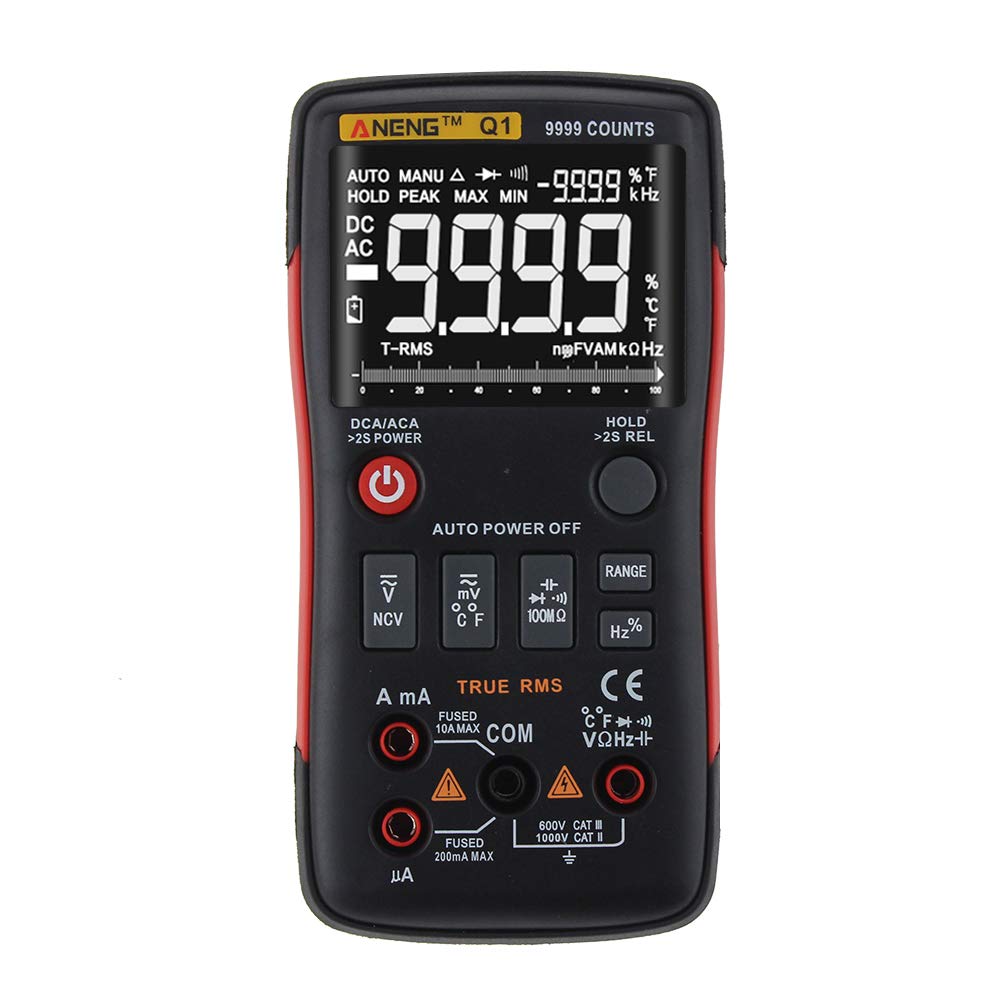
Figure 1: ANENG Q1 Digital Multimeter with its display and function buttons.
2. Nga korero haumaru
Always observe basic safety precautions when using this multimeter to prevent personal injury or damage to the device. Read and understand all safety information before operation.
- Kaua e neke ake i nga uara whakauru morahi mo tetahi mahi.
- Kia tupato ki te mahi tahi me te voltagkei runga ake i te 30V AC RMS, te tihi 42V, te 60V DC ranei. Ko enei voltaghe morearea ohorere.
- I mua i te ine i te au, me whakarite kia whakakorehia te hiko o te iahiko, ka honoa te ine maha i roto i nga raupapa.
- Always disconnect test leads from the circuit before changing functions.
- Tirotirohia nga arataki whakamatautau mo te whakamaarama kua pakaru, te whakarewa ranei kua kitea i mua i te whakamahi. Whakakapihia mena kua pakaru.
- Do not operate the multimeter if the battery cover is not properly closed.
- Whakakapia tonutia ngā pākahiko ina puta mai te tohu pākahiko iti hei whakarite kia tika ngā pānui.
- Kia mau ki nga ture haumaru o te rohe me te motu.
3. Tatūnga
3.1 Tāuta Pūhiko
- Me mohio kua weto te mita maha.
- Kimihia te wahanga pākahiko kei muri o te taputapu.
- Wewetehia te uhi o te wahanga pākahiko ka tango.
- Insert two 1.5V AA batteries, observing the correct polarity (+/-).
- Whakakapihia te uhi o te pākahiko ka mau ki te huri.
3.2 Te hono i nga kaiarahi Whakamātautau
The multimeter comes with a set of test leads. Always connect the black lead to the 'COM' (Common) jack. Connect the red lead to the appropriate input jack based on the measurement function:
- VΩHz+ jack for Voltage, Resistance, Frequency, Capacitance, Diode, and Continuity measurements.
- mA jack for current measurements up to 999.9mA.
- 10A jack for current measurements up to 10A.

Figure 2: Included test leads and probes.

Figure 3: Complete ANENG Q1 Multimeter kit with accessories.
4. Nga Tohutohu Whakahaere
The ANENG Q1 multimeter offers both automatic and manual ranging. Press the 'RANGE' button to switch between auto and manual modes. In manual mode, press 'RANGE' repeatedly to cycle through available ranges.
4.1 Hiko / Whakaweto
Press the red power button to turn the multimeter on or off. The device features an auto power-off function to conserve battery life after a period of inactivity.
4.2 Te Ine AC/DC Voltage (V)
- Connect the black test lead to the 'COM' jack and the red test lead to the 'VΩHz+' jack.
- Tīpakohia te voltage measurement function (AC V or DC V) using the function button.
- Tūhonoa ngā probe whakamātautau kia whakarara puta noa i te ara iahiko, i te wāhanga rānei e inehia ana.
- Pānuihia te voltage uara kei runga i te whakaaturanga.
4.3 Measuring AC/DC Current (A/mA/µA)
- Hiranga: Ensure the circuit is de-energized before connecting the multimeter for current measurement.
- Connect the black test lead to the 'COM' jack. Connect the red test lead to the 'mA' jack for currents up to 999.9mA, or to the '10A' jack for currents up to 10A.
- Select the current measurement function (AC A or DC A).
- Whakatuwheratia te ara iahiko ka honoa te mita maha-maha ki te kawenga mā te raupapa.
- Re-energize the circuit and read the current value on the display.
4.4 Te Ine i te Ātete (Ω)
- Connect the black test lead to 'COM' and the red test lead to 'VΩHz+'.
- Select the resistance measurement function.
- Me mohio kua whakakorehia te hiko, te waahanga ranei i mua i te ine i te parenga.
- Honoa ngā pūwero whakamātautau puta noa i te wāhanga.
- Panuihia te uara aukati kei runga i te whakaaturanga.
4.5 Measuring Capacitance (F)
- Connect the black test lead to 'COM' and the red test lead to 'VΩHz+'.
- Select the capacitance measurement function.
- Me whakarite kia tino pau te hiko o te pūnga i mua i te ine hei ārai i te kino o te mita maha.
- Honoa ngā probe whakamātautau ki ngā pito o te capacitor.
- Panuihia te uara capacitance kei runga i te whakaaturanga.
4.6 Measuring Frequency (Hz) and Duty Cycle (%)
- Connect the black test lead to 'COM' and the red test lead to 'VΩHz+'.
- Select the frequency/duty cycle measurement function.
- Tūhonohia ngā porotiti whakamātautau ki te pūtake tohu.
- Pānuihia te uara auau, te huringa mahi rānei kei runga i te whakaaturanga.
4.7 Measuring Temperature (°C/°F)
- Connect the temperature probe to the appropriate input jacks (usually 'COM' and 'VΩHz+' or dedicated temperature jacks if available).
- Select the temperature measurement function.
- Whakatakotoria te pito o te ine pāmahana ki runga, ki te taha rānei o te mea e inehia ana te pāmahana.
- Pānuihia te uara pāmahana kei runga i te whakaaturanga.
4.8 Whakatautau Diode
- Connect the black test lead to 'COM' and the red test lead to 'VΩHz+'.
- Select the diode test function.
- Honoa te ine whero ki te anode me te ine pango ki te cathode o te diode.
- Ka whakaatuhia te rōrahi whakamua e te whakaaturangatage drop. Reverse the probes; an open circuit (OL) indicates a good diode.
4.9 Whakamātautau Tonu
- Connect the black test lead to 'COM' and the red test lead to 'VΩHz+'.
- Tīpakohia te mahi whakamatautau tonu.
- Honoa ngā probe whakamātautau puta noa i te ara iahiko, i te wāhanga rānei.
- A continuous beep indicates a low resistance path (continuity).
4.10 NCV (Kore-Whakapā Voltage) Rapunga
- Select the NCV function.
- Bring the top of the multimeter close to the conductor or outlet.
- Ka tohu te taputapu i te aroaro o te hiko ACtage through an audible alarm and/or visual indicator.
5. Tiaki
5.1 Te horoi
Mukua te keehi me te panuiamp cloth and mild detergent. Do not use abrasives or solvents. Ensure the device is completely dry before use.
5.2 Rokiroki
When not in use for extended periods, remove the batteries to prevent leakage. Store the multimeter in a cool, dry place, away from direct sunlight and extreme temperatures. The recommended storage conditions are -20°C to 60°C (-4°F to 140°F) with humidity less than 80% RH.
6. Te Raru
- Kore Whakaatu: Tirohia te whakaurunga o te pākahiko me te whakarite kia kore nga pākahiko e pau. Whakakapihia mehemea e tika ana.
- Pānui hē: Verify that the correct function and range are selected. Ensure test leads are properly connected and not damaged. Check battery level.
- Whakaaturanga 'OL' (Tapanui) The measured value exceeds the selected range or the maximum input limit. Switch to a higher range or ensure the input is within the device's specifications.
- Karekau Pao Tonu: Check if the circuit is truly continuous and has very low resistance. Ensure test leads are making good contact.
7. Whakatakotoranga
7.1 Whakatakotoranga Hiko

Figure 4: Electrical Specifications - DC and AC Voltage.

Figure 5: Electrical Specifications - DC and AC Current, and Resistance.

Figure 6: Electrical Specifications - Capacitance, Frequency, and Duty Cycle.

Figure 7: Electrical Specifications - Temperature, Diode, Continuity, and NCV.
7.2 General, Mechanical, and Environmental Specifications

Figure 8: General, Mechanical, and Environmental Specifications.
| Tawhā | Uara |
|---|---|
| Whakaatu | LCD Tatau 9999 |
| Awheawhe | Aunoa/A-ringa |
| Rauemi | ABS+TPE |
| Reiti Whakahou | 3 Wa/Tuarua |
| RMS pono | Ae |
| Pupuri Raraunga | Ae |
| Whakamuri | Ae |
| Tohu Pūhiko Iti | Ae |
| Whakaweto Aunoa | Ae |
| Tawhā | Uara |
|---|---|
| Ahu | 146*74*34mm |
| Taumaha | 125g |
| Momo Pūhiko | 2 x 1.5V AA Battery (not included) |
| Tawhā | Uara |
|---|---|
| Te Waahi Mahi | 0~40°C |
| Te haumākū whakahaere | <75% RH |
| Paemahana Rokiroki | -20~60°C |
| Rokiroki Haumākū | <80% RH |
8. Pūtāhui me te Tautoko
8.1 Pūtāhui
This ANENG Q1 Digital Multimeter comes with a pūtāhui kotahi tau from the date of purchase, covering manufacturing defects. This warranty does not cover damage caused by misuse, accident, unauthorized modification, or normal wear and tear. Please retain your proof of purchase for warranty claims.
8.2 Tautoko Kiritaki
For technical assistance, troubleshooting, or warranty inquiries, please contact the retailer or manufacturer's customer service. Refer to your purchase documentation for specific contact details.