
EOTECH XPS2-0
EOTECH XPS2 Holographic Weapon Sight XPS2-0 User Manual
Brand: EOTECH | Model: XPS2-0
1. Hua Neke Atuview & Nga Whakaaturanga
The EOTECH XPS2-0 Holographic Weapon Sight is a compact and robust optic designed for rapid target acquisition and reliable performance. Its advanced holographic technology provides a clear and precise aiming solution for various shooting scenarios.
- EOTECH XPS2-0: Holographic Weapon Sight in black with 68MOA ring and (1) 1 MOA dot reticle.
- Whakaekenga Whakanuia: Compatible with both 1" weaver and MIL-STD 1913 rails, offering flexible mounting options.
- Tirohanga Whakaritea: Features 20 brightness settings to ensure optimal visibility in any lighting condition, from bright daylight to low-light environments.
- Hoahoa Kiato: Its small footprint leaves ample rail space for additional accessories such as rear iron sights or magnifiers.

2. Tatūnga
2.1 Te Whakamau i te Tirohanga
The XPS2-0 is designed for easy mounting on any 1" Weaver or MIL-STD 1913 rail. Ensure the rail is clean and free of debris before mounting. Use the provided thumb-bolt or Allen-type bolt to securely fasten the sight to your firearm's rail. Tighten the bolt firmly to prevent movement under recoil.

2.2 Tāuta Pūhiko
The XPS2-0 uses a single CR123 battery. To install or replace the battery:
- Unscrew the battery cap located on the front right side of the sight.
- Insert the CR123 battery with the positive (+) end facing forward.
- Whakahokia te potae pākahiko kia mau.
The sight will flash when the battery is at 20% capacity, indicating it's time for replacement soon.
3. Operating the Sight
3.1 Power On/Off & Brightness Adjustment
The control buttons are located on the rear of the sight:
- Hei Whakahiko: Press either the 'Up' (▲) or 'Down' (▼) button.
- Hei Whakarite i te Maama: Press the 'Up' (▲) button to increase brightness or the 'Down' (▼) button to decrease brightness. There are 20 settings available.
- Hei Whakaweto: Simultaneously press both the 'Up' (▲) and 'Down' (▼) buttons.

3.2 Reticle Description
The XPS2-0 features a 68 MOA (Minute of Angle) ring with a 1 MOA dot in the center. This reticle design allows for quick target acquisition while maintaining precision.
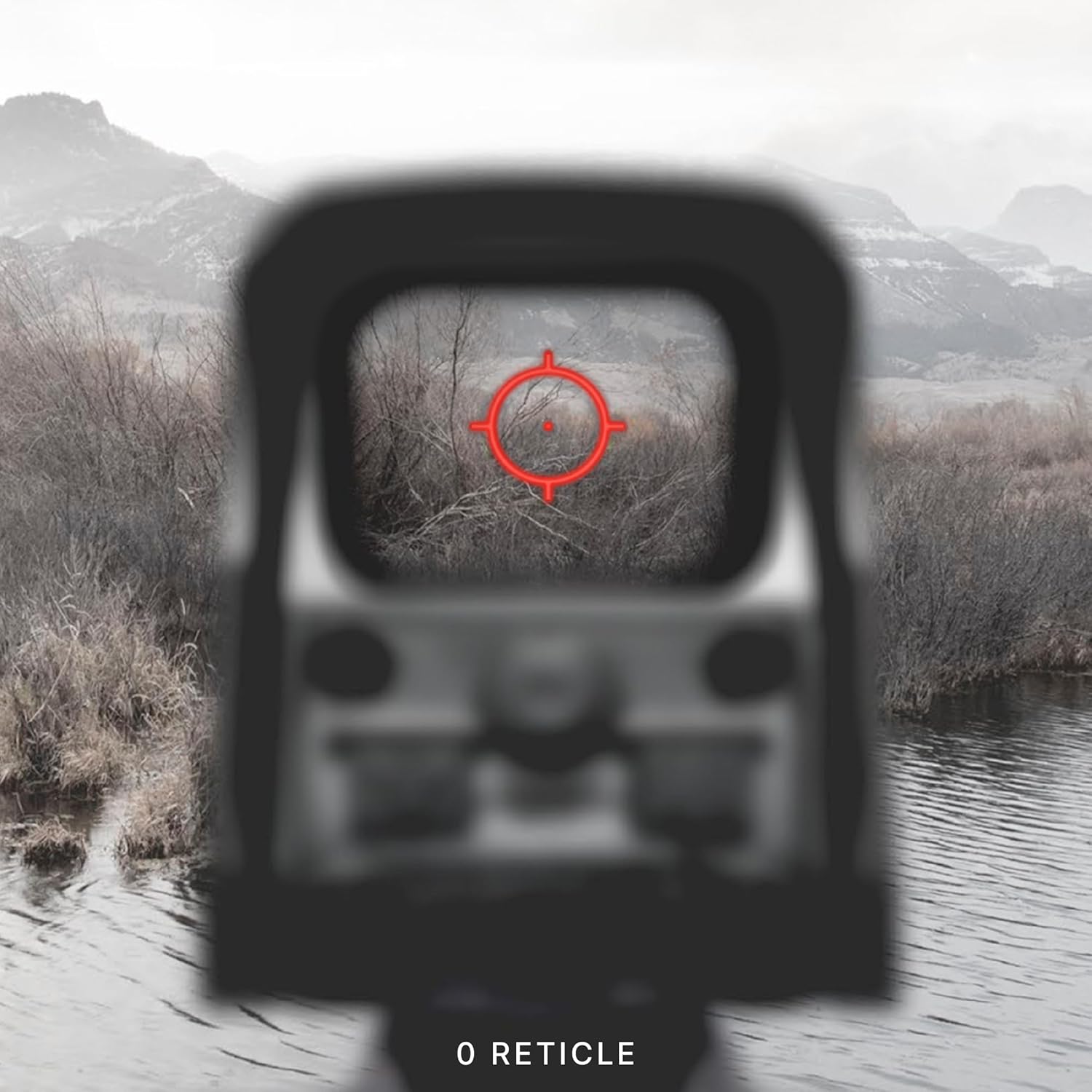

3.3 Te Huringa Hau me te Whakanuia
Adjustments for windage (left/right) and elevation (up/down) are located on the side of the sight. Each click provides a precise adjustment to the point of impact.

4. Tiaki
To ensure the longevity and optimal performance of your EOTECH XPS2-0, regular maintenance is recommended:
- Whakapai Arotahi: Use a soft, lint-free cloth and lens cleaning solution to gently wipe the optical surfaces. Avoid abrasive materials or excessive pressure.
- Tinana horoi: Wipe the sight's body with a damp he kakahu hei tango i te paru me te paru. A ape i nga matū kino.
- Rokiroki: Store the sight in a dry, cool place away from direct sunlight and extreme temperatures. Remove the battery if storing for extended periods.
5. Te Raru
5.1 Tohu Pūhiko Iti
When the battery life reaches approximately 20%, the reticle will flash upon power-up to indicate a low battery condition. Replace the CR123 battery promptly to ensure continued operation.
5.2 Reticle Blinking Under Recoil
If the reticle blinks or flickers during recoil, this is another indication of a low battery. Replace the battery to resolve this issue.
6. Whakatakotoranga
| Āhuahira | Taipitopito |
|---|---|
| Waitohu | EOTECH |
| Ingoa Tauira | XPS2-0 |
| Tae | Pango |
| Kāhua | XPS2-0 |
| Taumaha Tūemi | 226.79 Karamu |
| Rauemi | Kirihou |
| Te Whakarahi Morahi | 1x |
| Te Whakarahi Moiti | 1x |
| Pūrere Hototahi | Raiwhara |
| Momo Whakaeke | Maunga Kaiwhatu |
| Whakakitenga Po Hototahi | Kao |
| Ahu (LxWxH) | 3.8" x 2.1" x 2.5" |
| Momo Pūhiko | CR123 |
7. Raihana me te Tautoko
The EOTECH XPS2-0 Holographic Weapon Sight comes with a 10-year limited warranty from the manufacturer, covering defects in materials and workmanship under normal use. For warranty claims or technical support, please refer to the official EOTECH webpaetukutuku, whakapā atu ranei ki ta raatau ratonga kaihoko.
It is recommended to register your product online to ensure you are contacted in the event of any product issues and to facilitate warranty service.
8. Nga Korero Haumaru Nui
WHAKATOKANGA: Kei roto i tenei hua nga matū e mohiotia ana e te State of California ki nga mate pukupuku me nga whanaketanga whanau o etahi atu kino kino ranei.
Tuhinga e pa ana - XPS2-0
 |
EOTECH EXPS3 HD HWS Holographic Weapon Sight Manual User manual and technical guide for the EOTECH EXPS3 HD Holographic Weapon Sight (HWS), covering operation, features, maintenance, and troubleshooting. |
 |
EOTECH EFLX-CE Mini Reflex Sight User Manual Comprehensive user manual for the EOTECH EFLX-CE Mini Reflex Sight, detailing features, specifications, setup, operation, maintenance, and support. Learn how to effectively use and care for your EOTECH optic. |
 |
Leonardo DRS IWS-LR Takitahi Weapon Tiro-Awhe Roa | Atahanga Ngawha Ko nga korero taipitopito mo te Leonardo DRS IWS-LR, he tirohanga patu waiariki kiato, roa mo nga mahi whakanekeneke. Ko nga ahuatanga ko te whakaaturanga teitei, UWB ahokore, LRF hototahi, me te mahi pakari i roto i nga ahuatanga kino. |
 |
R8T-AMR Red Dot Sight and J3T-AMR Magnifier Specifications Technical specifications and features for the R8T-AMR Red Dot Sight and J3T-AMR 3X Magnifier, including material, dimensions, and functional capabilities. |
 |
Tasco QP22 Electronic Open Reflex Sight - Manual Kaiwhakamahi me nga Whakatakotoranga He aratohu matawhānui mo te Tasco QP22 Electronic Open Reflex Sight, tae atu ki nga ahuatanga, te tautuhi i nga waahanga, nga tohutohu whakauru, te whakaurunga o te pākahiko, nga tikanga whakakorekore, me nga whakaritenga hangarau. |
 |
EOTECH OGL C On-Gun Laser: User Manual and Specifications Comprehensive user manual and technical specifications for the EOTECH OGL C On-Gun Laser. Learn about its features, operation, safety, and maintenance for commercial use. |
Ask a question about this manual
Ask about setup, troubleshooting, compatibility, parts, safety, or missing instructions. Manuals+ will review the question and use this page’s manual context to help answer it.