
Te Nestling HK-688
Nestling HK-688 Walkie Talkies User Manual
Tauira: HK-688
1. Kupu Whakataki
This manual provides comprehensive instructions for the safe and effective operation of your Nestling HK-688 Walkie Talkies. These mini 2-way radios are designed for clear communication over long distances, making them ideal for children's outdoor adventures, camping, hiking, and general play.
The Nestling HK-688 Walkie Talkies feature 22 UHF channels, a generous range, and user-friendly controls. Please read this manual thoroughly before using the device to ensure proper functionality and to maximize your experience.

Image: Three Nestling HK-688 walkie talkies in camo blue, camo pink, and camo green, displayed with their product packaging.
2. Hua Neke Atuview
2.1 Ihirangi mokete
Kei roto i te kete paerewa ngā tūemi e whai ake nei:
- 3x Nestling HK-688 Camo Kids Walkie Talkies (Camo Blue, Camo Pink, Camo Green)
- 1x Manual Kaiwhakamahi (tenei tuhinga)
- Kia mōhio: Kāore ngā pākahiko AAA i roto, me hoko motuhake.
2.2 Nga waahanga matua
- 22 FRS/GMRS Channels: Provides multiple communication options.
- Awhe Roa: Up to 3km (1.9 miles) in typical conditions, and up to 5km (3.1 miles) in open fields.
- Kounga Oro Maama: Ensures effective communication.
- Whakaaturanga Whakamuri LCD: Mo te ngawari viewing of channel, battery status, and other indicators.
- Built-in Mini LED Torch: Useful for low-light conditions.
- Automatic Channel Scan: Quickly finds active channels.
- Te Whakakā Aunoa: Reduces background noise for clearer reception.
- CTCSS 99 Sub-codes: Enhances privacy by filtering unwanted signals.
- Waea Matohi: Notifies you of incoming calls.
- Maukati Channel: Prevents accidental channel changes.
- PTT/VOX Function: Push-to-Talk for manual transmission or Voice Operated Exchange for hands-free communication.
- Battery Save Function: Extends battery life.
- Matohi Hiko Iti: Indicates when batteries are running low.
- Rōrahi Whakaritea: Control the listening level.
- Maamaa me te Kawe: Designed for easy carrying with a built-in belt clip.
- Drop Resistant Design: Enhanced durability for active use.

Image: Visual representation of the walkie talkie's dimensions and key features like drop resistance, low battery alert, flashlight, and communication range.

Image: Features of the walkie talkie, including 22 channels with privacy codes, extended range, noise reduction, drop resistance, and a built-in flashlight.
2.3 Waenga Pūrere

Image: Detailed diagram illustrating the various parts of the walkie talkie, including buttons, display, and audio components.
- Antenna: Mo te tuku me te whiwhi tohu.
- Lamp (Flashlight): Rama LED kua hangaia.
- hopuoro: For speaking into the device.
- Pātene PTT (Push-to-Talk): Pēhia me te pupuri kia tukuna tō reo.
- Whakaaturanga LCD: Shows channel, battery level, and other indicators.
- Pātene Maukati Waea: Locks the current channel.
- Pātene Aroturuki: Allows listening to weak signals on the current channel.
- Lamp Pātene Matawai: Activates the flashlight and initiates channel scan.
- Pātene Raro: Whakatere i ngā tahua, whakaiti rānei i ngā uara.
- Pātene Mana/Tahua: Turns the device on/off and accesses the menu.
- Kaikōrero: For listening to incoming transmissions.
3. Tatūnga
3.1 Tāuta Pūhiko
Each Nestling HK-688 Walkie Talkie requires 4x AAA batteries (not included).
- Release the Belt Clip: Press the lock on the top of the belt clip and lift the clip up to detach it from the radio.
- Whakatuwherahia te waahanga pākahiko: Locate the battery cover on the back of the walkie talkie. Gently push down on the tab and slide the cover off.
- Kōkuhu Pūhiko: Insert 4x AAA batteries into the compartment, ensuring correct polarity (+/-) as indicated inside the compartment.
- Katia te Wāhanga Pūhiko: Replace the battery cover and slide it until it clicks securely into place. Reattach the belt clip if desired.
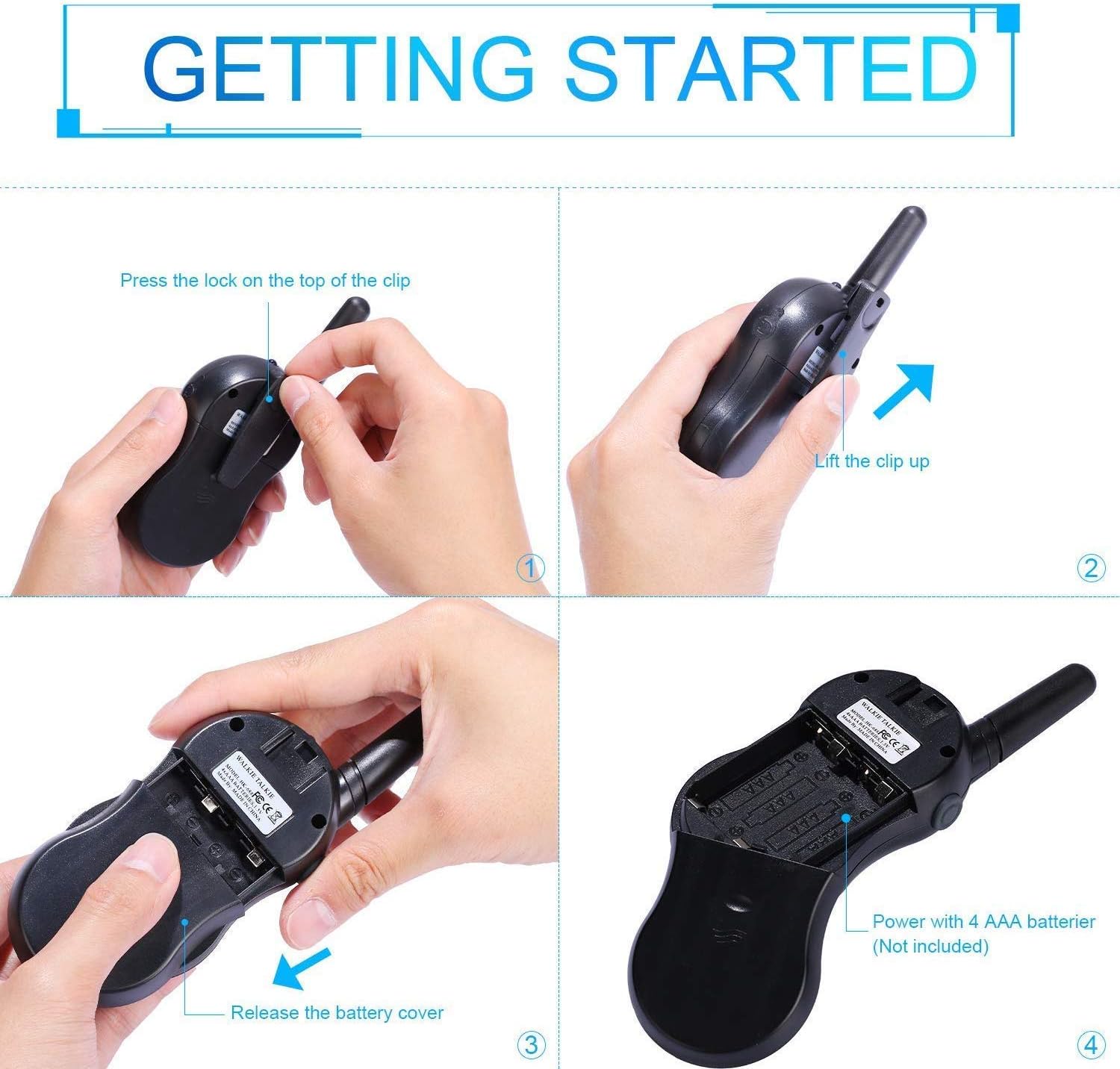
Image: Step-by-step instructions for opening the battery compartment and inserting AAA batteries into the walkie talkie.

Image: An open battery compartment of the walkie talkie, ready for battery insertion.
3.2 Kei te Hiko / Weto
To turn the walkie talkie on or off, press and hold the Mana / Tahua button until the LCD screen illuminates or turns off.
4. Nga Tohutohu Whakahaere
4.1 Basic Communication (Push-to-Talk)
- Tīpakohia he Hongere: Ensure all walkie talkies you wish to communicate with are set to the same channel and sub-code. Use the Up a Ki raro nga paatene hei huri i nga hongere.
- Tuku: Patohia me te pupuri i te PTT button (located on the side of the radio). Speak clearly into the microphone, holding the radio approximately 2-3 inches from your mouth.
- Whiwhi: Tukua te PTT button to listen for incoming transmissions.
Tip: For optimal range and clarity, avoid obstructions like buildings, dense foliage, or large metal objects. Adverse weather conditions can also affect range.
4.2 Channel Selection and Sub-codes (CTCSS/DCS)
Your walkie talkie supports 22 FRS/GMRS channels and 99 CTCSS/DCS sub-codes. Sub-codes help filter out unwanted conversations on the same channel, enhancing privacy.
- Pehia te Tahua button once to enter channel selection mode. The channel number will flash.
- Whakamahia te Up or Ki raro nga paatene hei kowhiri i to hongere e hiahia ana koe (1-22).
- Pehia te Tahua button again to enter sub-code selection mode. The sub-code number will flash.
- Whakamahia te Up or Ki raro buttons to select your desired sub-code (0-99). Setting to 0 disables the sub-code.
- Pehia te PTT button or wait a few seconds for the setting to be saved and exit the menu.
4.3 Mahi VOX (Te Whakawhitinga Reo)
The VOX function allows for hands-free communication. When activated, the radio will automatically transmit when it detects your voice.
- Pehia te Tahua button multiple times until the VOX icon (VOX) appears on the LCD and flashes.
- Whakamahia te Up or Ki raro buttons to select the VOX sensitivity level (e.g., 1-3, with 1 being most sensitive). Select "OFF" to disable VOX.
- Pehia te PTT button or wait a few seconds to save the setting and exit.
4.4 Te Mahi Rarama
To turn the built-in LED flashlight on or off, briefly press the Lamp button (often combined with the Scan button).
4.5 Call Alert Tone
To send a call alert tone to other radios on the same channel, briefly press the Karanga button (often represented by a musical note icon).
4.6 Hongere Maukati
To prevent accidental channel changes, you can lock the current channel.
- Patohia me te pupuri i te Maukati Waea button (often represented by a key icon) until a key icon appears on the LCD.
- Hei iriti, pehia me te pupuri i te Maukati Waea button again until the key icon disappears.

Whakaahua: Examples of suitable scenarios for using the walkie talkies, such as outdoor play, family activities, and leisure.

Image: Illustrations of walkie talkies being used for communication in both play and household settings.
5. Tiaki
5.1 Tiaki Pūhiko
- Always use fresh, high-quality AAA batteries.
- Remove batteries from the walkie talkie if it will not be used for an extended period to prevent leakage and damage.
- Makahia nga pākahiko kua whakamahia kia rite ki nga ture o te rohe.
5.2 Te horoi me te Penapena
- Horoia te walkie-talkie ki te wai ngohengohe,amp kakahu. Kaua e whakamahi i nga matū kino me nga horoi horoi.
- Do not immerse the walkie talkie in water, as it is not water-resistant.
- Whakaorangia te walkie talkie ki te waahi hauhautanga, maroke atu i te ra tika me te wera nui.
6. Te Raru
| Raruraru | Take pea | Rongoā |
|---|---|---|
| Karekau he kaha | Kua mate nga pākahiko, kua he ranei te whakaurunga. | Whakakapihia nga pākahiko ki nga mea hou, kia tika te polarity. |
| Kaore e taea te tuku, te tango ranei | Not on the same channel/sub-code; out of range; PTT button not pressed/released. | Ensure all radios are on the same channel and sub-code. Move closer to the other radio. Press and hold PTT to transmit, release to receive. |
| He kino te kounga oro / Static | Out of range; obstructions; low battery; squelch setting. | Move closer. Avoid obstructions. Replace batteries. Check squelch settings. |
| Channel changes accidentally | Channel lock is not activated. | Activate the channel lock function. |
| Kaore te VOX e mahi | He iti rawa te tairongo VOX, kua weto ranei te VOX. | Adjust VOX sensitivity to a higher level or ensure VOX is enabled. |
7. Whakatakotoranga
| Āhuahira | Taipitopito |
|---|---|
| Waitohu | Nestling |
| Tauira | HK-688 |
| Awhe Auautanga | 400-470MHz |
| Nga hongere | 22 Ngā Hongere FRS/GMRS |
| Waehere-iti | CTCSS 99 |
| Te Mana Tuku | <=0.5W |
| Momo Whakawaenga | FM-F3E |
| Awhe | Up to 3km (1.9 miles) typical, MAX 5km (3.1 miles) in open field |
| Whakawhirinaki | Aunoa tio |
| Momo Whakaatu | LCD Whakamuri |
| Waea taringa | 2.5mm / 0.1inihi |
| Tuku Hiko | 4x AAA batteries per radio (Not Included) |
| Product Dimensions (H x L x D) | 14cm x 5.5cm x 3.5cm (5.5 x 2.2 x 1.4 inihi) |
| Taumaha mōkihi | 370g |
| Tae | Camo Blue, Camo Pink, Camo Green |
| Taumata Atete Wai | Ehara i te wai ātete |
8. Pūtāhui me te Tautoko
Nestling HK-688 Walkie Talkies come with a 12 Marama Rarangi mai i te ra o te hokonga.
For any support inquiries, troubleshooting assistance beyond this manual, or warranty claims, please refer to the contact information provided on the product packaging or the retailer's webte waahi i hokona ai te hua.