
1. Kupu Whakataki
The Divoom Macchiato is a palm-sized, portable Bluetooth speaker with an integrated FM radio tuner, designed to deliver high-quality audio in a compact form factor.
2. Ihirangi mokete
Tena koa tirohia te pouaka mo nga mea e whai ake nei:
- Divoom Macchiato Bluetooth Speaker
- Tauira Whakatau USB
- Pukapuka Kaiwhakamahi
- (Additional accessories may vary by region)
3. Hua Neke Atuview
Kia mohio koe ki nga waahanga me nga mana whakahaere a te kaikorero.
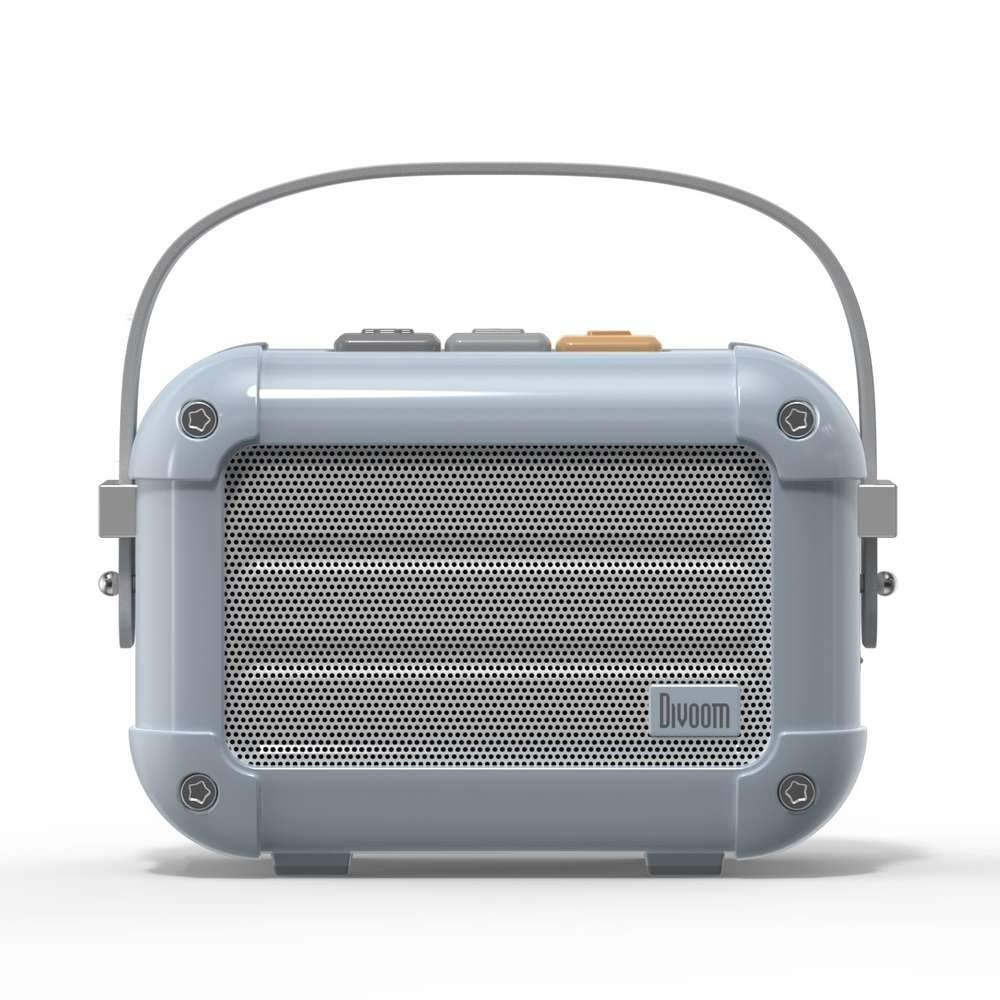
Whakaahua 3.1: Mua view of the Divoom Macchiato Bluetooth Speaker in blue.
3.1 Mana me nga Tauranga
The Divoom Macchiato speaker features intuitive controls for easy operation.
- Ngā Pātene o Runga: Typically control power, volume, track navigation, and mode selection (e.g., Bluetooth, FM).
- Tauranga Whakatau: Usually a USB Type-C port for charging the device.
- Kāniwha Kāri TF: Allows playback of music directly from a TF (MicroSD) card.
- Antenna FM: An extendable antenna for improved FM radio reception.

Whakaahua 3.2: Hoki view of the Divoom Macchiato Bluetooth Speaker, showing the charging port and TF card slot.
4. Tatūnga
4.1 Hiko / Whakaweto
- Hei Whakahiko: Press and hold the power button (usually one of the top buttons) for approximately 2-3 seconds until you hear an audible cue or see an indicator light.
- Hei Whakaweto: Press and hold the power button for approximately 2-3 seconds until you hear an audible cue or the indicator light turns off.
4.2 Takirua Nihokikorangi
- Ensure the speaker is powered on and in Bluetooth pairing mode. The indicator light will typically blink rapidly.
- I runga i tō pūrere pūkoro (waea atamai, papa, me ētahi atu), whakahohea te Nihokikorangi.
- Rapua "Divoom Macchiato" in the list of available Bluetooth devices.
- Select "Divoom Macchiato" to connect. Once connected, the speaker will provide an audible confirmation, and the indicator light will turn solid.
Tuhipoka: Ka ngana aunoa te kaikōrero ki te hono atu ki te taputapu takirua whakamutunga ina ka ana te hiko.
4.3 FM Radio Setup
- Extend the FM antenna fully for optimal reception.
- Switch the speaker to FM radio mode using the mode button (refer to your specific model's button layout).
- Use the track navigation buttons (usually +/-) to scan for available FM stations.
- Some models may allow saving favorite stations; refer to your specific model's instructions for details.
5. Nga Tohutohu Whakahaere
5.1 Music Playback (Bluetooth/TF Card)
- Purei/Tatari: Patohia te paatene Play/Pause (he maha tonu te whakauru ki te paatene hiko, ki te paatene whakatapua ranei).
- Mana Rōrahi: Whakamahia ngā pātene whakanui (+) me te whakaiti (-) o te oro.
- Riu Panuku: Press and hold or short press the next track button (often the + button).
- Riu o mua: Press and hold or short press the previous track button (often the - button).
- Whakahoki Kaari TF: Whakauruhia he kaari TF me te MP3 files into the TF card slot. The speaker should automatically switch to TF card mode or require manual selection via the mode button.
5.2 App Features (if applicable)
For enhanced functionality, download the Divoom companion app from your device's app store. The app may offer features such as:
- Customizing sound profiles.
- Accessing additional audio sources.
- Managing FM radio stations.
- Whakahōu Firmware.
6. Tiaki
- Te horoi: Whakamahia he kakahu ngohengohe, maroke hei horoi i te mata o te kaikorero. Kaua e whakamahi i ngā kaihoroi whakakoi, i ngā whakarewa rānei.
- Rokiroki: Whakaorangia te kaikorero ki te waahi makariri, maroke atu i te ra tika me te wera nui.
- Tiaki Pūhiko: Hei whakaroa i te ora o te pākahiko, karohia te tuku katoa i te pākahiko. Whakatakihia te kaikorero i nga wa katoa, ahakoa kaore i te whakamahia mo nga wa roa.
- Ātete wai: This model is NOT waterproof. Avoid exposure to water or high humidity.
7. Te Raru
| Raruraru | Rongoā |
|---|---|
| Karekau te kaikorero e kaha ana. | Me whakarite kei te utaina te pākahiko. Honoa te kaikorero ki tetahi puna hiko ma te whakamahi i te taura utu USB. |
| Kaore e taea te hono ma te Nihokikorangi. |
|
| Karekau he oro, he iti te reo. |
|
| He pai te manaaki reo irirangi FM. |
|
8. Whakatakotoranga
| Āhuahira | Taipitopito |
|---|---|
| Tau tauira | MACCHIATO |
| Waitohu | Divoom |
| Hangarau Hononga | Nihokikorangi |
| Hangarau Whakawhitiwhiti Ahokore | Nihokikorangi |
| Kaikorero Te Mana Putanga Morahi | 6 Watts |
| Momo Kaikorero | Paorooro |
| Momo Whakaeke | Maunga Ripanga |
| Whakamahinga Manakohia mo te Hua | Waiata |
| Tikanga Mana | Reo |
| parewai | HĒ (Kāore e Ārai Wai) |
9. Pūtāhui me te Tautoko
For warranty information and customer support, please refer to the documentation included with your product or visit the official Divoom webpae. Puritia to riirii hoko hei tohu mo te hoko mo nga kereme whakamana.