
1. Kupu Whakataki
The Ardest HW632 is an automatic battery charging control module designed to manage the charging process for 12V-24V lead-acid and lithium-ion batteries. This module features real-time voltage monitoring, automatic charge initiation and termination, and user-configurable voltage settings to prevent overcharging and prolong battery life. It is suitable for various applications, including solar power systems, automotive, and general battery charging setups.

Figure 1: Ardest HW632 Battery Charging Control Module. This image displays the top view of the blue circuit board with its components, including the 3-digit LED display, control buttons, and terminal blocks.
2. Nga Hua o te Hua
- Automatic control circuit connection for simplified setup.
- Automatic charging and power-off functionality to prevent overcharging.
- Te wa-pono voltage monitoring via a 3-digit red LED display.
- Auto-save setting feature retains user configurations.
- Utilizes an ST core chip for reliable performance.
- Integrated LM2596 switch voltage kaiwhakahaere.
- User-configurable start and stop charging voltages.
- On-board momentary push buttons for easy voltage tautuhinga.
- Module disconnects power supply to prevent battery overcharging.
- Compatible with lead-acid batteries, lithium-ion batteries, nickel-cadmium batteries, nickel-metal hydride batteries, polymer batteries, car batteries, and electric car batteries.
- Suitable for use with solar panels.
3. Whakatakotoranga
| Tawhā | Uara |
|---|---|
| Tauira | HW632 |
| Whakauru Voltage | DC 10-30V |
| Whakatauhia o naianei | 20A |
| Whakaatu Tika | 0.1V |
| Whakahaere Tika | 0.1V |
| Momo Putanga | Putanga Tika |
| Voltage Whakaaetanga | +/-0.1V |
| Nga Apure Tono | 12-24V Storage Battery |
| Ahu (L x W x H) | 82mm x 58mm x 18mm (3.23 x 2.28 x 0.71 inihi) |
| Taumaha Tūemi | 1.58 hekere |

Figure 2: Dimensions of the Ardest HW632 module. The image shows the module with measurements indicating a length of 82mm, width of 58mm, and height of 18mm.
4. Tatūnga me te Waea
Proper connection of the HW632 module is crucial for safe and effective operation. Ensure all connections are secure before applying power.
4.1 Tautuhinga Wae

Figure 3: Labeled components of the Ardest HW632 module. This image highlights the voltage display digital tube, the 'Start' voltage setting button, the 'Stop' voltage setting button, and the output indicator LED.
4.2 Wiring Hoahoa
Connect the charger input and battery detection port to the module as shown in the diagram below. The module requires a DC 10-30V input from your charger. The battery to be charged should be a 12V-24V storage battery.

Figure 4: Wiring diagram for the Ardest HW632 module. This diagram illustrates how to connect a charger input and a 12-24V storage battery to the module's terminal blocks.
4.3 Solar Panel Integration
The HW632 module can also be integrated into a solar charging system. Connect the solar panel output to the module's input, and the module's output to the battery.
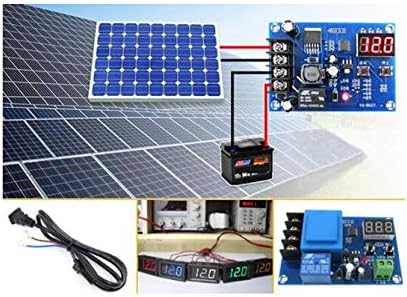
Figure 5: Solar panel connection diagram. This image shows the HW632 module connected between a solar panel array and a battery, demonstrating its use in a solar charging setup.
5. Nga Tohutohu Whakahaere
The module features two push buttons for setting the charging parameters and a 3-digit LED display for real-time voltage aroturukitanga.

Figure 6: Diagram illustrating the 'Using Method' for the Ardest HW632 module, showing the start and stop buttons and their functions for setting voltage and resetting.
5.1 Setting the Start Charging Voltage
- I roto i te vol noatage display state, press the Tīmata button once. The display will show the current start charging voltage.
- Pehia roa te Tīmata button for approximately 3 seconds. The digital display will begin to flash.
- While the display is flashing, use the Tīmata pātene hei whakanui ake i te voltage value and the Kati pātene hei whakaiti i te voltage uara.
- Once the desired start charging voltage is set, wait for a few seconds without pressing any buttons. The module will automatically save the setting and return to the normal voltage whakaatu.
5.2 Setting the Stop Charging Voltage
- I roto i te vol noatage display state, press the Kati button once. The display will show the current stop charging voltage.
- Pehia roa te Kati button for approximately 3 seconds. The digital display will begin to flash.
- While the display is flashing, use the Tīmata pātene hei whakanui ake i te voltage value and the Kati pātene hei whakaiti i te voltage uara.
- Once the desired stop charging voltage is set, wait for a few seconds without pressing any buttons. The module will automatically save the setting and return to the normal voltage whakaatu.
5.3 Tautuhi Tautuhi
To restore the module to its factory default settings:
- Me mohio kei te kaha te hiko o te kōwae.
- Pēhia me te pupuri i ngā pātene e rua i te wā kotahi Tīmata a Kati pātene.
- The digital display will show "888", indicating that the factory reset has been performed successfully.
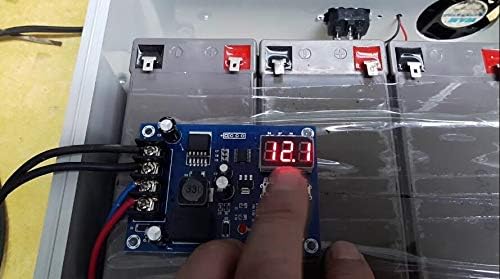
Figure 7: A user's hand interacting with the Ardest HW632 module, demonstrating the process of pressing the control buttons to adjust settings.
6. Tiaki
The Ardest HW632 module is designed for low maintenance. However, periodic checks can ensure optimal performance and longevity:
- Te ma: Puritia te kōwae kia matara mai i te puehu, te paru, me te makuku. Whakamahia he kakahu ngohengohe, maroke hei horoi.
- Hononga: Periodically inspect all wiring connections to ensure they are tight and free from corrosion. Loose connections can lead to inefficient operation or damage.
- Taiao: Operate the module within its specified temperature and humidity ranges. Avoid exposing it to extreme conditions.
7. Te Raru
If you encounter issues with your Ardest HW632 module, consider the following troubleshooting steps:
- Karekau he Whakaaturanga/Karekau he Mana:
- Whakaritea te voltagkei roto te e i te awhe DC 10-30V.
- Check all power connections for proper polarity and secure contact.
- Verify that the battery is connected, as the module may not display without a battery connected.
- Karekau te pākahiko i te utu:
- Confirm that the start charging voltage is set below the current battery voltage.
- Check the charger's output to ensure it is providing power.
- Tirohia ngā waea katoa mō ngā pakaru, ngā hononga koretake rānei.
- Battery Overcharging:
- Verify that the stop charging voltage is set correctly for your battery type.
- Perform a factory reset (refer to Section 5.3) and reconfigure the voltage tautuhinga.
- Hē Voltage Pānuitanga:
- Ensure connections are clean and secure to avoid voltage taka.
- Compare readings with a calibrated multimeter if possible.
8. Nga korero haumaru
Please observe the following safety precautions when installing and operating the Ardest HW632 module:
- Always disconnect power before making or changing any wiring connections.
- Ensure correct polarity when connecting the input power and battery. Incorrect polarity can damage the module and connected devices.
- Do not exceed the maximum rated current of 20A.
- Operate the module in a well-ventilated area to prevent overheating.
- Keep the module away from water, flammable materials, and corrosive substances.
- This module is not a toy. Keep out of reach of children.
- If you are unsure about any installation or operation steps, consult a qualified technician.
9. Pūtāhui me te Tautoko
The Ardest HW632 Battery Charging Control Module is manufactured by Ardest. For specific warranty information or technical support, please refer to the documentation provided with your purchase or contact your retailer. General inquiries can be directed to the manufacturer via their official support channels.