
1. Kupu Whakataki
This manual provides instructions for the safe and efficient use of your Woods 50012WD 2-Outlet Outdoor 24-Hour Heavy Duty Mechanical Timer. This device is designed to automate the on/off cycles of outdoor electrical devices, such as seasonal lighting or pond pumps, for convenience and energy saving.
The timer features two grounded outlets and a durable, weather-resistant housing suitable for outdoor use. Please read this manual thoroughly before installation and operation.
2. Nga Korero Haumaru Nui
WHAKATŪPATO: Hei whakaiti i te tupono o te ahi, te wiri hiko, te whara whaiaro ranei, me whai tonu i enei tikanga tiaki haumaru:
- Do not immerse the timer in water or expose it to direct water spray. It is weather-resistant, not waterproof.
- Ensure the timer is plugged into a Ground Fault Circuit Interrupter (GFCI) protected outlet when used outdoors.
- Do not exceed the electrical ratings of the timer: 125V, 15A, 1875W, 60Hz.
- Always unplug the timer from the power source before cleaning or performing any maintenance.
- Do not use with extension cords that are not rated for outdoor use.
- Kia matara atu nga tamariki i te matawā me nga taputapu hono.
- Do not disassemble the timer. There are no user-serviceable parts inside.
- Ensure all connections are secure and dry before applying power.
3. Ihirangi mokete
- Woods 50012WD Outdoor Mechanical Timer
- Pukapuka Tohutohu (tenei tuhinga)
4. Hua Neke Atuview
The Woods 50012WD timer features a rotating dial with segments for setting ON/OFF times, a manual override switch, and two grounded outlets.
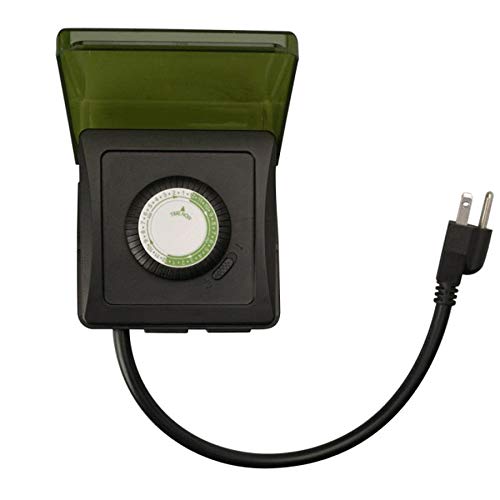
Whakaahua 1: Mua view of the Woods 50012WD Outdoor Mechanical Timer. The timer is black with a green central dial and a short power cord extending from the bottom. Two grounded outlets are visible on the side.
5. Tatūnga me te Tāuta
- Kōwhiria he Tauwāhi: Select a suitable outdoor location that is protected from direct heavy rain and snow, preferably under an overhang or in a sheltered area. Ensure the timer is placed on a stable surface or mounted securely.
- Monohia te Taima: Insert the timer's power cord into a 125V, 60Hz GFCI-protected outdoor electrical outlet.
- Tūhono Pūrere: Plug the devices you wish to control into the two grounded outlets on the timer. Ensure the total wattage o nga taputapu hono e kore e neke ake i te 1875W.
6. Nga Tohutohu Whakahaere
The Woods 50012WD is a 24-hour mechanical timer. Its operation relies on setting the current time and then pushing down segments on the dial to define ON periods.
6.1 Te Whakatakoto i te Wā o Nāianei
- Locate the rotating dial on the front of the timer. The dial is marked with 24 hours (1-24 or AM/PM indicators).
- Rotate the entire dial clockwise until the current time aligns with the "TIME NOW" arrow or indicator on the timer's housing. For example, if it's 6 PM, align the "18" (or "6 PM") mark with the indicator.
6.2 Setting ON/OFF Times
The dial is surrounded by small segments. Each segment typically represents a 15 or 30-minute interval. Pushing a segment ki raro activates the connected device during that time interval. Pulling a segment up deactivates the device.
- Identify the time periods when you want your connected devices to be ON.
- For each desired ON period, push the corresponding segments on the dial ki raro.
- For all other times, ensure the segments are pulled up.
- The timer will now cycle ON and OFF according to your settings every 24 hours.
6.3 Manual Override Switch
The timer includes a manual override switch, usually located near the dial. This switch allows you to bypass the programmed settings.
- Matawā ON: The timer will operate according to the programmed ON/OFF segments.
- ON I nga wa katoa: The connected devices will remain ON, overriding any programmed OFF times.
- WOTO I nga wa katoa: The connected devices will remain OFF, overriding any programmed ON times.
Refer to the specific markings on your timer for the exact positions of the manual override switch.
7. Tiaki
- Te horoi: Momotuhia te taima mai i te putanga hiko i mua i te horoinga. Horoia te taha o waho ki te wai ngohengohe.amp kakahu. Kaua e whakamahi i nga kai horoi me nga whakarewa.
- Rokiroki: Ki te mea ka roa te wā e rongoa ai te taima, kia ma, kia maroke hoki. Rokiroki ki te wāhi hauhautanga, maroke, kia matara atu i te rā tika.
- Tirotiro: Periodically inspect the timer and its cord for any signs of damage, such as cracks, fraying, or discoloration. If damage is found, discontinue use and replace the unit.
8. Te Raru
| Raruraru | Take pea | Rongoā |
|---|---|---|
| Kāore te pūrere e whakakā/whakaweto i ngā wā kua whakaritea. |
|
|
| Kāore te taima e mahi ana. |
|
|
9. Whakatakotoranga
- Tauira: 50012WD
- Momo: Heavy Duty Outdoor Mechanical Timer
- Putanga: 2 Nga Putanga Whakapapa
- Voltage Whakatauranga: 125 V
- AmpWhakatauranga erage: 15 A
- Whakatauranga Auautanga: 60 Hz
- Whakatauranga Hiko: 1875 W
- Momo Matama: 24-Hora Miihini
- Waitohu: Woods (Southwire/Coleman Cable)
- UPC: 078693500121
10. Pūtāhui me te Tautoko
Woods products are manufactured to high-quality standards. For warranty information or technical support, please refer to the official Woods (Southwire/Coleman Cable) webpaetukutuku, whakapā atu ranei ki ta raatau tari ratonga kaihoko.
Tena koa pupurihia to tohu mo te hoko mo nga kereme whakamana.
Mōhiohio Whakapā: Mō ngā mōhiohio tautoko hou rawa atu, tirohia te Toa Woods i runga i a Amazon or the official manufacturer's webpae.