
1. Hua Neke Atuview
The Snap-On 18V 1/2" Drive Green MonsterLithium Impact Wrench Kit (Part #CT8850GK2) is a high-performance cordless tool designed for professional use in automotive, industrial, and general maintenance applications. This kit provides powerful fastening and loosening capabilities for various bolts and nuts, offering portability and efficiency with its MonsterLithium battery technology.
The kit includes the impact wrench, two 5 Ah MonsterLithium batteries, a dual-charger, and this instruction manual, ensuring you have everything needed for immediate operation.
2. Nga korero haumaru
Kia mau tonu ki nga whakaritenga haumaru taketake ina whakamahi taputapu hiko hei whakaiti i te tupono o te ahi, te ru hiko, me te whara whaiaro.
- Pānuihia ngā tohutohu katoa: Kia mohio koe ki nga mahi a te taputapu me nga aratohu haumaru i mua i te whakamahi.
- Mau whakamarumaru kanohi: Me mau tonu ngā mōhiti haumaru kua whakaaetia e te ANSI, ngā mōhiti haumaru rānei me ngā parepare taha.
- Mau ki te tiaki whakarongo: Ko te rongonga roa ki te haruru mai i nga taputapu hiko ka kino te rongo.
- Kia ma te waahi mahi me te whakamarama pai: Ko nga waahi kapi, pouri ranei ka pa mai nga aitua.
- Kaua e mahi i roto i ngā āhuarangi pahū: Kaua e whakamahia ngā taputapu hiko i te aroaro o ngā wai mura, ngā hau, te puehu rānei.
- Taonga mahi haumaru: I nga wa katoa clamp ka mau ranei i te mea mahi kia kore ai e neke i te wa e mahi ana.
- Use correct tool for the job: Do not force a small tool or attachment to do the work of a heavy-duty tool.
- Kia tupato ki nga taputapu: Kia mau ki te tapahi taputapu koi me te ma kia pai ake ai te mahi. Whaia nga tohutohu mo te whakahinuhinu me te whakarereke i nga taputapu.
- Haumaru Pūhiko: Use only specified chargers and batteries. Do not short-circuit, incinerate, or expose batteries to high temperatures.
3. Ihirangi mokete
Your Snap-On 18V 1/2" Drive Green MonsterLithium Impact Wrench Kit (Part #CT8850GK2) should include the following items:
- 1 x Snap-On 18V 1/2" Drive MonsterLithium Impact Wrench
- 2 x Snap-On 5 Ah MonsterLithium Batteries
- 1 x Snap-On Dual-Charger
- 1 x Pukapuka Tohutohu
- 1 x Kawea Puke
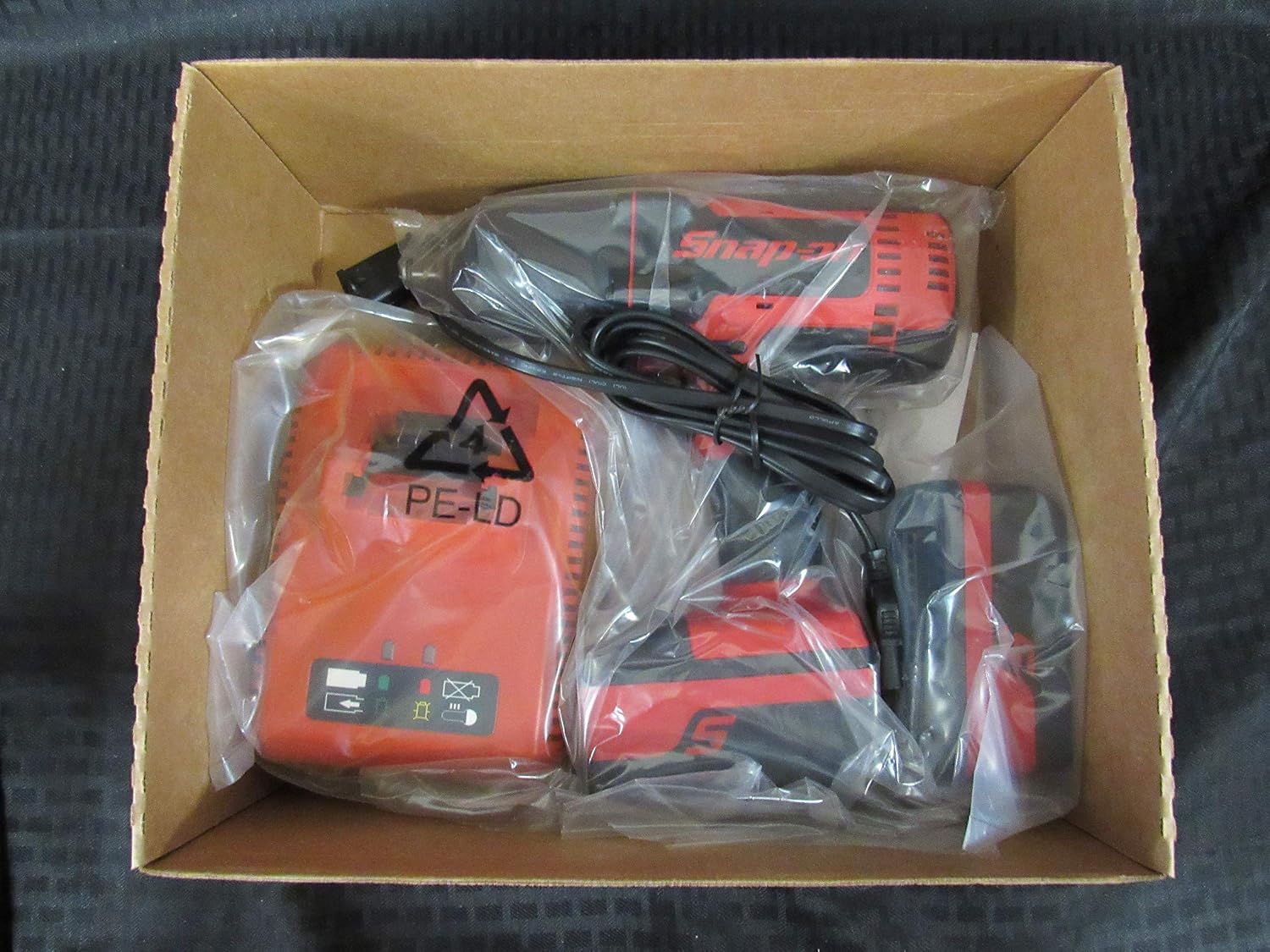
Image 1: The Snap-On 18V 1/2" Drive Green MonsterLithium Impact Wrench Kit contents, including the impact wrench, batteries, and charger, neatly packed in the box.

Image 2: The black Snap-On branded carry bag, designed for convenient storage and transport of the impact wrench kit components.
4. Tatūnga
4.1 Te Whakataki i nga Pahiko
- Connect the dual-charger to a standard electrical outlet.
- Slide the 5 Ah MonsterLithium batteries into the charging slots on the dual-charger. Ensure they are fully seated.
- The charger's indicator lights will show the charging status. Refer to the charger's specific manual for detailed light indications.
- Kia tino utua, tangohia ngā pākahiko mai i te rihi.
4.2 Installing/Removing Batteries
- Hei Tāuta: Align the battery with the battery port on the impact wrench and slide it in until it clicks securely into place.
- Hei Tango: Press the battery release button(s) on the side of the battery and slide the battery out of the tool.
4.3 Attaching/Removing Sockets
- Hei Āpiti: Push the desired 1/2" drive socket onto the square drive anvil of the impact wrench until it locks securely.
- Hei Tango: Pull the socket firmly off the anvil. Some sockets may require a slight twist while pulling.
5. Nga Tohutohu Whakahaere
5.1 Kei te Hiko / Weto
The impact wrench is activated by pressing the variable speed trigger. The tool will turn off when the trigger is released.
5.2 Forward/Reverse Selection
A forward/reverse selector switch is located above the trigger. Push the switch to the left for forward (tightening) rotation and to the right for reverse (loosening) rotation. Ensure the switch is in the center position for trigger lock-off when not in use or when changing accessories.
5.3 Operating the Impact Wrench
- Tīpakohia te turanga e tika ana mo te whakapiri.
- Me whakarite kua whakakiia te pākahiko me te whakauru tika.
- Tautuhia te tīpakonga whakamua/whakamuri ki te ahunga e hiahiatia ana.
- Whakanohoia te putanga ki runga i te whakapiri.
- Press the variable speed trigger to begin operation. The speed is controlled by the amount of trigger depression.
- Apply steady pressure to the tool to prevent it from jumping off the fastener.
- For tightening, stop when the fastener is snug or reaches the desired torque. For loosening, continue until the fastener is free.
6. Tiaki me te Tiaki
6.1 Te horoi
- Me horoi i nga wa katoa nga whakatuwheratanga o te taputapu kia kore e wera.
- Whakamahia he ngohengohe, damp he kakahu hei muru i waho o te taputapu. Kaua e whakamahi i nga matū kino, i nga horoi horoi ranei.
- Keep the drive anvil clean and free of debris.
6.2 Rokiroki
- Whakaorangia te taputapu me nga pākahiko ki te waahi makariri, maroke, kia matara atu i te ra me te wera nui.
- Ensure the forward/reverse selector is in the center (locked) position before storing.
- Store batteries with a partial charge (around 50%) if storing for extended periods to prolong battery life.
- Utilize the provided carry bag for organized and protected storage.
6.3 Tiaki Pūhiko
- Do not allow batteries to fully discharge before recharging.
- Avoid exposing batteries to water or extreme heat.
- If a battery is damaged or no longer holds a charge, dispose of it properly according to local regulations.
7. Te Raru
| Raruraru | Take pea | Rongoā |
|---|---|---|
| Kaore e timata te taputapu | Karekau te pākahiko i utaina Kaore i tika te whakauru o te pākahiko Pātene whakamua/whakamuri i te tūranga pokapū (maukati) | Utuhia te pākahiko Tāutahia te pākahiko kia mau Nekehia te pana ki te tūranga whakamua, ki te tūranga whakamuri rānei |
| He iti te mana/mahi | He iti te pākahiko i te utu Te werawera Ngā paraihe waro kua tawhito (mēnā e tika ana) | Whakaorangia te pākahiko Tukua kia whakamatao te taputapu Whakapa atu ki te pokapū ratonga whai mana |
| Socket not staying on anvil | He he te rahi o te turanga Worn anvil or socket retention pin | Ensure 1/2" drive socket is used Inspect anvil and retention pin; contact service if damaged |
If you encounter issues not listed here or if the suggested solutions do not resolve the problem, please contact Snap-On customer support or an authorized service center.
8. Whakatakotoranga Hangarau
| Āhuahira | Whakatakotoranga |
|---|---|
| Tau tauira | CT8850 |
| Nama Wahi | CT8850GK2 |
| Voltage | 18 Volts |
| Rahi Puku | 1/2 Inihi |
| Momo Pūhiko | MonsterLithium |
| Pūhiko Raukaha | 5 Ah |
| Aratau Mahi | Hiko |
| Kāhua Upoko | Tapawha Pumau |
| Momo Whakaoti | Kua pania te paura |
| Tae | Kakariki, Whero |
| Te Roa o te Tuemi | 8.2 Inihi |
| Rauemi | Utauta |
| UPC | 635133722569 |
9. Pūtāhui me te Tautoko Kiritaki
Specific warranty information for the Snap-On 18V 1/2" Drive Green MonsterLithium Impact Wrench Kit is typically provided with the product at the time of purchase or can be found on the official Snap-On webpae. Tena koa pupurihia to tohu mo te hoko mo nga kereme whakamana.
For customer support, technical assistance, or to locate an authorized service center, please visit the official Snap-On website or contact their customer service department directly. Contact information can usually be found on the manufacturer's webte waahi kei runga ranei i te kohinga hua.