
1. Kupu Whakataki
The COTEC SP-4000-148 is a high-frequency pure sine wave inverter designed to convert 48VDC battery power into 120VAC household electricity. This inverter delivers a continuous output of 4000W, making it suitable for various applications requiring stable and clean AC power. Its robust design and advanced features ensure reliable performance and protection for your connected devices.
Āhuatanga matua:
- Pure sine wave output for sensitive electronics.
- Power ON / OFF remote control capability (Green Terminal).
- Input & output fully isolated for enhanced safety.
- Temperature & load controlled cooling fan.
- User-friendly interface with 3-color LED status indicators.
- Output frequency (50/60 Hz) selectable via DIP switch.
- Putanga voltage selectable via DIP switch.
- Power saving mode adjustable via variable resistor.
- Comprehensive input protections: Reverse Polarity (Fuse), Under Voltage, Neke Atu i te Voltage.
- Extensive output protections: Short Circuit, Overload, Over Temperature.
- Type 1 Indoor Aluminum Enclosure.
- E13 / UL / CE / FCC approved.
2. Nga korero haumaru
Read all instructions and warnings carefully before installing or operating the inverter. Failure to follow these instructions may result in electric shock, fire, serious injury, or death.
Whakatupato Haumaru Whānui:
- Pūmate Hiko: Tenei inverter hua vol teiteitage AC power. Treat the output terminals with the same respect as any utility AC outlet.
- Kaimahi Tohu: Ko te whakaurunga me te mahi ma nga kaimahi mohio anake.
- Whakahau: Kia tika te hauhautanga huri noa i te inverter. Kaua e ārai i ngā pūaha hauhautanga. Ka taea e te wera nui te pakaru, te ahi rānei.
- Taiao: Do not expose the inverter to rain, snow, spray, or any liquids. Do not operate in areas with flammable fumes or gases.
- Whakapapa: The inverter must be properly grounded. Refer to the installation section for grounding instructions.
- Haumaru Pūhiko: Work near lead-acid batteries is dangerous. Batteries can generate explosive gases. Ensure proper ventilation and wear eye protection.
- Whakauru DC: Connect the DC input cables with correct polarity. Reverse polarity will blow the internal fuse and void the warranty.
- Taumaha: Do not exceed the inverter's rated output power. Overloading can damage the inverter and connected appliances.
- Tiaki: Before performing any maintenance or cleaning, disconnect all power sources (DC and AC).
3. Hua Neke Atuview
The COTEC SP-4000-148 inverter features a robust aluminum enclosure and clearly labeled connection points for ease of installation and operation. Familiarize yourself with the components before proceeding with installation.

Whakaahua 3.1: Te katoa view of the COTEC SP-4000-148 Pure Sine Wave Inverter. This image shows the blue aluminum casing and the grey end caps with ventilation slots.
Front Panel (AC Output Side):
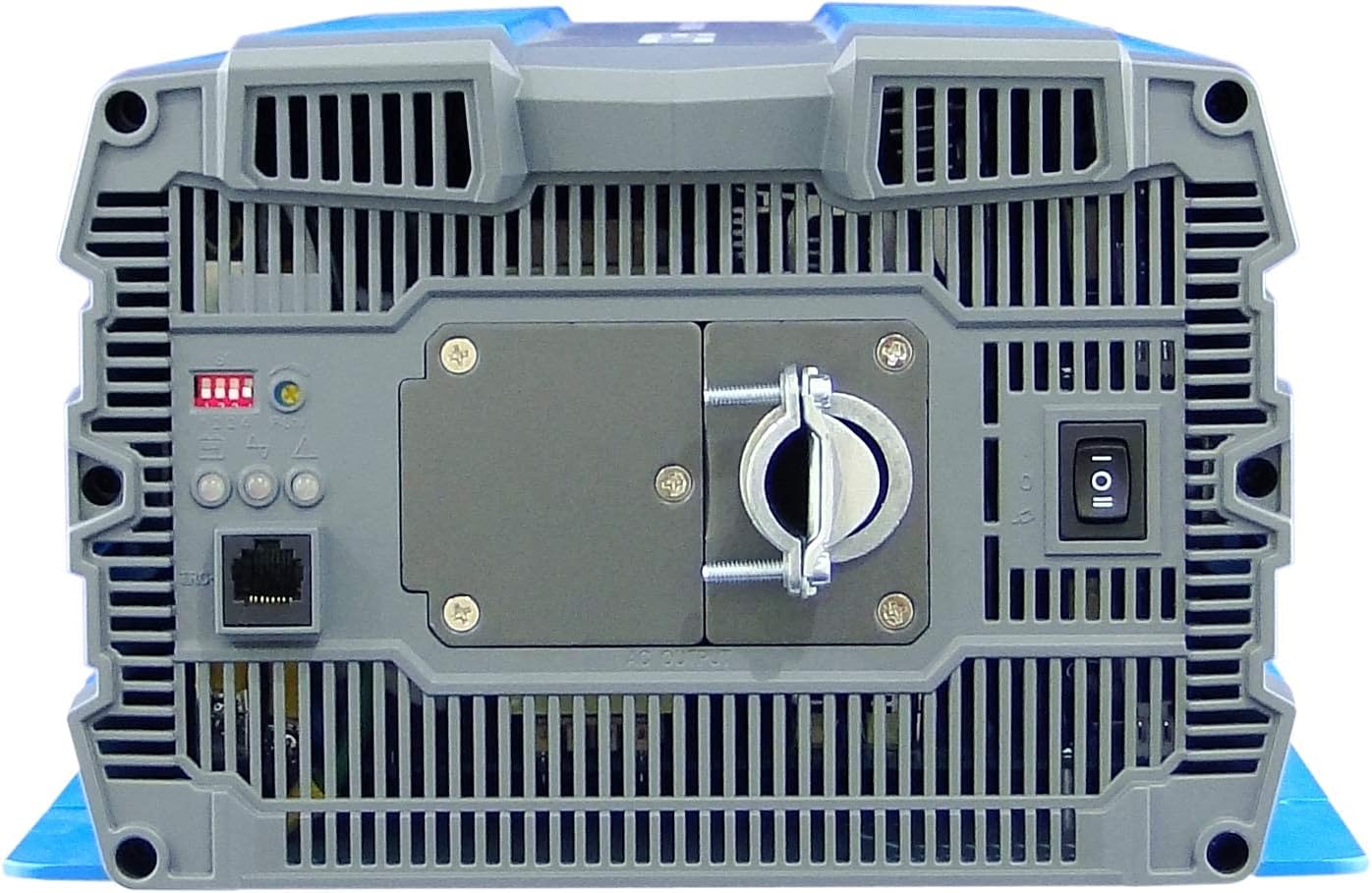
Figure 3.2: Front panel of the inverter. This view highlights the AC output terminal, the remote control terminal (green), LED status indicators, DIP switches, and the main power switch.
- Kāpeka Huaputa AC: Hardwire connection for 120VAC output.
- Remote Control Terminal (Green): For connecting an optional remote ON/OFF switch.
- Tohu Tūnga LED: Provide visual feedback on inverter status (Power, Fault, Overload).
- Whakawhiti DIP: Used to select output frequency (50/60 Hz) and output voltage.
- Power Saving Mode Resistor: Adjustable resistor for fine-tuning power saving mode.
- Whakawhiti Hiko Matua: Controls the inverter's power.
Rear Panel (DC Input Side):

Figure 3.3: Rear panel of the inverter. This view shows the DC input terminals (red for positive, black for negative) and the chassis ground connection point.
- Ngā Kāpeka Tāuru DC: Heavy-duty terminals for connecting to the 48VDC battery bank. Ensure correct polarity (Red for Positive, Black for Negative).
- Chassis Ground Terminal: For connecting the inverter to an earth ground.
- Cooling Fan Vents: Ensure these vents are not obstructed for proper heat dissipation.
4. Tāutanga
Proper installation is crucial for the safe and efficient operation of your inverter. Follow these steps carefully.
4.1 Whakapiki i te Inverter
- Choose a dry, well-ventilated location away from direct sunlight, heat sources, and moisture.
- Mount the inverter on a non-combustible surface.
- Ensure there is at least 6 inches (15 cm) of clear space around all sides of the inverter for proper airflow.
- Use appropriate fasteners to secure the inverter firmly to the mounting surface.
4.2 Hononga Whakauru DC
WHAKATŪPATO: Ensure the battery bank is disconnected or isolated before making any connections. Use appropriately sized cables and fuses/breakers.
- Connect the positive (+) DC cable (typically red) from your 48VDC battery bank to the red positive (+) terminal on the inverter's rear panel.
- Connect the negative (-) DC cable (typically black) from your 48VDC battery bank to the black negative (-) terminal on the inverter's rear panel.
- Ensure all DC connections are tight and secure to prevent loose connections and arcing.
- Install an external DC fuse or circuit breaker between the battery bank and the inverter's positive terminal, as close to the battery as possible. Consult the specifications for appropriate fuse sizing.
4.3 Hononga Putanga AC
The SP-4000-148 uses a hardwire AC output connection.
- Ensure the inverter is OFF and all DC power is disconnected.
- Connect your AC load wiring to the designated AC output terminal block on the front panel.
- Follow all local electrical codes for AC wiring.
- Ensure all AC connections are secure.
4.4 Whakapapa whenua
The inverter chassis must be properly grounded.
- Connect a ground wire from the chassis ground terminal on the inverter's rear panel to a reliable earth ground point.
- Ensure the ground connection is secure and meets all local electrical codes.
4.5 Hononga Mana Mamao (Whiringa)
If using an optional remote control, connect it to the green terminal block on the front panel according to the remote control's instructions.
5. Mahi
Once the inverter is properly installed and all connections are secure, you can begin operation.
5.1 Kei te Hiko / Weto
- Ensure all DC and AC connections are correct and secure.
- If an external DC breaker is installed, ensure it is closed (ON).
- Flip the main power switch on the inverter's front panel to the 'ON' position.
- The LED indicators will illuminate, and the cooling fan may briefly activate.
- To power off, flip the main power switch to the 'OFF' position.
5.2 Tohu Tūnga LED
The inverter features 3-color LED indicators to display its operational status:
- LED Kakariki: Tohu mahi noa.
- LED kōwhai: Indicates a warning or abnormal condition (e.g., low battery, minor overload). Refer to troubleshooting.
- LED Whero: Indicates a fault or critical error (e.g., severe overload, over-temperature, short circuit). The inverter will typically shut down. Refer to troubleshooting.
5.3 Tautuhinga Whakawhiti DIP
The DIP switches on the front panel allow configuration of output frequency and voltage. Refer to the detailed specifications or the label on the inverter for specific switch positions for desired settings.
- Auautanga Putanga: Select between 50 Hz or 60 Hz.
- Putanga Voltage: Select desired AC output voltage (hei tauira, 100V, 110V, 115V, 120V).
FAKATOKANGA: Always power off the inverter before changing DIP switch settings.
5.4 Aratau Tiaki Hiko
The power saving mode can be adjusted via the variable resistor on the front panel. This mode reduces standby power consumption when no load or a very light load is detected. Adjust the resistor to set the threshold for entering/exiting power saving mode.
6. Tiaki
Ko te tiaki i nga wa katoa ka mau te roa me te mahi tino pai o to kaihurihuri.
- Te horoi: Horoia te taha waho o te inverter i ia wā ki te kakahu maroke, ngohengohe. Kia kore he puehu, he paru rānei i roto i ngā pūaha hau. Kaua e whakamahi i ngā wai horoi.
- Taki Hononga: Annually inspect all DC and AC connections for tightness. Loose connections can cause overheating and damage.
- Tiaki Pūhiko: Whāia ngā taunakitanga tiaki a te kaihanga pākahiko, tae atu ki te tirotiro i ngā taumata electrolyte (mō ngā pākahiko waipuke) me te horoi o te pito.
- Taiao: Me whakarite kia noho tonu te taiao whakahaere i roto i nga awhe pāmahana me te haumākū kua tohua.
7. Te Raru
This section provides solutions to common issues you might encounter with your inverter.
| Raruraru | Take pea | Rongoā |
|---|---|---|
| Inverter does not turn on (No LEDs) | No DC input power; Blown DC fuse/breaker; Loose DC connections; Reverse polarity. | Tirohia te puhiko voltage; Check external DC fuse/breaker; Verify DC connections are tight and correct polarity. |
| Red LED illuminates, inverter shuts down | Overload; Short circuit on AC output; Over-temperature; Input over/under voltage. | Reduce AC load; Check AC wiring for short circuits; Allow inverter to cool down; Verify battery voltagkei roto i te awhe whakahaere. |
| Yellow LED illuminates, intermittent operation | Minor overload; Low battery voltage warning; High temperature warning. | Reduce AC load; Recharge batteries; Ensure adequate ventilation. |
| No AC output, Green LED is on | AC output wiring issue; Faulty AC appliance. | Check AC output connections; Test with a different AC appliance. |
| Cooling fan runs constantly or loudly | High ambient temperature; Heavy load; Obstructed vents. | Ensure proper ventilation; Reduce load if possible; Clean vents. |
8. Whakatakotoranga
The following table details the technical specifications for the COTEC SP-4000-148 Pure Sine Wave Inverter.

Figure 8.1: Detailed technical specifications for the COTEC SP-4000 series, including input, output, protection, and environmental parameters.
| Whakatakotoranga | Uara |
|---|---|
| Waitohu | KOTEK |
| Ingoa Tauira | SP Series |
| Wattage | 4000 watts |
| Whakauru Voltage | 48 Volts DC |
| Te Mana Putanga | 4000 Watts |
| Auautanga Putanga | 60 Hz (Selectable) |
| Nga Putanga Hiko Katoa | 1 (Hardwire) |
| Standby Power Shutoff | High Efficiency (Adjustable) |
| Momo Whakapiri | Type 1 Indoor Aluminum Enclosure |
| Whakaaetanga | E13 / UL / CE / FCC |
| UPC | 648152674771 |
| Mfr Waahanga Nama | SP-4000-148 |
Tuhituhi Hangaia:

Figure 8.2: Mechanical drawings providing dimensions for the COTEC SP-4000 series inverter, useful for installation planning.
9. Pūtāhui me te Tautoko
COTEK products are manufactured to high-quality standards. This product is covered by a manufacturer's warranty against defects in materials and workmanship. Please refer to the warranty card included with your product or visit the official COTEC webpae mo nga tikanga me nga tikanga whakamana.
Tautoko Kiritaki:
For technical assistance, troubleshooting, or warranty claims, please contact COTEC customer support through their official channels. Have your product model number (SP-4000-148) and purchase information ready when contacting support.
- Webpae: www.cotek.com.tw (Exoample, please verify official webpae)
- Īmēra: support@cotek.com (Example)
- Waea: +1-XXX-XXX-XXXX (Example)