
Bios BBYCA10300783
BIOS Weather Indoor/Outdoor Wireless Thermometer & Hygrometer
Model: 312BC (BBYCA10300783)
Brand: Bios
Kupu Whakataki
This manual provides detailed instructions for the setup, operation, and maintenance of your BIOS Weather Indoor/Outdoor Wireless Thermometer & Hygrometer. Please read this manual thoroughly before using the device to ensure proper function and longevity.
The BIOS Weather Indoor/Outdoor Wireless Thermometer & Hygrometer is designed to provide accurate readings of indoor temperature and humidity, as well as outdoor temperature. It features wireless connectivity for the outdoor sensor, a moon phase display, and the capability to connect with up to three sensors (additional sensors sold separately).
- Wireless range up to 30 meters (100 feet) from the outdoor sensor.
- Indoor monitor includes a hygrometer sensor for RH percentage readings (20% to 95%).
- Displays temperature from up to 3 sensors (Model No. 312TX, sold separately).
- Tracks relative indoor humidity and moon phase.
Ihirangi mokete
Ina whakatuwheratia te kete, me tirotiro kei te pai katoa ngā wāhanga, ā, kei te pai tonu te āhua:
- 1 x Main Display Unit (Indoor Monitor)
- 1 x Ahokore Pūoko waho
- 1 x Pukapuka Tohutohu (tenei tuhinga)

Image: The main display unit (left) and the wireless outdoor sensor (right). The main unit shows indoor temperature, humidity, moon phase, time, and outdoor temperature. The outdoor sensor displays its current temperature.
Aratohu Tatūnga
1. Tāuta Pūhiko
Both the main display unit and the wireless outdoor sensor require batteries (not included).
- Open the battery compartment on the back of both the main display unit and the outdoor sensor.
- Insert the required batteries (e.g., AA or AAA, refer to the battery compartment markings for correct type and polarity).
- Katia kia mau nga wahanga pākahiko.
Tuhipoka:
- It is recommended to insert batteries into the outdoor sensor first, then the main display unit, to facilitate immediate pairing.
- Use high-quality alkaline batteries for optimal performance, especially in cold weather for the outdoor sensor.
2. Te Whakanohonga Pūoko
Proper placement of both units is crucial for accurate readings and reliable wireless communication.
- Wāhanga Whakaaturanga Matua: Place indoors, away from direct sunlight, heat sources, or drafts that could affect temperature and humidity readings. Ensure it is within 30 meters (100 feet) of the outdoor sensor.
- Panui Ahokore Ahokore:
- Mount in a shaded area to avoid direct sunlight, which can cause artificially high temperature readings.
- Protect from direct rain and snow. An overhang or a weather-resistant enclosure is ideal.
- Avoid placing near large metal objects, electrical appliances, or thick walls that could interfere with the wireless signal.
- Ensure it is within the 30-meter (100-foot) wireless range of the main unit.
3. Takirua Tuatahi
The main display unit and outdoor sensor should automatically pair upon battery installation. If pairing does not occur:
- Ensure both units have fresh batteries.
- Bring the outdoor sensor closer to the main display unit.
- Press the "CH" (Channel) button on the main display unit to cycle through channels or initiate a search for the sensor.
- If issues persist, remove batteries from both units, wait a few minutes, and reinsert them, starting with the outdoor sensor.
Nga Tohutohu Whakahaere
1. Whakaatu Atuview
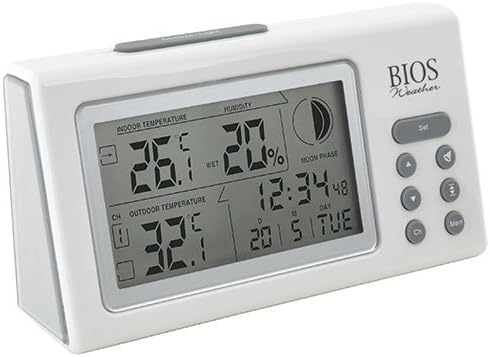
Whakaahua: Koki view of the main display unit, highlighting the various segments for indoor temperature, humidity, moon phase, time, and outdoor temperature.
The main display unit provides the following information:
- Temperature Roto: E whakaatu ana i te pāmahana o nāianei i roto i te rūma kei reira te waeine matua.
- Haumākū: Shows the relative indoor humidity percentage.
- Te pāmahana o waho: Displays the temperature from the connected wireless outdoor sensor.
- Wā me te Rā: Te waa me te ra.
- Wahanga Marama: An icon indicating the current moon phase.
- Tohu Channel: Shows which outdoor sensor channel is currently displayed (if multiple sensors are used).
2. Nga Mahi Patene
The main display unit features several buttons for configuration and viewte raraunga:
| Pātene | Mahi |
|---|---|
| SET | Enters setup mode for time, date, and other settings. Press to confirm settings. |
| ▲ / ▼ (Up/Down) | Adjusts values during setup. Cycles through channels for outdoor sensors. |
| CH (Hongere) | Switches between outdoor sensor channels (1, 2, 3) or initiates a search for sensors. |
| MEM (Mahara) | Displays maximum and minimum temperature/humidity readings. Press again to clear. |
3. Tautuhi Wā me te Rā
- Patohia me te pupuri i te SET pēhi i te pātene kia kimo rā anō te whakaaturanga wā.
- Whakamahia te ▲ or ▼ nga paatene hei whakatika i te haora.
- Perehi SET to confirm and move to the next setting (minutes, year, month, day).
- Whakahokia ngā taahiraa 2 me te 3 kia whirihorahia rā anō ngā tautuhinga katoa.
- Perehi SET one last time to exit setup mode.
4. ViewNgā Pānuitanga Mōrahi/Mōrahi
Pehia te MEM pātene ki view the maximum recorded indoor temperature, humidity, and outdoor temperature. Press MEM ano ki view the minimum readings. To clear the memory, press and hold the MEM button while the max/min readings are displayed.
Te tiaki
1. Te horoi
To clean the display unit and outdoor sensor, use a soft, damp cloth. Do not use abrasive cleaners, solvents, or harsh chemicals, as these may damage the plastic casinngā wāhanga hiko rānei.
2. Whakakapinga Pūhiko
When the battery indicator appears on the display, it is time to replace the batteries in the respective unit (main unit or outdoor sensor). Always replace all batteries in a unit at the same time with new, high-quality batteries of the correct type.
Hiranga:
- Makahia nga pākahiko tawhito kia rite ki nga ture o te rohe.
- If the unit will not be used for an extended period, remove the batteries to prevent leakage and damage.
Raparongoā
If you experience issues with your BIOS Weather Thermometer & Hygrometer, please refer to the following common problems and solutions:
| Raruraru | Te Take Taea / Rongoa |
|---|---|
| Kāore he pānui pāmahana o waho, kāore hoki he tohu "---" e whakaaturia ana. |
|
| He kore tika te panui o te pāmahana/makuku. |
|
| He atarua, he putea ranei te whakaaturanga. |
|
| Kei te hē te Wā/Rā. |
|
Whakatakotoranga Hua

Image: The main display unit with indicated dimensions: 21.59 cm (length), 7.62 cm (width), and 19.05 cm (height).
| Āhuahira | Taipitopito |
|---|---|
| Tau tauira | BBYCA10300783 (312BC) |
| Momo | Indoor/Outdoor Thermometer and Hygrometer |
| Rauemi | Kirihou |
| Tae | Mā |
| Ahu (Waeine Matua) | Teitei: 19.05 cm, Whanui: 7.62 cm, Hohonu: 21.59 cm |
| Taumaha | 0.30 kg |
| Mokowoko Korekore | Tae atu ki te 30 mita (100 putu) |
| Awhe haumākū o roto | 20% ki te 95% RH |
| Sensor Capability | Supports up to 3 outdoor sensors (additional sensors Model No. 312TX, sold separately) |
| Nga waahanga motuhake | Wireless connectivity, Multi-Sensor support, Humidity Tracking, Moon Phase Display |
| Puna Mana | Pūhiko Powered |
Nga korero Whakaputanga
This BIOS Weather product comes with a 1-Tau Rarangi mo nga waahanga from the date of purchase. This warranty covers defects in materials and workmanship under normal use. It does not cover damage resulting from misuse, accident, unauthorized modification, or improper installation.
Tena koa pupurihia to tohu mo te hoko mo nga kereme whakamana.
Tautoko Kiritaki
If you have any questions, require technical assistance, or need to make a warranty claim, please contact Bios customer support. For more information and resources, you may also visit the official Bios store on Amazon:
Visit the Bios Store on Amazon
Please have your product model number (BBYCA10300783) and purchase date ready when contacting support.
Ask a question about this manual
Ask about setup, troubleshooting, compatibility, parts, safety, or missing instructions. Manuals+ will review the question and use this page’s manual context to help answer it.