
1. Kupu Whakataki
This manual provides detailed instructions for the installation, operation, and maintenance of your Alpine CDE-163BT Advanced Bluetooth CD Receiver. Please read this manual thoroughly before using the unit to ensure proper operation and to prevent damage. Keep this manual for future reference.
The Alpine CDE-163BT is a versatile car stereo receiver featuring advanced Bluetooth connectivity for hands-free calling and audio streaming, CD playback, USB input, and FM/AM tuner capabilities. It is designed to deliver high-quality audio performance and user-friendly control.
2. Tatūnga me te Tāuta
2.1 Ihirangi mokete
I mua i te tiimata o te whakaurunga, tirohia kei te noho nga waahanga katoa:
- Alpine CDE-163BT Head Unit
- Te Kai-ruinga
- Whakaekea te Manga me te Mowhiti Kuti
- Hopuoro mō te Waea Kore-Ringa Nihokikorangi
- Pukapuka a te Kaipupuri (tenei tuhinga)
- Whakamaunga i nga taputapu (nguu, taiapa)
2.2 Wiring Hoahoa
Refer to the wiring diagram provided with the unit's installation guide for specific connections. Key connections include:
- Mana: Yellow (constant 12V), Red (switched 12V), Black (ground).
- Kaikōrero: White/White-Black (Front Left), Gray/Gray-Black (Front Right), Green/Green-Black (Rear Left), Purple/Purple-Black (Rear Right).
- Antenna: Blue (power antenna/amplifier remote turn-on).
- hopuoro: Honoa te hopuoro kua tukuna ki te tāuru motuhake mō te waea kore-ā-ringa.
Tupato: Incorrect wiring can cause damage to the unit or vehicle's electrical system. If you are unsure about any wiring connections, consult a qualified professional installer.
2.3 Hiko Tuatahi
After installation, turn on your vehicle's ignition. The unit should power on. Follow any on-screen prompts for initial setup, such as language selection or clock setting.
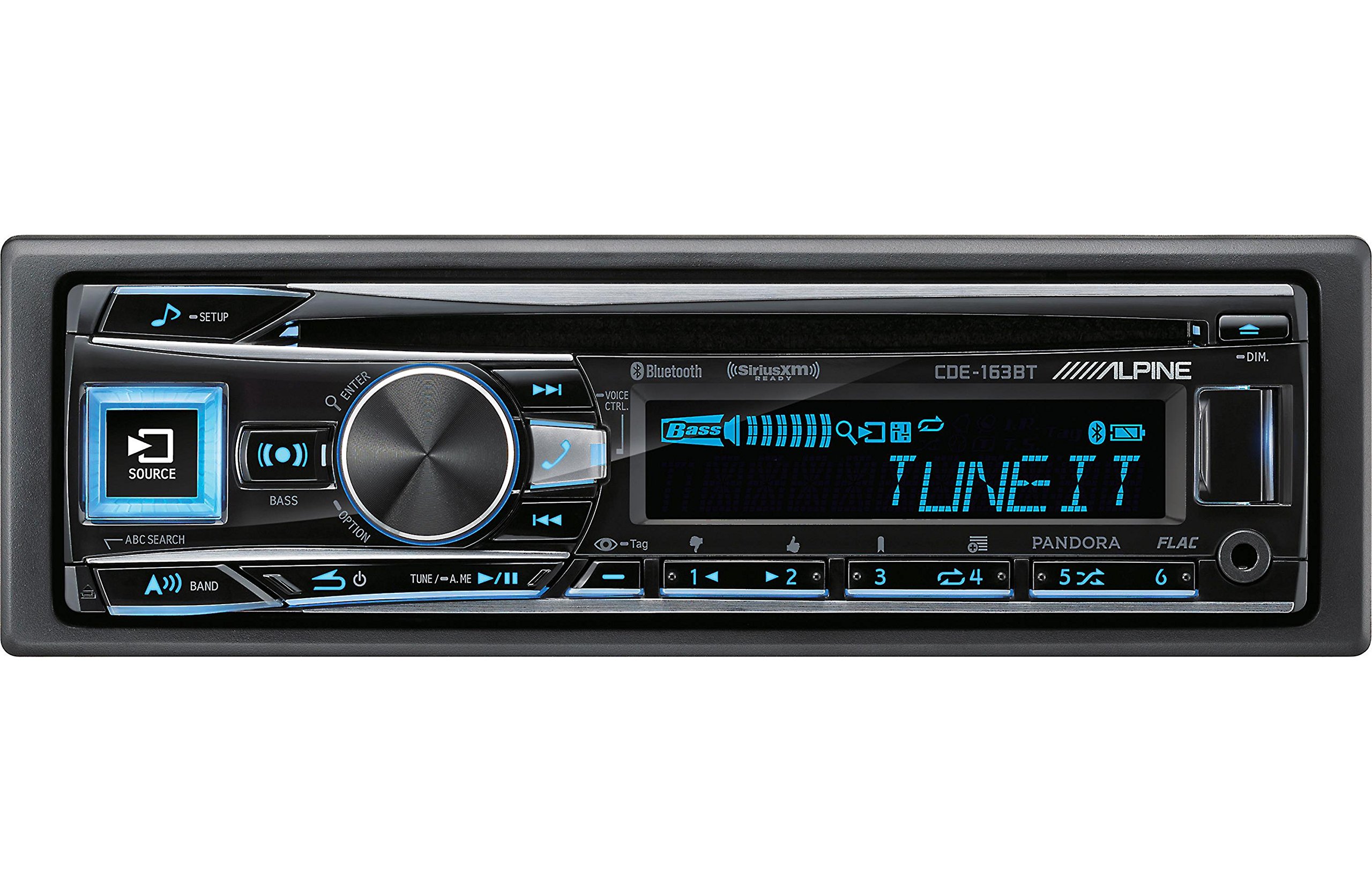
Figure 2.3.1: Front panel of the Alpine CDE-163BT receiver. This image displays the main controls, including the large rotary knob, source button, setup button, and display screen showing "TUNEIT" and "Bass" indicators.
3. Mahi
3.1 Ngā Mana Whakahaere o te Paewhiri o Muaview
Kia mōhio koe ki ngā mana whakahaere matua kei te papa o mua:
Whakaatu 3.1.1: Taipitopito view of the Alpine CDE-163BT front panel. Key controls include the SOURCE button (left, illuminated), SETUP button (top left), large central rotary knob for volume and selection, BASS/OPTION button, VOICE CTRL button, and various preset/track skip buttons along the bottom.
- Pātene PUTANGA: Selects the audio source (CD, Tuner, USB, Bluetooth Audio, AUX).
- Pātene tatūnga: Accesses the main setup menu for system adjustments.
- Rotary Knob (Volume/ENTER): Turns to adjust volume. Press to confirm selections in menus.
- BASS/OPTION Button: Provides quick access to bass settings or other options depending on the current mode.
- VOICE CTRL Button: Activates voice control features on connected smartphones.
- Pene BAND: Switches between FM1, FM2, FM3, and AM bands in tuner mode.
- TUNE/A.ME/II Buttons: Used for manual tuning, auto memory, and play/pause functions.
- Track Skip/Preset Buttons (1-6): Used for skipping tracks or selecting radio presets.
- Pātene DIM: Whakaritea te kanapa whakaatu.
3.2 Te Whakakā/Te Whakaweto me te Kōwhiringa Pūtake
- Hei huri i te waeine ON, press any button (e.g., SOURCE or the Rotary Knob).
- Hei huri i te waeine WATE, press and hold the power button (often integrated with the TUNE/A.ME button).
- Pehia te PUTANGA button repeatedly to cycle through available audio sources: CD, Tuner, USB, Bluetooth Audio, AUX.
3.3 Mana Rōrahi
Hurihia te pokapū nui Puta Turi huri matau ki te taha matau hei whakanui i te oro, huri maui hoki ki te taha matau hei whakaiti i te oro.
3.4 Tautuhinga Ororongo
Pehia te BASS/OPTION button or navigate through the SETUP menu to adjust audio settings such as Bass, Treble, Balance (left/right), and Fader (front/rear). Use the Rotary Knob to adjust values and press it to confirm.
3.5 Te Whakahaere Reo Irirangi (Whakatū FM/AM)
- Select "Tuner" as the source using the PUTANGA pātene.
- Pehia te PĀERE te paatene hei whakawhiti i waenga i nga roopu FM1, FM2, FM3, me AM.
- Whakatika ā-ringa: Pehia te TUNE buttons (◀ / ▶) to manually tune frequencies.
- Rapua te Whakatika: Patohia me te pupuri i te TUNE pātene ki te rapu aunoa i te teihana kaha muri.
- Teihana tatūkē: Hei penapena i tētahi teihana, whakahōnore ki te auau e hiahiatia ana, kātahi ka pēhi me te pupuri i tētahi o ngā pātene kua whakaritea (1-6) kia rongo rā anō koe i te tangi pī. Hei whakahoki mai i tētahi kua whakaritea, pēhi noa i te pātene kua whakaritea e rite ana.
3.6 Whakahoki CD
- Insert a CD into the disc slot. The unit will automatically switch to CD source and begin playback.
- Use the ◀ / ▶ buttons to skip tracks.
- Pehia te TUNE/A.ME/II button for Play/Pause.
- Pehia te ABC SEARCH button to search for tracks by name.
3.7 Hononga Nihokikorangi
The CDE-163BT features built-in Bluetooth for hands-free calling and audio streaming.
3.7.1 Te Honohono i tētahi Pūrere Nihokikorangi
- Me mohio kei te whakahohea te Nihokikorangi i runga i to taputapu pūkoro.
- On the CDE-163BT, go to the SETUP menu and select "Bluetooth Setup".
- Choose "Pairing" or "Device Search".
- On your mobile device, search for available Bluetooth devices and select "Alpine CDE-163BT".
- Confirm the pairing code if prompted. Once paired, the Bluetooth icon on the receiver's display will illuminate.
3.7.2 Waea-Waea-a-ringa
- Ina tae mai he waea, ka whakaatuhia e te waeine te ID kaikaranga. Pēhia te pātene KAUPAPA button (Rotary Knob) to answer.
- Hei whakamutu waea, pehia te KAUPAPA pātene ano.
- Use the supplied microphone for clear communication.
- Pehia te VOICE CTRL button to activate your smartphone's voice assistant.
3.7.3 Rererenga Ororongo Nihokikorangi
- Select "Bluetooth Audio" as the source.
- Start playback on your paired mobile device. Audio will stream through the receiver.
- Use the ◀ / ▶ buttons on the receiver to skip tracks.
3.8 Whakahoki USB
- Connect a USB storage device (e.g., USB flash drive) to the USB port.
- Select "USB" as the source. The unit will automatically detect and begin playing compatible audio files (including FLAC format).
- Use the ◀ / ▶ buttons to skip tracks.
- The unit supports various audio formats.
3.9 Pandora and SiriusXM Ready
- Pandora: Connect your iPhone or Android smartphone via USB or Bluetooth and launch the Pandora app. Select Pandora as the source on the receiver to control the app.
- SiriusXM: This unit is SiriusXM Ready. An optional SiriusXM Connect Vehicle Tuner and subscription are required for satellite radio reception. Connect the tuner and select SiriusXM as the source.
3.10 Tautuhinga Whakaatu
- Pehia te DIM button to adjust the display brightness.
- Access the SETUP menu to customize display colors for buttons and the screen.
4. Tiaki
4.1 Te Whakapai i te Waeine
Horoia te papa o mua ki te kakahu ngohengohe, maroke. Mō ngā paru uaua,ampen the cloth lightly with water. Avoid using harsh chemicals, abrasive cleaners, or solvents as they can damage the finish.
4.2 Tiaki Kōpae
Handle CDs by their edges. Keep discs clean and free of scratches. If a disc is dirty, wipe it gently from the center outwards with a soft, lint-free cloth. Do not use solvents or abrasive cleaners on discs.
5. Te Raru
If you experience issues with your CDE-163BT, refer to the table below for common problems and solutions.
| Raruraru | Take pea | Rongoā |
|---|---|---|
| Karekau he kaha | Waea hē; Pūwero pakaru; Whakawetohia te mura o te waka. | Tirohia ngā hononga hiko; Whakakapia te fiusi; Whakakāhia te mura o te waka. |
| Karekau he tangi | He iti rawa te rōrahi; Whakahohe wahangu; He waea waea korero; Amplifier atu. | Whakanuia te oro; Whakawetohia te whakangū; Tirohia ngā hononga kaikōrero; Tirohia ampmana whakaahuru. |
| Nihokikorangi kore hono | Device not in pairing mode; Bluetooth off on phone; Interference. | Ensure phone Bluetooth is on and discoverable; Re-attempt pairing; Move closer to unit. |
| CD skips or won't play | Dirty or scratched disc; Disc inserted incorrectly. | Clean disc; Insert disc correctly; Try a different disc. |
| Ko te taputapu USB kaore i te mohiotia | Hōputu hotokore; He taputapu USB kua pakaru; Hononga wewete. | Whakaritea files are compatible; Try a different USB device; Reconnect USB device. |
If the problem persists after attempting these solutions, please contact Alpine customer support.
6. Whakatakotoranga
Below are the technical specifications for the Alpine CDE-163BT Advanced Bluetooth CD Receiver:
- Tau tauira: 79380
- Rahi Hua: 5 x 11 x 10 inihi
- Taumaha Tūemi: 4.05 pauna (4.1 Pauna)
- Hangarau Whakawhitiwhiti Ahokore: Nihokikorangi
- Hangarau Hononga: Nihokikorangi
- Nga waahanga motuhake: Built-In Bluetooth, FM Tuner
- Ētahi atu āhuatanga Whakaatu: Ahokore
- Tae: Pango
- Kaihanga: Alpine
- Hangarau Hononga: Nihokikorangi
- Ngā Pūrere Hototahi: Waea atamai
- Momo Tuhono: 3.5mm Jack, USB
- Aratau Putanga Ororongo: Mono, Stereo
- Whirihoranga Hongere Oro Hapori: 4 Channel
- Wattage: 200 watts
- Te Ra Tuatahi Wātea: Hanuere 19, 2016
7. Pūtāhui me te Tautoko Kiritaki
7.1 Nga Korero Whakaputanga
Alpine products are manufactured to the highest quality standards. This product is covered by a limited warranty. Please refer to the separate warranty card included with your purchase for specific terms, conditions, and duration of coverage. Retain your proof of purchase for warranty claims.
7.2 Tautoko Kiritaki
For technical assistance, troubleshooting beyond this manual, or warranty service, please contact Alpine customer support:
- Webpae: Tirohia te paetukutuku mana o Alpine webpae tukutuku mō ngā rauemi tautoko, ngā FAQ, me ngā puka whakapā.
- Waea: Refer to the Alpine website or your warranty card for regional customer service phone numbers.
- Pokapū Ratonga Whakamana: For repairs, locate an authorized Alpine service center through the official webpae.
When contacting support, please have your product model number (CDE-163BT) and serial number ready.