
1. Kupu Whakataki
The Ohaus ST10C-A Pen Meter is designed for simple, fast, and accurate measurement. This economical device offers reliable performance for various applications. Its durable construction and user-friendly features make it suitable for consistent use in diverse environments.
2. Hua Neke Atuview
The ST10C-A Pen Meter is a compact, handheld device. Key features include a clear digital display, an intuitive on/off button, a protective sensor cap, and a wrist strap for secure handling.
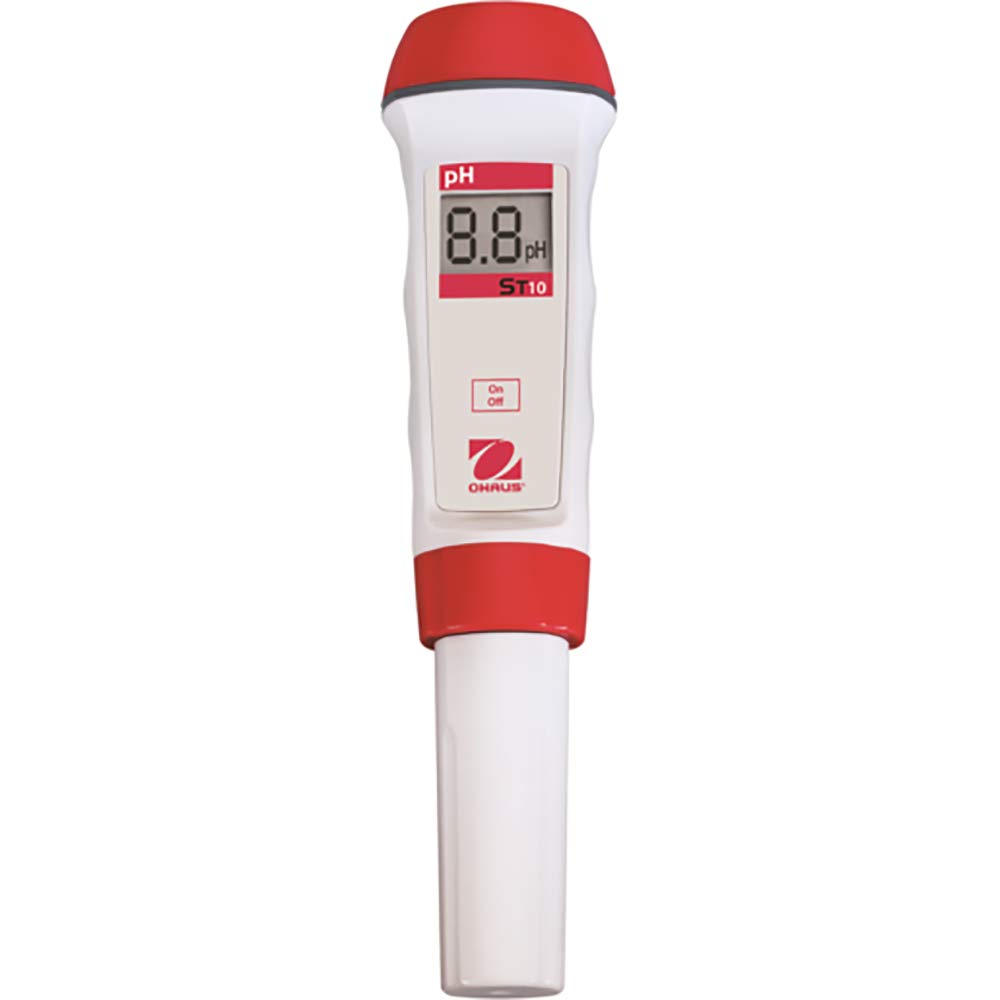
Whakaahua 1: Ohaus ST10C-A Pen Meter. This image shows the Ohaus ST10C-A Pen Meter. It features a digital display for pH readings, an 'On/Off' button, and a durable, waterproof design with red accents.
The meter's IP67 waterproof ABS housing ensures protection against dust and water ingress, making it suitable for wet conditions. An automatic shutdown feature helps conserve battery life.
3. Tatūnga
- Wewete ana: Carefully remove the meter and all accessories from the packaging. Inspect for any damage.
- Tāuta Pūhiko: The meter typically comes with batteries pre-installed or requires simple installation. Refer to the battery compartment cover for instructions on opening and inserting batteries, ensuring correct polarity.
- Sensor Preparation: Remove the protective sensor cap. If the sensor appears dry, condition it according to standard pH electrode practices (e.g., soaking in storage solution or pH 7 buffer for a short period).
- Whakaritenga Tuatahi: For optimal accuracy, perform an initial calibration using fresh pH buffer solutions (e.g., pH 4.01, 7.00, and 10.01). Follow the calibration procedure outlined in the meter's specific quick start guide or on-screen prompts.
4. Nga Tohutohu Whakahaere
- Hiko Whakaka/Weto: Pehia te Ka/Weto button located on the front of the meter to turn the device on or off.
- Te Inenga:
- Ensure the sensor cap is removed.
- Rinse the sensor with distilled water before and after each measurement.
- Rukuhia te pūoko ki roto i te sample solution, ensuring the sensor tip is fully submerged.
- Āta whakaohokia te otinga kia ōrite, kia tau ai te pānui.
- Read the pH value displayed on the screen once it becomes stable.
- Whakaweto Aunoa: The meter is equipped with an automatic shutdown feature to conserve battery life. It will power off after a period of inactivity.
5. Tiaki
- Te horoi i te pūoko: After each use, rinse the sensor thoroughly with distilled or deionized water. Do not wipe the sensor bulb, as this can cause static charges and damage the sensitive glass.
- Rokiroki: Always replace the protective sensor cap after use. Ensure the cap contains a small amount of storage solution (or pH 7 buffer) to keep the sensor hydrated. Never store the sensor dry or in distilled water.
- Whakakapinga Pūhiko: When the battery indicator appears on the display, replace the batteries promptly. Refer to the battery compartment for the correct battery type and installation procedure.
- Whakapai Whānui: The meter's housing can be cleaned with a damp kakahu. A ape i te whakamahi i nga matū kino, i nga horoi horoi ranei.
6. Te Raru
| Raruraru | Take pea | Rongoā |
|---|---|---|
| Kāore te mita e tahuri. | Nga pākahiko kua mate, kua he ranei te whakaurunga. | Whakakapihia nga pākahiko, kia tika te polarity. |
| Ngā pānui hē, kāore rānei i te pumau. |
|
|
| Te puhoi o te wā whakautu. | Sensor is old or contaminated. | Clean the sensor. If problem persists, consider replacing the sensor. |
7. Whakatakotoranga
- Tauira: ST10C-A
- Waitohu: Ohau
- Whare: IP67 waterproof ABS
- Āhuatanga: Protective sensor cap, automatic shutdown, wrist strap
- Ahu: Approximately 15 x 10 x 4 inches (Product dimensions as listed, note this might be packaging size)
- Taumaha: Approximately 2 Pounds (Product weight as listed, might be shipping weight)
Note: Specific measurement ranges, accuracy, and resolution details should be confirmed with the official Ohaus product data sheet.
8. Pūtāhui me te Tautoko
For detailed warranty information, technical support, or service inquiries, please refer to the official Ohaus website or contact your local Ohaus representative. Keep your purchase receipt for warranty claims.
Official Ohaus Webpae: www.ohaus.com