
1. Kupu Whakataki
Welcome to the user manual for your new Salora SM508 mobile phone. This guide provides essential information to help you set up, operate, maintain, and troubleshoot your device. Please read this manual carefully to ensure proper use and to maximize the performance and longevity of your phone.
2. Hua Neke Atuview
The Salora SM508 is a compact and reliable basic mobile phone designed for essential communication. It features a color display, a comfortable keypad, and dual SIM support.
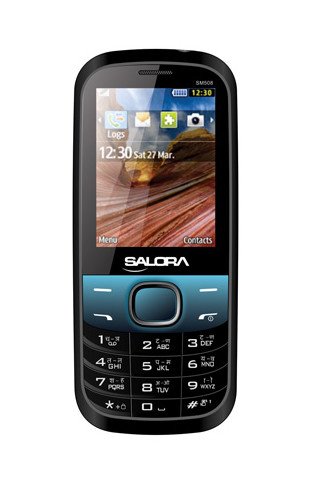
Ko tenei whakaahua e whakaatu ana i mua view of the Salora SM508 mobile phone. It features a color display at the top, a central navigation button, and a standard alphanumeric keypad below. The phone has a black body with blue accents around the navigation cluster.
3. Tatūnga
3.1 Kōkuhu Kāri Sim
- Turn off the phone and remove the back cover.
- Āta tango i te pākahiko.
- Locate the SIM card slots. The Salora SM508 supports dual SIM cards.
- Insert your SIM card(s) into the designated slot(s) with the gold contacts facing down. Ensure they are securely seated.
3.2 Inserting Battery
- Align the battery contacts with the contacts in the phone's battery compartment.
- Gently press the 1800 mAh Li-Ion battery into place until it clicks.
- Whakakapia anō te taupoki o muri, me te whakarite kia mau te mau.
3.3 Inserting Memory Card (Optional)
- With the back cover and battery removed, locate the memory card slot.
- Insert a microSD card (up to 8GB) into the slot with the gold contacts facing down.
- Whakakapia te pākahiko me te uhi o muri.
3.4 Te Whakataki i te Pūrere
- Honoa te riihi ki te tauranga utu i runga i to waea.
- Monohia te rihi ki te putanga hiko.
- The battery indicator on the screen will show the charging status. Charge the phone fully before first use.
3.5 Initial Power On/Off
- Hei Whakahiko: Pēhia me te pupuri i te pātene Mana/Whakamutu Waea kia mārama rā anō te mata.
- Hei Whakaweto: Press and hold the Power/End Call button until the power-off options appear, then select 'Power off'.
4. Nga Tohutohu Whakahaere
4.1 Whakaterenga Taketake
- Use the navigation keys (up, down, left, right) to move through menus and options.
- Press the central 'OK' or 'Select' button to confirm a selection.
- Use the 'Back' or 'Clear' button to return to the previous screen or delete characters.
4.2 Te Waea me te Whiwhi Waea
- Hei Waea: Tāuruhia te tau waea mā te whakamahi i te papapātuhi, ka pēhi i te pātene Waea Kakariki.
- Hei Whiwhi Waea: When the phone rings, press the Green Call button to answer.
- Hei Whakamutu Waea: Pēhia te pātene Whakamutu Waea Whero.
4.3 Te Tuku me te Whiwhi SMS
- Whakatere ki te tahua 'Karere'.
- Select 'Write Message' or 'New SMS'.
- Whakauruhia to karere ma te whakamahi i te papapātuhi.
- Tāpirihia te nama waea a te kaiwhiwhi, tīpakohia rānei mai i ngā hoapā.
- Patohia te 'Tukua'.
4.4 Whakamahinga Kaamera
- Whakauru atu ki te taupānga kāmera mai i te tahua matua.
- The phone features a 1.3 MP primary (rear) camera.
- Hangaia to kopere ma te whakamahi i te whakaaturanga.
- Press the 'OK' or 'Capture' button to take a photo.
4.5 Rongorau me te Hononga
- Jack Ororongo: The phone includes a 3.5 mm audio jack for connecting headphones or external speakers.
- Nihokikorangi: Enable Bluetooth from the settings menu to connect to compatible devices for file te whakawhiti, te whakawhitiwhiti-a-ringa ranei.
- GPRS: The phone supports GPRS for basic internet connectivity. Consult your network provider for data plan details.
5. Tiaki
5.1 Te horoi i to taputapu
- Whakamahia he kakahu ngohengohe, maroke, kore-raro hei horoi i te mata me te tinana o te waea.
- A ape i te whakamahi i nga matū kino, i nga whakarewa horoi, i nga horoi kaha ranei.
- Do not allow water or liquids to enter the phone.
5.2 Tiaki Pūhiko
- A ape i te tuku i te pākahiko ki te wera nui (wera, makariri ranei).
- Kaua e werohia, ka wetewetehia, kaua e porotiti poto te pākahiko.
- If the battery is damaged or swollen, discontinue use immediately and replace it with an authorized Salora battery.
5.3 Rokiroki
- Rokirokihia te waea ki te wāhi hauhautanga, maroke, kia matara atu i te rā tika me te makuku.
- If storing for an extended period, ensure the battery is partially charged (around 50%) to preserve its lifespan.
6. Te Raru
If you encounter issues with your Salora SM508, please refer to the following common solutions:
- Kaore te waea e whakaka ana:
Ensure the battery is charged. Connect the charger and wait a few minutes before attempting to power on. Check if the battery is properly inserted. - Karekau he tohu whatunga:
Check if your SIM card is correctly inserted. Ensure you are in an area with network coverage. Try restarting the phone. - Kāore e taea te waea/te whiwhi waea:
Verify that your SIM card is active and has sufficient balance/plan. Check network signal strength. Ensure call barring or flight mode is not enabled. - Nga take utu:
Ensure the charger is properly connected to both the phone and the power outlet. Try using a different compatible charger. Check the charging port for any debris. - Kāore te papapātuhi e aro mai:
Restart the phone. If the issue persists, ensure no physical damage to the keypad.
If the problem persists after trying these steps, please contact Salora customer support.
7. Whakatakotoranga
Below are the detailed technical specifications for the Salora SM508 mobile phone:
| Āhuahira | Whakatakotoranga |
|---|---|
| Waitohu | Salora |
| Tauira | SM508 |
| Pūnaha Mahi | Android 5.1, Android v5 1 OS (Note: This specification appears to be an error in the source data for a basic phone with a keypad interface. The phone operates on a proprietary feature phone OS.) |
| Rahi Mata | 6.1 Centimetres (2.4" TFT Screen) |
| Whakatau | 320 x 240 pika |
| Kāmera Tuatahi | 1.3 MP (Rear) |
| Pūhiko | 1800 mAh, Li-Ion |
| Te Rokiroki Mahara | Ka taea te toro atu ki te 8GB |
| Tautoko SIM | Sim rua |
| Hangarau Hononga | Nihokikorangi, GPRS |
| Jack Ororongo | 3.5 mm |
| Atanga Pūrere - Tuatahi | Papapātuhi |
| Tauwehe Puka | Pae |
| Tae | Pango, Kahurangi |
| Taumaha Tūemi | 140 g |
| Ahu mōkihi | 14 x 9.4 x 6.2 cm |
| Te Ra Tuatahi Wātea | 18 Pepuere 2014 |
8. Pūtāhui me te Tautoko
8.1 Nga Korero Whakaputanga
The Salora SM508 comes with a 1 tau te whakamana a te kaiwhakanao mo te taputapu mai i te ra o te hokonga. Ko nga taputapu kei roto i te pouaka, tae atu ki nga pākahiko, ka hipokina e te 6-marama whakamana kaihanga mai i te ra o te hokonga. Ka kapi tenei whakamana i nga hapa o te hangahanga me nga take ka puta mai i te whakamahinga noa.
Tena koa pupuri i to riirii hoko hei tohu mo te hoko mo nga kereme whakamana.
8.2 Tautoko Kiritaki
For any technical assistance, warranty claims, or further inquiries regarding your Salora SM508 mobile phone, please contact Salora customer support directly. Refer to the packaging or the official Salora webpae mo nga korero whakapā o naianei.