
Apollo 20826-T
Pukapuka Kaiwhakamahi
Apollo ASI 20826-T Surface Mounted Waste Receptacle
Tauira: 20826-T
Kupu Whakataki
This manual provides comprehensive instructions for the installation, operation, and maintenance of your Apollo ASI 20826-T Surface Mounted Waste Receptacle. Please read this manual thoroughly before installation and use to ensure proper function and longevity of the product.
Nga korero haumaru
- Ensure the receptacle is securely mounted to a stable wall surface to prevent tipping or falling.
- Do not overload the receptacle beyond its stated capacity (12.8 Gallons).
- Keep hands clear of the push door mechanism during operation to avoid pinching.
- Use appropriate personal protective equipment (PPE) when handling or cleaning the unit, especially if dealing with waste.
- This product is designed for waste collection; do not use it for purposes other than its intended use.
Tatūnga me te Tāuta
The ASI 20826-T is designed for surface mounting. Proper installation is crucial for stability and safety.
Utauta me nga Rauemi e hiahiatia ana:
- Drill
- Riipene Ine
- Taumata
- Pene, Tohu ranei
- Appropriate mounting hardware (screws, anchors) suitable for your wall type (not included).
Hipanga Tāuta:
- Tīpako Tauwāhi: Choose a suitable wall location that can support the weight of the receptacle when full. Ensure adequate clearance for the push door operation and waste disposal.
- Tohua nga Tohu Whakakaunga: Hold the receptacle against the wall at the desired height. Use a level to ensure it is straight. Mark the locations for the mounting holes on the wall using a pencil or marker.
- Drill Pilot rua: Drill pilot holes at the marked locations. The size of the drill bit should match the requirements of your chosen mounting hardware.
- Tāutahia ngā Punga (mēnā e tika ana): If using wall anchors, insert them into the drilled pilot holes according to the anchor manufacturer's instructions.
- Maunga Receptacle: Align the receptacle's mounting holes with the drilled holes/anchors. Secure the receptacle to the wall using appropriate screws. Tighten all screws firmly but do not overtighten.
- Manatoko Pūmautanga: Gently pull on the mounted receptacle to ensure it is securely fastened to the wall and does not wobble.
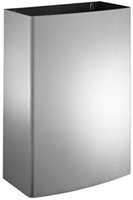
Image: The Apollo ASI 20826-T surface mounted waste receptacle, featuring a sleek stainless steel design with a closed top and a discreet opening for waste disposal.
Nga Tohutohu Whakahaere
Te tuku para:
- To dispose of waste, gently push the top door inward.
- Place waste materials into the opening.
- Release the door, and it will return to its closed position, concealing the waste.
Emptying the Receptacle:
- Access the interior of the receptacle. Depending on the specific design, this may involve unlocking a front panel or lifting the top section.
- Remove the internal liner or bag containing the waste.
- Dispose of the waste according to local regulations.
- Replace the internal liner or bag and secure the receptacle's access panel or top.
Te tiaki
Regular cleaning and maintenance will ensure the longevity and hygienic operation of your waste receptacle.
Cleaning the Stainless Steel Surface:
- Wipe down the exterior surfaces regularly with a soft cloth dampka whakakiia ki te hopi ngawari me te wai.
- For stubborn marks or fingerprints, use a stainless steel cleaner specifically designed for satin finishes. Always wipe in the direction of the grain.
- Avoid abrasive cleaners, scouring pads, or harsh chemicals, as these can scratch or damage the satin finish.
- Dry the surface thoroughly with a clean, soft cloth to prevent water spots.
Horoi o roto:
- Periodically clean the interior of the receptacle, especially if spills occur.
- Use a disinfectant cleaner as needed to maintain hygiene.
Taki Hangahanga:
- Periodically check the push door mechanism for smooth operation. If it becomes stiff, a small amount of silicone-based lubricant can be applied to moving parts (avoiding contact with waste areas).
Raparongoā
| Raruraru | Take pea | Rongoā |
|---|---|---|
| Push door sticks or is stiff. | Accumulation of dirt or debris; lack of lubrication. | Clean the mechanism thoroughly. Apply a small amount of silicone-based lubricant to moving parts. |
| Receptacle wobbles after installation. | Mounting hardware is loose or insufficient for the wall type. | Check all mounting screws and tighten them. If necessary, use stronger anchors or consult a professional for secure installation. |
| Ka mau tonu ngā kakara kino. | Inadequate cleaning; waste left too long; liner not properly sealed. | Clean the interior thoroughly with disinfectant. Empty waste more frequently. Ensure waste bags are properly sealed and replaced. |
Whakatakotoranga
| Tauira: | ASI 20826-T |
| Waitohu: | Aporo |
| Rahi Hua: | 9 x 15 x 23 inihi (W x D x H) |
| Taumaha Tūemi: | 16 Pauna |
| Raukaha: | 12.8 Karani |
| Rauemi: | Kowiri tira |
| Momo Mutu: | Satin |
| Hangaia Tuwhera: | Closed-Top with Push Door |
Nga korero Whakaputanga
Apollo products are manufactured to high standards and are backed by a manufacturer's warranty against defects in materials and workmanship. The specific warranty period and terms may vary. Please retain your proof of purchase for warranty claims.
For detailed warranty information, please refer to the documentation provided with your purchase or visit the official Apollo webpae.
Tautoko Kiritaki
If you have any questions, require technical assistance, or need to report an issue with your Apollo ASI 20826-T waste receptacle, please contact Apollo customer support.
Please have your model number (ASI 20826-T) and purchase date ready when contacting support.
Contact information for Apollo is typically found on their official webte waahi, te kohinga hua ranei.
Ask a question about this manual
Ask about setup, troubleshooting, compatibility, parts, safety, or missing instructions. Manuals+ will review the question and use this page’s manual context to help answer it.