
Ka mutu te huaview
The iSound Twist Portable Bluetooth Wireless Speaker offers a unique design combined with superior sound quality. Its compact form factor allows for portability, while its advanced features enable wireless music streaming and hands-free calling. The speaker features full stereo sound with 6 watts total output from two 40mm drivers and a passive radiator for enhanced bass.
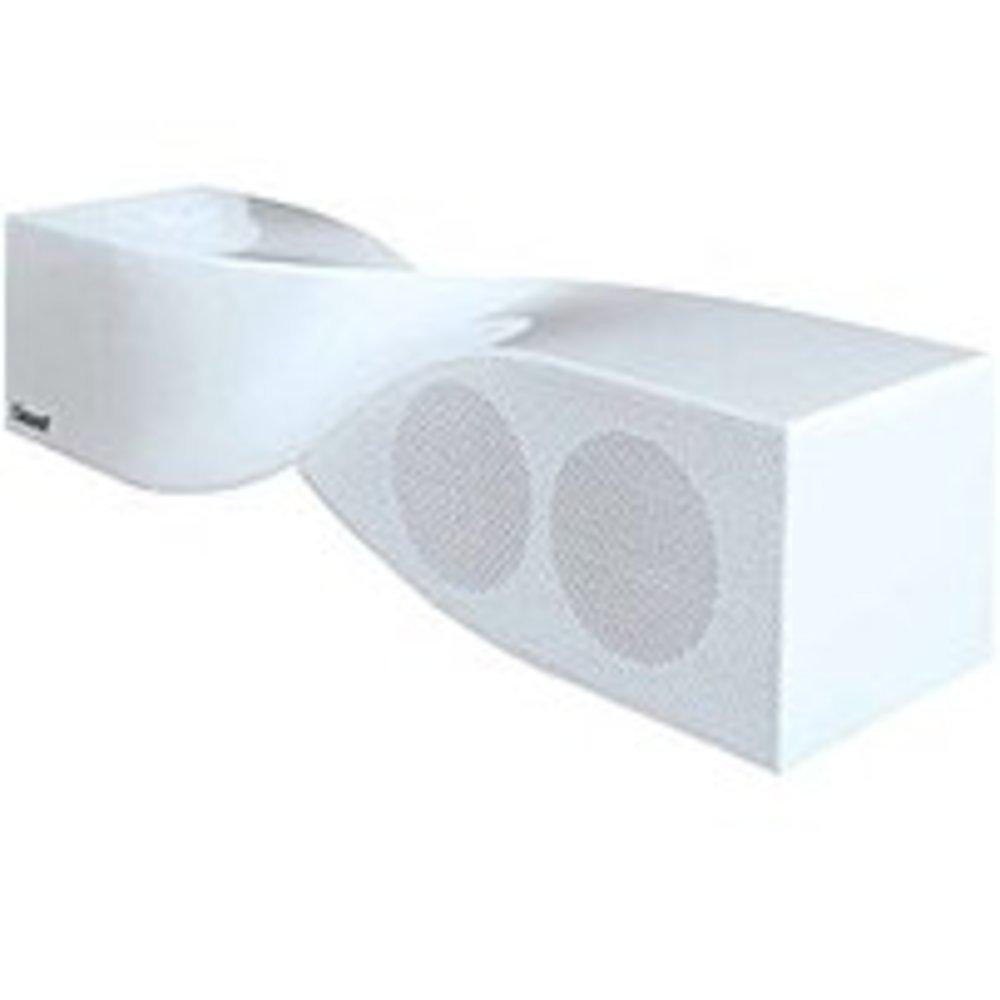
Image: The iSound Twist Portable Bluetooth Wireless Speaker in white, showcasing its unique twisted design.
Ihirangi mokete
- iSound Twist Portable Bluetooth Wireless Speaker
- Tauira Whakatau USB
- 3.5mm AUX Input Cable
- Pukapuka Kaiwhakamahi (tenei tuhinga)
Tatūnga
1. Whakakii i te Tukuoro
Before initial use, fully charge the iSound Twist speaker. Connect the provided USB charging cable to the speaker's USB charging port and the other end to a powered USB source (e.g., computer, USB wall adapter). The charging indicator light will illuminate during charging and turn off when fully charged. A full charge provides up to 5 hours of continuous play.

Image: Rear panel of the speaker, highlighting the USB charging port, ON/OFF switch, and AUX IN port.
2. Te Whakakaha/Weto
Locate the ON/OFF switch on the rear panel of the speaker. Slide the switch to the "ON" position to power on the device. Slide it to the "OFF" position to power off.
3. Takirua Nihokikorangi
- Ensure the speaker is powered on and within close proximity to your Bluetooth-enabled device (e.g., smartphone, tablet, laptop).
- The speaker will automatically enter Bluetooth pairing mode. A blue indicator light will flash, indicating it is discoverable.
- On your device, navigate to the Bluetooth settings and enable Bluetooth.
- Rapua available devices. The iSound Twist speaker should appear in the list, typically named "iSound Twist" or similar.
- Select the speaker from the list to initiate pairing. If prompted for a password, enter "0000".
- Once successfully paired, the blue indicator light on the speaker will stop flashing and remain solid. You will hear an audible confirmation.
- Your device is now connected, and you can stream audio wirelessly.
4. Hononga Whakauru AUX
For devices without Bluetooth capability, or if you prefer a wired connection, use the provided 3.5mm AUX cable.
- Connect one end of the 3.5mm AUX cable to the AUX IN port on the rear of the speaker.
- Connect the other end of the cable to the headphone jack or audio output port of your audio device.
- The speaker will automatically switch to AUX input mode.
Nga Tohutohu Whakahaere
Nga Mahi Paewhiri Mana
The speaker features onboard controls located on its top surface for convenient operation.
- Pihi Mana / Aratau: Press and hold to power on/off. Short press to switch between Bluetooth and AUX modes.
- Pātene Purei/Whakamutu/Waea: Short press to play or pause music. During an incoming call, short press to answer or end the call. Press and hold to reject an incoming call.
- Rōrahi Whakarunga/Pātene Riu Panuku: Short press to increase volume. Press and hold to skip to the next track.
- Rōrahi Whakararo/Pātene Riro o mua: Short press to decrease volume. Press and hold to go to the previous track.
Waea-a-ringa
When connected via Bluetooth, the iSound Twist speaker's built-in microphone allows for hands-free phone calls.
- Whakautu i te Karanga: When a call comes in, the music will pause. Press the Play/Pause/Call button once to answer.
- Whakamutua te Waea: During a call, press the Play/Pause/Call button once to end the call.
- Te Whakakahore i tetahi Waea: Press and hold the Play/Pause/Call button to reject an incoming call.
Te tiaki
- Tiakina te kaikōrero i te wai, te makuku, me te tino mahana.
- Horoia te kaikorero ki te kakahu ngohengohe, maroke. Kaua e whakamahi i nga kai horoi me nga whakarewa.
- A ape i te tuku, te tuku ranei i te kaikorero ki nga paanga kaha.
- Ki te kore e whakamahia mō te wā roa, rongoatia te kaikorero ki te wāhi hauhautanga, maroke, ka utu i ia wā hei pupuri i te hauora o te pākahiko.
Raparongoā
| Raruraru | Rongoā |
|---|---|
| Karekau te kaikorero e kaha ana. | Kia tino utua te pākahiko. Honoa te kaikorero ki tētahi pūtake hiko mā te whakamahi i te taura USB, ka ngana anō. |
| Kaore e taea te hono ma te Nihokikorangi. |
|
| Karekau he oro, he iti te reo. |
|
| He kino te kounga o te waea. |
|
Whakatakotoranga
| Āhuahira | Taipitopito |
|---|---|
| Ingoa Tauira | ISOUND-1691 |
| Waitohu | iSound |
| Momo Kaikorero | Pourewa |
| Āhuahira Motuhake | Hanga Ki Rorooro |
| Nga Whakamahinga Manakohia | For Smartphones or Tablets, Music Players |
| Pūrere Hototahi | Papamahi, Pona, Pūoro MP3, Pūwhakaata, Waea Atamai, Papaaho, Pouaka Whakaata |
| Whirihoranga Hongere oro a tawhio noa | 2.0 |
| Tae | Mā |
| Taumaha Tūemi | 13.6 hekere |
| He parewai | He teka |
| Hangarau Whakawhitiwhiti Ahokore | Nihokikorangi |
| Rahi Kaioro | 0.75 Inihi |
| Puna Mana | Pūhiko Powered |
| Te maha o nga pākahiko | 1 nga pākahiko Lithium Ion e hiahiatia ana. (kei roto) |
| Momo Atekōkiri Ororongo | Atekōkiri Hihiko |
| Rahi Atekōkiri Ororongo | 40 Mirimita |
| Hunga Hua | 5 x 4 x 11.75 inihi |
| Kaikorero Te Mana Putanga Morahi | 6 Watts |
| Hangarau Hononga | Ahokore |
| Aratau Putanga Ororongo | Tirooro |
| Momo Whakaeke | Maunga Ripanga |
Ataata Hua Whaimana
Video: Official product video for the iSound Twist Bluetooth Speaker, demonstrating its features and design. This video showcases the speaker's ability to stream audio from various devices and handle calls.
Pūtāhui me te Tautoko
The iSound Twist Portable Bluetooth Wireless Speaker comes with a Rarangi Whakaiti. For specific warranty terms, conditions, and support inquiries, please refer to the warranty card included in your product packaging or visit the official iSound webpae.
For further assistance, please contact iSound customer support.