
Showtec 8717748269171
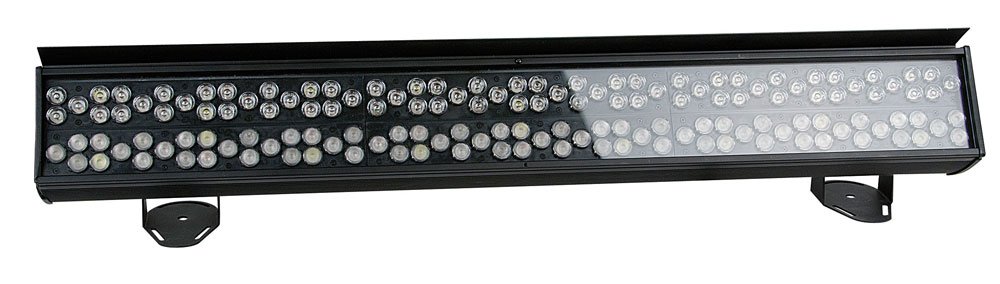
Pukapuka Kaiwhakamahi Spectral CYC-4000
Brand: Showtec | Model: 8717748269171
1. Hua Neke Atuview
Nga waahanga matua
- Extremely powerful
- Dual lens system for optimal wash effect
- Sliding brackets for easy mounting
- PowerCon input and output
- Can be controlled in 1 or 3 sections
Whakaahuatanga Hua
The Spectral CYC-4000 is a powerful lighting tool for all large-scale cyclorama applications. Specially designed with its dual 15° and 30° optical design, it creates an impressive light throw while maintaining smooth and uniform color mixing. This extremely bright cyclorama light combines the RGB color palette with white and orange pastels, offering a rich array of colors to paint with. A custom-built slide-in-glare flag ensures professional lighting considerations are fully adhered to, whether washing curtains and drapes for walls and landscapes.
2. Nga korero haumaru
Pānuihia ngā tohutohu haumaru katoa i mua i te whakahaere i te taputapu. Ki te kore e pērā, ka whara, ka pakaru rānei te hua.
- Kia mohio kua tika te papa o te taputapu.
- Kaua e tukuna te taputapu ki te ua, ki te makuku ranei.
- A ape i te toronga kanohi ki te puna marama.
- Me whakarite kia pai te hau huri noa i te waahanga.
- Momotuhia te mana i mua i te horoi, te tohatoha ranei.
3. Tatūnga
Follow these steps to set up your Spectral CYC-4000:
- Unpack the unit and inspect for any shipping damage.
- Attach the sliding brackets securely to a suitable mounting surface (truss, wall, or floor).
- Ensure the mounting location can support the weight of the fixture.
- Connect the PowerCon input cable to a compatible power source.
- If daisy-chaining multiple units, connect the PowerCon output to the next unit's input.
- Connect DMX control cables if using external control.
4. Nga Tohutohu Whakahaere
Operating the Spectral CYC-4000 is straightforward:
- Power on the unit. The display (if present) will illuminate.
- Use the onboard controls or DMX controller to select the desired operating mode (e.g., DMX mode, auto program, static color).
- Adjust color mixing, intensity, and other parameters as needed for your application.
- Utilize the dual 15° and 30° optics to achieve the desired light throw and coverage for cyclorama or wall washing.
- Position the custom-built slide-in-glare flag to control light spill and achieve precise illumination.
5. Tiaki
Regular maintenance ensures optimal performance and longevity:
- Clean the lenses and exterior casing periodically with a soft, dry cloth.
- Kaua e whakamahi i nga kai horoi me nga whakarewa.
- Check all cables and connections for wear or damage before each use.
- Me whakarite kia noho maemaa nga tuwhera o te hau i te puehu me te otaota.
- For internal servicing, contact qualified personnel.
6. Te Raru
Tirohia te ripanga i raro nei mo nga take noa me o raatau otinga:
| Raruraru | Take pea | Rongoā |
|---|---|---|
| Karekau he kaha | Kua momotu te taura hiko; kāore he hiko mai i te putanga hiko | Check power connections; test outlet |
| Kaore he mana DMX | Incorrect DMX address; faulty DMX cable; DMX terminator missing | Verify DMX address; replace cable; add terminator to last unit |
| Ka whiti marama | Unstable power supply; DMX signal interference | Ensure stable power; check DMX connections and shielding |
7. Whakatakotoranga
Detailed specifications for the Spectral CYC-4000:
| Whakatakotoranga | Uara |
|---|---|
| Waitohu | Showtec |
| Tae | ma |
| Nga waahanga e waatea ana | Karekau he korero mo nga waahanga e manawapa ana |
| Whakahōunga Pūmanawa Kua Whakamanahia Tae noa ki | Ko nga korero kaore i te waatea |
| Tauira Tuemi | 8717748269171 |
| ASIN | B005CAMHUO |
| Te Rā Tuatahi e Wātea ana i runga i te Amazon.fr | 20 Oketopa 2011 |
8. Pūtāhui me te Tautoko
This product comes with a standard manufacturer's warranty. For specific warranty terms and conditions, please refer to the documentation included with your purchase or visit the official Showtec webpae.
For technical support, troubleshooting assistance beyond this manual, or spare parts inquiries, please contact Showtec customer service. Contact information can typically be found on the manufacturer's webte waahi kei runga ranei i te kohinga hua.
Tena koa pupurihia to tohu mo te hoko mo nga kereme whakamana.
Ask a question about this manual
Ask about setup, troubleshooting, compatibility, parts, safety, or missing instructions. Manuals+ will review the question and use this page’s manual context to help answer it.