
1. Kupu Whakataki
This manual provides comprehensive instructions for the setup, operation, and maintenance of your Brondi Bravo DUOS Professional fixed-line telephone system. This system includes a base unit with a corded handset and a cordless DECT handset, designed for use on a single telephone line.
Key features include hands-free operation on the base unit, call transfer capabilities between the base and cordless handsets, support for up to 5 connectable cordless handsets, a phonebook capacity of 50 names and numbers, and a large illuminated display showing the last 30 received calls.
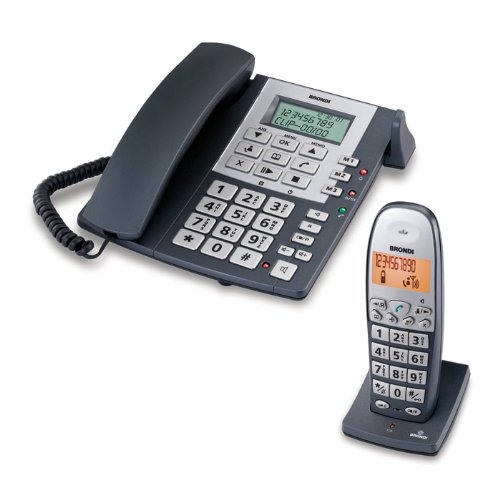
Figure 1.1: Brondi Bravo DUOS Professional Telephone System (Base Unit and Cordless Handset)
2. Ihirangi mokete
Tena koa tirohia te kete mo nga mea e whai ake nei:
- Brondi Bravo DUOS Professional Base Unit with corded handset
- Brondi Bravo DUOS Professional Cordless Handset
- Cordless Handset Charging Cradle
- Waea Waea Waea
- Pūurutau Mana mō te Wāhanga Tūāpapa
- Power Adapter for Charging Cradle
- Rechargeable AAA Batteries (for cordless handset)
- Pukapuka Kaiwhakamahi (tenei tuhinga)
3. Tatūnga
3.1 Hononga Waeine turanga
- Connect the telephone line cord to the "LINE" port on the base unit and to your telephone wall socket.
- Connect the base unit power adapter to the "POWER" port on the base unit and plug it into an electrical outlet.
- Whakanohoia te wae turanga ki runga i te mata papatahi, taumau.
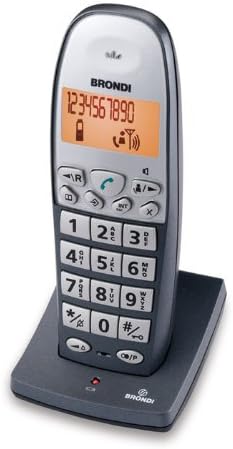
Figure 3.1: Base Unit Connections
3.2 Cordless Handset Setup
- Whakatuwheratia te uhi o te wahanga pākahiko kei muri o te ringaringa kore.
- Insert the provided rechargeable AAA batteries, observing the correct polarity (+/-).
- Katia te uhi o te wahanga pākahiko.
- Connect the charging cradle power adapter to the cradle and plug it into an electrical outlet.
- Place the cordless handset in the charging cradle. The handset display should indicate charging. Allow at least 12-15 hours for the initial charge.

Figure 3.2: Cordless Handset and Charging Cradle
3.3 Registering Additional Handsets (Optional)
The system supports up to 5 cordless handsets. To register an additional handset:
- I runga i te waeine turanga, pehia me te pupuri i te PAGE button (or equivalent registration button) for approximately 5 seconds until the registration indicator on the base unit flashes.
- On the cordless handset, access the menu, navigate to "Registration" or "Add Handset", and confirm.
- Enter the system PIN (default is usually 0000 or 1234) if prompted.
- Ka whakaatu te waea pūkoro i tētahi karere whakaū ina angitu te rēhitatanga.
4. Nga Tohutohu Whakahaere
4.1 Te Waea me te Whiwhi Waea
- Making a Call (Corded Handset): Hikitia te waea waea, waeahia te nama, ka pehi i te KARANGA button (green receiver icon) or wait for automatic dialing.
- Making a Call (Cordless Handset): Pehia te KARANGA patene, waeahia te nama, waeahia ranei te nama i te tuatahi ka pehi KARANGA.
- Whiwhi Waea: When the phone rings, lift the corded handset or press the KARANGA pātene i runga i te ringaringa korekore.
- Hands-free (Base Unit): During a call on the base unit, press the KORERO button to activate hands-free mode. Press again to deactivate.
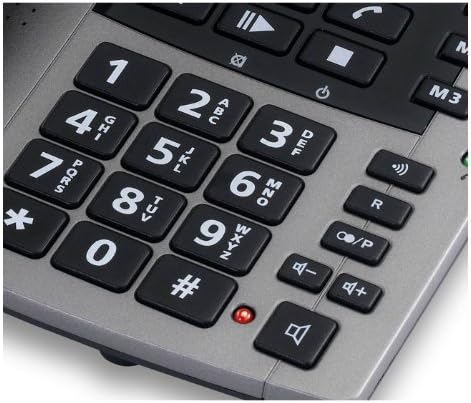
Figure 4.1: Base Unit Keypad Layout
4.2 Pukapuka Waea
Ka taea e te pukapuka waea te rongoa i te 50 ingoa me ngā tau.
- Te Tāpiri i tētahi Tāurunga: Access the menu, select "Phonebook", then "Add New Entry". Enter the name and number using the keypad.
- Calling from Phonebook: Access the phonebook, scroll to the desired entry, and press the KARANGA pātene.
4.3 Call Log (Caller ID)
The illuminated display shows the last 30 received calls (Caller ID service required from your telephone provider).
- Viewte Rangitaki Waea: Pehia te WHAKANUI MAI button (or navigate via menu) to view the list of received calls.
- Karanga Hoki Mai: Select an entry from the call log and press the KARANGA button to dial the number.

Figure 4.2: Base Unit Display
4.4 Call Transfer (Base to Cordless Handset)
During an active call on the base unit, you can transfer the call to a registered cordless handset:
- During a call on the base unit, press the WHAKAMAHI button (often labeled INT or with an arrow icon).
- Select the desired cordless handset number (e.g., 1, 2, etc.).
- The cordless handset will ring. The user on the cordless handset can answer the call.
- Hang up the corded handset to complete the transfer.
5. Tiaki
- Te horoi: Whakamahia he ngohengohe, damp cloth to clean the surfaces of the telephone units. Do not use abrasive cleaners or solvents.
- Battery Care (Cordless Handset):
- Always use the original rechargeable AAA batteries provided or approved replacements.
- Ki te kore te ringaringa e whakamahia mo te wa roa, tangohia nga pākahiko kia kore ai e pakaru.
- Ensure the handset is placed correctly in the charging cradle when not in use to maintain battery charge.
- Nga Tikanga Taiao: Avoid exposing the telephone system to direct sunlight, excessive heat, moisture, or dust.
6. Te Raru
| Raruraru | Take pea | Rongoā |
|---|---|---|
| No dial tone on base unit. | Kāore te taura waea i hono, i hapa rānei. | Check the telephone line cord connection. Try a different cord or wall socket. |
| Cordless handset not working/no power. | Batteries low or not inserted correctly; handset out of range; handset not registered. | Ensure batteries are charged and correctly inserted. Move closer to the base unit. Re-register the handset if necessary (see Section 3.3). |
| Kare e rongo te kaiwaea / Kare e taea e te kaiwaea te rongo i ahau. | Volume too low; faulty connection; microphone/speaker issue. | Adjust volume. Check all connections. Test with another phone if possible. |
| Karekau he whakaaturanga, karekau ranei e taea te panui. | Power issue; contrast setting; battery issue (cordless). | Check power adapter for base unit. Ensure cordless handset batteries are charged. Adjust display contrast if available in settings. |
7. Whakatakotoranga
- Tauira: BRAVOPROF2
- Waitohu: Brondi
- Momo: Fixed-line telephone system (Corded Base Unit + Cordless DECT Handset)
- Connectable Handsets: Tae atu ki te 5
- Te Raukaha Puka Waea: 50 ingoa me nga nama
- Call Log Capacity: Last 30 received calls
- Whakaatu: Whakamarama
- Batteries (Cordless Handset): AAA rechargeable
- Ahu mōkihi: 34 x 33.8 x 10.4 cm
- Taumaha Hua: Tata ki te 499 g (1.1 lbs)
- GTIN (Tau Tūemi Tauhokohoko Ao): 08015908714609
8. Pūtāhui me te Tautoko
For warranty information and technical support, please refer to the documentation included in your product packaging or visit the official Brondi webpae. Puritia to riirii hoko hei tohu mo te hoko mo nga kereme whakamana.
Tuhipoka: Ka rereke pea nga kupu whakamana mo ia rohe me te kaihokohoko.