
1. Kupu Whakataki
Thank you for choosing the Ground Zero GZNA 2800XII 2-Channel Ampkaiwhakarewa. Ko tenei pukapuka e whakarato ana i nga korero tino nui mo te whakaurunga tika, te mahi, me te tiaki i a koe amplifier. To ensure optimal performance and safety, please read these instructions thoroughly before attempting to install or operate the unit. Keep this manual for future reference.
2. Nga Tohutohu Haumaru
- E taunakitia ana te whakaurunga ngaio: Due to the complexity of car audio systems and the high power output of this amplifier, professional installation by a qualified technician is strongly recommended.
- Tuku Hiko: Me whakarite kia taea e te pūnaha hiko o te waka te tautoko i te amplifier's power requirements. Incorrect wiring can lead to fire, injury, or damage to the ampkaiwhakarewa me te waka.
- Whakapapa: Me hono tonu te pūmau whenua ki tētahi mata whakarewa ma, kāore anō kia peitahia o te anga o te waka. Ka pā te haruru, te kore rānei e mahi pai mēnā he hononga whenua ngoikore.
- Parenga Puka: Install an appropriate fuse (not supplied) on the power cable as close to the vehicle battery as possible. Refer to the specifications for recommended fuse ratings.
- Aukati i te makuku me te wera: Kaua e hurahia te amplifier to moisture, water, or extreme temperatures. Install it in a dry, well-ventilated area.
- Whakaeke Haumaru: Maunga te amplifier securely to prevent it from coming loose during sudden stops or accidents.
- Ararere taura: Route all cables carefully to avoid pinching, chafing, or interference with vehicle controls. Keep power cables separate from signal cables to minimize noise.
- Taumata Rōrahi: Ka pā kino pea te rongo ki te roa o te wā e rongohia ana e koe te reo nui. Me whakatikatika tika te reo.
3. Hua Neke Atuview
The Ground Zero GZNA 2800XII is a high-performance 2-channel amplifier designed for car audio applications, capable of delivering up to 2800 Watts of maximum power. Its robust design ensures reliable operation and excellent sound reproduction.

Whakaahua 1: Runga view of the Ground Zero GZNA 2800XII 2-Channel Ampkaikawe Ko te amplifier features a dark blue top panel with the 'GROUND ZERO NUCLEAR HIGH POWER AMPLIFIER' logo, and silver-colored heatsink fins on the sides. A small, separate black power module is visible in the upper left corner, indicating a robust power supply design.
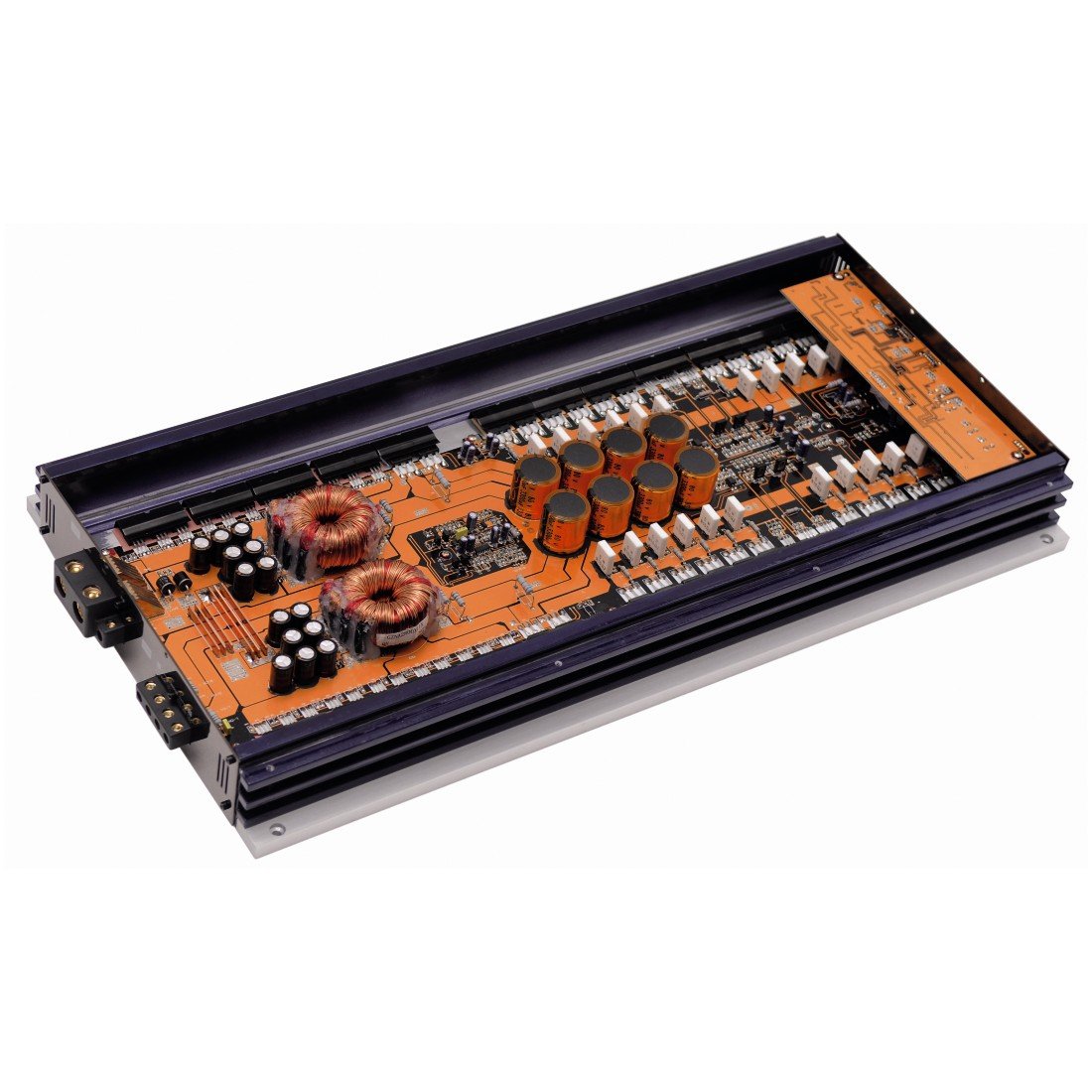
Whakaahua 2: Roto view of the Ground Zero GZNA 2800XII amplifier with the top cover removed, revealing the circuit board. The orange PCB is densely populated with high-quality components, including large toroidal transformers, numerous capacitors, and power transistors, indicating a high-current, high-power design for stable and efficient operation.
4. Tatūnga me te Tāuta
He mea nui te whakaurunga tika mo te mahi me te roa o to oranga amplifier. Always disconnect the vehicle's battery negative terminal before starting any electrical work.
4.1. Tauwāhi Maunga
- Kōwhiria he wāhi maroke, he pai te hauhautanga, kia matara atu i te rā tika me ngā pūtake wera.
- Me whakarite kia rawaka te rere o te hau huri noa i te amplifier's heatsink fins for proper cooling.
- Maunga te amplifier securely to a solid surface using appropriate hardware.
4.2. Hononga Hiko
- Power Cable (B+): Run a heavy-gauge power cable directly from the positive terminal of the vehicle's battery to the amplifier's B+ terminal. Install an in-line fuse holder with an appropriate fuse (refer to specifications) within 18 inches (45 cm) of the battery.
- Taura Whenua (GND): Honoa he taura whenua taumaha mai i te amplifier's GND terminal to a clean, unpainted metal point on the vehicle chassis. The ground cable should be as short as possible, ideally less than 3 feet (1 meter).
- Remote Turn-On Cable (REM): Connect a smaller gauge wire from the amplifier's REM terminal to the remote turn-on output of your head unit. This signal turns the ampWhakakā, whakaweto hoki i te pūoko oro o tō waka.
4.3. Whakauru Tohu
- Connect RCA cables from your head unit's pre-out outputs to the ampKo nga koki whakauru RCA a lifier.
- Ensure proper channel matching (Left to Left, Right to Right).
4.4. Putanga Tukuoro
- Tūhonohia ō kaikōrero ki te ampnga pito putanga o te korero a liifier. Tirohia te polarity tika (+ ki + me - ki -).
- Ensure the speaker impedance matches the amplifier's recommended load.
5. Nga Tohutohu Whakahaere
Kotahi te amplifier is correctly installed, follow these steps for initial setup and operation:
- Hinga-Whakaoho tuatahi: Reconnect the vehicle's battery. Turn on your head unit. The amplifier should power on, indicated by an LED indicator.
- Tautuhinga Whiwhi: Tīmata ki te amplifier's gain control set to minimum. Play a familiar piece of music at a moderate volume on your head unit. Slowly increase the amplifier's gain until you hear distortion, then back off slightly. The gain control is not a volume control; it matches the amplifier's input sensitivity to the head unit's output.
- Tautuhinga Whakawhiti: Whakaritea te amplifier's crossover filters (if available) according to your speaker type and system configuration. For subwoofers, use a Low-Pass Filter (LPF). For full-range speakers, use a High-Pass Filter (HPF).
- Whakatikatika: Make small adjustments to the gain and crossover settings to achieve balanced and clear sound.
6. Tiaki
The Ground Zero GZNA 2800XII ampHe iti noa te tiaki e hiahiatia ana mō te kaiwhakaora kia roa ai te mahi.
- Te horoi: Horoia te taha waho o te mata i ia wā, i ia wā amplifier with a soft, dry cloth to remove dust. Do not use harsh chemicals or abrasive cleaners.
- Tirotiro: Regularly check all wiring connections for tightness and signs of corrosion. Ensure proper ventilation around the ampkaikawe
- Aukati i nga arai: Kaua e tuu he ahanoa ki runga ake o te amplifier that could block airflow to the heatsink.
7. Te Raru
Mena ka pa ki a koe nga raru o to amplifier, tirohia nga raru me nga otinga e whai ake nei:
| Raruraru | Take pea | Rongoā |
|---|---|---|
| Ampe kore e huri te kaitahu | No power, blown fuse, faulty ground, no remote signal | Check power cable connection, replace fuse, verify ground connection, check remote turn-on wire. |
| Kaore he putanga oro | No input signal, speaker wires disconnected, gain too low, ampkaiwhakaora i te aratau tiaki | Check RCA connections, verify speaker wiring, adjust gain, check for protect light (if lit, refer to manual or contact support). |
| Oro kerekere | Gain set too high, poor ground, damaged speakers, incorrect crossover settings | Reduce gain, improve ground connection, inspect speakers, adjust crossover settings. |
| Excessive noise (hiss, whine) | Poor grounding, signal cable interference, faulty RCA cables | Ensure solid ground connection, route signal cables away from power cables, try different RCA cables. |
If the problem persists after attempting these solutions, please contact Ground Zero customer support or a qualified car audio technician.
8. Whakatakotoranga
The following are the technical specifications for the Ground Zero GZNA 2800XII 2-Channel AmpKaiwhakaora:
| Āhuahira | Whakatakotoranga |
|---|---|
| Tau tauira | 00113441 |
| ASIN | B003TSD3VI |
| Waehere Tuhinga o te Ao | 04037072004311 |
| Te maha o nga hongere | 2 |
| Te Mana Putanga Morahi | 2800 Watts |
| Mahinga Mahi Voltage | 14.4 Ngā Waohiko (Ingoa) |
| Momo Whakaeke | Pūkana |
| Ahu mōkihi | 70 x 36 x 12 cm (27.5 x 14.2 x 4.7 inihi) |
| Taumaha mōkihi | 5.44 kg (12 lbs) |
9. Pūtāhui me te Tautoko
Ground Zero products are manufactured to high-quality standards. For specific warranty information, please refer to the warranty card included with your product or visit the official Ground Zero website. In case of technical issues or questions not covered in this manual, please contact your authorized Ground Zero dealer or customer support for assistance.