
Kupu Whakataki
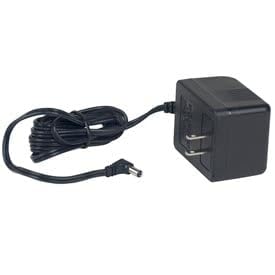
This manual provides essential information for the safe and effective use of your Detecto 8529-B217-08 AC Adapter. This adapter is designed to provide power to specific Detecto devices, including models PC10, PC20, and PC30. Please read these instructions carefully before installation and operation, and retain them for future reference.
Nga korero haumaru
- Whakamahi Roto anake: This AC adapter is designed for indoor use in dry locations. Do not expose it to rain, moisture, or extreme temperatures.
- Voltage: Me whakarite te putanga hiko voltage matches the adapter's specifications (240 Volts).
- A ape i te utaina nui: Do not overload power outlets or extension cords, as this can result in a risk of fire or electric shock.
- Tiaki taura: Protect the power cord from being walked on or pinched, particularly at plugs, convenience receptacles, and the point where they exit from the adapter.
- Wewete i te wa e kore e whakamahia: Disconnect the adapter from the power outlet when not in use for extended periods or before cleaning.
- Kaore he waahanga e taea ana e te Kaiwhakamahi: Do not attempt to open or repair the adapter. Refer all servicing to qualified service personnel.
Tatūnga
Follow these steps to properly set up your Detecto 8529-B217-08 AC Adapter:
- Tirohia te Pūurutau: Before connecting, visually inspect the AC adapter and its cable for any signs of damage. Do not use if damaged.
- Tūhono ki te Pūrere: Locate the power input port on your Detecto PC10, PC20, or PC30 device. Insert the adapter's output connector firmly into this port.
- Hono ki te Putanga Hiko: Plug the AC adapter's power plug into a standard, grounded electrical outlet. Ensure the outlet provides the correct voltage (240 Volts).
- Manatokohia te Hononga: Confirm that both connections are secure. Your Detecto device should now receive power.
Nga Tohutohu Whakahaere
The Detecto 8529-B217-08 AC Adapter functions as a power supply for your compatible Detecto device. Once properly connected as described in the Setup section, the adapter continuously supplies power to the device when plugged into an active electrical outlet.
- Hiko Whakaka/Weto: The adapter itself does not have an on/off switch. Power to your Detecto device is controlled by plugging or unplugging the adapter from the wall outlet, or by using the power switch on the Detecto device itself, if available.
- Mana Tonu: For continuous operation of your device, ensure the adapter remains securely plugged into both the device and the power outlet.
Te tiaki
Proper maintenance ensures the longevity and reliable performance of your AC adapter.
- Te horoi: Disconnect the adapter from the power outlet and the device before cleaning. Use a soft, dry cloth to wipe the exterior. Do not use liquid cleaners, aerosols, or solvents.
- Rokiroki: Mena kāore e whakamahia ana, rongoatia te urutau ki te wāhi hauhautanga, maroke, kia matara atu i te rā tika me te makuku. Kaua e takai pūmau i te taura kia kore ai e pakaru.
- Tirohanga taura: Periodically inspect the power cable and connectors for any signs of wear, cuts, or damage. Replace the adapter if any damage is observed.
Raparongoā
If you encounter issues with your Detecto 8529-B217-08 AC Adapter, refer to the following common problems and solutions:
| Raruraru | Take pea | Rongoā |
|---|---|---|
| Pūrere kaore i te hiko. | Karekau te urutau e hono tika. | Ensure the adapter is securely plugged into both the device and the wall outlet. |
| Pūrere kaore i te hiko. | Kāore he hiko mai i te putanga hiko. | Test the outlet with another device or check the circuit breaker. |
| Pūrere kaore i te hiko. | Kua pakaru te urutau, te taura rānei. | Inspect the adapter and cable for visible damage. If damaged, discontinue use and replace. |
| He tino wera te urutau. | Te taumaha rawa, te hauhautanga ngoikore rānei. | Ensure the adapter is not covered and has adequate airflow. If overheating persists, discontinue use. |
Whakatakotoranga
- Tau tauira: 8529-B217-08
- Waitohu: Ka kitea
- Ngā Pūrere Hototahi: Detecto PC10, PC20, PC30
- Whakauru Voltage: 240 Volts
- Wattage: 5 watts
- Whakatakotoranga i tutuki: UL
- Puna Hiko: AC
- Momo Tuhono Hiko Matua: 2 Pin
- Rahi Hua: 8 x 5 x 4 inihi
- Taumaha Tūemi: 0.01 hekere
Nga korero Whakaputanga
Specific warranty terms for the Detecto 8529-B217-08 AC Adapter are provided by the manufacturer, Detecto. For detailed information regarding warranty coverage, duration, and claims procedures, please refer to the documentation included with your original purchase or visit the official Detecto webpae. Puritia to tohu hoko mo te whakamana whakamana.
Tautoko
If you require further assistance or have questions not covered in this manual, please contact Detecto customer support. You can typically find contact information, including phone numbers and email addresses, on the official Detecto webte waahi kei roto ranei i te kohinga hua.