
1. Kupu Whakataki
This manual provides essential instructions for the safe and efficient operation, setup, and maintenance of your Ohaus ES50R ES Industrial Bench Scale. The Ohaus ES50R is designed for industrial weighing applications, offering a capacity of 50 kg (110 lb) with a readability of 20 g (0.05 lb). Please read this manual thoroughly before using the scale to ensure proper functionality and to prevent damage.
2. Nga korero haumaru
Kia mau tonu nga whakaritenga haumaru e whai ake nei:
- Do not overload the scale beyond its maximum capacity of 50 kg (110 lb).
- Ensure the scale is placed on a stable, level surface to achieve accurate readings.
- Operate the scale only with the specified 120 V power supply.
- Kaua e tukua te tauine kia tino wera, kia tino makuku, kia tino whiti rānei te rā.
- Kaua e rumakina te unahi ki te wai, ki etahi atu wai ranei.
- Keep the scale clean and free from dust and debris.
- Ko ngā kaimahi whai tohu anake me mahi i ngā whakatikatika, i ngā mahi tiaki rānei i tua atu i ngā mahi horoi noa.
3. Ihirangi mokete
Manatokohia kei te noho nga waahanga katoa i te wa e wetewete ana:
- Ohaus ES50R ES Industrial Bench Scale unit
- Power Adapter (for 120 V operation)
- Pukapuka Kaiwhakamahi (tenei tuhinga)
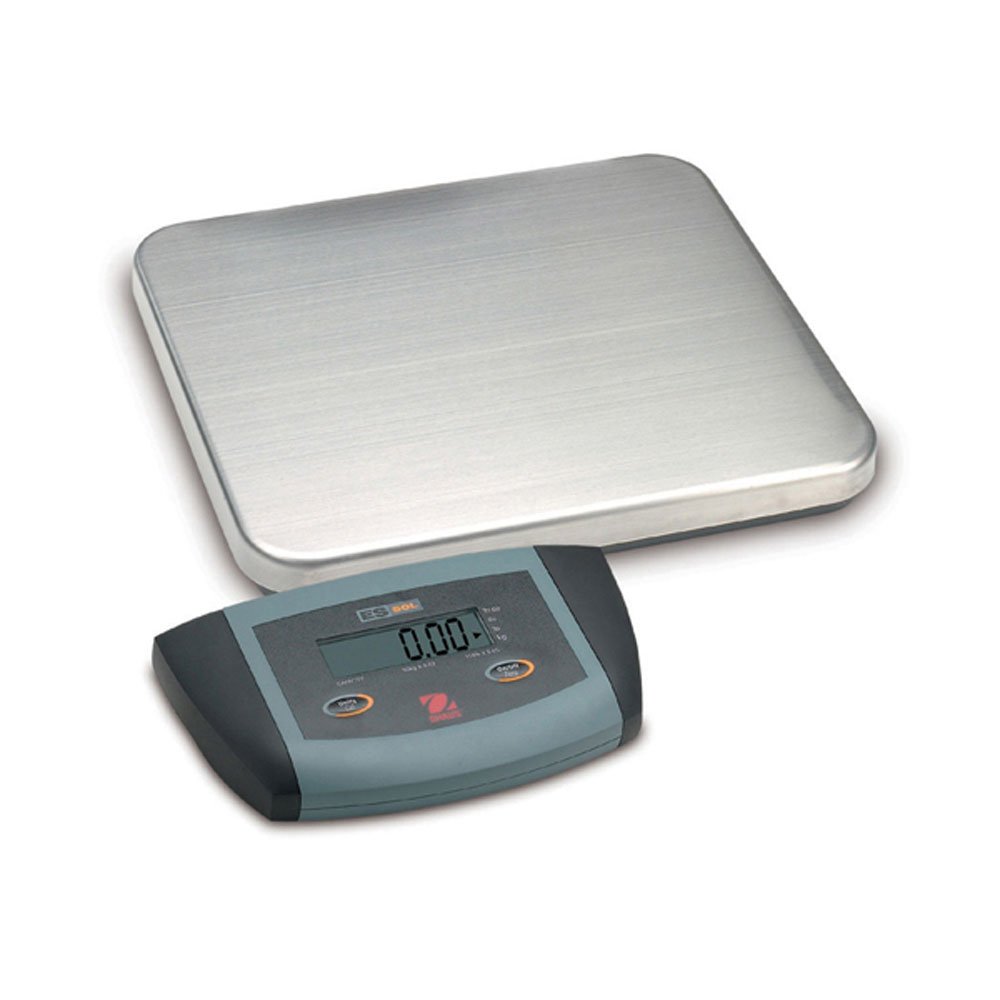
Whakaahua 1: Ohaus ES50R ES Industrial Bench Scale. This image shows the complete bench scale unit, including the weighing platform and the display unit.
4. Tatūnga
- Wewete ana: Kia ata tangohia nga waahanga katoa mai i te kete. Puritia te takai mo te kawe me te rokiroki a muri ake nei.
- Turanga: Place the scale on a firm, level, and stable surface, free from vibrations, drafts, and rapid temperature changes. Ensure adequate space around the scale for safe operation.
- Hononga Hiko: Connect the power adapter to the scale's power input port. Plug the adapter into a standard 120 V AC power outlet.
- Hiko Tuatahi: Pehia te ON/OFF button to power on the scale. The display will perform a self-test and then show "0.00" or "0.0".
- Whakataumata: If your scale includes adjustable feet, rotate them until the bubble in the spirit level (if present) is centered.
5. Nga Tohutohu Whakahaere
5.1 Taumaha Taketake
- Ensure the scale is powered on and the display shows "0.00" or "0.0".
- Place the item to be weighed gently in the center of the weighing platform.
- Wait for the display to stabilize. The stable weight reading will be shown on the large LCD display.
- Tangohia te taonga i te tūāpapa. Me hoki te whakaaturanga ki te kore.
5.2 Mahi Tare
The tare function allows you to subtract the weight of a container, so only the net weight of the contents is displayed.
- Whakanohoia he ipu kore ki runga i te papa pauna.
- Pehia te TARE button. The display will reset to "0.00" or "0.0", indicating the container's weight has been tared.
- Add the material to be weighed into the container. The display will show the net weight of the material.
- To clear the tare, remove the container from the platform and press the TARE pātene ano.
5.3 Nga waahanga motuhake
- Weto Aunoa: The scale is equipped with an auto shut-off feature to conserve power. If no activity is detected for a set period, the scale will automatically turn off.
- Whakaaturanga Nui: The LCD display provides clear and easy-to-read weight indications.
- Whakaweto ā-ringa: To manually turn off the scale, press and hold the ON/OFF pātene kia weto te whakaaturanga.
6. Tiaki
6.1 Te horoi
To maintain accuracy and prolong the life of your scale:
- Disconnect the scale from the power supply before cleaning.
- Wipe the scale surfaces with a damp he kakahu me te horoi ngawari.
- Kaua e whakamahia nga kai horoi, nga whakarewa, nga matū kino ranei.
- Ensure no liquid enters the scale's internal components.
- Dry the scale thoroughly after cleaning.
6.2 Whakariterite
Regular calibration ensures the accuracy of your scale. Refer to the full technical manual or contact Ohaus customer support for detailed calibration procedures. Calibration typically requires certified weights.
7. Te Raru
| Raruraru | Take pea | Rongoā |
|---|---|---|
| Kaore te tauine e ka ana. | No power supply; faulty power adapter. | Check power connection and outlet. Ensure power adapter is functioning correctly. |
| Ko nga panui kore tika. | Scale not level; unstable surface; overload; calibration required. | Ensure scale is level and on a stable surface. Do not exceed capacity. Perform calibration if necessary. |
| Display shows "Err" or error code. | Overload; internal malfunction. | Remove weight from platform. If error persists, power cycle the scale. If still present, contact customer support. |
| Auto shut-off too soon/not at all. | Auto shut-off settings. | Refer to the full technical manual for adjusting auto shut-off settings, if available. |
8. Whakatakotoranga
| Āhuahira | Taipitopito |
|---|---|
| Tauira | ES50R |
| Waitohu | Ohau |
| Te kaha | 50 kg / 110 lb |
| Te panui | 20 g / 0.05 lb |
| Momo Whakaatu | LCD (Whakaaturanga Nui) |
| Nga waahanga motuhake | Auto Shut Off, Manual Shutdown |
| Tauwehe Puka | Tauine Paerewa |
| Tuku Hiko | 120 V AC (via adapter) |
| Hunga Hua | 15 x 13 x 5.5 inihi |
| Taumaha Tūemi | 9.64 pauna |
| Kaihanga | COLE-PARMER |
9. Pūtāhui
The Ohaus ES50R ES Industrial Bench Scale comes with a 1-tau pūtāhui from the date of purchase. This warranty covers defects in materials and workmanship under normal use. It does not cover damage resulting from misuse, accident, unauthorized modification, or operation outside the specified environmental and electrical limits. For warranty claims, please retain your proof of purchase and contact Ohaus customer support.
10. Tautoko Kiritaki
For technical assistance, service, or to inquire about replacement parts, please contact Ohaus customer support. Visit the official Ohaus webpaetukutuku mō ngā mōhiohio whakapā hou me ngā rauemi tāpiri.
Tuhipoka: Always provide your product model number (ES50R) and serial number (if applicable) when contacting support.