
1. Vokatra mihoatraview
The ATK N9 Tri-Mode Gaming Headset is designed for gamers requiring flexible connectivity, clear audio, and reliable communication across multiple devices. It supports 3.5 mm wired, 2.4G wireless, and Bluetooth connections, allowing seamless switching between gaming consoles, PC, and mobile devices. Stereo-tuned dynamic drivers deliver balanced sound, enhancing in-game audio cues such as footsteps, gunfire, and environmental effects. The detachable noise-canceling microphone improves voice clarity for team communication, online gaming, and voice calls. Its over-ear design, with soft ear cushions and an adjustable headband, ensures a comfortable fit for extended gaming sessions. The headset is compatible with PS5, PS4, PC, Nintendo Switch, and mobile devices. For Xbox Series X|S, audio and microphone functions are supported via the 3.5 mm wired connection.

2. Ny votoatin'ny fonosana
Hamarino fa ny entana rehetra voatanisa etsy ambany dia tafiditra ao anatin'ny fonosanao:
- ATK N9 Pro/White Gaming Headset
- Mikrofôna azo esorina manala tabataba
- USB-C Charging Cable
- 3.5mm Audio Cable
- 2.4G Wireless USB Adapter
- User Manual (ity antontan-taratasy ity)

3. Fametrahana voalohany
3.1. Fametrahana ny Headset
Before first use, fully charge the headset using the provided USB-C charging cable. Connect the USB-C end to the headset's charging port and the USB-A end to a compatible USB power source (e.g., PC, wall adapter). The LED indicator will show charging status.
3.2. Fametrahana ny mikrôfôna
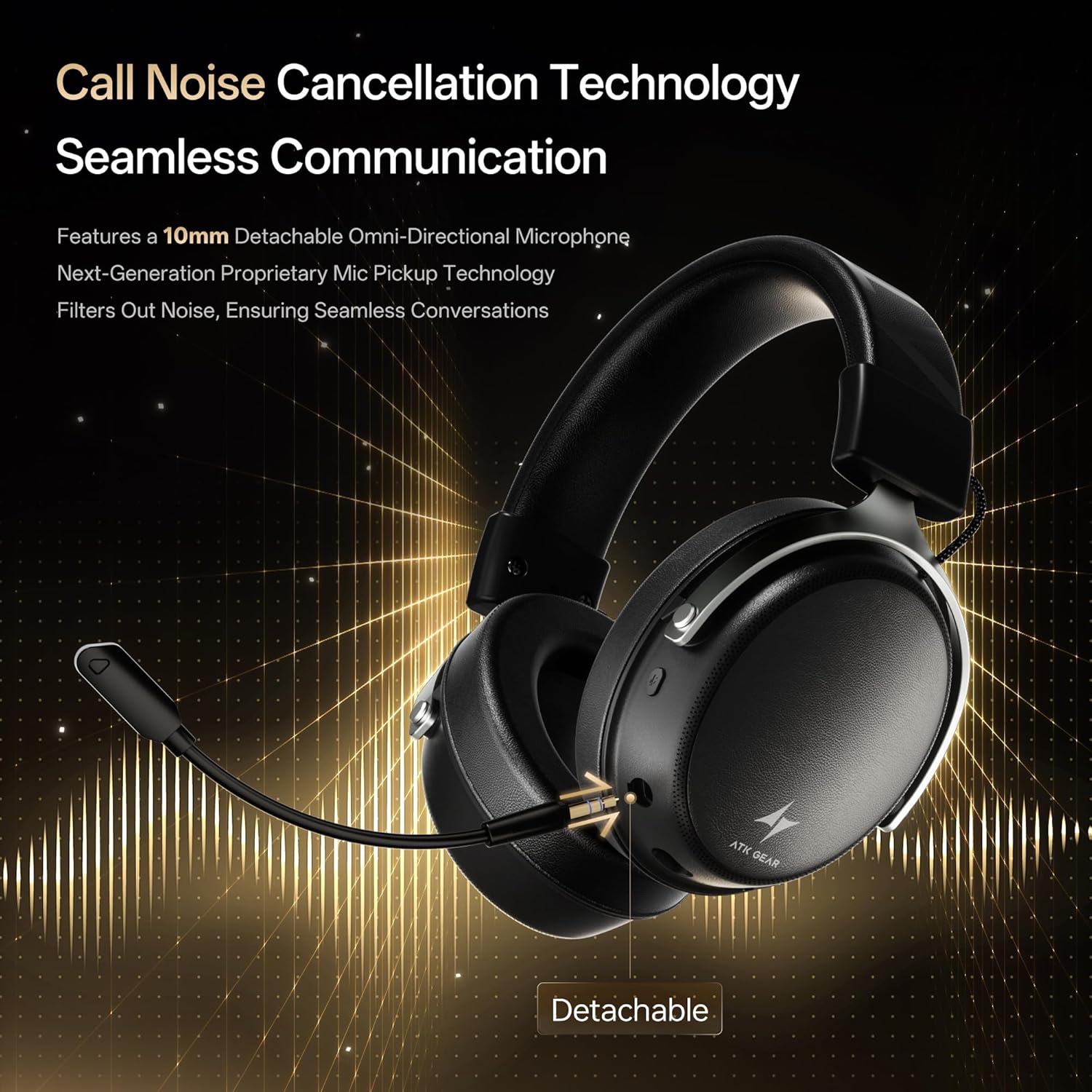
Insert the detachable boom microphone into the microphone port on the left earcup until it clicks into place. Ensure it is securely connected for optimal voice pickup.
3.3. Safidy fifandraisana
The ATK N9 Pro/White headset offers three connectivity modes:
- 2.4G Wireless Mode: For PC, PS4, PS5, and Nintendo Switch (docked mode).
- Plug the 2.4G wireless USB adapter into an available USB port on your device.
- Herinaratra amin'ny headset.
- Switch the headset to 2.4G mode using the mode switch. The headset will automatically pair with the adapter.
- Adjust audio output settings on your device if necessary to select the headset.
- Mode Bluetooth: For mobile devices, PC, and Nintendo Switch (handheld mode).
- Power on the headset and switch to Bluetooth mode. The LED indicator will flash, indicating pairing mode.
- On your device, go to Bluetooth settings and select "ATK N9 Pro" from the list of available devices.
- Once connected, the LED indicator will show a steady light.
- 3.5mm Wired Mode: For Xbox Series X|S, PS4, PS5, PC, Nintendo Switch, and mobile devices.
- Ampifandraiso amin'ny jack 3.5mm an'ny headset ny tendrony iray amin'ny tariby audio 3.5mm.
- Connect the other end to the 3.5mm audio port on your device (e.g., controller, PC audio jack).
- Hiasa amin'ny fomba misy tariby ny headset, ka tsy hiraharaha ireo fiasa tsy misy tariby.

4. Torolàlana miasa
4.1. Fanaraha-maso ny écouteur
The ATK N9 Pro/White headset features intuitive controls located on the earcups:
- Bokotra hery: Press and hold to power on/off. Short press for play/pause (in 2.4G/Bluetooth mode).
- Fiovan'ny fomba: Toggle between 2.4G wireless, Bluetooth, and wired modes.
- Volume Up/Down Wheel: Ahodina hanitsy ny feo.
- Bokotra Mangina mikrô: Tsindrio hampangina/fanalana ny mikrô.
- Spatial Audio Button: Press to activate/deactivate 3D Spatial Audio.
- Mic Monitoring Button: Press to enable/disable microphone monitoring (sidetone).
4.2. Fampiasana mikrô
The detachable noise-canceling microphone is designed for clear communication. Position the microphone approximately 1-2 inches from your mouth for optimal voice pickup. Use the microphone mute button on the headset to quickly mute your voice when needed.
4.3. Fanitsiana ny mety
The headset features an adjustable headband and soft ear cushions for comfort. Extend or retract the headband to achieve a snug yet comfortable fit. The earcups are designed to fully enclose your ears for passive noise isolation and comfort during long gaming sessions.
5. Famaritana ara-teknika
| endri-javatra | famaritana |
|---|---|
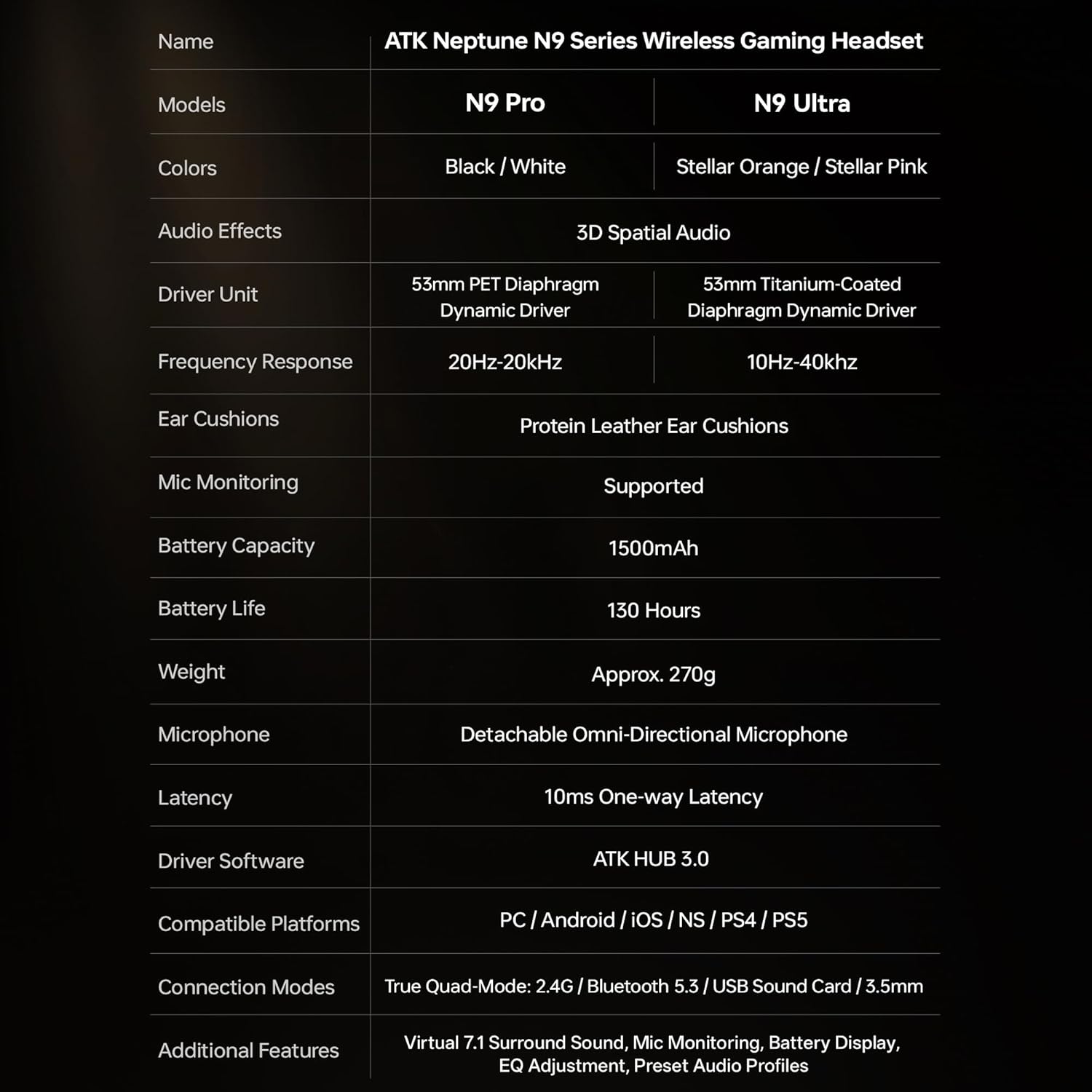
| Anarana modely | ATK N9 Pro |
| fifandraisana | 3.5mm Wired, 2.4G Wireless, Bluetooth 5.3 |
| Karazana mpamily | Driver Dinamika |
| Haben'ny mpamily | 53 mm |
| Salan'ny Frequency | 20 Hz - 20,000 Hz |
| Impedance | 64 ohm |
| mikrô | Detachable Noise-Canceling Omni-Directional |
| Fahaizana bateria | 1500mAh |
| Fiainana bateria | Hatramin'ny 130 ora |
| Latency (2.4G) | 10 Milliseconds (one-way) |
| lanja | 270g ny |
| Fametrahana sofina | Over sofina |
| Fitaovana mifanentana | PS5, PS4, PC, Nintendo Switch, Mobile Devices, Xbox Series X|S (wired) |
| Endri-javatra fanampiny | 3D Spatial Audio, Mic Monitoring, Volume Control |

6. Fikarakarana sy fikojakojana
- Fanadiovana: Mampiasà lamba malefaka sy maina hanadiovana ny headset. Fadio ny mampiasa akora simika masiaka na akora abrasive.
- fitahirizana: Tehirizo ao amin'ny toerana mangatsiatsiaka sy maina lavitry ny tara-masoandro mivantana sy ny hafanana tafahoatra ny headset.
- Fikarakarana bateria: Mba hanalavana ny androm-piainan'ny bateria dia aza ampiasaina matetika ny écouteur. Ampidiro matetika ny bateria, na dia tsy ampiasaina mandritra ny fotoana maharitra aza.
- fanoherana ny rano: The headset is not water-resistant. Avoid exposure to liquids.
7. Famahana olana
7.1. No Audio / Low Volume
- Ensure the headset is powered on and connected in the correct mode (2.4G, Bluetooth, or 3.5mm wired).
- Check the volume wheel on the headset and your device's volume settings.
- For wireless modes, ensure the headset is paired correctly and selected as the audio output device in your system settings.
- If using 3.5mm wired, ensure the cable is fully inserted into both the headset and the device.
7.2. Tsy mandeha ny mikrôfôna
- Ataovy azo antoka fa miraikitra tsara amin'ny headset ny mikrôfôna.
- Check if the microphone mute button on the headset is engaged.
- Verify that the headset microphone is selected as the input device in your device's sound settings.
- For Xbox Series X|S, ensure you are using the 3.5mm wired connection for microphone support.
7.3. Olana amin'ny fifandraisana
- 2.4G Wireless: Ensure the USB adapter is firmly plugged in. Try a different USB port.
- Bluetooth: Ensure the headset is in pairing mode. Forget the device on your phone/PC and re-pair. Keep the headset within the 5-meter Bluetooth range.
- Jeneraly: Power cycle both the headset and your connected device.
8. Warranty sy fanohanana
8.1. Fampahalalana momba ny fiantohana
The ATK N9 Pro/White Gaming Headset comes with a Garantie 6 volana manomboka amin'ny datin'ny fividianana. Ity antoka ity dia mandrakotra ny lesoka amin'ny famokarana sy ny fahaiza-manao amin'ny fampiasana mahazatra. Tsy mandrakotra ny fahasimbana vokatry ny fampiasana diso, ny lozam-pifamoivoizana, ny fanovana tsy nahazoana alalana, na ny fikikisana sy ny rovitra mahazatra.
8.2. Fanohanana ny mpanjifa
For further assistance, technical support, or warranty claims, please contact ATK customer service through the retailer where the product was purchased or visit the official ATK webtranonkala hahazoana fampahalalana momba ny fifandraisana.