
1. Fampidirana
The Hibriway K1 Portable Karaoke Machine is designed to deliver a high-quality audio experience with its 50W speaker and two wireless microphones. Featuring Bluetooth 5.0 connectivity, versatile input options (TF card, USB, AUX), and dynamic RGB lighting, this device is suitable for various indoor and outdoor entertainment settings. Its portable design with an integrated handle and long-lasting battery ensures convenience and extended use.
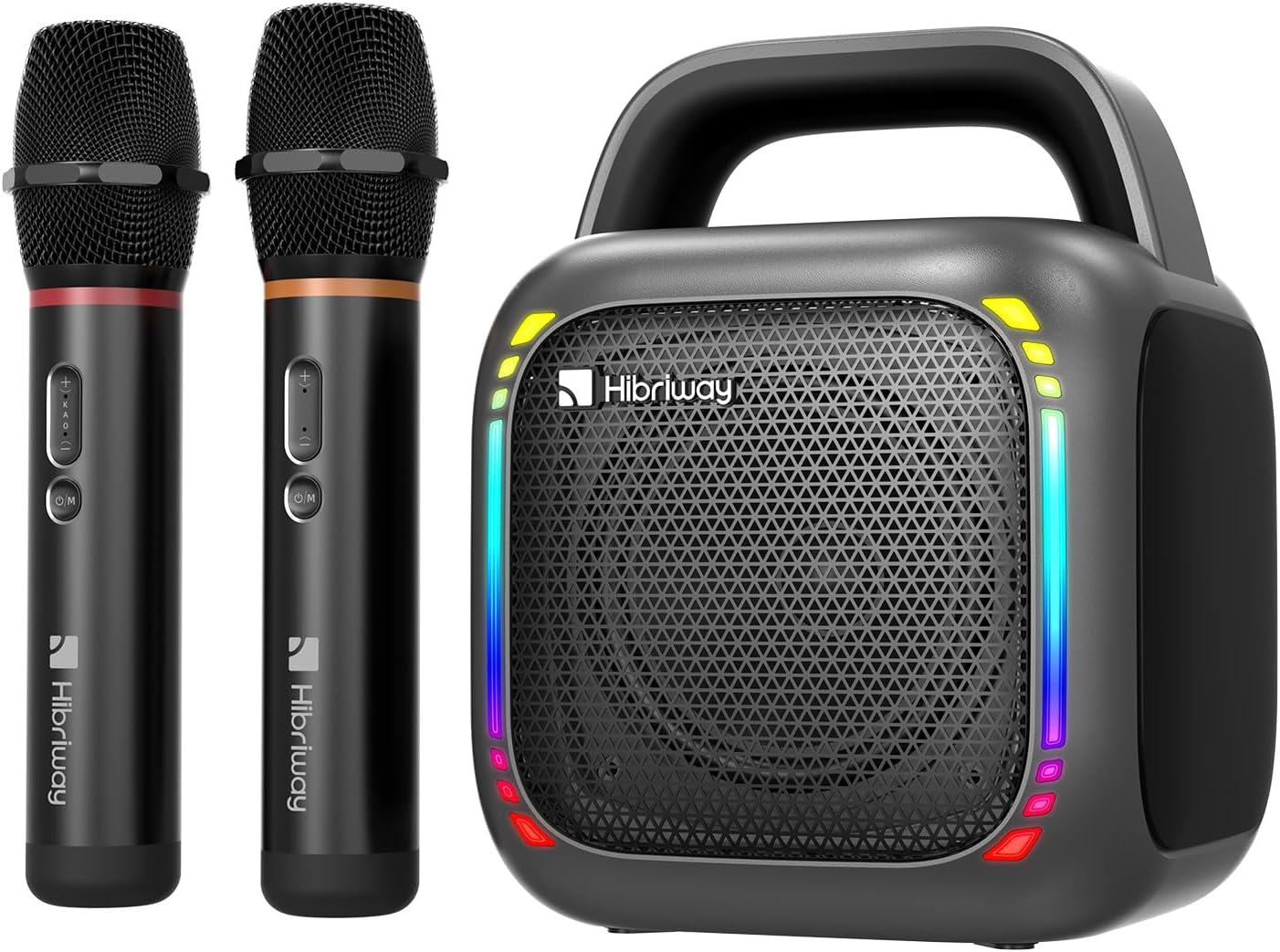
Image 1: Hibriway K1 Portable Karaoke Machine with two wireless microphones.
2. Ny votoatin'ny fonosana
- Hibriway K1 Portable Karaoke Machine (1 unit)
- Mikrofon-tariby tsy misy tariby (singa 2)
- Cable charging USB Type-C (unit 1)
- User Manual (ity antontan-taratasy ity)
3. Fametrahana
3.1 Charging the Karaoke Machine
- Connect the provided USB Type-C charging cable to the charging port on the karaoke machine.
- Ampifandraiso amin'ny adaptatera herinaratra USB mifanaraka amin'izany ny faran'ny tariby iray (tsy tafiditra).
- Hirehitra ny famantarana ny famandrihana. Matetika maharitra 2-4 ora ny famandrihana feno.
- The integrated 8000mAh battery provides approximately 6-8 hours of continuous playback on a full charge.
3.2 Charging the Wireless Microphones
- Each microphone has a built-in 1200mAh rechargeable battery.
- Connect the microphones to a USB power source using their respective charging ports.
- Charging indicators on the microphones will show charging status.
- Fully charged microphones provide up to 10 hours of working time.

Image 2: Dimensions and battery specifications for the Hibriway K1 Karaoke Machine and microphones.
3.3 Mamelona/Mamono
- To power on the karaoke machine, press and hold the power button until the indicator lights illuminate.
- Mba hamonoana dia tsindrio indray ny bokotra herinaratra.
- For microphones, locate the power button (often labeled O/M) and press to turn on or off.
4. Torolàlana miasa
4.1 Fifandraisana Bluetooth
- Ensure the karaoke machine is powered on and in Bluetooth pairing mode (indicated by a flashing Bluetooth light).
- Amin'ny fitaovanao (smartphone, tablette, solosaina), avelao ny Bluetooth ary tadiavo ireo fitaovana misy.
- Select "Hibriway K1" (or similar name) from the list to pair.
- Once connected, the Bluetooth indicator light will become solid, and you can play audio through the speaker.
4.2 Other Connection Methods
The Hibriway K1 supports multiple audio input options:
- Karatra TF: Insert a Micro TF card into the designated slot. The machine will automatically switch to TF card mode and begin playing audio files.
- USB Flash Drive: Insert a USB flash drive into the USB port. The machine will switch to USB mode and play audio files.
- AUX Input: Connect an external audio device using a 3.5mm AUX cable (not included) to the AUX port. The machine will switch to AUX mode.

Image 3: Multiple connection methods supported by the Hibriway K1 Karaoke Machine.
4.3 True Wireless Stereo (TWS).
To achieve an immersive stereo sound experience, you can pair two Hibriway K1 karaoke machines together:
- Ensure both Hibriway K1 machines are powered on and not connected to any other Bluetooth device.
- On one machine (this will be the primary unit), press and hold the TWS pairing button (refer to device controls for exact button).
- The primary unit will search for the secondary unit. Once connected, you will hear an audible confirmation.
- Now, connect your audio source via Bluetooth to the primary unit. Audio will play simultaneously through both speakers, creating a stereo effect.

Image 4: True Wireless Stereo (TWS) pairing for enhanced sound.
4.4 Using the Wireless Microphones

Image 5: Hibriway wireless microphones with mode indicators.
- Power on both microphones. They should automatically pair with the karaoke machine.
- Fanaraha-maso ny feo: Use the '+' and '-' buttons on the microphone to adjust microphone volume.
- Echo/Reverb: The 'M' button on the microphone can be used to cycle through or adjust echo/reverb effects. Pressing it may turn the echo on or off.
- KTV Mode: This mode is optimized for vocal performance with effects suitable for karaoke.
- Fomba ivelany: This mode may offer clearer vocal projection for open-air environments.
4.5 RGB vokatry ny jiro
The karaoke machine features dynamic RGB lighting with multiple modes:
- Locate the light effect button (often indicated by a sun or lightbulb icon) on the machine.
- Press the button to cycle through the 4 available RGB lighting modes:
- Full-Color Rhythm
- Beat-Synced Lights
- Single-Color Transformation
- Single-Color Breathing Light
- Choose the lighting effect that best suits your environment or mood.

Image 6: Dynamic RGB lighting effects of the Hibriway K1 Karaoke Machine.
5. Fikojakojana
- Fanadiovana: Use a soft, dry cloth to clean the exterior of the karaoke machine and microphones. Do not use abrasive cleaners or solvents.
- fitahirizana: Tehirizo ao amin'ny toerana mangatsiatsiaka sy maina ny fitaovana, lavitry ny tara-masoandro mivantana sy ny mari-pana tafahoatra rehefa tsy ampiasaina.
- Fikarakarana bateria: To prolong battery life, avoid fully discharging the device frequently. Charge the unit regularly, even if not in use for extended periods.
- Fipoahana rano: Tsy tantera-drano ity fitaovana ity. Halaviro ny rano na ny hamandoana be.
6. Famahana olana
- Tsy misy hery:
- Ataovy azo antoka fa feno ny fitaovana.
- Hamarino ny tariby sy ny adaptatera famandrihana raha misy fahasimbana.
- Tsy misy feo:
- Verify the volume on both the karaoke machine and your connected device is turned up.
- Ensure the correct input mode (Bluetooth, TF, USB, AUX) is selected.
- If using microphones, ensure they are powered on and paired.
- Microphone tsy mandeha:
- Check if the microphone is charged and powered on.
- Ensure the microphone is within range of the karaoke machine.
- Re-pair the microphone if necessary (power off and on both devices).
- Fanalana Bluetooth:
- Ensure your device is within the Bluetooth range (typically 10 meters).
- Avoid obstacles that may interfere with the signal.
- Disconnect and re-pair the Bluetooth connection.
- Echo Effect Issues:
- If echo is too strong or absent, press the 'M' button on the microphone to adjust or toggle the effect.
7. Famaritana
| Laharana modely | K1 |
| Marika | Hibriway |
| Power Output Speaker | 50W |
| Audio Input | Bluetooth 5.0, Karatra TF, USB, AUX |
| Teknolojia fifandraisana | Bluetooth, TF Card, USB |
| Main Unit Battery | 8000mAh Lithium-ion (Rechargeable) |
| Main Unit Playback Time | 6-8 ora (eo ho eo) |
| Batterie mikrofona | 1200mAh (Rechargeable) |
| Fotoana fiasan'ny mikrôfôna | Hatramin'ny 10 ora |
| refy (L x W x H) | 15 x 15 x 20 cm |
| lanja | 1.8 kg (3.96 lbs eo ho eo) |
| KEVITRA | plastika |
| loko | Gunmetal Grey |
| Endri-javatra manokana | Stereo Pairing (TWS), Lightweight, Integrated Handle, Portable, RGB Lights |
| Fitaovana mifanentana | Solosaina, Smartphone, Tablet |
| Loharanon-kery | Battery Powered |
| Karazana mpampitohy | USB Type-C |
| Isan'ny fantsona | 2 |
8. Warranty sy fanohanana
For warranty information and technical support, please refer to the documentation provided with your purchase or contact Hibriway customer service directly. Contact details can typically be found on the manufacturer's official webtoerana na eo amin'ny fonosana vokatra.