
1. Fampidirana
This manual provides comprehensive instructions for the safe and effective operation, setup, and maintenance of your Docreate 8000W Handheld Spot Welder. Please read this manual thoroughly before using the device to ensure proper function and to prevent injury or damage.
2. Information momba ny fiarovana
WARNING: Electrical tools can be dangerous if not handled properly. Always follow safety precautions.
- Manaova fitaovana fiarovana manokana (PPE) sahaza, anisan'izany ny solomaso fiarovana, fonon-tanana ary akanjo fiarovana.
- Ataovy azo antoka fa misy rivotra tsara ny faritry ny asa ary tsy misy fitaovana mora mirehitra.
- Do not operate the spot welder in wet conditions or near liquids.
- Arovy ny ankizy sy ny mpiasa tsy nahazoana alalana hiala amin'ny faritra fandidiana.
- Tapaho ny famatsiana herinaratra alohan'ny hanaovana fikojakojana na fanitsiana.
- Do not attempt to weld materials other than those specified (nickel strips, iron sheets, stainless steel sheets).
- Always ensure proper contact between the welding pens and the workpiece to avoid arcing or damage.
- The device should be fully charged before first use. Charge immediately if the display shows voltage ambany 7.3V.
3. Ny votoatin'ny fonosana
Hamarino fa ao anaty fonosanao avokoa ny entana rehetra voatanisa etsy ambany:
- Docreate 8000W Handheld Spot Welder Unit
- Spot Welding Pens (integrated with cables)
- Foot Pedal Switch
- Power Adapter / Charger
- Nickel Strip Sample
- User Manual (ity antontan-taratasy ity)

Image 3.1: Contents of the Docreate 8000W Handheld Spot Welder package, including the main unit, welding pens, foot pedal, power adapter, and nickel strip.
4. Vokatra mihoatraview
The Docreate 8000W Handheld Spot Welder is designed for precise spot welding of various battery types and thin metal sheets. It features a compact design and adjustable power output.
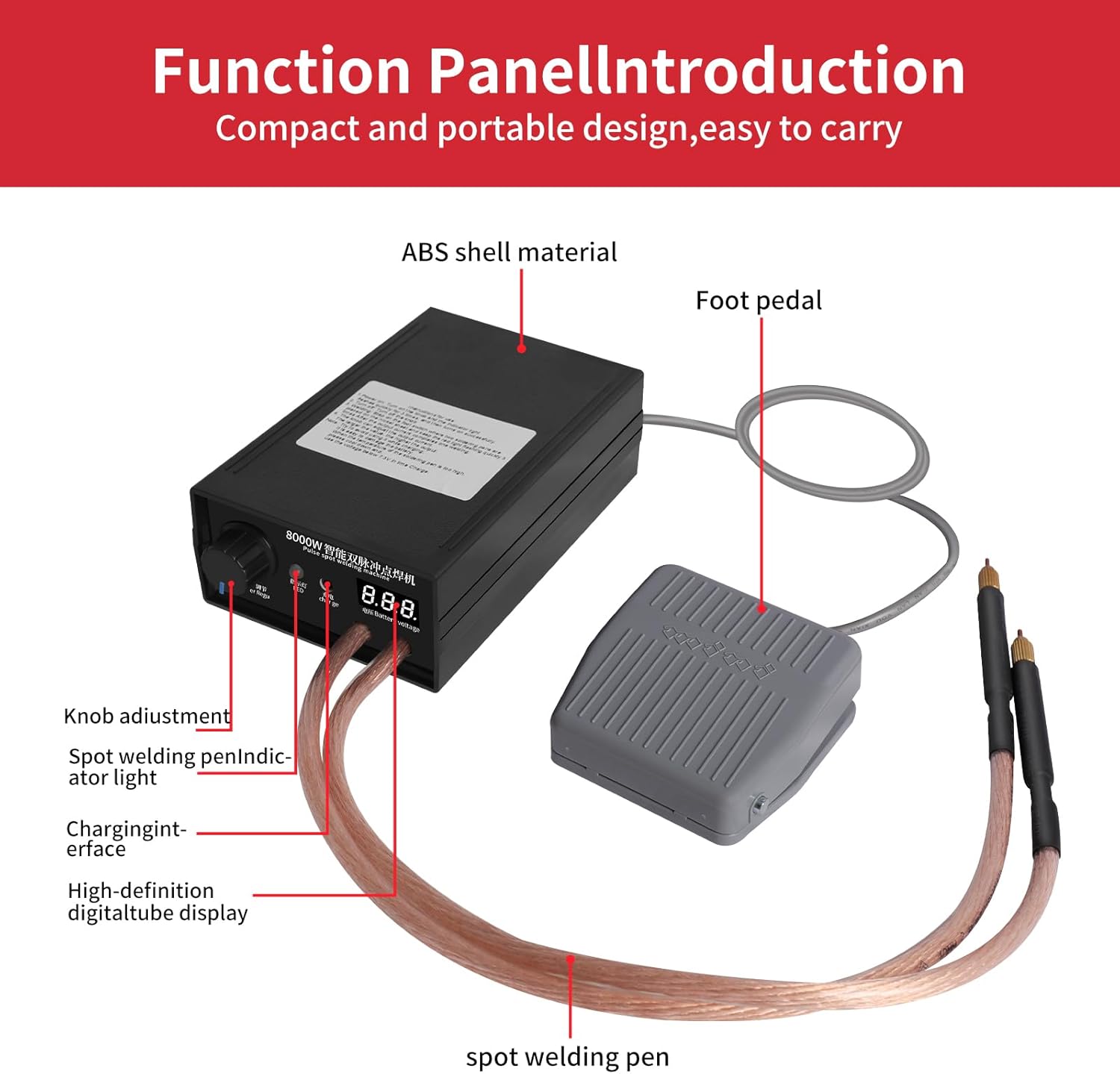
Image 4.1: Diagram illustrating the main components of the spot welder, including the ABS shell, foot pedal connection, knob adjustment, spot welding pen indicator, charging interface, and digital tube display.
singa fototra:
- Vondrona lehibe: Houses the control circuitry, battery, and display.
- Spot Welding Pens: Connected via flexible cables, these pens deliver the welding current to the workpiece. The pins are removable and replaceable.
- Foot Pedal Switch: Activates the welding process, allowing for precise positioning of the pens.
- Power Adjustment Knob: Controls the output power from 1 to 9 levels (0-800A).
- Fampisehoana nomerika: Shows the internal battery voltage amin'ny fotoana tena izy.
- Fametrahana ny Interface: For connecting the power adapter to recharge the internal battery.
5. Fametrahana
- fiampangana voalohany: Before first use, fully charge the spot welder. Connect the power adapter to the charging interface on the unit and plug it into a suitable power outlet. The digital display will show the battery voltage. Charge until the voltage stabilizes at its maximum level.
- Mampifandray ireo singa: Ensure the spot welding pens are securely connected to the main unit. Connect the foot pedal switch to its designated port.
- Fanomanana ny faritry ny asa: Set up your work area on a stable, non-flammable surface. Ensure adequate lighting and ventilation. Keep all necessary materials (nickel strips, batteries, etc.) within reach.

Image 5.1: The spot welder connected to its power adapter for charging. Ensure the device is fully charged before operation.
6. Torolàlana miasa
6.1 Power On/off
The device typically powers on automatically when the knob is turned from the 'OFF' position. To power off, turn the knob fully counter-clockwise to the 'OFF' position.
6.2 Adjusting Welding Power
The spot welder features a 1-9 level knob adjustment for output power, ranging from 0-800A. Turn the knob clockwise to increase the output power. A higher setting is generally required for thicker nickel strips or stronger welds. Start with a lower setting and gradually increase as needed for your specific material.

Image 6.1: The power adjustment knob on the front panel of the spot welder. Rotate to select the desired welding power level.
6.3 Dingana fanaovana welding
- Manomana workpiece: Ensure the nickel strip and battery terminals (or other materials) are clean and free of oxidation.
- Position Pens: Place the two spot welding pens firmly onto the nickel strip, ensuring good contact with the material to be welded. The pens should be positioned close together but not touching each other.
- Atombohy ny fanendasana: While maintaining firm pressure on the pens, press and hold the foot pedal switch.
- Observe Indicator: The red light on the unit will blink three times quickly, indicating the welding cycle is in progress. After approximately 0.5 seconds, the unit will output a current to complete the weld.
- Release Pedal: Release the foot pedal switch once the weld is complete.
- Jereo ny laso: Carefully inspect the welded joint for strength and appearance. Adjust the power setting if the weld is too weak or if it burns through the material.

Image 6.2: Proper placement of the spot welding pens on a nickel strip, ready for welding. The foot pedal is used to initiate the weld.
Tip for Beginners: Ny bateria voltage level displayed on the LCD screen is crucial. Ensure the voltage is above 7.3V for optimal welding performance. If it drops below this, recharge the unit.
7. Fikojakojana
- Fanadiovana: Regularly clean the welding pens and the main unit with a dry, soft cloth. Ensure no metal dust or debris accumulates on the welding tips.
- Welding Pen Tips: The tips of the welding pens are consumable. If they become worn or pitted, they can be removed and replaced to maintain optimal welding performance.
- fitahirizana: Store the spot welder in a cool, dry place away from direct sunlight and moisture. Ensure the unit is powered off before storage.
- Fikarakarana bateria: To prolong battery life, avoid completely discharging the unit. Recharge when the voltage display indicates a low level (below 7.3V).
8. Famahana olana
| OLANA | Antony mety hitranga | vahaolana |
|---|---|---|
| Lasantsy malemy na tsy mitovy | Voltage, insufficient power setting, poor contact with workpiece, dirty welding tips. | Recharge the unit (if voltage is below 7.3V). Increase power setting. Ensure firm and clean contact. Clean or replace welding tips. |
| Tsy mandeha ny unit | Battery fully discharged, power knob in 'OFF' position. | Connect to charger. Turn power knob clockwise to an active setting. |
| Welds burn through material | Avo loatra ny fametrahana herinaratra. | Decrease the power setting using the adjustment knob. |
| Foot pedal unresponsive | Foot pedal not properly connected, faulty pedal. | Check foot pedal connection. If issue persists, contact support. |
9. Famaritana
- Modely: SKU930645-US
- Famoahana herinaratra: 8000W (Peak)
- Welding Thickness: 0.1mm - 0.3mm (Nickel Sheets)
- Output ankehitriny: 0-800A (Adjustable, 9 levels)
- Haben'ny efijery: 2.5x1 sm
- Soldering Pen Length: 350mm (tokony ho 13.8 santimetatra)
- Haben'ny tarika (LxWxH): 15 x 9.5 x 6 sm (eo ho eo amin'ny 5.9 x 3.7 x 2.4 santimetatra eo ho eo)
- Lanja entana: 1.9 kilao (eo ho eo. 0.86 kg)
- Loharano herinaratra: AC/DC (Internal rechargeable battery)
- Fampiharana: 18650 lithium battery packs, iron sheets, stainless steel sheets, 0.1-0.15mm nickel plated steel, 0.1mm pure nickel sheet.
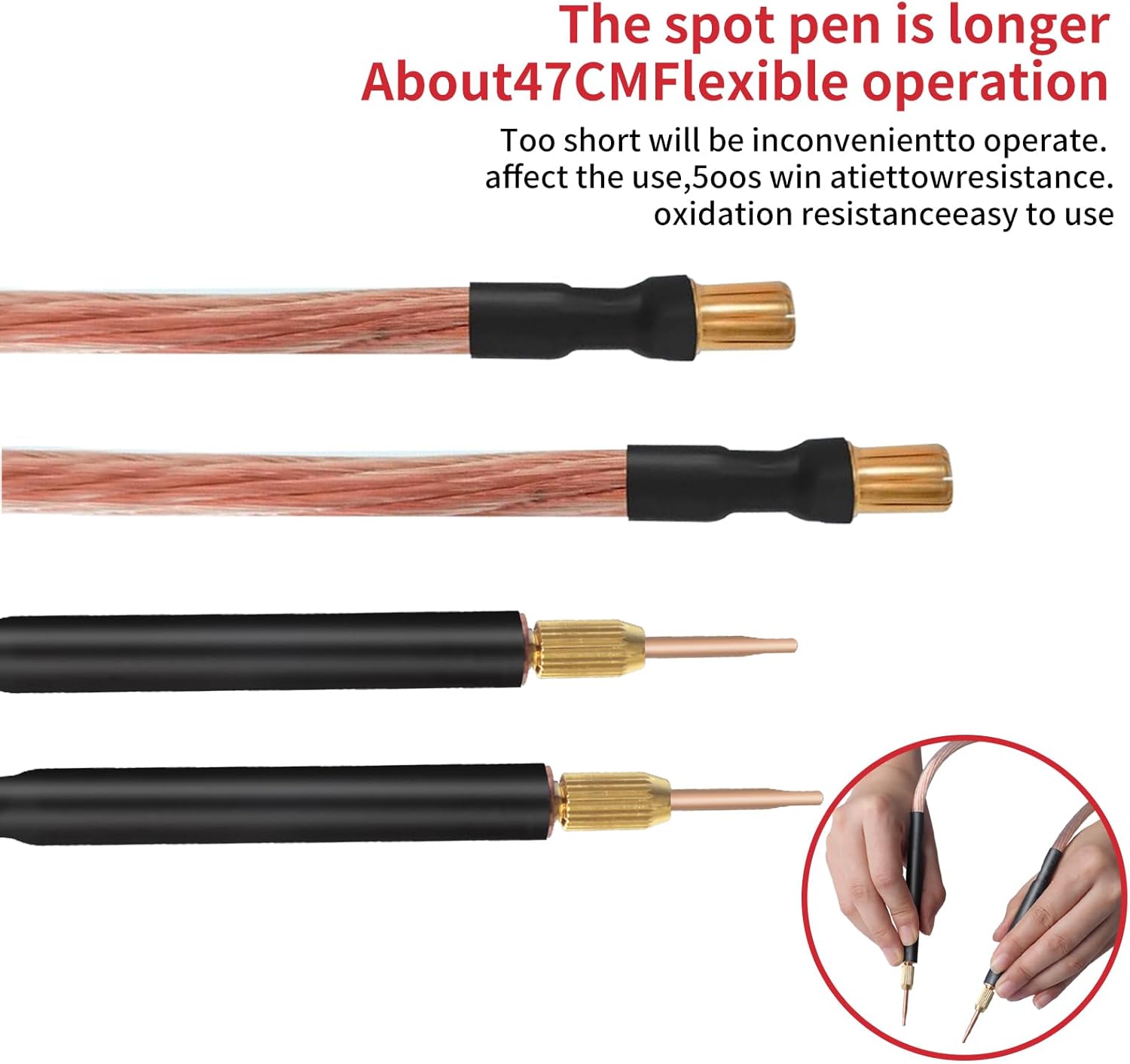
Image 9.1: Detailed dimensions for the spot welding pen cables and the welding pens themselves.
10. Warranty sy fanohanana
For any questions or concerns regarding your Docreate 8000W Handheld Spot Welder, please contact the seller or manufacturer directly. Refer to your purchase documentation for specific warranty terms and contact information.
The manufacturer is Docreate.