
Sava lalana
Welcome to your new TIMESS wall clock. This manual provides instructions for the setup, operation, and maintenance of your 14-inch silent wall clock, which features an analog time display and an integrated LCD for perpetual calendar and temperature readings.
Key features of your TIMESS wall clock include:
- Silent, non-ticking quartz movement for a peaceful environment.
- Large, easy-to-read analog dial with clear numbers and minute marks.
- Integrated LCD display showing month, date, day of the week, and temperature in Fahrenheit.
- Durable construction with a refined piano lacquer frame and an HD glass panel.

This image displays the TIMESS 14-inch wall clock, highlighting its blue frame, large white numbers, and the integrated LCD screen at the bottom of the dial.
Fonosana fonosana
Azafady, jereo ny votoatin'ny fonosana mba hahazoana antoka fa misy ny entana rehetra:
- TIMESS 14-inch Wall Clock Unit
- Fitaovana mihantona
- User Manual (ity antontan-taratasy ity)
Hametraka
1. Fametrahana bateria
Your clock requires two (2) AA carbon batteries (not included) for operation. Alkaline batteries are not recommended as they may affect the clock's movement over time.
- Tadiavo ao ambadiky ny famantaranandro ny toerana misy ny bateria.
- Insert two AA carbon batteries according to the polarity indicators (+/-) inside the compartment.

This image shows the rear of the clock, highlighting the battery compartment for two AA batteries and the silent quartz movement mechanism.
2. Fametrahana ny Fotoana Analog
After installing the batteries, set the analog time:
- Locate the time adjustment knob on the back of the clock.
- Ahodiho manaraka ny fihodin'ny famantaranandro na mifanohitra amin'ny famantaranandro mandra-panehoan'ny tanana ora sy minitra ny ora marina.
3. Setting the LCD Display (Date and Temperature)
The LCD display automatically activates and shows the month, date, day of the week, and temperature once batteries are installed. No manual setting is required for the date and time on the LCD.
To switch the temperature unit between Celsius (°C) and Fahrenheit (°F):
- Locate the 'UP' button on the back of the clock, usually near the battery compartment or LCD module.
- Double-press this button to toggle the temperature unit. The default display is Fahrenheit (°F).

Ity sary ity dia manome antsipiriany view of the LCD screen, clearly showing the month, date, day of the week (SAT), and temperature (79.0 °F).
4. Fametrahana ny famantaranandro
To securely mount your clock on a wall:
- Choose a suitable location on your wall.
- Use a wall anchor and screw (not included) appropriate for your wall type.
- Hang the clock using the keyhole slot located on the back of the clock. Ensure it is stable and level.
This image shows a white plastic mounting hook, indicating the clock can be easily hung on a wall.
Torolàlana miasa
Reading the Analog Time
The large numbers and distinct hands on the clock face allow for easy reading of the current hour and minute.
Famakiana ny LCD Display
The LCD continuously displays the current month, date, day of the week, and ambient temperature. The temperature reading is updated periodically to reflect changes in the environment.
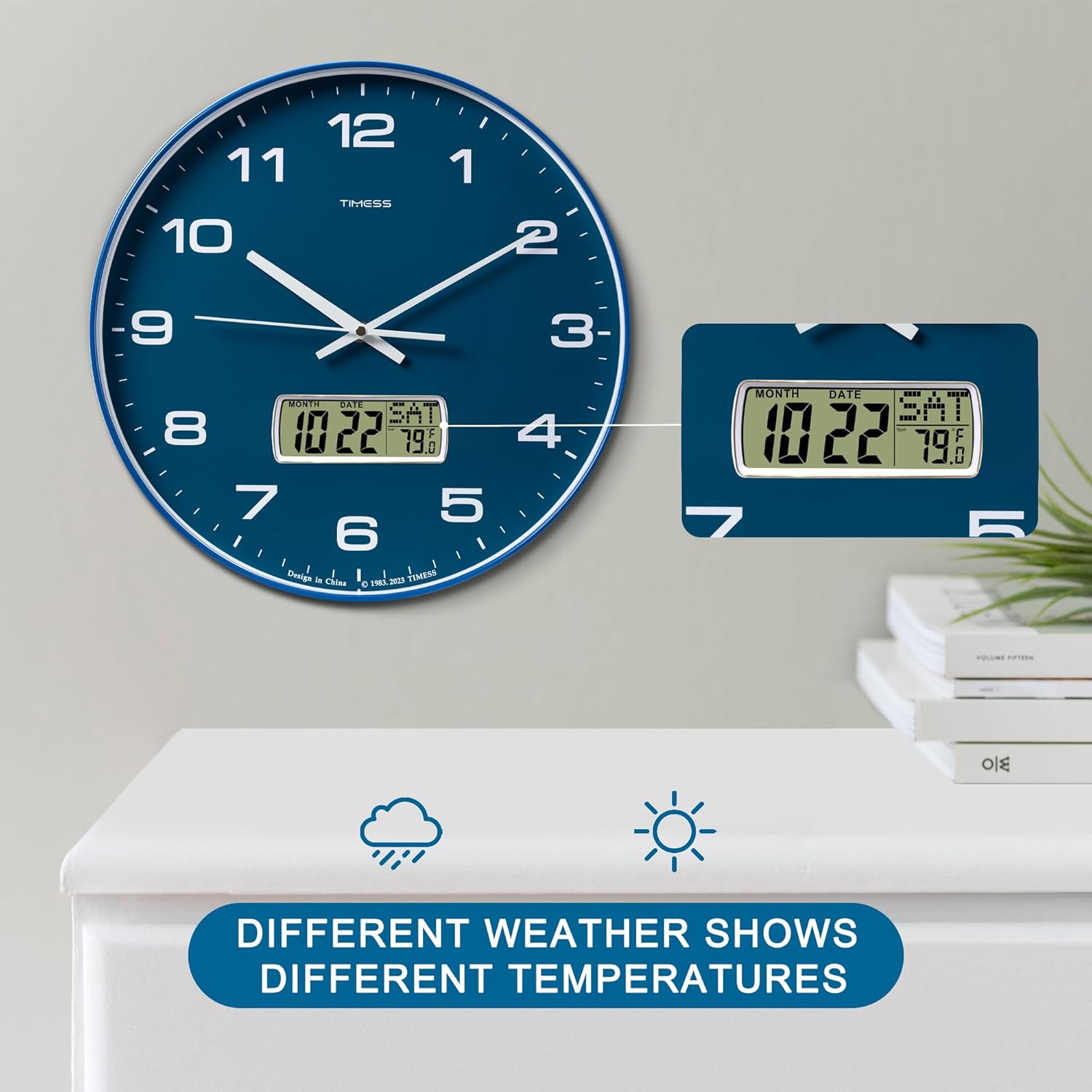
This image illustrates the clock's LCD display, emphasizing its ability to show real-time temperature, which may vary with environmental conditions.
fikarakarana
Fanoloana bateria
When the clock hands slow down, stop moving, or the LCD display dims or becomes blank, it is time to replace the batteries. Follow the battery installation steps in Section 3.1 to replace the two AA carbon batteries.
FANADIOVANA
To clean the clock, gently wipe the surface with a soft, dry cloth. Avoid using abrasive cleaners, chemical solvents, or harsh detergents, as these may damage the finish or the LCD screen.

This image highlights the HD glass panel, which protects the clock face and LCD, and should be cleaned gently.
Fanamboarana
Clock Not Keeping Time
- Olana: Analog hands are not moving or display incorrect time.
- Vahaolana: Check if the batteries are correctly installed and have sufficient power. Replace with fresh AA carbon batteries if necessary. Adjust the time using the knob on the back of the clock.
LCD Display tsy mandeha
- Olana: LCD screen is blank, dim, or displays incorrect information.
- Vahaolana: Ensure batteries are properly inserted and are not depleted. Replace batteries if needed.
Incorrect Temperature Unit
- Olana: Temperature is displayed in Celsius instead of Fahrenheit, or vice versa.
- Vahaolana: Double-press the 'UP' button on the back of the clock to toggle between Celsius and Fahrenheit.
fepetra arahana
Product Specifications
| endri-javatra | antsipirihany |
|---|---|
| Marika | TIMESS |
| Laharana modely | P59D-3-Blue |
| Color | Calendar Blue |
| Ny refin'ny vokatra | 35.56 x 3.81 x 35.56 sm (14 x 1.5 x 14 santimetatra) |
| Lanja entana | 1.36 kg (3 lbs) |
| KEVITRA | Acrylonitrile Butadiene Styrene (ABS) |
| Karazana fampisehoana | Analog with LCD Digital |
| Endri-javatra manokana | Perpetual Calendar Display, Temperature Display (°F/°C) |
| Loharanon-kery | 2 x AA Carbon Batteries (not included) |

This image visually confirms the clock's dimensions, indicating a 14-inch diameter and 1.8-inch depth.
Fampahalalana manan-danja momba ny fiarovana
- Aza atao amin'ny hafanana tafahoatra, ny tara-masoandro mivantana, na ny hamandoana be ny famantaranandro.
- Fadio ny fandatsahana ny famantaranandro na ny fiatraikany mafy.
- Ario am-pahamendrehana ny bateria efa nampiasaina araka ny fitsipika eo an-toerana.
- Arovy tsy ho azon'ny ankizy ny bateria.
- Aza afangaro ny batterie taloha sy vaovao, na karazana batterie samihafa.
Warranty sy fanohanana ny mpanjifa
For warranty information and customer support, please refer to the documentation provided with your purchase or contact TIMESS customer service directly. Contact details are typically available on the manufacturer's official webtranokala na amin'ny alàlan'ny mpivarotra anao.