
Xiaomi POCO X4 Pro 5G
Boky Torolàlana ho an'ny Mpampiasa: Finday avo lenta Xiaomi POCO X4 Pro 5G
Model: POCO X4 Pro 5G
1. Fampidirana
This manual provides comprehensive instructions for the safe and efficient use of your Xiaomi POCO X4 Pro 5G smartphone. Please read this manual carefully before using the device and keep it for future reference.
The Xiaomi POCO X4 Pro 5G is a high-performance smartphone featuring a 6.67-inch 120Hz AMOLED DotDisplay, Snapdragon 695 processor, 108MP triple camera, and a 5000mAh battery with 67W turbo charging.
2. Information momba ny fiarovana
Always follow basic safety precautions when using your smartphone to reduce the risk of fire, electric shock, and injury.
- Aza atao amin'ny hafanana tafahoatra na amin'ny tara-masoandro mivantana ny fitaovana.
- Fadio ny milatsaka na mametraka ilay fitaovana amin'ny fiantraikany mahery vaika.
- Mampiasà charger sy kojakoja tany am-boalohany na voamarina.
- Aza manandrana manongotra na manamboatra ilay fitaovana.
- Arovy amin'ny rano sy ny hamandoana ilay fitaovana.
3. Efa tapitra ny fitaovanaview
Familiarize yourself with the components of your POCO X4 Pro 5G.

Sary 3.1: Eo aloha sy aoriana View of POCO X4 Pro 5G. This image displays the smartphone from both the front, showing its large display, and the back, highlighting the camera module and the "POCO" branding. Wired earphones are also depicted, suggesting audio connectivity options.
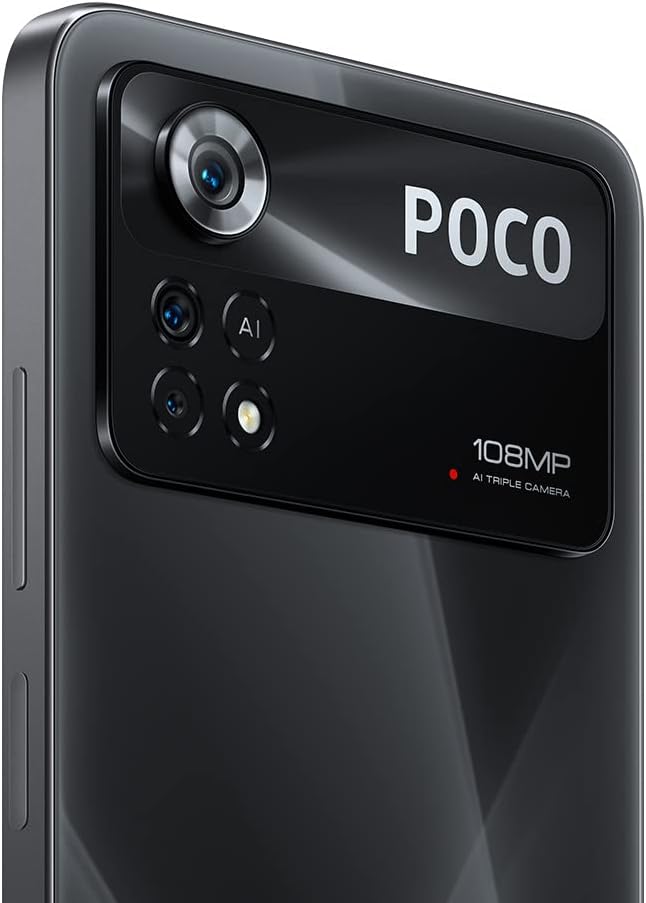
Sary 3.2: Rear Camera Module. A detailed shot of the smartphone's rear camera array, featuring the prominent 108MP main sensor, along with additional lenses and the AI Triple Camera designation.
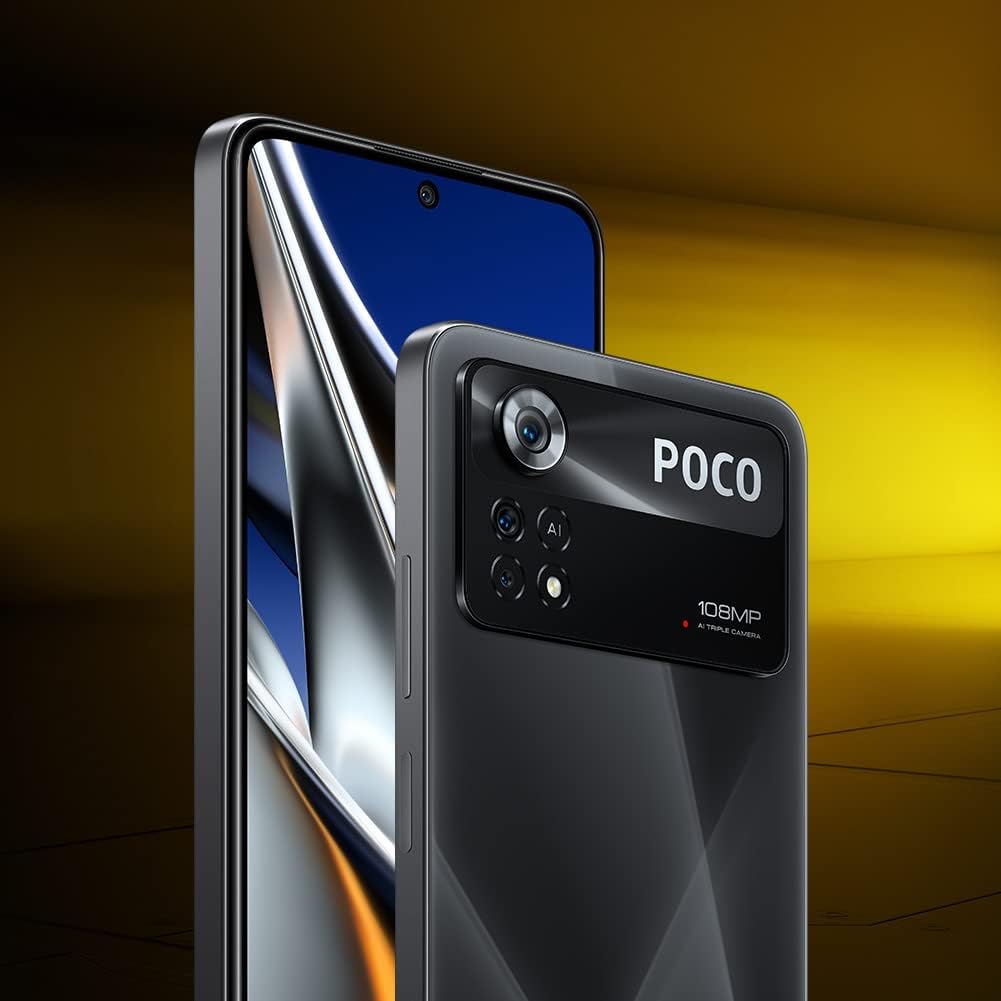
Sary 3.3: Device Profile. This image shows the smartphone from a slight angle, emphasizing its thin design and the edge-to-edge display.

Sary 3.4: Available Color Variants. This image displays four units of the POCO X4 Pro 5G, showcasing the different color options available for the device.
3.1. Bokotra sy seranana ara-batana
- Bokotra hery: Located on the right side, used to turn the device on/off or wake/sleep the screen. Also integrates the fingerprint sensor.
- Botom-peo: Located above the power button, used to adjust media volume and ringtone volume.
- Port USB Type-C: Eo amin'ny farany ambany, ampiasaina amin'ny fiampangana sy famindrana angona.
- Jack headphone 3.5mm: Located at the top, for connecting wired headphones.
- Tray karatra SIM: Located on the left side, for inserting SIM cards and microSD card.
- Mpandahateny: Dual stereo speakers located at the top and bottom for enhanced audio experience.
4. Fametrahana
4.1. Mampiditra karatra SIM sy karatra MicroSD
- Tadiavo ny lovia karatra SIM eo amin'ny ilany havia amin'ny fitaovana.
- Ampidiro ao anatin'ilay lavaka kely eo akaikin'ny lovia ny fitaovana ejector SIM ary atosio moramora mandra-pipoitra ilay lovia.
- Apetraho eo amin'ny toerana voatondro eo amin'ny lovia ny karatra Nano-SIM sy/na karatra microSD anao. Ataovy azo antoka fa mitodika midina ny fifandraisana volamena.
- Ampidiro tsara ao anatin'ilay fitaovana ilay lovia mandra-pikitika azy.
4.2. Fahefana voalohany sy setup Wizard
- Tsindrio ary hazòny ny bokotra Power mandra-piseho ny logo Xiaomi.
- Araho ny toromarika eo amin'ny efijery mba hamitana ny fanamboarana voalohany:
- Fidio ny fiteninao sy ny faritra misy anao.
- Mifandray amin'ny tambajotra Wi-Fi.
- Accept the End User License Agreement and Privacy Policy.
- Midira amin'ny kaontinao Google na mamorona vaovao.
- Mametraha ny hidin'ny efijery (PIN, lamina, tenimiafina, dian-tanana, fanokafana amin'ny tarehy).
- Avereno ny angona avy amin'ny fitaovana teo aloha (tsy voatery).
- Configure additional settings like Google Assistant and payment info.
4.3. Fametrahana ny fitaovana
Alohan'ny fampiasana voalohany dia asaina mameno tanteraka ny fitaovanao.
- Connect the USB Type-C cable to the charging port on the bottom of the phone.
- Ampifandraiso amin'ny adaptatera herinaratra ny faran'ny tariby hafa.
- Ampidiro amin'ny fivoahan'ny rindrina ny adaptatera herinaratra.
- The device supports 67W turbo charging. A full charge from 0% to 100% typically takes approximately 41 minutes.
5. Operating Your POCO X4 Pro 5G
5.1. Fikarohana fototra
- Efijery voalohany: Swipe miankavia na miankavanana mba hivezivezy eo anelanelan'ny efijery an-trano.
- App Drawer: On some MIUI versions, swipe up from the bottom of the screen to access all installed applications.
- Alokaloka fampahafantarana: Swipe midina avy eo an-tampon'ny efijery mankany view fampahafantarana sy fanovana haingana.
- Fampiharana vao haingana: Swipe up from the bottom and hold (for gesture navigation) or tap the square button (for button navigation) to see recently used applications.
5.2. Fampiasana fakan-tsary
The POCO X4 Pro 5G features a 108MP AI Triple Camera system.
- Sokafy ny fampiharana Camera avy amin'ny efijerin'ny tranonao na ny sarinao fampiharana.
- Select your desired mode (Photo, Portrait, Video, Pro, Night, Macro, etc.) by swiping left or right on the mode selector.
- Tsindrio ny bokotra "shutter" mba haka sary na hanombohana/hijanonana ny fandraketana horonan-tsary.
- Ampiasao ny fanaraha-maso zoom eo amin'ny efijery hanitsiana ny fampitomboana.
- Tsindrio ny efijery mba hifantohana amin'ny zavatra iray manokana.
5.3. fifandraisana
- Wifi: Mandehana any Fikirana > Wi-Fi hifandray amin'ny tambajotra tsy misy tariby misy.
- Bluetooth: Mandehana any Fikirana > Bluetooth mba hampifandraisana amin'ny fitaovana Bluetooth toy ny écouteur na haut-parleurs.
- Data finday: Hamarino tsara fa miasa ny karatra SIM-nao ary mandeha ny angon-drakitra finday Fikirana > karatra SIM & tambajotra finday.
- NFC: The device supports NFC for contactless payments and quick pairing. Enable it in Fikirana > Fifandraisana & fizarana > NFC.
5.4. Alexa Integration
Your POCO X4 Pro 5G comes with Alexa built-in, allowing for hands-free voice control.
- Download the Amazon Alexa app from the Google Play Store.
- Open the Alexa app and complete the setup process, including logging into your Amazon account.
- Enable hands-free Alexa in the app settings.
- Once set up, you can activate Alexa by saying "Alexa" followed by your command, even when the phone is locked.
- Use Alexa to make calls, open apps, control smart home devices, check weather, and more.
6. Fikojakojana
6.1. Fanavaozana rindrambaiko
Hamarino sy asio fanavaozam-baovao tsy tapaka mba hahazoana antoka fa mahomby sy azo antoka.
- Mandehana any Fikirana> Momba ny telefaona> version MIUI.
- Tap "Check for updates" to see if a new version is available.
- Download and install updates when prompted. Ensure your device has sufficient battery and a stable internet connection.
6.2. Manadio ny fitaovanao
- Mampiasà lamba malefaka sady tsy misy loko hamafa ny efijery sy ny lamosin'ny telefaona.
- Ho an'ny setroka mafy loha, kely dampen ilay lamba misy rano na mpanadio écran.
- Fadio ny mampiasa akora simika mahery vaika, akora abrasive na tifitra aerosol.
- Aza manipy mpanadio mivantana amin'ny fitaovana.
6.3. Fikarakarana bateria
- Fadio ny fanalana tanteraka ny bateria matetika.
- Do not leave the device plugged in for extended periods after it's fully charged.
- Keep the device within optimal temperature ranges (0°C to 35°C) to prolong battery life.
7. Famahana olana
7.1. Olana sy Vahaolana iraisana
| OLANA | Antony mety hitranga | vahaolana |
|---|---|---|
| Tsy mandeha ny fitaovana | bateria ambany; Lozisialy fianjerana | Ampidiro ny fitaovana mandritra ny 30 minitra farafahakeliny. Tsindrio ary hazòny ny bokotra Hery mandritra ny 10-15 segondra mba hanery ny hanomboka indray. |
| Apps mianjera na mangatsiaka | Tsy ampy ny RAM; Bibikely amin'ny fampiharana; Rindrambaiko efa lany andro | Akatona ireo fampiharana any ambadika. Fafao ny cache fampiharana (Settings > Apps > Manage apps > [App Name] > Clear cache). Update the app or system software. |
| Faharetan'ny bateria | High screen brightness; Many background apps; GPS/Bluetooth always on | Reduce screen brightness. Close unnecessary background apps. Turn off GPS/Bluetooth when not in use. Check battery usage in Fikirana > Bateria. |
| Network connectivity issues (Wi-Fi/Mobile Data) | Incorrect settings; Router issues; SIM card problem | Toggle Wi-Fi/Mobile Data off and on. Restart router. Reinsert SIM card. Reset network settings (Settings > Connection & sharing > Reset Wi-Fi, mobile networks, and Bluetooth). |
7.2. Famerenana ny orinasa
A factory reset will erase all data from your device and restore it to its original factory settings. Back up important data before proceeding.
- Mandehana any Fikirana> Momba ny finday> Famerenana amin'ny orinasa.
- Tap "Erase all data" and follow the on-screen prompts.
- You will need to enter your screen lock password to confirm.
8. Famaritana
| endri-javatra | famaritana |
|---|---|
| Marika | Xiaomi |
| MODELY | POCO X4 Pro 5G |
| Rafitra fikirakirana | Android (MIUI 13) |
| miseho | 6.67-inch AMOLED DotDisplay, 2400 x 1080 FHD+, 120Hz Refresh Rate, 360Hz Touch Sampling Rate |
| processeur | Snapdragon 695 5G (6nm) |
| ram | 8 GB (expandable with Dynamic RAM Expansion Technology) |
| fitahirizana | 256 GB |
| Fakan-tsary aoriana | 108MP Main + 8MP Ultra-wide + 2MP Macro |
| Batterie | 5000mAh |
| fa mamaly ny | 67W Turbo Charging |
| fifandraisana | 5G, Wi-Fi, Bluetooth, NFC, 3.5mm Headphone Jack, USB Type-C |
| teny | Dual Stereo Speakers |
| Endri-javatra hafa | Side-mounted Fingerprint Sensor, AI Face Unlock, Z-axis linear motor, Alexa Built-in |
9. Warranty sy fanohanana
Your Xiaomi POCO X4 Pro 5G comes with a standard manufacturer's warranty. Please refer to the warranty card included in your product packaging for specific terms and conditions, including warranty period and coverage.
9.1. Fampahalalana momba ny fiantohana
For products purchased in Italy, the device typically includes a 2-year warranty from the date of purchase, covering manufacturing defects. Keep your proof of purchase (receipt or invoice) as it is required for warranty claims.
9.2. Fanohanana ny mpanjifa
For technical support, service, or warranty claims, please contact Xiaomi customer service through their official webtoerana na foibem-panompoana nahazoana alalana.
- Xiaomi ofisialy Webtranokala: www.mi.com/global/service/support/
- POCO Community: c.po.co (for forums and community support)
When contacting support, please have your device's model number (POCO X4 Pro 5G) and IMEI number ready. The IMEI can be found by dialing *#06# on your phone's dialer or in Settings > About phone > All specs > Status > IMEI (SIM slot 1).