
Sava lalana
Misaotra anao nividyasing the Northpoint NP-TL LED Desk Lamp. This modern and versatile desk lamp is designed to provide optimal lighting for your workspace while offering convenient features such as QI wireless charging and an integrated display for time and temperature. Please read this manual carefully before use to ensure proper operation and to maximize the lifespan of your product.
Torolàlana fiarovana
- Ensure the power adapter is compatible with your local power supply before connecting.
- Aza disassemble, manamboatra, na manova ny lamp yourself. Contact qualified service personnel for assistance.
- Fadio ny mametraka ny lamp in high-temperature, humid, or dusty environments.
- Tazony ny lamp away from water and other liquids.
- Do not look directly into the LED light source for extended periods to prevent eye strain.
- Esory ny lamp from the power outlet before cleaning or when not in use for a long time.
- Ity vokatra ity dia natao ho an'ny fampiasana anatiny ihany.
Fonosana fonosana
Azafady, jereo ny fonosana ho an'ireto zavatra manaraka ireto:
- Northpoint NP-TL LED Desk Lamp
- 12V Power adaptatera
- User Manual
Vita ny vokatraview
Familiarize yourself with the components of your Northpoint NP-TL LED Desk Lamp.

Sary 1: Eo anoloana view of the Northpoint NP-TL LED Desk Lamp, showing the adjustable light head, flexible arm, integrated display, and QI wireless charging base with mood lighting.

Sary 2: lafiny view of the Northpoint NP-TL LED Desk Lamp, highlighting the flexible arm design and the integrated display on the lamp's body.

Image 3: The Northpoint NP-TL LED Desk Lamp in a typical desk environment, demonstrating its compact size and ambient lighting capabilities.
- Adjustable LED Head: Provides directional lighting.
- Sandry malefaka: Allows for easy positioning of the light.
- Fampisehoana mitambatra: Shows time, date, and ambient temperature.
- Touch Control Panel: For adjusting light settings and display functions.
- Takelaka famandrihana QI tsy misy tariby: Located on the base for compatible devices.
- Mood Light Base: Provides ambient RGB lighting.
Hametraka
- Vahao: Esory tsara ny singa rehetra amin'ny fonosana.
- toerana: Apetraho ny lamp eo amin'ny tany marin-toerana sy fisaka.
- Hery mampifandray: Insert the DC plug of the 12V power adapter into the power input port on the back of the lamp base. Plug the adapter into a standard wall outlet.
- Fametrahana voalohany ny fampisehoana: Upon first power-on, the display will illuminate. You may need to set the time and date using the touch controls (refer to "Operating Instructions - Display Settings").
Torolàlana miasa
Functions maivana
- Herim-batana / maty: Tsindrio ny bokotra herinaratra (
 ) on the touch control panel to turn the lamp on or off.
 - Brightness Adjustment (Dimmable): Raha ny lamp is on, press and hold the Bokotra famirapiratana (often represented by a sun icon or +/-) to smoothly adjust the light intensity. Release when the desired brightness is reached.
- Fanitsiana ny mari-pana amin'ny loko: Tsindrio ny Mode/Color Temperature button (often represented by a 'M' or color spectrum icon) to cycle through different color temperatures: Warm White, Neutral White, and Cool White.
QI Wireless Charging
- Place your QI-compatible smartphone or device directly onto the wireless charging pad located on the lampny base.
- Hamarino tsara fa eo afovoan'ny takelaka famandrihana ny fitaovana mba hahazoana famandrihana tsara indrindra.
- A charging indicator (if available on your device) will confirm that charging has begun.
- Remove any metallic objects or thick cases from your device that may interfere with wireless charging.
Integrated Display Settings (Time, Date, Temperature)
The integrated LCD displays time, date, and ambient temperature. Specific buttons for setting these functions are usually located near the display or on the touch panel.
- Fametrahana Ora/Daty: Look for buttons labeled "SET", "MODE", or similar. Typically, you press "SET" to enter setting mode, then use arrow buttons or +/- to adjust values, and "SET" again to confirm and move to the next setting (e.g., hour, minute, year, month, day).
- Fampisehoana maripana: Ny lamp automatically detects and displays the ambient temperature. No manual setting is required for this function.
Fanazavana ny toe-po
- Ny lamp features an integrated mood light base. Look for a dedicated bokotra Mood Light (often a color wheel or RGB icon).
- Tap the button to cycle through different static colors or activate a color-changing mode.
- Press and hold the button to turn the mood light off.
fikarakarana
- Fanadiovana: Disconnect the power before cleaning. Use a soft, dry cloth to wipe the lamp. Do not use abrasive cleaners, solvents, or harsh chemicals.
- fitahirizana: Raha mitahiry ny lamp for an extended period, unplug it and store it in a cool, dry place.
- Loharano maivana LED: Efa tafiditra ao anaty fitaovana ny loharanon-jiro LED fa tsy azo soloina.
Fanamboarana
| OLANA | Antony mety hitranga | vahaolana |
|---|---|---|
| Lamp tsy mandeha. | Tsy misy fifandraisana herinaratra. Adapter herinaratra diso. | Ataovy azo antoka fa mipetaka tsara amin'ny l ny adaptatera herinaratraamp ary ny fivoahan'ny rindrina. Andramo amin'ny toerana hafa. Raha mbola mitohy ny olana dia mifandraisa amin'ny serivisy ho an'ny mpanjifa. |
| Tsy mandeha ny charging Wireless. | Device not QI-compatible. Device not properly aligned. Obstruction (e.g., thick case, metallic object). | Verify your device supports QI wireless charging. Reposition your device on the charging pad. Remove any cases or metallic objects. |
| Display shows incorrect time/date. | Time/date not set or reset after power interruption. | Refer to "Operating Instructions - Display Settings" to manually set the time and date. |
| Mitsilopilopy na tsy milamina ny hazavana. | Famatsiana herinaratra tsy milamina. Olana singa anatiny. | Andramo apetaho ny lamp into a different power outlet. If the problem continues, discontinue use and contact customer support. |
fepetra arahana
| Marika | Northpoint |
| Laharana modely | NP-TL |
| Haben'ny vokatra (L x W x H) | 16.6 x 6 x 33.5 cm |
| KEVITRA | simili-cuir |
| Karazana vita | Leather look |
| Karazana loharanon-jiro | LED |
| fahefana | 18 Watts |
| Luminous Flux | 480 lm |
| Fanondroana famandrihana loko (CRI) | 80.00 |
| Endri-javatra manokana | Dimmable, QI Wireless Charging, Temperature Display, Mood Lighting |
| Switch Style | mikasika |
| IP Rating | IP20 |
| BOKYtage | 12 Volts |
| Anisan'ny singa | QI Charging Station, 12V Power Adapter |

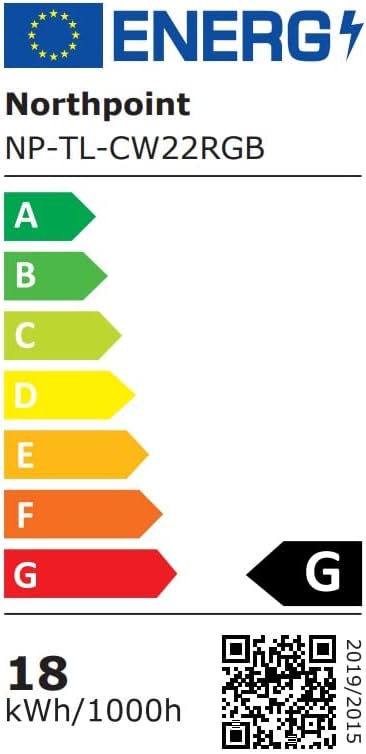
Image 4: Energy efficiency label for the Northpoint NP-TL LED Desk Lamp, indicating energy class G and 18 kWh/1000h consumption.
Warranty sy fanohanana
Northpoint products are manufactured to high-quality standards. For warranty information or technical support, please refer to the contact details provided with your purchase documentation or visit the official Northpoint website. Azafady, tehirizo ny porofon'ny fividiananao raha misy fitakiana fiantohana.
Note: Information regarding spare parts availability and software updates is not available at the time of printing.