
1. Fampidirana
The Braun MultiServe Coffee Machine KF9150BK is designed to provide a superior coffee experience, offering flexibility from a single cup to a full carafe. Its advanced features ensure consistent brewing quality and allow for personalized coffee preferences. This manual will guide you through the proper setup, operation, and maintenance of your new coffee machine to ensure optimal performance and longevity.

Figure 1: Braun MultiServe Coffee Machine KF9150BK in Stainless/Black.
2. Inona no tafiditra
Upon unpacking your Braun MultiServe Coffee Machine, please ensure all the following components are present:
- Braun MultiServe Coffee Machine Unit
- Glass Carafe (10-Cup)
- Sivana maharitra tone volamena
- Sivana rano saribao
- Fandrefesana Scoop
- Boky torolàlana (torolàlana ity)
- Torolalana fanombohana haingana

Figure 2: All components included with the Braun MultiServe Coffee Machine.
3. Fametrahana
Before first use, follow these steps to prepare your coffee machine:
- Esory ny entana ary diovy: Remove all packaging materials. Wash the glass carafe, permanent filter, and water reservoir with warm, soapy water. Rinse thoroughly and dry.
- Install Charcoal Filter: If included, soak the charcoal filter in cold water for 5 minutes. Insert it into the filter holder within the water reservoir.
- Fitahiry rano feno: Remove the water reservoir from the unit. Fill it with fresh, cold water up to the desired level, or to the 'MAX' line for a full carafe. Reinsert the reservoir securely.
- Place Filter Basket: Insert the permanent filter (or a paper filter) into the filter basket. Place the filter basket into its designated slot.
- First Clean Cycle: Before brewing coffee, run a full carafe cycle with only water to clean the internal components. Discard the water after the cycle.

Figure 3: Filling the removable water reservoir.
Figure 4: The permanent filter and filter basket assembly.
4. Torolàlana miasa
Your Braun MultiServe Coffee Machine offers various brewing options:
4.1. Fanamboarana kafe
- Ampio kofehin-kafe: Use the included measuring scoop to add your desired amount of coffee grounds to the filter. Refer to the scoop markings for recommended amounts based on brew size.
- Safidio ny haben'ny labiera: Use the MultiServe Dial System to select your desired brew size, ranging from 5 oz, 8 oz, 12 oz, 16 oz, 20 oz, Half Carafe, or Full Carafe.
- Choose Brew Style (BrewChoice Plus): Select your preferred coffee strength using the BrewChoice Plus buttons:
- Fahazavana: For a milder coffee.
- volamena: Certified by the Specialty Coffee Association for optimal flavor.
- Sahisahy: For a stronger, more intense coffee.
- ambonin'ny ranomandry: Specifically designed for brewing concentrated coffee over ice.
- Place Carafe/Cup: For carafe brewing, ensure the glass carafe is placed on the warming plate. For single-serve brewing, slide down the Cup Shelf and place your mug directly underneath the dispenser.
- Manomboka manao labiera: Press the 'Brew' button to begin the brewing process. The machine will automatically calculate the precise water flow, temperature, and speed using the ExactBrew System.
- Tondro momba ny fahamasinana: The display will show a Freshness Indicator, letting you know how long the brewed coffee has been sitting on the warming plate.

Figure 5: Available brewing sizes on the MultiServe Dial System.

Figure 6: BrewChoice Plus options including Light, Gold, Bold, and Over Ice.

Figure 7: Single-serve brewing with the adjustable Cup Shelf.
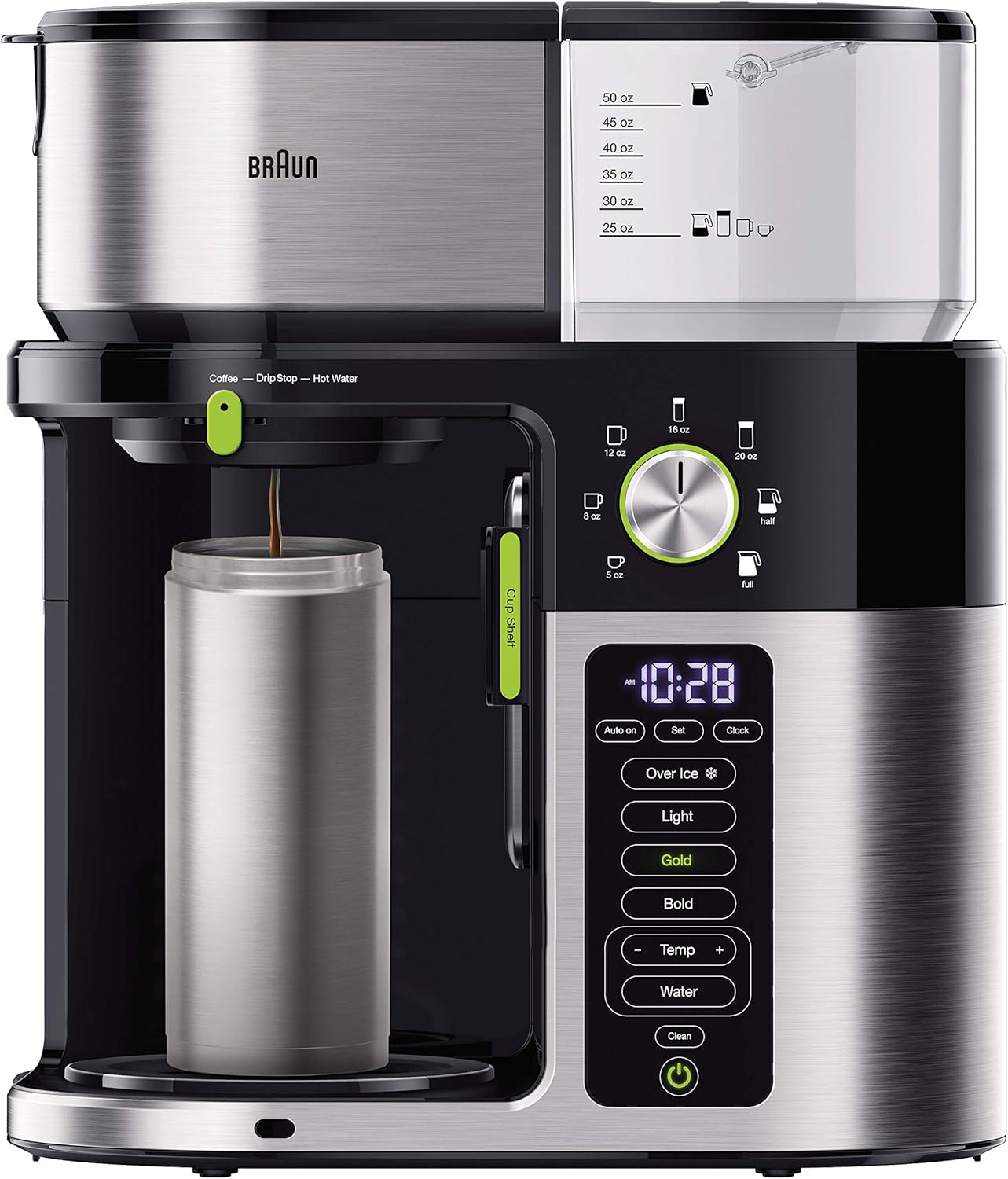
Figure 8: Illustration of ExactBrew Technology and TempSensor System for optimal brewing.
4.2. Famoahana rano mafana
The machine features a separate hot water spout to prevent coffee taste transfer when preparing tea or other hot beverages.
- Kaopy toerana: Place your cup under the dedicated hot water spout.
- Select Water: Press the 'Water' button on the control panel.
- Mamoaka: The machine will dispense hot water.
5. Fikojakojana
Regular cleaning and maintenance will ensure your Braun MultiServe Coffee Machine continues to perform optimally.
5.1. Fanadiovana isan'andro
- Karafa sy sivana: After each use, wash the glass carafe, carafe lid, permanent filter, and filter basket with warm, soapy water. These parts are also top-rack dishwasher safe.
- ivelany: Fafao amin'ny doka ny ivelan'ny milinaamp lamba. Aza mampiasa mpanadio abrasive.
5.2. Manalefaka
Over time, mineral deposits can build up in your coffee machine, affecting performance. The machine has a 'Clean' button to initiate a descaling cycle.
- Follow the instructions in the detailed user manual for the specific descaling procedure using a descaling solution.
- The 'Clean' indicator light will illuminate when descaling is recommended.
5.3. Charcoal Water Filter Replacement
- The charcoal water filter should be replaced approximately every 2 months, or after 60 uses, whichever comes first.
- Refer to the full user manual for detailed instructions on replacing the filter.
6. Famahana olana
If you encounter issues with your Braun MultiServe Coffee Machine, please refer to the following common solutions. For more complex problems, consult the full User Manual (PDF) linked in the 'Warranty & Support' section.
- Kafe tsy azo amboarina: Ensure the machine is plugged in, the water reservoir is filled, and the filter basket is correctly inserted. Check if the 'Brew' button was pressed.
- Kafe malemy: Increase the amount of coffee grounds or select the 'Bold' brew strength setting. Ensure the charcoal filter is not clogged and is replaced regularly.
- Overflowing Filter Basket: Do not overfill the filter basket with coffee grounds. Ensure the carafe is properly placed on the warming plate and the drip stop is not engaged if brewing a carafe.
- Error Codes (e.g., E21): Specific error codes indicate internal issues. Please refer to the detailed User Manual for a list of error codes and their corresponding troubleshooting steps.
7. Famaritana
| endri-javatra | antsipirihany |
|---|---|
| Marika | Braun |
| Laharana modely | KF9150BK |
| loko | Stainless / Black |
| Ny refin'ny vokatra | 7.1" D x 13" W x 15" H |
| Lanja entana | 10 kg |
| Karazana mpanao kafe | Mitete kafe milina |
| Karazana sivana | Reusable (Gold Tone Permanent Filter) |
| Karazana fampidirana kafe | Pod-free |
| Fomba fiasa | Automatic tanteraka |
| Fampidiran'ny fifandraisan'ny olombelona | Bokotra, Dial |
| Endri-javatra manokana | Freshness Indicator, Unique Carafe Design, TempSensor System, BrewChoice Plus, MultiServe Dial System, Hot Water Spout |
8. Warranty & Fanohanana
The Braun MultiServe Coffee Machine KF9150BK comes with a Garantie voafetra 3 taona. Azafady, tehirizo ny porofon'ny fividiananao ho an'ny fitakiana fiantohana.
For detailed information on warranty terms, troubleshooting, and product support, please refer to the official user manuals:
For further assistance, please contact Braun customer service.