
Sava lalana
This manual provides essential instructions for the safe and efficient operation of your Pioneer VSX-1024 7.2-Channel Network A/V Receiver. Please read this manual thoroughly before using your receiver and keep it for future reference. This receiver is designed to deliver high-quality audio and video performance, supporting various connectivity options and network features.
Fampahalalana manan-danja momba ny fiarovana
Always follow these basic safety precautions to reduce the risk of fire, electric shock, and injury:
- Loharano herinaratra: Ampifandraiso amin'ny fivoahana AC amin'ny voltage voalaza eo amin'ny tontonana aoriana.
- rivotra: Ensure adequate ventilation. Do not block ventilation openings. Maintain a minimum distance of 10 cm (4 inches) from the rear and sides, and 20 cm (8 inches) from the top.
- Rano sy hamandoana: Aza atao amin'ny orana na ny hamandoana ilay fitaovana. Aza asiana zavatra feno ranon-javatra, toy ny vazy, eo amin'ilay fitaovana.
- Zavatra vahiny: Do not insert any foreign objects into the unit.
- Fanadiovana: Esory amin'ny fivoahan'ny rindrina ny fitaovana alohan'ny hanadiovana azy. Mampiasà lamba maina ihany.
- Serivisy: Aza manandrana manamboatra ilay fitaovana. Alefaso amin'ny mpiasan'ny serivisy mahafeno fepetra ny serivisy rehetra.
- Fifandraisana amin'ny mpandahateny: Ensure all speaker wires are correctly connected to prevent short circuits.
Hametraka
1. Famoahana
Esory tsara ao anaty fonosana ny mpandray sy ny kojakoja rehetra. Hamarino tsara fa eo daholo ny entana rehetra:
- Pioneer VSX-1024 A/V Receiver
- Fanaraha-maso lavitra sy bateria
- MCACC Setup Microphone
- Antenna FM/AM
- Tady herinaratra
- Torolàlana fanombohana haingana (raha misy)
2. Connecting Your Components
Before making any connections, ensure the receiver and all components are turned off and unplugged from the power outlet.
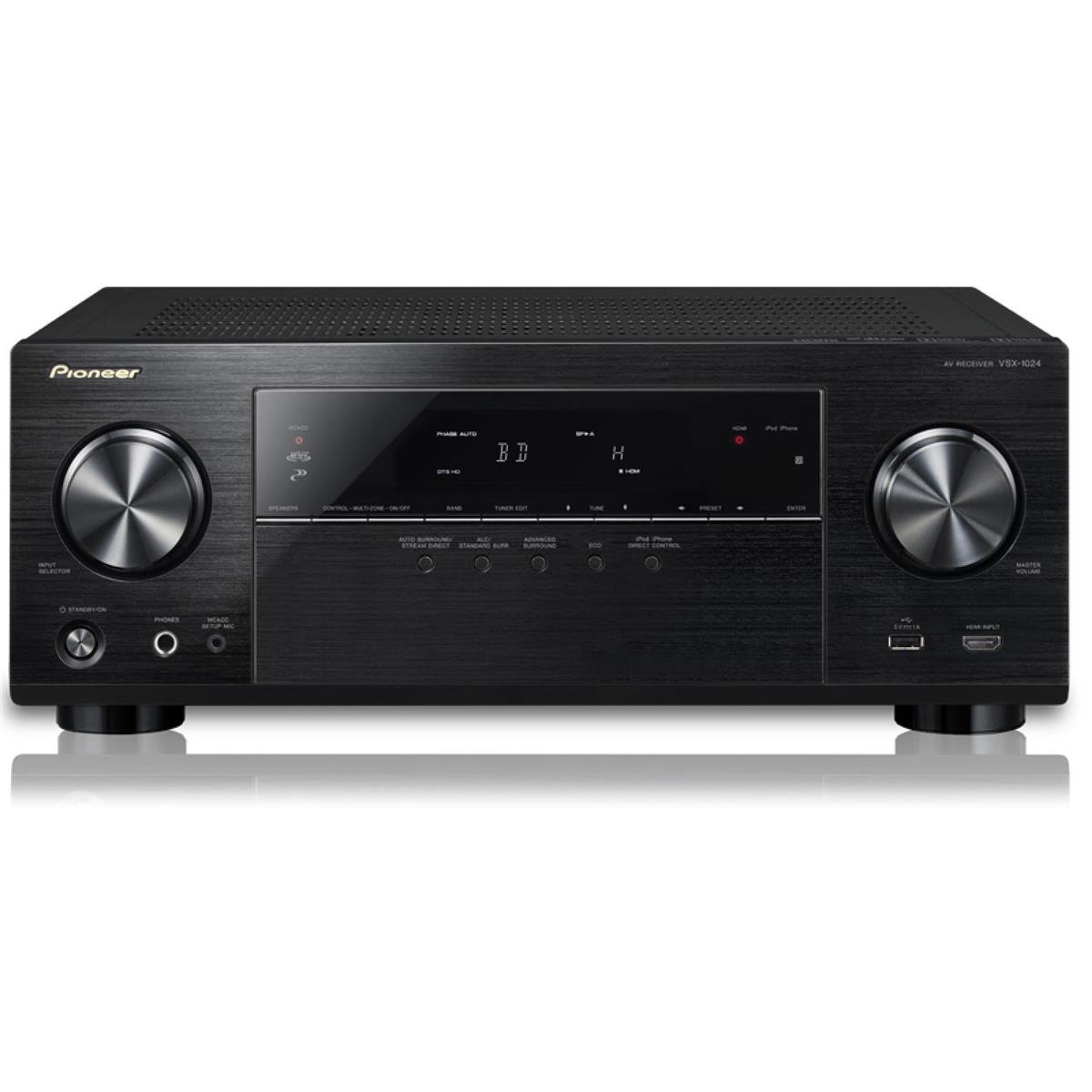
Sary: Front view of the Pioneer VSX-1024 A/V Receiver, showing the display, control knobs, and front panel inputs. This image illustrates the general appearance of the receiver.
Fifandraisana HDMI
Use HDMI cables to connect your video sources (e.g., Blu-ray player, game console, cable box) to the HDMI IN jacks on the receiver. Connect the HDMI OUT (ARC) jack on the receiver to an HDMI input on your TV.
- Connect HDMI OUT (ARC) on receiver to HDMI IN (ARC) on TV.
- Connect HDMI OUT from source devices to HDMI IN 1-7 on receiver.
Fifandraisana amin'ny mpandahateny
Connect your speakers to the corresponding speaker terminals on the rear panel. Ensure correct polarity (+ to + and - to -) for all speakers. This receiver supports a 7.2 channel configuration.
- Connect front left and right speakers.
- Connect center speaker.
- Connect surround left and right speakers.
- Connect surround back left and right speakers (or use for front height/width).
- Connect up to two powered subwoofers to the SUBWOOFER PRE OUT jacks.
Network Connection
For network features like AirPlay and Spotify, connect the receiver to your home network. Use an Ethernet cable to connect the receiver's LAN port to your router, or configure a wireless connection if a compatible wireless adapter is used.
3. Initial Setup (MCACC)
The Multi-Channel Acoustic Calibration System (MCACC) automatically optimizes your speaker settings for your listening environment.
- Connect the supplied MCACC setup microphone to the SETUP MIC jack on the front panel.
- Apetraho amin'ny toerana voalohany hihainoanao ny mikrôfôna.
- Follow the on-screen instructions displayed on your TV to start the MCACC calibration process.
- The system will emit test tones and measure speaker size, level, distance, and equalization.
Fampandehanana ny Receiver anao
1. Fampandehanana fototra
- Herim-batana / maty: Tsindrio ny ON / STANDBY bokotra eo amin'ny tontonana anoloana na fanaraha-maso lavitra.
- Fanaraha-maso ny feo: Ampiasao ny MASTER VOLUME bokotra eo amin'ny tontonana eo aloha na ny VOLUME +/- bokotra amin'ny lavitr'ezaka.
2. Safidio fidirana
To switch between connected devices, press the corresponding input selector buttons on the remote control (e.g., BD / DVD, Tapaka ny, SAT/CBL) or use the INPUT SELECTOR bokotra eo amin'ny tontonana anoloana.
3. Fomba feo
The receiver offers various sound modes to enhance your listening experience. Use the Nanodidina or ADV. SURROUND buttons on the remote to cycle through modes like Dolby Digital, DTS, Stereo, and various Pioneer-specific sound fields.
4. Network Features
Leverage the receiver's network capabilities for streaming and connectivity:
- Apple AirPlay: Stream music wirelessly from your Apple devices (iPhone, iPad, iPod touch, Mac) to the receiver. Ensure both devices are on the same network.
- Spotify Connect: Access millions of songs from the Spotify digital music-streaming service. Control playback directly from the Spotify app on your smartphone or tablet.
- HTC Connect: Stream music from compatible HTC smartphones.
- Playback tsy misy gap: Enjoy uninterrupted playback for supported audio formats including AIFF, Apple Lossless, WAV, FLAC, AAC, and MP3.
5. Fanaraha-maso lavitra
The supplied remote control provides full functionality for the receiver. Familiarize yourself with the button layout for convenient operation. Ensure batteries are inserted correctly.
fikarakarana
1. Fanadiovana
To maintain the appearance and performance of your receiver:
- Esory ny tadin-jiro alohan'ny hanadiovana.
- Fafao amin'ny lamba malefaka sy maina ny ety ivelany.
- Aza mampiasa mpanadio, savoka, na solvents, fa mety hanimba ny endriny.
- Keep ventilation openings clear of dust.
2. Fanavaozana firmware
Pioneer may release firmware updates to improve performance or add new features. It is recommended to periodically check the Pioneer website for available updates and follow the instructions provided for installation. Firmware updates can often resolve minor operational issues.
Fanamboarana
If you encounter problems with your receiver, refer to the following common issues and solutions:
| OLANA | Antony mety / Vahaolana |
|---|---|
| Tsy misy hery | Ensure the power cord is securely plugged into the receiver and a working wall outlet. Check the power outlet with another device. |
| Tsy misy feo avy amin'ny mpandahateny | Check speaker connections for correct polarity and secure fit. Verify the correct input source is selected. Ensure volume is not muted or set too low. Run MCACC calibration again. |
| Tsy misy sary amin'ny fahitalavitra | Verify HDMI cables are securely connected between source, receiver, and TV. Ensure the correct HDMI input is selected on both the receiver and TV. Try bypassing the receiver by connecting the source directly to the TV to isolate the issue. |
| Tsy mandeha ny subwoofer | Check the subwoofer's power and connection to the receiver's SUBWOOFER PRE OUT. Ensure subwoofer settings are enabled in the receiver's menu. Re-run MCACC calibration. |
| Network features not working | Ensure the receiver is properly connected to your home network (wired or wireless). Check network settings on the receiver and your router. Restart your router and receiver. |
| Tsy mandeha ny fanaraha-maso lavitra | Replace batteries with new ones. Ensure there are no obstructions between the remote and the receiver's IR sensor. |
If the problem persists after trying these solutions, contact Pioneer customer support or a qualified service technician.
fepetra arahana
| endri-javatra | antsipirihany |
|---|---|
| Marika | MPISAVA LALANA |
| Laharana modely | VSX-1024 |
| Fantsona Sound manodidina | 7.2 fantsona |
| Hery mivoaka | 50 Watts (per channel, typical) / 980 Watts (total output) |
| Teknolojia fifandraisana | HDMI Input / Output, MHL input, Bluetooth, Component Video Input / Output, Composite A/V Input, USB, Ethernet input, Wireless Adapter Port, Analog Audio Inputs, Digital Inputs / Output, Pre-Amp Output, Headphone Output, Radio |
| Tohanana Aterineto | Spotify |
| Teknolojia Wireless | AirPlay |
| Fitaovana mifanentana | Smartphone, Mpandahateny |
| Lanja entana | 20.3 kilao |
| loko | Mainty |
Warranty sy fanohanana
Raha mila fanazavana momba ny garantie, jereo azafady ny karatra garantie miaraka amin'ny vokatrao na tsidiho ny tranokala ofisialin'ny Pioneer. website. Pioneer provides customer support and service for its products. For technical assistance, troubleshooting, or service inquiries, please visit the Pioneer support webtranokala na mifandray mivantana amin'ny departemantan'ny serivisy mpanjifany.
Fanamarihana: Ny famaritana ny vokatra sy ny endri-javatra dia mety hiova tsy misy fampandrenesana.