
1. Ievads
The MiBOXER TRI-PW 500W AC Triac Dimmer is designed for precise control of lighting systems in residential and commercial environments. This device integrates WiFi and 2.4GHz technology, allowing for remote operation via compatible applications and MiBOXER remote controls. It supports triac dimming, ensuring compatibility with a wide range of lighting fixtures, including LED, halogen, and incandescent lights, for smooth and consistent dimming from full brightness to a soft glow.
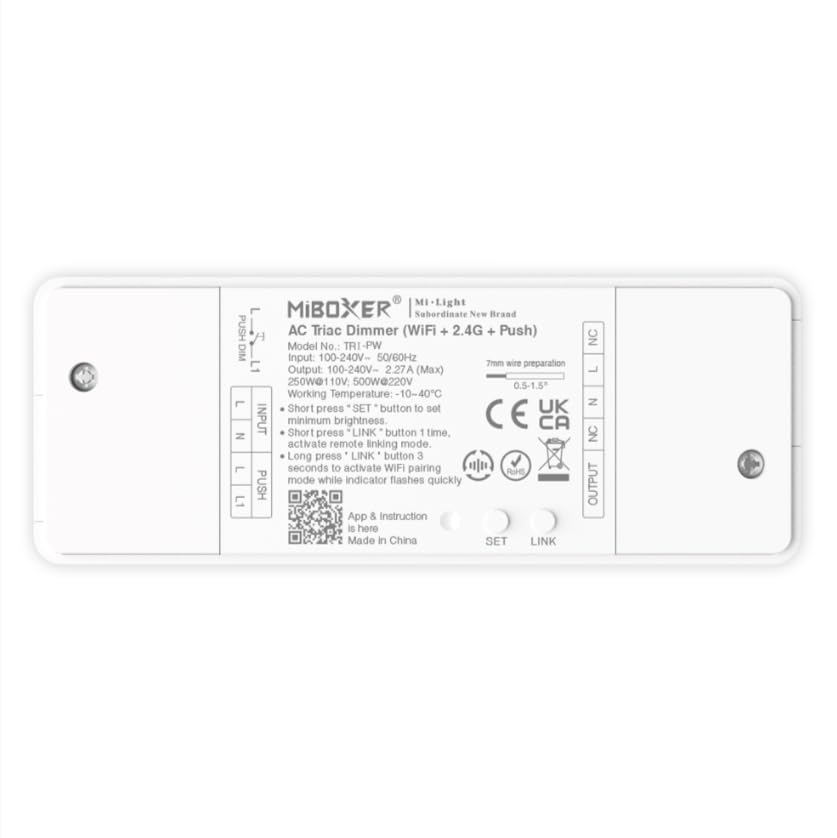
1.1. attēls: beidziesview of the MiBOXER TRI-PW 500W AC Triac Dimmer unit.
2. Drošības informācija
- Elektroinstalācija: Uzstādīšanu drīkst veikt tikai kvalificēts elektriķis saskaņā ar vietējiem elektrības noteikumiem un noteikumiem.
- Strāvas atslēgšana: Pirms aptumšotāja uzstādīšanas vai apkopes vienmēr atvienojiet strāvas padevi no ķēdes pārtraucēja.
- Voltage Saderība: Pārliecinieties, vai ievades tilptage matches the dimmer's specifications (100-240V AC).
- Kravnesība: Do not exceed the maximum load capacity of 500W. Overloading can cause damage or fire.
- Lietošanai tikai iekštelpās: This device is intended for indoor use in dry locations. Avoid exposure to moisture or extreme temperatures.
- Saderība: Use only with compatible dimmable lighting fixtures (LED, halogen, incandescent).
3. Iepakojuma saturs
Pārliecinieties, vai iepakojumā ir visas sastāvdaļas:
- MiBOXER TRI-PW 500W AC Triac Dimmer Unit
- User Manual (may be included as a separate document)

Image 3.1: MiBOXER TRI-PW Dimmer unit shown with its packaging and a user manual.
4. Produkta īpašības
- Powerful 500W Capacity: Supports high-power loads, suitable for various lighting fixtures.
- Triac Dimming Technology: Provides flicker-free dimming for LED, halogen, and incandescent lights.
- WiFi & 2.4GHz Control: Integrates with WiFi and MiBOXER 2.4GHz systems for smartphone or remote control.
- Push Control Compatibility: Allows for quick, on-site dimming adjustments via a push button.
- Lietotne un balss vadība: Compatible with major smart home platforms for app-based and voice command control.
- Atmiņas funkcija: Retains previous lighting settings after power cycles.
5. Specifikācijas
| Funkcija | Detaļas |
|---|---|
| Zīmols | MiBOXER |
| Modeļa nosaukums | TRI-PW |
| Īpaša iezīme | 500 W AC Triac Dimmer |
| Frekvenču joslas klase | Viena josla |
| Bezvadu sakaru standarts | 802.11b |
| Saderīgas ierīces | Atbalstiet PUSH aptumšošanu |
| Ieteicamie lietojumi | Home lighting systems |
| Savienojamības tehnoloģija | Wi-Fi |
| Viedās mājas saderība | Smart Home Compatible (e.g., Amazon Alexa, Google Assistant) |
| Pārklājums | LED, halogen, incandescent, high-power loads |
| Biežums | 2.4 GHz |
| Izmēri (aptuveni) | 117 mm (garums) x 45 mm (platums) x 24 mm (augstums) |
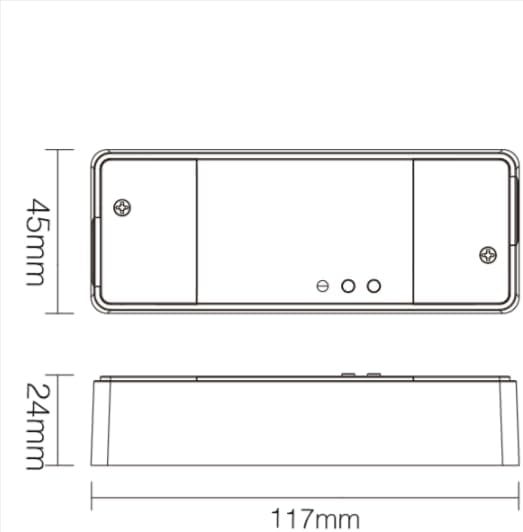
Image 5.1: Technical drawing showing the approximate dimensions of the TRI-PW dimmer.

Image 5.2: Packaging dimensions for the MiBOXER TRI-PW dimmer.
6. Iestatīšana un instalēšana
Svarīgi: Pirms uzstādīšanas sākšanas pārliecinieties, vai strāvas padeve ir atvienota pie ķēdes pārtraucēja.
Elektroinstalācijas shēma
The MiBOXER TRI-PW dimmer supports two primary wiring methods for integration with a push switch. Both methods are suitable for triac dimming LED lights, traditional filament lamps, un halogēna lamps.

Image 6.1: Wiring diagrams for connecting the MiBOXER TRI-PW dimmer with a push switch.
Method 1: Single-Wire Push Switch Connection
- Connect the Live (L) and Neutral (N) input wires from your power supply (100-240V~) to the corresponding 'INPUT' terminals on the dimmer.
- Connect the Live (L) and Neutral (N) output wires to your lighting fixture (100-240V~) from the 'OUTPUT' terminals.
- Connect one wire from the push switch to the 'PUSH' terminal on the dimmer.
- Connect the other wire from the push switch to the Live (L) input terminal.
Method 2: Two-Wire Push Switch Connection
- Connect the Live (L) and Neutral (N) input wires from your power supply (100-240V~) to the corresponding 'INPUT' terminals on the dimmer.
- Connect the Live (L) and Neutral (N) output wires to your lighting fixture (100-240V~) from the 'OUTPUT' terminals.
- Connect the two wires from the push switch directly to the 'PUSH' terminals on the dimmer.
After wiring, secure the dimmer in a suitable electrical box or enclosure. Restore power at the circuit breaker.
7. Lietošanas instrukcijas
7.1. Push Switch Control
- Īsa nospiešana: Turn the lights ON or OFF.
- Ilgi nospiediet: Adjust the brightness level. Release the button to set the desired brightness.
7.2. WiFi lietotnes vadība
The TRI-PW dimmer supports control via a smart app (e.g., Tuya Smart app). No additional 2.4G gateway is required for app control.
- Download the compatible smart home app from your device's app store.
- Reģistrējieties vai piesakieties savā kontā.
- Put the dimmer into pairing mode (refer to the app's instructions or the dimmer's specific pairing procedure, usually involving a long press of the 'SET' button or power cycling).
- Follow the in-app instructions to add the device to your network.
- Once connected, you can control the dimmer's ON/OFF state and brightness from your smartphone.
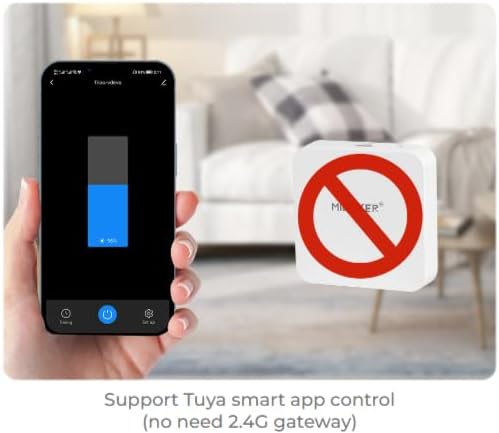
7.1. attēls: Piemērsample of controlling the dimmer using a smartphone application.
7.3. 2.4GHz Remote Control
The dimmer can be paired with MiBOXER 2.4GHz remote controls for direct wireless control.
- Ensure the dimmer is powered on.
- Refer to your MiBOXER 2.4GHz remote control's manual for specific pairing instructions. Typically, this involves pressing a "Link" or "Pair" button on the remote within a few seconds of powering on the dimmer or pressing the dimmer's 'SET' button.
- A successful pairing is usually indicated by the connected light flashing.
7.4. Balss vadība (Alexa/Google palīgs)
The TRI-PW dimmer is compatible with smart home voice assistants like Amazon Alexa and Google Assistant when integrated through a compatible smart home app.
- Ensure your dimmer is successfully connected to the smart home app (e.g., Tuya Smart).
- Atveriet savu Amazon Alexa vai Google Home lietotni.
- Enable the skill or service for the smart home app you are using (e.g., "Tuya Smart" skill).
- Discover devices. Your dimmer should appear in the list.
- Assign a name to your dimmer (e.g., "Living Room Light").
- You can now control your light using voice commands, such as "Alexa, turn on Living Room Light" or "Hey Google, dim Living Room Light to 50%."

Image 7.2: The dimmer is compatible with voice control platforms like Amazon Alexa and Google Assistant.
8. Apkope
- Tīrīšana: Disconnect power before cleaning. Wipe the dimmer with a soft, dry cloth. Do not use liquid cleaners or aerosols.
- Pārbaude: Periodiski pārbaudiet vadu savienojumu stingrību un nodiluma vai bojājumu pazīmes.
- Programmaparatūras atjauninājumi: If available, check the smart home app for firmware updates to ensure optimal performance and security.
9. Traucējummeklēšana
| Problēma | Iespējamais cēlonis | Risinājums |
|---|---|---|
| Gaismas neieslēdzas. | No power, incorrect wiring, faulty bulb, dimmer not paired. | Check circuit breaker. Verify wiring according to diagrams. Test bulb. Re-pair dimmer with app/remote. |
| Gaismas mirgo vai dūko. | Incompatible bulb, overloaded circuit, loose wiring. | Ensure bulbs are dimmable and compatible with triac dimmers. Reduce load. Check wiring connections. |
| Dimmer not responding to app/remote. | Dimmer out of range, WiFi issue, not paired. | Ensure dimmer is within WiFi/2.4GHz range. Check WiFi router. Re-pair dimmer with app/remote. |
| Nevar izveidot savienojumu ar Wi-Fi. | Incorrect WiFi password, 5GHz network, dimmer not in pairing mode. | Verify WiFi password. Ensure you are connecting to a 2.4GHz network. Put dimmer into WiFi pairing mode. |
10. Garantija un atbalsts
This MiBOXER TRI-PW dimmer comes with a 2 gada garantija no pirkuma datuma. Šī garantija attiecas uz materiālu un ražošanas defektiem normālas lietošanas apstākļos.
The warranty does not cover damage caused by improper installation, misuse, unauthorized modifications, or acts of nature.
For technical support or warranty claims, please contact your retailer or the manufacturer directly. Please have your purchase receipt and product model number (TRI-PW) available when contacting support.
Lai iegūtu plašāku informāciju, varat apmeklēt vietni MiBOXER Store on Amazon.