
1. Ievads
Paldies par pirkumuasing the Kaiser Professional 15-inch Speaker System, Model GEM-9520. This manual provides essential information for the safe and efficient operation of your new speaker system. Please read it thoroughly before use and retain it for future reference.
2. Drošības informācija
- Barošanas avots: Izmantojiet tikai norādīto strāvas adapteri. Pārliecinieties, vai spriegumstage atbilst jūsu vietējam barošanas avotam.
- Ūdens un mitrums: Do not expose the speaker to water, rain, or high humidity. Avoid placing liquid-filled objects on the speaker.
- Ventilācija: Nodrošiniet atbilstošu ventilāciju ap skaļruni. Neaizbloķējiet ventilācijas atveres.
- Siltums: Keep the speaker away from heat sources such as radiators, heat registers, stoves, or other apparatus that produce heat.
- Tīrīšana: Pirms tīrīšanas atvienojiet strāvas padevi. Izmantojiet sausu, mīkstu drānu. Nelietojiet šķidrus tīrīšanas līdzekļus vai aerosolu tīrīšanas līdzekļus.
- Apkope: Nemēģiniet apkalpot šo produktu pats. Visu apkopi uzticiet kvalificētam servisa personālam.
- Izvietojums: Place the speaker on a stable, flat surface or securely mount it on the provided tripod. Avoid placing it in direct sunlight or near strong magnetic fields.
3. Iepakojuma saturs
Pārliecinieties, vai iepakojumā ir visi priekšmeti:
- Kaiser GEM-9520 Professional 15-inch Speaker System
- Vadu mikrofons
- Skaļruņu statīvs
- Strāvas kabelis
- Lietotāja rokasgrāmata (šis dokuments)

Image: Kaiser GEM-9520 speaker system with included microphone and tripod stand.
4. Produkts beidziesview
The Kaiser GEM-9520 is a versatile 15-inch professional speaker system designed for various audio applications. It features multiple input options, LED lighting, and a robust design.
Priekšējais panelis
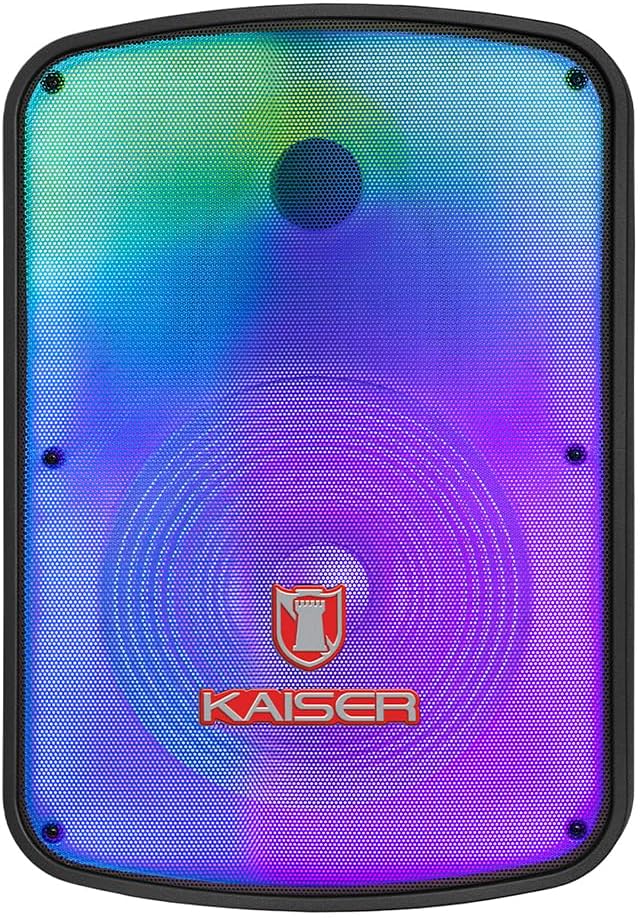
Attēls: priekšpuse view of the Kaiser GEM-9520 speaker, showcasing the 15-inch driver and integrated LED lighting.
Aizmugurējais vadības panelis
The rear panel houses all input/output connections and control knobs.

Attēls: Aizmugure view of the Kaiser GEM-9520 speaker, displaying the control panel with various inputs and adjustments.

Attēls: Detalizēts view of the control panel, showing the display, volume, equalizer, and input ports.
Included Microphone and Tripod

Image: The wired microphone included with the Kaiser GEM-9520 speaker system.
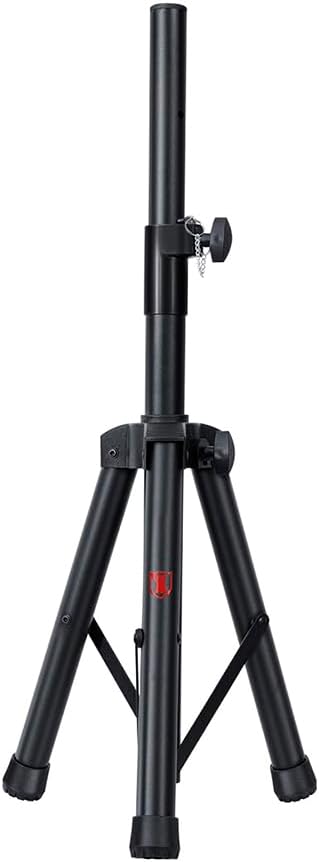
Image: The adjustable tripod stand for mounting the speaker.
5. Iestatīšana
5.1 Izpakošana un sākotnējā novietošana
- Uzmanīgi izņemiet visas sastāvdaļas no iepakojuma.
- Place the speaker on a flat, stable surface or prepare for tripod mounting.
5.2 Tripod Assembly and Speaker Mounting
- Unfold the tripod legs and extend them to a stable position. Ensure all locking mechanisms are secure.
- Adjust the height of the tripod to your desired level and secure the locking pin and knob.
- Carefully lift the speaker and place its bottom mounting hole onto the tripod pole. Ensure it is seated firmly.

Image: Close-up of the tripod stand, showing its adjustable components.
5.3 Power Connection and Initial Charge
- Connect the provided power cable to the speaker's power input port on the rear panel.
- Pievienojiet strāvas kabeļa otru galu piemērotā elektrotīkla kontaktligzdā.
- For optimal battery life, fully charge the speaker before its first use. The charging time is approximately 3 hours.
6. Lietošanas instrukcijas
6.1 Ieslēgšana/izslēgšana
Locate the power switch on the rear control panel. Flip it to the 'ON' position to power on the speaker. Flip it to 'OFF' to power off.
6.2 Režīmu izvēle
Press the 'MODE' button on the control panel to cycle through available input modes: Bluetooth, USB, Micro SD, AUX, and FM Radio.
6.3 Volume and Equalizer Controls
- Apjoms: Rotate the 'VOLUME' knob to adjust the overall output volume.
- Treble (Agudos): Use the 'AGUDOS' knob to adjust the high-frequency response.
- Bass (Bajos): Use the 'BAJOS' knob to adjust the low-frequency response.
6.4 Bluetooth savienojums
- Switch the speaker to Bluetooth mode. The display will show 'BLUE' and a pairing indicator will flash.
- Savā mobilajā ierīcē (viedtālrunī, planšetdatorā, klēpjdatorā) iespējojiet Bluetooth un meklējiet pieejamās ierīces.
- Select 'Kaiser GEM-9520' (or similar name) from the list.
- Kad skaļrunis ir savienots pārī, atskanēs apstiprinājuma skaņa un Bluetooth indikators pārtrauks mirgot.
6.5 Atskaņošana ar USB/Micro SD karti
- Ievietojiet USB zibatmiņas disku vai Micro SD karti (ar iepriekš ielādētu MP3 audio failu). files) attiecīgajā ostā.
- The speaker will automatically switch to USB/Micro SD mode and begin playback. If not, press the 'MODE' button.
- Use the playback controls (Play/Pause, Next/Previous Track) on the control panel to manage your music.
6.6 AUX ieeja
- Connect an external audio device (e.g., MP3 player, computer) to the 'AUX' input port on the speaker using a 3.5mm audio cable.
- Switch the speaker to AUX mode using the 'MODE' button.
- Kontrolējiet atskaņošanu un skaļumu no pievienotās ierīces.
6.7 Mikrofona lietošana
- Connect the wired microphone to the 'MIC' input port on the rear panel.
- Adjust the microphone volume using the 'VOL MIC' knob.
- Adjust the echo effect using the 'ECO' knob.

Image: Close-up of the wired microphone, showing its ON/OFF switch.
6.8 Microphone Audio Priority Function
This function automatically lowers the background music volume when the microphone is in use, making the voice clearer and more prominent. To activate/deactivate this function, refer to the specific button or switch on the control panel labeled for 'Mic Priority' or similar.

Image: Diagram illustrating the microphone audio priority function, which lowers music volume when the microphone is active.
6.9 KSR-LINK Function
The KSR-LINK function allows you to wirelessly connect two compatible Kaiser speakers for a stereo sound experience. Refer to the specific instructions for KSR-LINK pairing, usually involving pressing a dedicated button on both speakers simultaneously.
7. Apkope
- Tīrīšana: Wipe the speaker's exterior with a soft, dry cloth. Do not use abrasive cleaners, waxes, or solvents.
- Uzglabāšana: Ja skaļrunis ilgstoši netiek lietots, uzglabājiet to vēsā, sausā vietā, pasargājot no tiešiem saules stariem un ekstremālām temperatūrām.
- Akumulatora kopšana: Lai paildzinātu akumulatora darbības laiku, izvairieties no biežas akumulatora pilnīgas izlādes. Regulāri uzlādējiet skaļruni, pat ja tas netiek lietots.
8. Traucējummeklēšana
| Problēma | Iespējamais cēlonis | Risinājums |
|---|---|---|
| Nav jaudas | Strāvas kabelis nav pievienots; Akumulators izlādējies; Izslēgts barošanas slēdzis. | Ensure power cable is securely connected and plugged in. Charge the battery. Turn the power switch to 'ON'. |
| Nav skaņas | Volume too low; Incorrect input mode; External device not playing. | Increase the master volume. Select the correct input mode. Ensure the connected device is playing and its volume is up. |
| Bluetooth netiek savienots | Speaker not in pairing mode; Device too far; Previously paired device connected. | Ensure speaker is in Bluetooth pairing mode. Move device closer to speaker. Disconnect from other Bluetooth devices. |
| Mikrofons nedarbojas | Microphone not connected; Microphone volume too low; Microphone switch off. | Ensure microphone is securely plugged in. Increase 'VOL MIC' knob. Turn the microphone's ON/OFF switch to 'ON'. |
| Slikta FM radio uztveršana | Weak signal; No external antenna. | Reposition the speaker. Extend any built-in antenna or connect an external one if available. |
9. Specifikācijas
| Funkcija | Specifikācija |
|---|---|
| Modelis | GEM-9520 |
| Izvades vattage | 25000 vati (PMPO) |
| Skaļruņa izmērs | 15 collas |
| Barošanas avots | Akumulators |
| Akumulatora darbības laiks (vidēji) | 6 stundas |
| Uzlādes laiks | 3 stundas |
| Savienojamības tehnoloģija | AUX, Bluetooth, USB |
| Audio ieejas | Microphone, USB, Micro SD, 3.5 mm, 6.3 mm |
| Īpašas funkcijas | High-resolution audio, LED light, USB port, Microphone Audio Priority, KSR-LINK |
| Montāžas veids | Floor Mount (Tripod included) |
| Materiāls | Plastmasa |
| Produkta izmēri (G x P x A) | 45 x 35 x 64 cm |
| Produkta svars | 10.85 kg |
10. Garantija un atbalsts
This Kaiser product is covered by a manufacturer's warranty. For specific warranty terms and conditions, please refer to the warranty card included in your product packaging or contact Kaiser customer support. For technical assistance or service inquiries, please visit the official Kaiser webvietnē vai sazinieties ar klientu apkalpošanas nodaļu.