
1. Ievads
This user manual provides essential information for the safe and efficient operation of your Qoltec 51758 Mains & Inverter Adapter. This power adapter is designed to provide reliable power to compatible HP notebooks, featuring advanced protection mechanisms against overvoltage, overload, short circuit, and overheating. Please read this manual thoroughly before using the product to ensure proper functionality and longevity.
2. Drošības instrukcijas
To prevent injury or damage to your device, always follow these safety precautions:
- Nepakļaujiet adapteri ūdenim, mitrumam vai augstam gaisa mitrumam.
- Do not disassemble, modify, or attempt to repair the adapter. Refer all servicing to qualified personnel.
- Pārliecinieties, vai strāvas kontaktligzdas skaļumstage is compatible with the adapter's specifications.
- Nenovietojiet adapteri tiešos saules staros vai siltuma avotu tuvumā.
- Do not use the adapter if the cable or connector is damaged.
- Uzglabāt bērniem nepieejamā vietā.
- Atvienojiet adapteri no strāvas kontaktligzdas, ja to ilgstoši nelietojat.
3. Produkts beidziesview
The Qoltec 51758 adapter is a compact and efficient power solution. It includes the main adapter unit and various interchangeable tips to ensure compatibility with a range of HP notebooks.
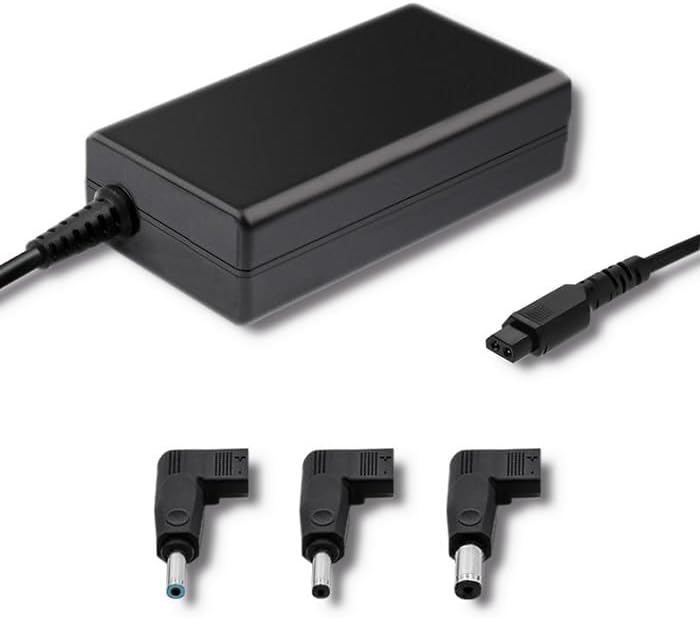
3.1. attēls. Priekšpuse view of the Qoltec 51758 power adapter showing the main unit and three common interchangeable tips.

3.2. attēls. Aizmugure view of the Qoltec 51758 power adapter, highlighting the AC input port and the three interchangeable tips.
The adapter features a robust design with a standard AC input port and a DC output cable that connects to the interchangeable tips. These tips ensure a secure and correct fit for various HP notebook models.
4. Iestatīšana
- Identify the Correct Tip: Select the interchangeable tip that matches the power input port of your HP notebook. Ensure it fits snugly and securely.
- Connect the Tip: Attach the selected tip to the DC output cable of the Qoltec 51758 adapter.
- Connect to Notebook: Insert the connected tip into the power input port of your HP notebook.
- Pievienojiet strāvas kontaktligzdai: Plug the AC input cable of the adapter into a standard wall power outlet.
- Pārbaudiet savienojumu: Confirm that the power indicator light (if present on your notebook or adapter) illuminates, indicating a successful power connection.
5. Darbība
Once properly set up, the Qoltec 51758 adapter operates automatically to provide power to your connected HP notebook. It will charge the notebook's battery and/or power the notebook directly.
- Uzlāde: When connected, the adapter will charge your notebook's battery until it reaches full capacity.
- Direct Power: The adapter can also power your notebook directly, even if the battery is fully charged or removed (if supported by the notebook).
- Aizsardzības līdzekļi: The adapter is equipped with built-in protections against overvoltage, overload, short circuit, and overheating. In case of an anomaly, the adapter may temporarily cease operation to protect itself and the connected device. Disconnect and reconnect to reset if this occurs.
6. Apkope
Pareiza apkope nodrošina adaptera ilgmūžību un optimālu veiktspēju.
- Tīrīšana: Pirms tīrīšanas atvienojiet adapteri no visiem barošanas avotiem un ierīcēm. Virsmas noslaukšanai izmantojiet mīkstu, sausu drānu. Nelietojiet šķidrus tīrīšanas līdzekļus vai aerosolus.
- Uzglabāšana: When not in use, store the adapter in a cool, dry place away from direct sunlight and extreme temperatures. Avoid tightly winding the cables to prevent damage.
- Kabeļa kopšana: Regularly inspect the power cables and connectors for any signs of wear, cuts, or damage. Replace if necessary.
7. Traucējummeklēšana
| Problēma | Iespējamais cēlonis | Risinājums |
|---|---|---|
| Adapteris nenodrošina strāvu. | No power from outlet; loose connection; damaged cable/adapter. | Check outlet with another device. Ensure all connections are secure. Inspect cables for damage. |
| Notebook not charging. | Incorrect tip used; notebook power port issue; adapter fault. | Verify the correct tip is used and fully inserted. Test with another compatible adapter if possible. |
| Adapteris šķiet karsts. | Normal operation under load; poor ventilation; overload. | Ensure adequate ventilation around the adapter. If excessively hot, disconnect and allow to cool. Reduce load if possible. |
If the problem persists after attempting these solutions, please contact Qoltec customer support.
8. Specifikācijas
| Funkcija | Detaļas |
|---|---|
| Zīmols | Qoltec |
| Modelis | 51758 |
| Wattage | 65 vati |
| Produkta izmēri | 2.79 x 24.64 x 16.51 cm |
| Preces svars | 214 grami |
| Saderīgas ierīces | HP Notebooks |
| Aizsardzības līdzekļi | Overvoltage, Overload, Short Circuit, Overheat Protection |
| Savienotāja veids | Interchangeable DC Power Tips |
| Savienojamības tehnoloģija | Wired Power Adapter |
| Datums pirmais pieejams | 29. gada 2022. aprīlis |
Piezīme. Specifikācijas var tikt mainītas bez iepriekšēja brīdinājuma.
9. Garantija un atbalsts
Qoltec products are manufactured to high quality standards. For information regarding warranty coverage, terms, and conditions, please refer to the warranty card included with your product or visit the official Qoltec webvietne.
For technical support, troubleshooting assistance, or inquiries about replacement parts, please contact Qoltec customer service through their official channels. Have your product model number (51758) and purchase details ready when contacting support.
Qoltec Official Webvietne: www.qoltec.com (Piezīme. Šis ir vietturis URL, please refer to actual Qoltec webvietne atbalsta saņemšanai.)