
Ievads
This manual provides comprehensive instructions for the safe and effective use of your Fujifilm EF-42 Shoe Mount Flash. Please read this manual thoroughly before using the product and retain it for future reference. The Fujifilm EF-42 is designed to provide enhanced lighting capabilities for compatible Fujifilm cameras, featuring a guide number of 42 (at ISO 100, 105mm zoom) and versatile bounce and swivel functions.
Drošības pasākumi
- Do not disassemble or modify the flash unit.
- Keep the flash unit dry. Do not expose it to water or high humidity.
- Izvairieties no tiešas zibspuldzes iedarbības uz acīm, īpaši nelielā attālumā.
- Use only specified batteries (4 AA batteries).
- Store the flash unit in a cool, dry place away from direct sunlight.
Iepakojuma saturs
Pārliecinieties, vai iepakojumā ir visas preces:
- Fujifilm EF-42 Shoe Mount Flash Unit
- Soft Case (if included with your specific purchase)
- Mini Stand (if included)
- Lietošanas instrukcija (šis dokuments)
Iestatīšana
1. Akumulatora uzstādīšana
The EF-42 flash requires four (4) AA batteries. For optimal performance and recycle times, high-capacity rechargeable Ni-MH batteries are recommended.
- Locate the battery compartment cover on the side of the flash unit.
- Atbīdiet vāku bultiņas norādītajā virzienā.
- Insert four AA batteries, ensuring correct polarity (+/-) as marked inside the compartment.
- Cieši aizveriet bateriju nodalījuma vāku, līdz tas noklikšķ savā vietā.

Attēls: priekšpuse view of the Fujifilm EF-42 Shoe Mount Flash. This image displays the main flash head and the infrared assist beam window.
2. Piestiprināšana pie kameras
The EF-42 flash unit attaches to your camera's hot shoe.
- Ensure both the camera and the flash unit are powered off.
- Remove the protective cap from the camera's hot shoe and from the flash unit's foot.
- Slide the flash unit's mounting foot completely into the camera's hot shoe.
- Tighten the locking wheel on the flash unit's foot to secure it firmly to the camera. Do not overtighten.
Operating the Flash
1. Ieslēgšana/izslēgšana
Locate the ON/OFF switch on the back panel of the flash unit.
- To power on, slide the switch to the "ON" position. The LCD panel will illuminate.
- Lai izslēgtu, pabīdiet slēdzi pozīcijā "IZSLĒGTS".

Attēls: Aizmugure view of the Fujifilm EF-42 Shoe Mount Flash, showing the LCD display, mode and select buttons, and the power switch.
2. Zibspuldzes režīmi
The EF-42 offers various flash modes to suit different shooting conditions. Use the REŽĪMS button to cycle through available modes and the SEL (Select) button to adjust settings within a mode.
- TTL (caur objektīvu) režīms: The flash automatically adjusts its output based on the camera's metering system for balanced exposure. This is the recommended mode for most situations.
- Manuālais režīms: Allows you to manually set the flash output power (e.g., 1/1, 1/2, 1/4, etc.). This mode provides precise control for advanced users.
- Vairāku režīmu: (If available) Fires the flash multiple times during a single exposure to capture stroboscopic effects.
3. Bounce and Swivel Functionality
The flash head can be tilted and swiveled to bounce light off ceilings or walls, creating softer, more natural-looking illumination and avoiding harsh direct flash.
- Slīpums: The flash head can be tilted upwards to various angles (e.g., 0°, 45°, 60°, 75°, 90°). Gently push the flash head upwards until it locks into the desired position.
- Grozāmais: The flash head can be swiveled horizontally (e.g., 90° left, 180° right). Gently rotate the flash head to the left or right until it locks into the desired position.

Image: Demonstration of the Fujifilm EF-42 flash head swiveling horizontally, illustrating its flexibility for bounce flash.
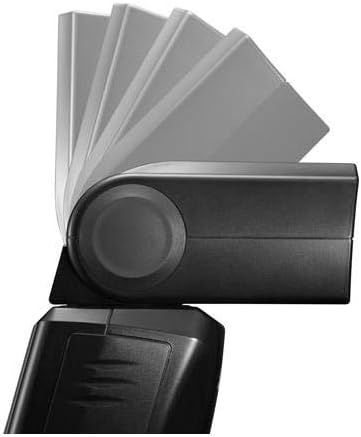
Image: Demonstration of the Fujifilm EF-42 flash head tilting vertically, showing its ability to direct light upwards for bounce lighting.
4. Zoom Head
The EF-42 features an automatic zoom head that adjusts to match the focal length of your lens, optimizing light coverage. In some modes, manual zoom adjustment may also be available via the SEL pogu.
5. Test Flash and Charge Indicator
The TEST/CHARGE button serves two functions:
- When the flash is charged and ready to fire, pressing this button will emit a test flash.
- The indicator light on this button will glow when the flash is fully charged and ready for use. It will blink or remain off during charging.
Apkope
- Tīrīšana: Zibspuldzes tīrīšanai izmantojiet mīkstu, sausu drānu. Noturīgu netīrumu gadījumā izmantojiet nedaudz sausu drānu.amp cloth can be used, followed by a dry cloth. Do not use solvents or abrasive cleaners.
- Akumulatora kopšana: Remove batteries if the flash unit will not be used for an extended period to prevent leakage.
- Uzglabāšana: Store the flash in its protective case (if supplied) in a cool, dry environment.
Problēmu novēršana
| Problēma | Iespējamais cēlonis | Risinājums |
|---|---|---|
| Flash does not power on. | Baterijas ir izlādējušās vai nepareizi ievietotas. | Replace batteries or check polarity. Ensure the ON/OFF switch is in the "ON" position. |
| Zibspuldze neuzplaiksnī. | Flash not fully charged; not securely mounted; camera settings. | Wait for the charge indicator to light up. Re-mount the flash firmly. Check camera flash settings. |
| Images are too dark/bright. | Incorrect flash exposure compensation; wrong mode; distance to subject. | Adjust flash exposure compensation on the flash or camera. Switch to TTL mode. Ensure subject is within flash range. |
| AF assist light not working. | Not all camera models support the flash's AF assist light. | Refer to your camera's manual for compatibility with external flash AF assist features. The camera's built-in AF assist may be used instead. |
Specifikācijas
| Modeļa numurs | 75769 |
| Ceļveža numurs | 42 (at ISO 100, 105mm zoom) |
| Saderīgi stiprinājumi | Fujifilm hot shoe |
| Barošanas avots | 4 x AA baterijas |
| Zibspuldzes sinhronizācijas ātrums | 1/200 or 1/250 (depending on camera model) |
| Produkta izmēri | 6.6 x 3 x 2.8 collas (16.8 x 7.6 x 7.1 cm) |
| Preces svars | 9.6 unces (272 grami) |
Garantija un atbalsts
For warranty information, please refer to the warranty card included with your product or visit the official Fujifilm website. For technical support, service, or inquiries, please contact Fujifilm customer service.
Vairāk informācijas un atbalsta resursu varat atrast vietnē Official Fujifilm Store on Amazon.