
1. Įvadas
This manual provides essential information for the safe and efficient use of your LG 43NU850B6LA Smart TV. This 43-inch Nano 4K UHD television is designed to deliver exceptional picture quality with its Nano Cell technology, powered by the α7 AI Processor 4K Gen9, and enhanced by HDR10 Pro. It also features webOS 26 AI for smart functionality and immersive Virtual 9.1.2 ChAI Sound.
Please read this manual thoroughly before operating your TV and keep it for future reference.
2. Produktas baigtasview ir Matmenys
The LG 43NU850B6LA is a 43-inch Smart TV featuring a sleek design and advanced display technologies. Understanding its physical characteristics is important for proper placement and installation.

2.1 vaizdas: Priekyje ir šone view of the LG 43NU850B6LA Smart TV with key dimensions. The TV measures approximately 95.9 cm (37.7 inches) in width, 56.3 cm (22.2 inches) in height without stand, and 7.08 cm (2.8 inches) in depth. With the stand, the height is 61.8 cm (24.3 inches) and depth is 20 cm (7.9 inches).
3. Sąranka
3.1 Išpakavimas ir stovo montavimas
Carefully remove the TV from its packaging. Place the TV face down on a soft, flat surface to avoid screen damage. Attach the included stands to the designated slots on the bottom of the TV using the provided screws. Ensure the stands are securely fastened.
3.2 Tvirtinimas prie sienos
The LG 43NU850B6LA is compatible with VESA wall mounts. The recommended VESA mounting pattern is 300x200 mm. Consult a professional for wall mount installation to ensure safety and proper setup.
3.3 Išorinių įrenginių prijungimas
Refer to the rear panel image below for port locations. Connect your devices as follows:
- Antena / kabelis: Connect your antenna or cable TV signal to the 'Sintonizador antena' port.
- HDMI įrenginiai: Use the 3x HDMI 2.1 ports for high-definition devices like Blu-ray players, game consoles, or set-top boxes.
- USB įrenginiai: The 1x USB 2.0 port can be used for connecting USB storage devices to play media or for software updates.
- Tinklas (LAN): Connect an Ethernet cable to the 'Ethernet LAN' port for a wired internet connection.
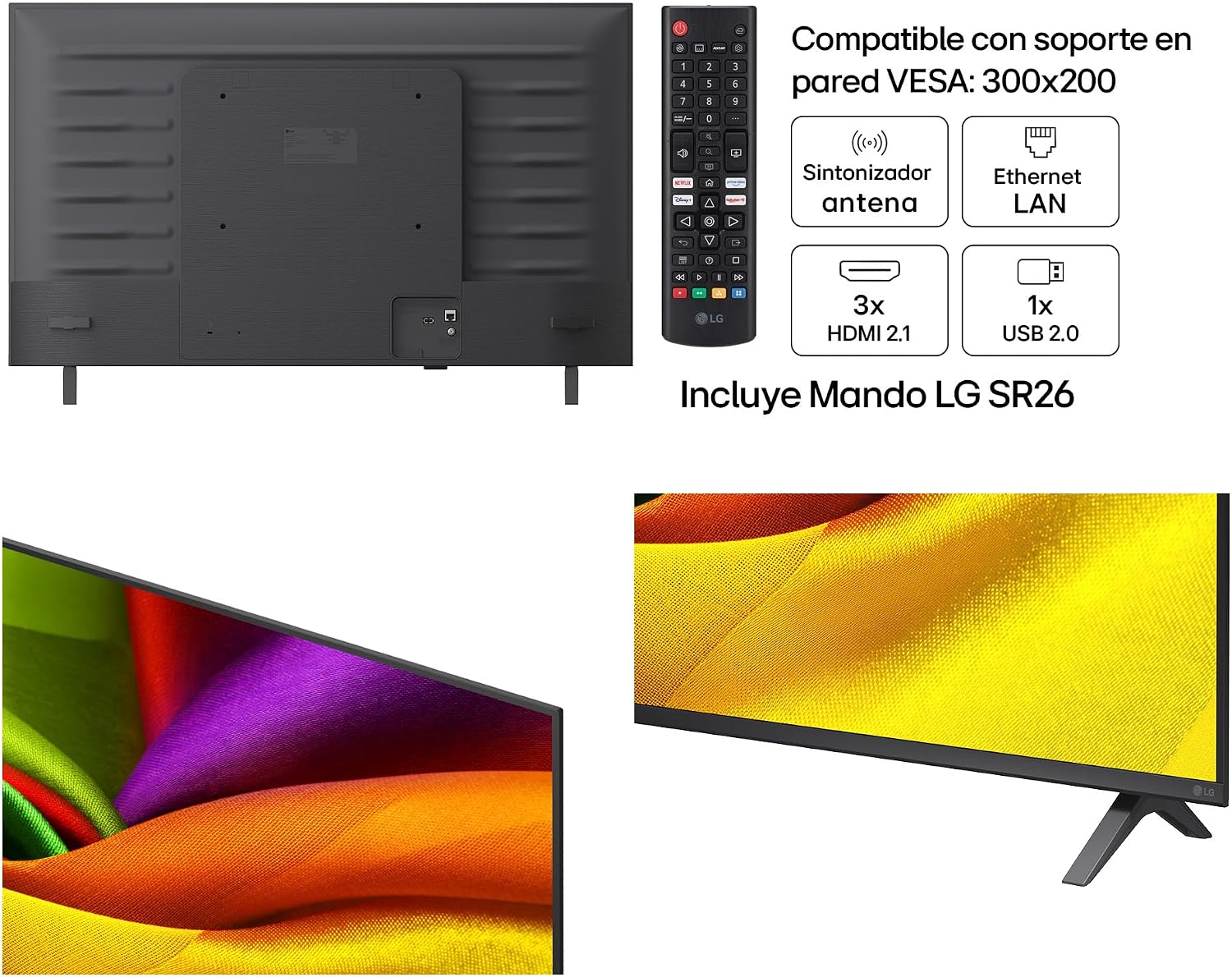
3.1 vaizdas: Galinis view of the LG 43NU850B6LA Smart TV, illustrating the location of the antenna tuner, Ethernet LAN port, 3 HDMI 2.1 ports, and 1 USB 2.0 port. The included LG SR26 remote control is also shown.
3.4 Pradinis įjungimas
After connecting all necessary cables, plug the power cord into an electrical outlet. Press the power button on the remote control or on the TV itself. Follow the on-screen instructions to complete the initial setup, including language selection, network connection, and channel scanning.
4. Televizoriaus valdymas
4.1 Nuotolinis valdymas
The included LG SR26 remote control allows you to navigate the TV's features. It typically includes buttons for power, volume, channel, input selection, smart home access, and navigation.
4.2 webOS 26 AI Smart Features
Jūsų televizorius veikia webOS 26 AI, providing an intuitive interface for accessing streaming services, apps, and other smart features. Use the remote's navigation buttons to browse the home screen and launch applications. The AI functionality can offer personalized recommendations and voice control options.
4.3 Vaizdo ir garso nustatymai
Access the TV's settings menu to customize picture and sound. You can adjust brightness, contrast, color, and sharpness. For sound, select from various modes or fine-tune equalizer settings. The α7 AI Processor 4K Gen9 automatically optimizes both picture and sound for an enhanced viewpatirtį.
5. Pagrindinės savybės ir technologijos
5.1 Nano Cell Technology
LG Nano Cell technology uses nanoparticles to filter and refine colors, enhancing the purity of the RGB spectrum. This results in more accurate and vibrant colors, even when viewed from wide angles. The Nano Detail Enhancer analyzes each frame to optimize contrast, detail, and brightness at a nanometric level, providing a 180% superior definition.

5.1 vaizdas: Išsamią view of the screen demonstrating the enhanced clarity and color precision provided by LG's Nano Cell technology, which offers 180% more sharpness.
5.2 HDR10 Pro
HDR10 Pro enhances the dynamic range of content, delivering brighter highlights and deeper shadows. This technology optimizes the display's resolution across 2,040 independent zones, resulting in a more immersive and detailed visual experience with greater contrast.

5.2 vaizdas: A visual comparison showing the difference between Standard Dynamic Range (SDR) and HDR10 Pro, highlighting the improved brightness, contrast, and color detail in the HDR10 Pro image.
5.3 α7 AI Processor 4K Gen9
The α7 AI Processor 4K Gen9 is the intelligent core of your TV. It utilizes advanced AI algorithms to analyze and optimize both picture and sound in real-time. This processor performs nano-scale image optimization across 2,040 independent zones, enhancing clarity, contrast, and creating a three-dimensional depth effect. It also improves audio quality by creating an immersive virtual surround sound experience.

5.3 vaizdas: A close-up illustration of the α7 AI Processor 4K Gen9 chip, emphasizing its role as the high-power processor that maximizes image and sound quality through Artificial Intelligence.
5.4 4K Super Upscaling
The 4K Super Upscaling feature enhances lower-resolution content to near 4K quality. Sophisticated algorithms analyze and upscale every frame, improving clarity and detail so you can enjoy non-4K content with improved visual fidelity.
5.5 AI Sound (Virtual 9.1.2 Ch)
AI Sound uses advanced algorithms to analyze and enhance audio, creating an immersive virtual 9.1.2 channel surround sound experience. This technology optimizes sound without the need for additional external speakers, providing a richer and more engaging audio landscape.
5.6 Dinaminis tonų atvaizdavimas
Dynamic Tone Mapping intelligently analyzes 2,040 independent zones on the screen to optimize brightness and contrast. This process ensures that every scene is displayed with optimal visual impact, revealing fine details in both bright and dark areas.

5.4 vaizdas: An image demonstrating Dynamic Tone Mapping, showing how intelligent analysis of 2,040 independent zones enhances brightness and contrast for a more vivid picture.
6. Specifikacijos
| Funkcija | Specifikacija |
|---|---|
| Modelio numeris | 43NU850B6LA |
| Ekrano dydis | 43 colių (108 cm) |
| Ekrano technologija | Nano Cell, 4K UHD |
| Procesorius | α7 AI procesorius 4K Gen9 |
| HDR formato palaikymas | HDR10 Pro |
| Operacinė sistema | webOS 26 AI |
| Garso kanalai | Virtual 9.1.2 ChAI Sound |
| Matmenys (su stovu) | 105 x 65 x 25 cm (plotis x aukštis x gylis) |
| Matmenys (be stovo) | 95.9 x 56.3 x 7.08 cm (plotis x aukštis x gylis) |
| Produkto svoris | 18 kg |
| Modelio metai | 2026 |
| Ryšys | 3x HDMI 2.1, 1x USB 2.0, Ethernet LAN, Antenna Tuner |
| VESA sieninis laikiklis | 300x200 mm |

6.1 vaizdas: The energy label for the LG 43NU850B6LA, indicating an energy efficiency class G. It shows an energy consumption of 54 kWh/1000h for SDR and 77 kWh/1000h for HDR. More details can be found at the official EPREL database: https://eprel.ec.europa.eu/qr/2577086
7. Priežiūra
7.1 Ekrano valymas
Švelniai nuvalykite ekraną minkštu, sausu, nepūkuotu skudurėliu. Jei dėmės sunkiai pašalinamos, švelniai nuvalykiteampNuvalykite šluostę vandeniu arba specializuotu ekrano valikliu. Niekada nepurkškite skysčio tiesiai ant ekrano.
7.2 Televizoriaus korpuso valymas
Use a soft, dry cloth to wipe the TV's frame and stand. Avoid using abrasive cleaners or solvents that could damage the finish.
7.3 Programinės įrangos naujiniai
Your TV may receive software updates to improve performance and add new features. Ensure your TV is connected to the internet and check for updates periodically through the settings menu. Follow on-screen prompts for installation.
8. Problemų sprendimas
Jei kyla problemų dėl televizoriaus, žr. toliau pateiktas dažniausiai pasitaikančias problemas ir sprendimus:
- Nėra galios: Įsitikinkite, kad maitinimo laidas yra tvirtai prijungtas ir prie televizoriaus, ir prie veikiančio elektros lizdo. Išbandykite kitą lizdą.
- Nėra vaizdo / garso: Check that the correct input source is selected. Verify all cables (HDMI, antenna) are properly connected.
- Nuotolinio valdymo pultas neveikia: Pakeiskite nuotolinio valdymo pulto baterijas. Įsitikinkite, kad tarp nuotolinio valdymo pulto ir televizoriaus jutiklio nėra jokių kliūčių.
- Tinklo ryšio problemos: For Wi-Fi, check your router and TV's network settings. For wired connections, ensure the Ethernet cable is properly connected. Try restarting your router.
- Prasta vaizdo kokybė: Sureguliuokite vaizdo nustatymus (ryškumą, kontrastą, ryškumą). Įsitikinkite, kad įvesties šaltinis teikia aukštos kokybės signalą.
For more complex issues, consult the full electronic manual available through your TV's help menu or contact LG customer support.
9. Garantija ir palaikymas
9.1 Informacija apie garantiją
Your LG 43NU850B6LA Smart TV comes with a three-year limited warranty against manufacturing defects. Please retain your proof of purchase for warranty claims. The warranty type is limited.
9.2 Pagalba klientams
For technical assistance, troubleshooting beyond this manual, or warranty service, please contact LG customer support. Refer to the official LG websvetainėje, kur rasite jūsų regionui būdingos kontaktinės informacijos.