
1. Įvadas
Thank you for choosing the Cillso GTR3 Fitness Smart Watch. This manual provides essential information for the proper setup, operation, and maintenance of your device. Please read it thoroughly to ensure optimal performance and a complete understanding of all features.
2. Pakuotės turinys
Patikrinkite, ar pakuotėje yra visi reikalingi daiktai:
- 1 x Cillso GTR3 Smart Watch
- 1 x magnetinis įkrovimo laidas
- 1 x Detailed User Manual (this document)
3. Sąrankos vadovas
3.1 Išmaniojo laikrodžio įkrovimas
Before first use, fully charge your Cillso GTR3 Smart Watch. Connect the magnetic charging cable to the charging points on the back of the watch and plug the USB end into a standard USB power adapter (not included).

Image: The Cillso GTR3 Smart Watch connected to its magnetic charging cable, indicating a 350 mAh battery and 3ATM waterproof rating.
A full charge typically takes approximately 2 hours. The watch has a standby time of up to 45 days and can last up to 10 days with heavy usage.
3.2 Programėlės atsisiuntimas ir susiejimas
To unlock the full functionality of your smart watch, download the "Runmefit" application on your smartphone.
- Atsisiųskite programą: Ieškokite "Runmefit" in your smartphone's app store (compatible with iOS 12.0+ and Android 7.0+).
- Įjungti Bluetooth: Išmaniajame telefone įjunkite „Bluetooth“.
- Open Runmefit App: Launch the app and follow the on-screen instructions to search for your device. Select "GTR3" from the list of available devices.
- Patvirtinkite susiejimą: Confirm the pairing request on both your phone and the smart watch.

Image: Visual guide demonstrating the steps to download the "Runmefit" app, enable Bluetooth, and connect the GTR3 smart watch.
3.3 „Bluetooth“ skambučio funkcijos įjungimas
For Bluetooth calling functionality, an additional connection is required:
- Ensure the watch is successfully bound to the "Runmefit" app.
- Eikite į savo išmaniojo telefono „Bluetooth“ nustatymus.
- Find and select "GTR3" (or a similar identifier) in the list of available devices and click to bind. This creates a separate audio connection.
- Once connected, you can use the watch to answer and make calls.
4. Naudojimo instrukcijos
4.1 Pagrindinė navigacija
The Cillso GTR3 features a 1.46-inch AMOLED Ultra-HD full touchscreen display. Swipe across the screen to navigate through menus and functions. Use the physical buttons for quick access or to return to the home screen.

Image: The 1.46-inch AMOLED display of the GTR3 Smart Watch showcasing skirtingų pritaikomų laikrodžio ciferblatų.
4.2 Sveikatos stebėjimas
Laikrodis nuolat stebi įvairius sveikatos rodiklius:
- Širdies ritmas: Seka jūsų širdies ritmą 24 valandas per parą, 7 dienas per savaitę. View real-time data and historical trends in the Runmefit app.
- Kraujo deguonis (SpO2): Monitors blood oxygen levels to help ensure vital signs stay within a healthy range.
- Miego stebėjimas: Automatically tracks sleep patterns, including deep sleep, light sleep, and awake times, providing insights into sleep quality.
- Streso stebėjimas: Analyzes stress levels throughout the day.
- Fiziologinio ciklo priminimas: Provides reminders for women's health tracking when configured in the app.

Vaizdas: Viršview of the GTR3's 24/7 health tracking capabilities, including heart rate, SpO2, body energy, and sleep monitoring.

Vaizdas: Išsamus view of the heart rate monitoring feature on the GTR3 Smart Watch and its companion app.

Image: The GTR3 Smart Watch showing continuous blood oxygen monitoring, with data also visible in the app.

Image: The GTR3 Smart Watch's sleep monitoring interface, showing duration of deep sleep, light sleep, and awake periods.
4.3 sporto režimų
The GTR3 supports over 110 sports modes, including walking, running, cycling, soccer, and hiking. Select your desired activity to track specific metrics such as steps, distance, calories burned, and exercise duration.

Image: The GTR3 Smart Watch highlighting its 110+ sports modes and detailed tracking of steps, calories, heart rate, blood oxygen, and stress.
4.4 Skambinimas ir pranešimai per „Bluetooth“
Once the Bluetooth call function is enabled (see Section 3.3), you can answer, reject, or make calls directly from your watch. The watch also displays notifications from your smartphone, including messages and app alerts.
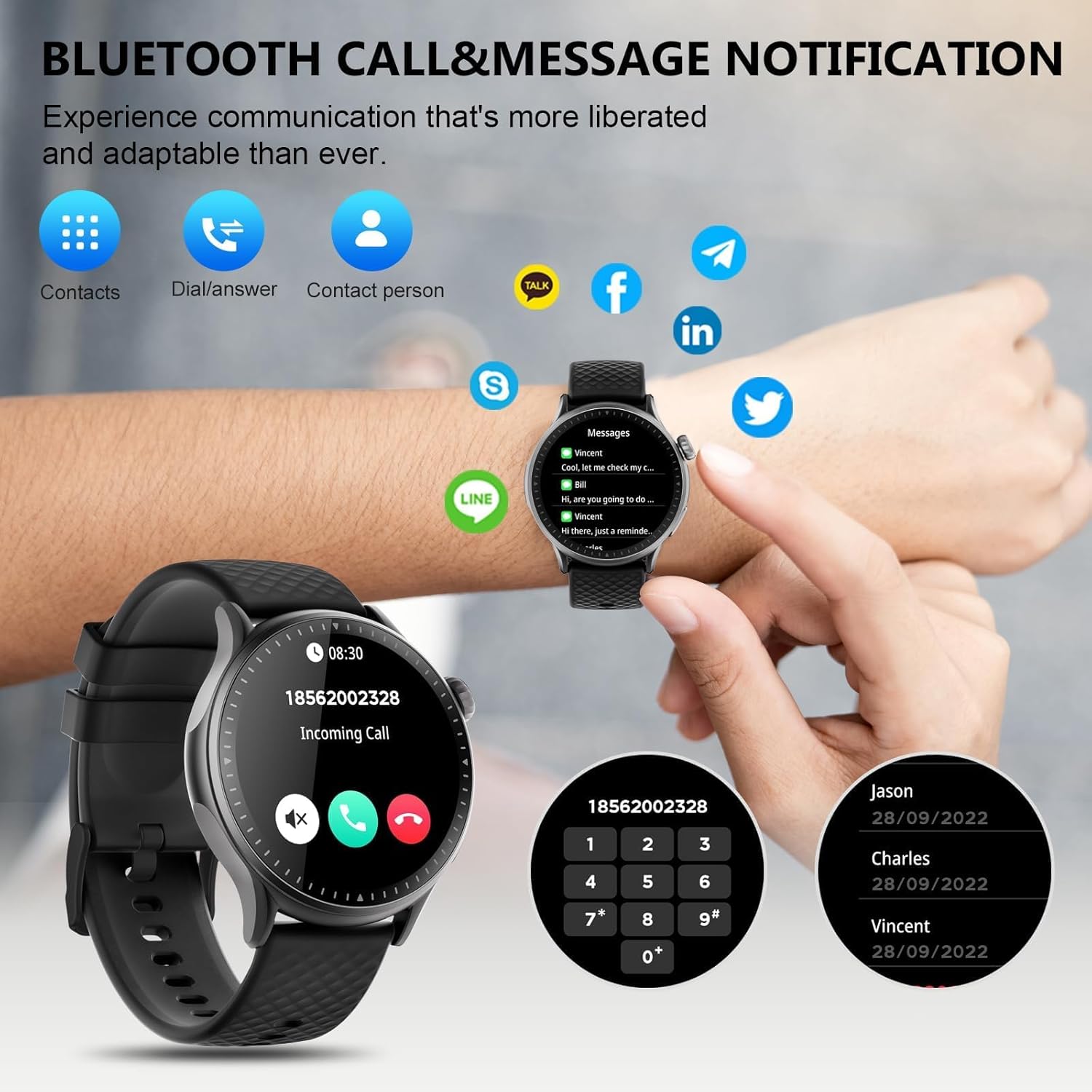
Image: The GTR3 Smart Watch displaying an incoming call and various message notification icons from social media and communication apps.
4.5 Dirbtinio intelekto balso asistentas
The built-in AI assistant allows for hands-free control. Use voice commands to check the weather, control music playback on your phone, set alarms, and more.

Image: The GTR3 Smart Watch's AI Voice Assistant interface, illustrating how to use voice commands for tasks like checking weather or setting alarms.
4.6 Papildomos funkcijos
The Cillso GTR3 offers a range of other useful features:
- Orų prognozė
- Raskite telefoną
- Chronometras ir laikmatis
- Skaičiuoklė
- Žadintuvas
- Nuotolinis fotoaparato valdymas
- Music Control (for your phone's music player)
- Kvėpavimo pratimai

Image: The GTR3 Smart Watch's app menu, showcasing icons for various functions including Find Phone, Weather, Calculator, Remote Camera Shutter, Breathing Exercises, Women's Health, and Alarm Clock.
4.7 Laikrodžio ciferblatų pritaikymas
Personalize your watch with a variety of watch faces. The "Runmefit" app offers over 200 watch faces to choose from. You can also upload your favorite photos to create custom watch faces.
5. Priežiūra
5.1 Hidroizoliacija
The Cillso GTR3 has a 3ATM waterproof rating, meaning it is resistant to splashes, rain, and sweat. It is suitable for daily use and can withstand brief immersion in water. However, it is ne recommended for hot showers, saunas, diving, or high-speed water sports, as steam or high water pressure can compromise the seals.
5.2 Valymas ir priežiūra
Norėdami išlaikyti laikrodžio išvaizdą ir funkcionalumą:
- Reguliariai valykite ekraną ir dirželį minkšta,amp audinys.
- Venkite naudoti stiprias chemines medžiagas, abrazyvinius valiklius ar tirpiklius.
- Prieš įkrovimą įsitikinkite, kad įkrovimo kontaktai yra švarūs ir sausi.
- Venkite laikrodžio ilgą laiką būti veikiamam ekstremalių temperatūrų ar tiesioginių saulės spindulių.
5.3 Baterijos ilgaamžiškumas
To maximize battery life, avoid fully discharging the watch frequently. Charge it when the battery level is low, and disconnect it once fully charged.
6. Problemų sprendimas
If you encounter issues with your Cillso GTR3 Smart Watch, refer to the following common problems and solutions:
| Problema | Galimas sprendimas |
|---|---|
| Watch not connecting to phone via Bluetooth. | Ensure Bluetooth is enabled on your phone. Restart both the watch and phone. Make sure the "Runmefit" app is open and running in the background. Check if the watch is already paired with another device. |
| „Bluetooth“ skambučių funkcija neveikia. | Verify that the watch is connected via Bluetooth in tiek the "Runmefit" app and your phone's native Bluetooth settings (as a separate audio device). |
| Notifications or calls only vibrate, no sound. | Check the sound settings on your watch and in the "Runmefit" app. Ensure the watch's speaker volume is not muted or set too low. Note that the speaker volume may be limited in noisy environments. |
| Inaccurate step count or health data. | Ensure the watch is worn snugly on your wrist. Calibrate the watch in the "Runmefit" app if available. Keep the app connected to sync data regularly. |
| Weather information not updating. | Ensure your phone's location services are enabled and the "Runmefit" app has permission to access your location. The app must be connected and running in the background to sync weather data. |
| Watch disconnects frequently. | Maintain close proximity between your watch and smartphone. Avoid obstacles that may interfere with the Bluetooth signal. Ensure the "Runmefit" app is not being closed by your phone's power-saving features. |
| Cannot customize watch faces. | Ensure the watch is connected to the "Runmefit" app. Follow the app's instructions for selecting or uploading watch faces. Some watches may have limitations on the number of custom faces stored simultaneously. |
7. Specifikacijos
| Funkcija | Detalė |
|---|---|
| Modelio pavadinimas | GTR3 |
| Prekės ženklas | Cillso |
| Ekrano tipas | AMOLED |
| Ekrano dydis | 1.46 colių |
| Rezoliucija | 1.46" AMOLED Ultra-HD |
| Operacinė sistema | iOS 12.0 ir naujesnės versijos ir Android 7.0 ir naujesnės versijos |
| Atminties talpa | 128 MB |
| Ryšio technologija | Bluetooth |
| Belaidžio ryšio standartas | Bluetooth |
| Baterijos talpa | 350 mAh (approximate, based on image) |
| Vidutinis akumuliatoriaus veikimo laikas | Up to 10 days (heavy usage), 45 days (standby) |
| Atsparumo vandeniui lygis | 3 bankomatai (30 metrų) |
| Išmatuoti rodikliai | Heart Rate, Sleep Duration, Blood Oxygen Monitor |
| Ypatingos savybės | 24/7 Activity Tracker, Heart Rate Monitor, Sleep Monitor, AI Voice Control, Message Notifications, Answer/Make Call, AMOLED Touchscreen, Cycle Tracking, Alarm Clock, Blood Oxygen Monitor, 110+ Sport Modes, Music Control, Distance Record/Pedometer/Calories, Distance Tracker |
| Juostos medžiagos tipas | Silicone, Rubber, or Fluoroelastomer |
| GPS | GPS per išmanųjį telefoną |
| Tikslinė auditorija | Unisex suaugusiesiems |
8. Informacija apie garantiją
The Cillso GTR3 Smart Watch comes with a 1 metų standartinė garantija nuo įsigijimo datos. Ši garantija taikoma gamybos defektams ir gedimams įprasto naudojimo metu. Ji netaikoma žalai, atsiradusiai dėl netinkamo naudojimo, nelaimingų atsitikimų, neleistinų modifikacijų ar šiame vadove pateiktų instrukcijų nesilaikymo.
Išsaugokite pirkimo įrodymą, kad galėtumėte kreiptis dėl garantijos.
9. Pagalba klientams
For further assistance, technical support, or warranty inquiries, please refer to the contact information provided with your purchase or visit the official Cillso website. Ensure you have your product model (GTR3) and proof of purchase ready when contacting support.