
Įvadas
Welcome to the HP OmniDesk M03 AI Desktop PC. This manual provides essential information for setting up, operating, maintaining, and troubleshooting your new computer. The HP OmniDesk M03 is designed for performance and efficiency, featuring an Intel Core Ultra 7 265 processor with dedicated AI cores, 16GB DDR5 RAM, and a 2TB NVMe SSD, running on Windows 11 Home.
Kas yra dėžutėje
Patikrinkite, ar pakuotėje yra visi komponentai:
- HP OmniDesk Desktop PC
- Belaidė klaviatūra
- Pelė
- Greito sąrankos vadovas
- Maitinimo kabelis

Image: The HP OmniDesk M03 desktop PC, wireless keyboard, mouse, and power cable, illustrating the contents of the product box.
Sąranka
1. Išorinių įrenginių prijungimas
Before powering on your PC, connect your monitor, keyboard, and mouse.
- Monitorius: Connect your monitor to the PC using an HDMI or DisplayPort cable. The ports are located on the rear of the PC.
- Klaviatūra ir pelė: The included keyboard and mouse are wireless. Insert batteries (if not pre-installed) and connect their USB receiver to an available USB port on the PC.
- Galia: Connect the power cable to the PC's power input on the rear and then to a wall outlet.
- Tinklas (neprivaloma): For a wired internet connection, connect an Ethernet cable from your router to the RJ45 port on the rear of the PC.

Image: Rear panel of the HP OmniDesk M03, highlighting the DisplayPort, HDMI, USB, and Ethernet ports for connecting external devices.

Vaizdas: Šoninė view of the HP OmniDesk M03 AI Desktop PC, showing its compact tower design.
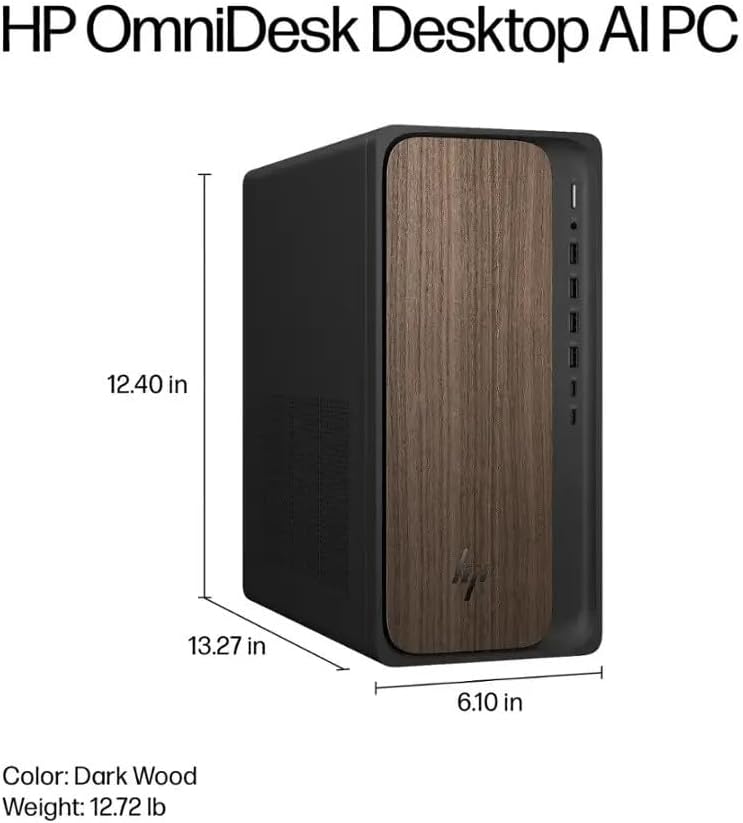
Image: Diagram illustrating the location and type of front and rear ports on the HP OmniDesk M03, including USB-A, USB-C, HDMI, DisplayPort, and audio jacks.
2. Įjungimas ir pradinė sąranka
Kai visi periferiniai įrenginiai prijungti:
- Paspauskite maitinimo mygtuką, esantį kompiuterio priekyje.
- Follow the on-screen instructions to complete the Windows 11 Home initial setup, including language selection, network connection (if not wired), account creation, and privacy settings.

Vaizdas: priekis view of the HP OmniDesk M03, showing the power button at the top right and various USB ports below it.
Kompiuterio valdymas
Windows 11 Home
Your HP OmniDesk M03 comes pre-installed with Windows 11 Home. Familiarize yourself with the operating system's interface, Start menu, and settings. Microsoft provides extensive online resources for Windows 11 usage.
AI funkcijos
The Intel Core Ultra 7 265 processor includes dedicated AI cores and Intel AI Boost, enhancing performance for AI-driven applications and features within Windows 11, such as AI Copilot. These features can assist with tasks, content creation, and system optimization.
Ryšys
- „Wi-Fi 6“ (802.11ax): Prisijunkite prie belaidžių tinklų, kad galėtumėte naudotis internetu. Tvarkykite „Wi-Fi“ nustatymus per „Windows 11“ tinklo nustatymus.
- "Bluetooth 5.4": Pair wireless devices such as headphones, speakers, or additional input devices. Access Bluetooth settings via the Windows 11 settings menu.
- Ethernet: For a stable, high-speed wired connection, ensure an Ethernet cable is connected to the RJ45 port.
Priežiūra
Cleaning Your PC
- Išorė: Šiek tiek naudokite minkštą, be pūkelių šluostę dampened with water or a mild cleaning solution to wipe down the exterior. Avoid harsh chemicals.
- angos: Periodically clean dust from the ventilation grilles using compressed air to ensure proper airflow and prevent overheating.
- Prievadai: Laikykite prievadus švarius nuo dulkių ir šiukšlių.
Programinės įrangos atnaujinimai
Regularly update Windows 11 and device drivers to ensure optimal performance, security, and compatibility. Access Windows Update through the Settings menu.
Duomenų atsarginė kopija
Rekomenduojama reguliariai kurti svarbių duomenų atsargines kopijas išoriniame diske arba debesies saugykloje, kad išvengtumėte duomenų praradimo.
Trikčių šalinimas
Šiame skyriuje aptariamos dažniausiai pasitaikančios problemos, su kuriomis galite susidurti.
- Nėra galios:
- Įsitikinkite, kad maitinimo laidas yra tvirtai prijungtas tiek prie kompiuterio, tiek prie sieninio lizdo.
- Patikrinkite, ar sieninis lizdas veikia, prijungdami prie jo kitą įrenginį.
- Nėra ekrano:
- Check that the monitor is powered on and correctly connected to the PC via HDMI or DisplayPort.
- Įsitikinkite, kad monitoriuje pasirinktas teisingas įvesties šaltinis.
- Nėra interneto ryšio:
- Jei naudojate „Wi-Fi“, patikrinkite, ar įjungtas „Wi-Fi“ adapteris ir ar esate prisijungę prie tinkamo tinklo naudodami teisingą slaptažodį.
- Jei naudojate laidinį ryšį, įsitikinkite, kad eterneto kabelis tinkamai prijungtas ir kad jūsų maršrutizatorius veikia.
- Klaviatūra / pelė nereaguoja:
- Patikrinkite belaidžių įrenginių akumuliatoriaus lygį.
- Ensure the USB receiver is plugged into a functional USB port.
- Try restarting the PC.
Dėl sudėtingesnių problemų kreipkitės į HP palaikymo tarnybą websvetainėje arba susisiekite su klientų aptarnavimo tarnyba.
Specifikacijos
Detailed technical specifications for the HP OmniDesk M03 AI Desktop PC:
| Komponentas | Specifikacija |
| Procesorius | Intel Core Ultra 7 265 (20-Core, up to 5.3 GHz, Intel AI Boost) |
| Operacinė sistema | „Windows 11 Home“ (64 bitų) |
| Atmintis (RAM) | 16 GB DDR5 5600 MHz |
| Sandėliavimas | 2 TB PCIe NVMe M.2 SSD diskas |
| Grafika | Integruota Intel Graphics |
| Vaizdo išvestis | 1x HDMI 2.1, 1x DisplayPort 1.4a |
| USB prievadai (priekyje) | 2x USB-A 5Gbps, 2x USB-A 10Gbps, 1x USB-C 5Gbps, 1x USB-C 10Gbps |
| USB prievadai (gale) | 4x USB 2.0 Type-A |
| Garso prievadai | 1x Headphone/Microphone Combo, 1x Line Input, 1x Line Output |
| Tinklas | Wi-Fi 6 (802.11ax), Bluetooth 5.4, Gigabit Ethernet (RJ45) |
| Matmenys (A x P x G) | 13.3 colio x 6.1 colio x 12.4 colio (33.8 cm x 15.5 cm x 31.5 cm) |
| Svoris | 11.77 svarai (5.34 kg) |

Image: Diagram showing the height (13.27 inches), width (6.10 inches), and depth (12.40 inches) of the HP OmniDesk M03 desktop PC.
Garantija ir palaikymas
Informacija apie garantiją
Your HP OmniDesk M03 AI Desktop PC comes with a 90 dienų ribota garantija. This warranty covers defects in materials and workmanship under normal use. For detailed terms and conditions, please refer to the warranty documentation included with your product or visit the official HP support websvetainę.
Pagalba klientams
For technical assistance, troubleshooting, or warranty claims, please contact HP Customer Support:
- Palaikymas internetu: Aplankykite pareigūną HP palaikymas Websvetainę tvarkyklėms, vadovams ir trikčių šalinimo vadovams.
- Pagalba telefonu: Refer to the Quick Setup Guide or HP's webregioninių kontaktinių numerių svetainė.
When contacting support, please have your product model (M03) and serial number ready.