
1. Baigėsiview
The GetPairr Vista 11-inch Portable Display Audio Android Navigation System is designed to enhance your in-car entertainment and navigation experience. Featuring a built-in Android system, it supports wireless connectivity for popular smartphone integration platforms and offers versatile audio output options.
Pagrindinės funkcijos:
- Integrated Android System: Equipped with a 4-core CPU, 2GB RAM, and 32GB ROM, allowing direct access to streaming applications like YouTube, Netflix, and Spotify via Wi-Fi tethering.
- Belaidis „CarPlay“ / „Android Auto“: Seamlessly connect your smartphone via Bluetooth for wireless access to navigation, music, messaging, and calls, eliminating cable clutter.
- Smart Split Screen (PIP Function): The 11-inch wide display supports a 5:5 split-screen ratio, enabling simultaneous viewing of navigation and other Android applications.
- Dvigubas „Bluetooth“ ryšys: Allows simultaneous connection to your smartphone for input and your car's audio system for wireless output to car speakers.
- Didelės raiškos ekranas: An 11-inch screen with 1920x720 resolution provides clear visuals for maps, videos, and applications, improving visibility and operational ease while driving.

2. Sąranka
2.1 Pakuotės turinys
Patikrinkite, ar pakuotėje yra visi reikalingi daiktai:
- Portable Display Audio Main Unit
- Stovi
- AUX laidas
- Cigarette Lighter Plug Adapter
- Vartotojo vadovas (šis dokumentas)

2.2 diegimas
- Įrenginio montavimas: Attach the provided stand to the main unit. Secure the stand to your dashboard using the 3M tape. Ensure the unit is placed in a location that does not obstruct your view arba trukdyti vairuoti.
- Maitinimo jungtis: Connect the cigarette lighter plug adapter to the main unit's 5V power cable. Insert the cigarette lighter plug into your vehicle's accessory socket. The unit supports both 12V and 24V vehicle systems.
- Pradinis įjungimas: Once connected, the unit will power on automatically when the vehicle's ignition is turned on.


3. Naudojimo instrukcijos
3.1 Android System and App Usage
The GetPairr Vista unit runs on an Android operating system, allowing you to install and use various applications.
- „Wi-Fi“ ryšys: To access online services and download apps, connect the unit to a Wi-Fi network. This can be done via your smartphone's tethering function or an in-car Wi-Fi hotspot.
- Programos diegimas: Use the pre-installed app store or other compatible methods to download and install applications like YouTube, Netflix, Spotify, etc.
- Navigacija: Utilize navigation apps directly on the unit or through connected CarPlay/Android Auto.

3.2 Belaidis „CarPlay“ / „Android Auto“ ryšys
Connect your smartphone wirelessly to access CarPlay or Android Auto features.
- Poravimas: On your smartphone, enable Bluetooth and search for the GetPairr Vista unit. Pair the devices.
- Automatinis prisijungimas: Once paired, CarPlay or Android Auto will automatically connect when the unit powers on.
- Funkcionalumas: Access your phone's navigation, music, messages, and make calls directly from the unit's display.
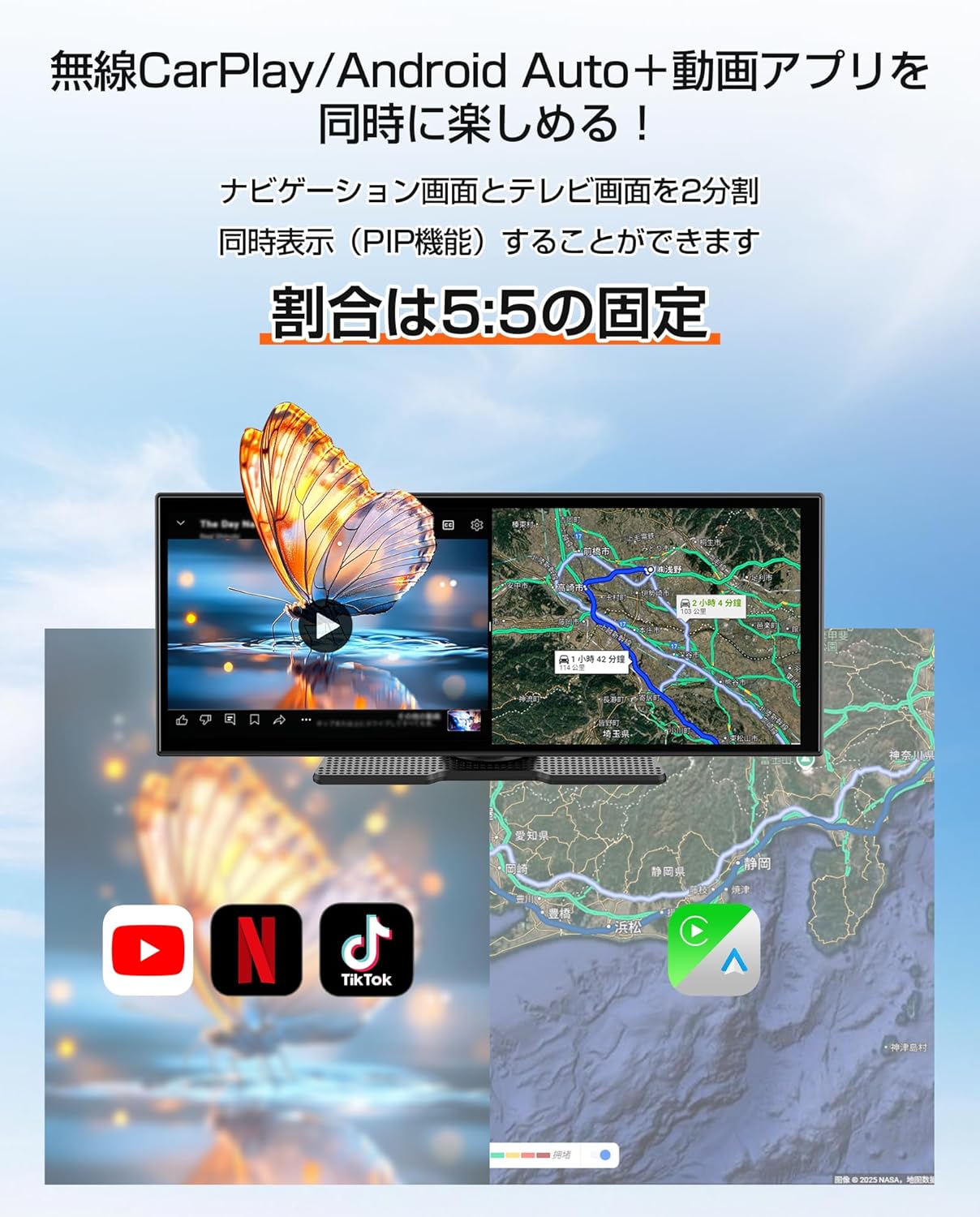
3.3 Split Screen Function (PIP)
The 11-inch display supports a 5:5 split-screen mode, allowing two applications to run side-by-side.
- Aktyvinimas: Refer to the on-screen interface for activating split-screen mode.
- Naudojimas: Pavyzdžiui,ample, display navigation on one half (via CarPlay/Android Auto) and a video streaming app (via the built-in Android system) on the other.

3.4 Garso išvesties parinktys
The unit offers multiple ways to output audio to your car's speakers.
- Dvigubas „Bluetooth“ ryšys: The unit can receive audio from your smartphone via Bluetooth and transmit it to your car's audio system (if it supports Bluetooth audio input).
- AUX kabelis: Connect the provided AUX cable from the unit to your car's AUX input for a wired audio connection.
- FM siųstuvas: The unit can transmit audio via an FM frequency, which you can tune into on your car's radio.
- Integruotas garsiakalbis: The unit has a small built-in speaker for basic audio output. For optimal sound quality, connecting to your car's audio system is recommended.

4. Priežiūra
4.1 Valymas
To maintain the display's clarity and unit's appearance:
- Švelniai nuvalykite ekraną minkštu, nepūkuotu skudurėliu. Jei dėmės sunkiai įveikiamos, šiek tiek nuvalykiteampNuvalykite šluostę vandeniu arba ekranui saugiu valikliu.
- Avoid using abrasive cleaners, solvents, or aerosol sprays directly on the unit.
- Laikykite prievadus švarius nuo dulkių ir šiukšlių.
4.2 Saugykla
Kai nenaudojamas ilgesnį laiką:
- Atjunkite įrenginį nuo maitinimo šaltinio.
- Įrenginį laikykite vėsioje, sausoje vietoje, toliau nuo tiesioginių saulės spindulių ir ekstremalių temperatūrų.
5. Problemų sprendimas
If you encounter issues with your GetPairr Vista unit, refer to the following common solutions:
- Nėra galios: Ensure the cigarette lighter adapter is securely plugged into both the unit and the vehicle's accessory socket. Check if the vehicle's accessory socket is receiving power.
- Nėra garso: Verify the audio output method selected (Bluetooth, AUX, FM). Ensure your car's audio system is set to the correct input source. Adjust volume on both the unit and your car's audio system.
- „CarPlay“ / „Android Auto“ neprisijungia: Ensure Bluetooth is enabled on your smartphone and the unit. Try unpairing and re-pairing the devices. Check for any software updates for your smartphone or the unit.
- Slow Performance/App Freezing: Close unused applications. Ensure a stable Wi-Fi connection for online activities. Restart the unit if necessary.
- Ekranas nereaguoja: Atlikite minkštąjį atkūrimą laikydami nuspaustą maitinimo mygtuką (jei yra) arba atjungdami ir vėl prijungdami maitinimą.
Jei problemos išlieka, susisiekite su klientų aptarnavimo tarnyba.
6. Specifikacijos
| Funkcija | Detalė |
|---|---|
| Ekrano dydis | 11 colių |
| Ekrano tipas | LCD |
| Rezoliucija | 1920x720 |
| Operacinė sistema | Android, Wireless Apple CarPlay, Wireless Android Auto |
| CPU | 4 branduolių |
| RAM | 2 GB |
| ROM | 32 GB |
| Ryšys | „Bluetooth“, USB, „Wi-Fi“ |
| Garso išvesties režimas | Stereo |
| Montavimo tipas | 3M juosta |
| Gaminio matmenys | 26 cm (ilgis) x 2.7 cm (plotis) x 10.5 cm (aukštis) |
| Svoris | 1 kg |
| Maitinimo įvestis | DC 12V/24V (per cigarečių degiklio adapterį) |
| Įtraukti komponentai | AUX Cable, Cigarette Plug Adapter, Portable Display Audio Main Unit, User Manual |
7. Garantija ir palaikymas
7.1 Informacija apie garantiją
The GetPairr Vista unit comes with a 1 metų gamintojo garantija from the date of purchase. In the event of any defects or malfunctions, the manufacturer offers exchange or refund services.
7.2 Pagalba klientams
For inquiries or support, please contact us via the official LINE account: @getpairr.