
1. Įvadas
Thank you for choosing the DazzlingStage 60W 9LED RGBW Stage Wall Wash Bar Light. This manual provides essential information for the safe and effective operation of your lighting fixture. Please read it thoroughly before installation and use, and retain it for future reference.
Šis stage light bar features 9 high-power RGBW LEDs, offering a wide spectrum of colors and dynamic lighting effects suitable for various events and venues.

1.1 vaizdas: Baigtaview of the DazzlingStage 60W 9LED RGBW Stage Wall Wash Bar Lights in various colors.
2. Saugos instrukcijos
- Elektros sauga: Užtikrinkite maitinimo šaltinio ttage matches the specifications of the fixture. Always disconnect power before cleaning, servicing, or moving the unit.
- Montavimas: Install the fixture in a well-ventilated area, away from heat sources. Ensure secure mounting to prevent accidental falls.
- Veikimas: Do not look directly into the light source when the fixture is operating, as it can cause eye damage. Avoid operating the unit in wet or damp sąlygas.
- Priežiūra: Visus techninės priežiūros darbus patikėkite kvalifikuotiems darbuotojams. Nebandykite taisyti įrenginio patys.
- Vaikai: Prietaisą laikykite vaikams nepasiekiamoje vietoje.
3. Pakuotės turinys
Išpakuodami patikrinkite, ar yra visi toliau išvardyti daiktai ir ar jie yra geros būklės:
- DazzlingStage 60W 9LED RGBW Stage Wall Wash Bar Light (x1 per pack)
- Power Cord (x1 per pack)
- Remote Control (x1 per pack)
- Mounting Bracket (x1 per pack)
- Knobs (x2 per pack)
- Black Gaskets (x2 per pack)
- Instruction Manual (x1 per pack)

3.1 pav.: Produkto pakuotės turinys.
4. Gaminio komponentai
Familiarize yourself with the main components of the light bar:
- LED masyvas: 9 RGBW LEDs for color mixing.
- Valdymo skydelis: Features a 4-digit LED display and control buttons (MENU, UP, DOWN, ENTER) for mode selection and parameter adjustment.
- DMX įvesties/išvesties prievadai: For connecting to a DMX controller or linking multiple units.
- Maitinimo įėjimas/išėjimas: Maitinimo prijungimui ir maitinimo sujungimui su kitais įrenginiais.
- Montavimo laikiklis: Adjustable bracket for floor standing or truss mounting.
- Šilumos kriauklė: Integrated cooling system to maintain optimal operating temperature.

Image 4.1: Key components and dimensions of the light bar.
5. Sąranka ir diegimas
The DazzlingStage Wall Wash Bar Light offers flexible installation options:
5.1 Laikiklio montavimas
Attach the included mounting bracket to the light bar using the provided knobs and gaskets. Ensure the bracket is securely fastened.
5.2 Įdėjimo parinktys
- Grindų stovėjimas: The bracket allows the light bar to stand upright on a flat surface. Adjust the angle as needed.
- Santvaros tvirtinimas: Naudokite atitinkamą klamps (not included) to attach the bracket to a lighting truss. Ensure the truss and clamps can support the weight of the fixture.
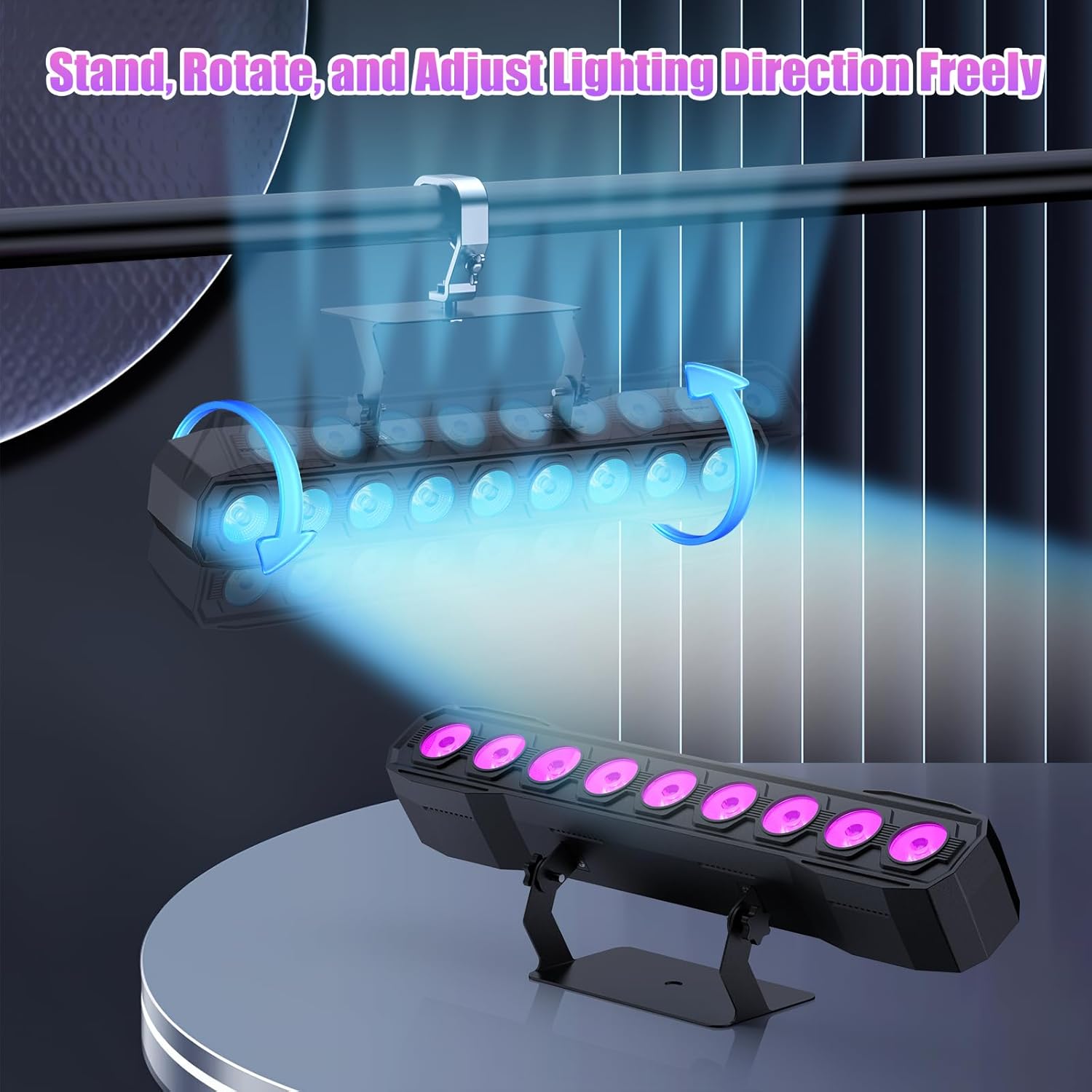
Image 5.1: Illustration of mounting and angle adjustment options.
5.3 Maitinimo jungtis
Connect the power cord to the Power IN port on the back of the fixture and then to a suitable power outlet. Multiple units can be daisy-chained using the Power OUT port to simplify wiring for larger setups.
6. Veikimo režimai
The DazzlingStage Wall Wash Bar Light supports several control modes:
- DMX512 valdymas: For professional control via a DMX console.
- Automatinis režimas: Pre-programmed lighting sequences.
- Sound-Activated Control: Šviesos reaguoja į aplinkos garsus.
- Nuotolinio valdymo pultas: Convenient wireless control using the included remote.
- Pagrindinis-pagalbinis režimas: Link multiple units where one acts as a master and others as slaves, synchronizing effects.
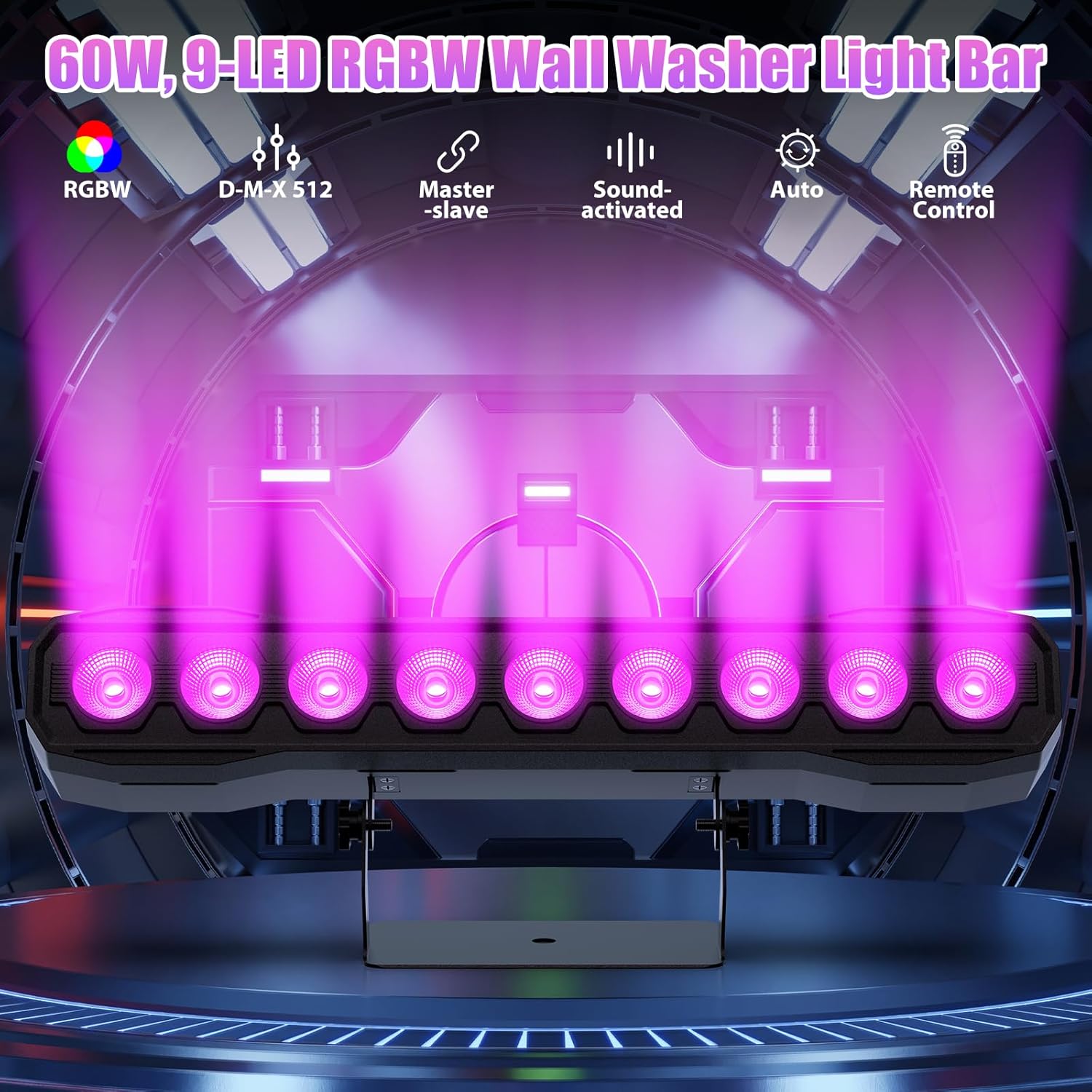
6.1 vaizdas: Baigtaview of available control modes.
6.1 Display Panel Operation
Use the buttons on the back of the fixture to navigate the menu and select modes:
- MENIU: Pereina per pagrindinio meniu parinktis.
- AUKŠTYN ŽEMYN: Adjusts values or navigates sub-menus.
- Įveskite: Patvirtina pasirinkimą.
6.2 apšvietimo efektai
The fixture supports various dynamic effects:
- Spalvų maišymas: Over 16.7 million color combinations with 0-100% linear dimming.
- Strobe: Flashing effect.
- Šokinėti: Instant color changes.
- Išnykimas: Smooth transitions between colors.
- Pulsas: Gradual changing effects.
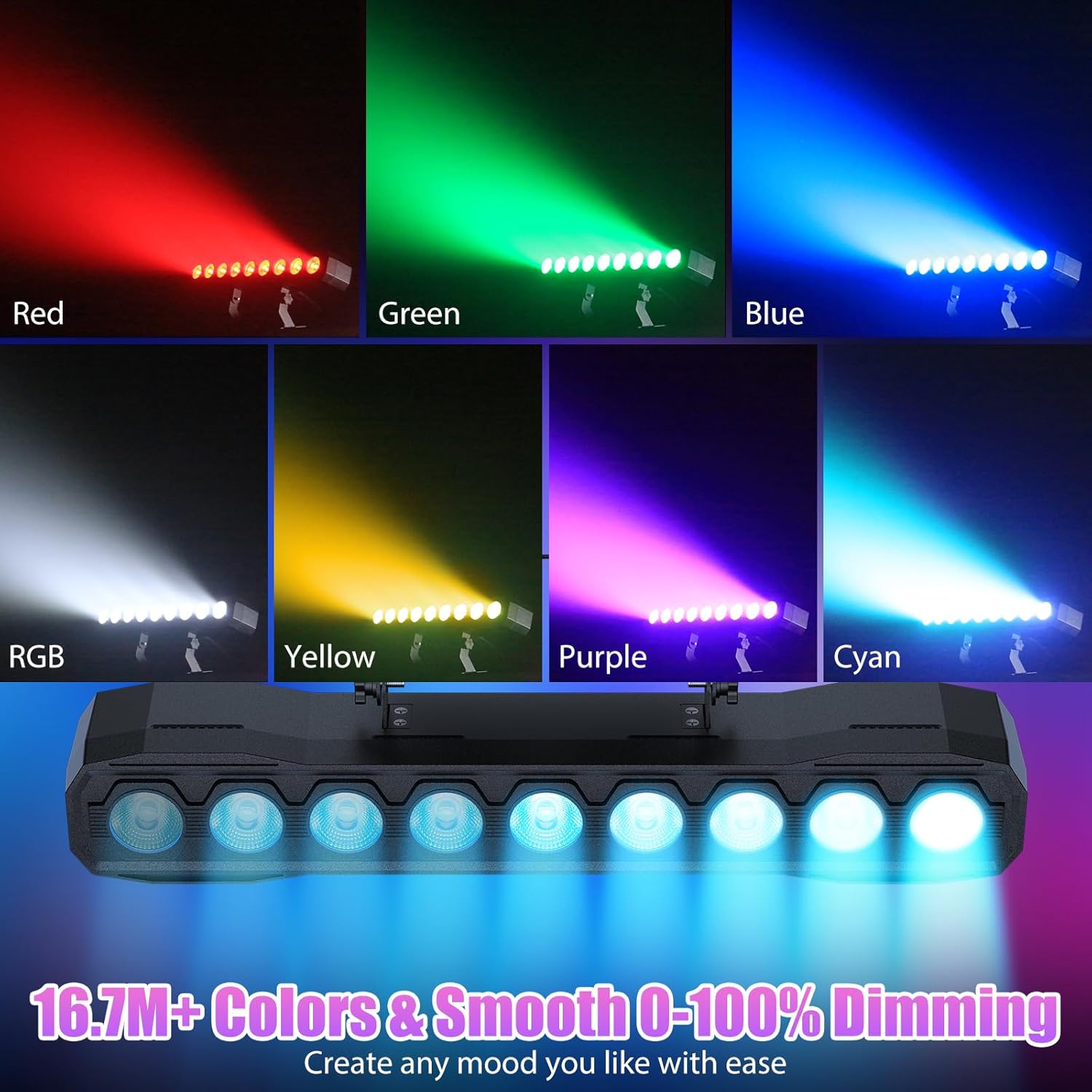
6.2 pav.: pvz.amples of color mixing and dimming capabilities.

Image 6.3: Visual representation of Strobe, Jump, Fade, and Pulse effects.
7. Nuotolinio valdymo funkcijos
Pridedamas nuotolinio valdymo pultas suteikia patogią prieigą prie įvairių funkcijų:
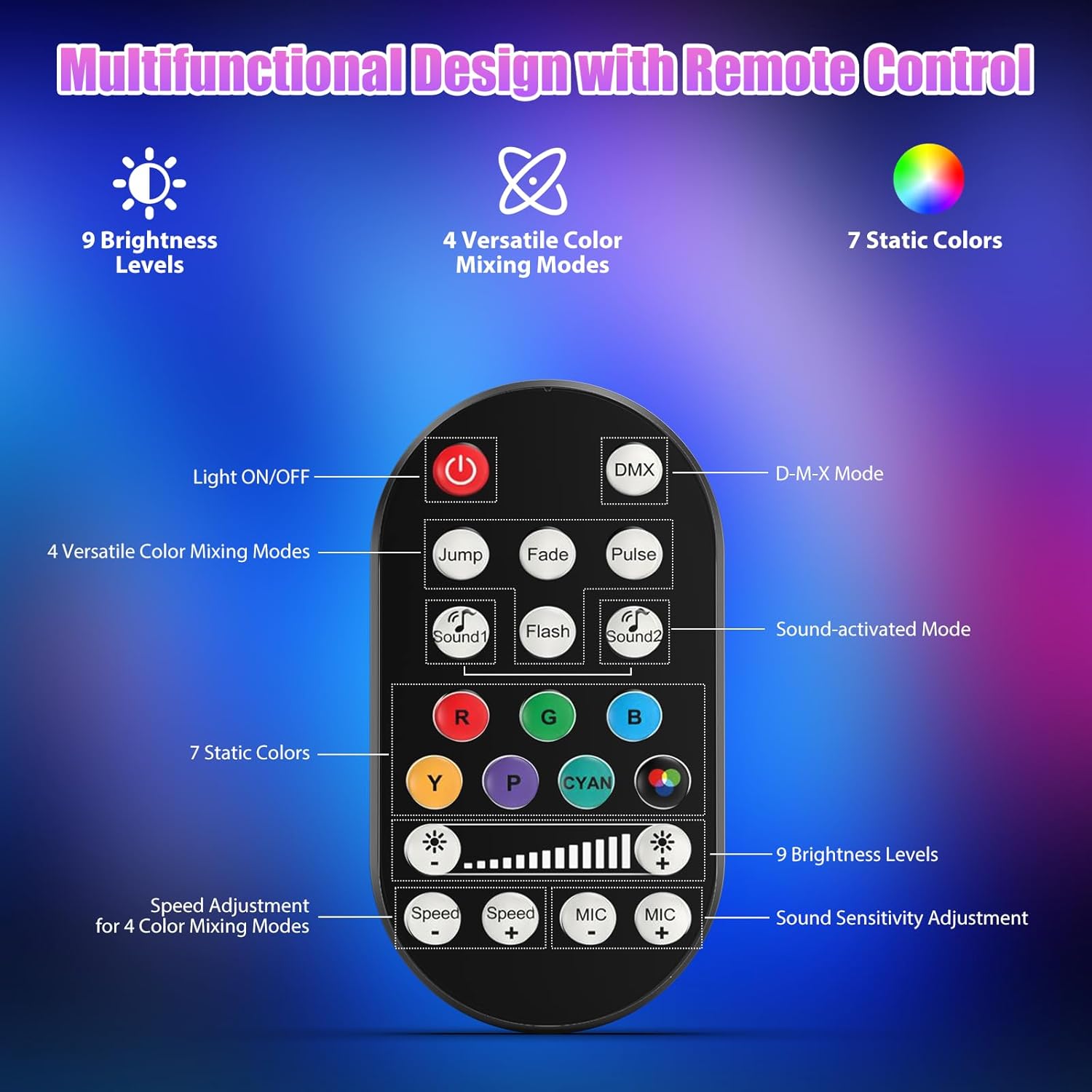
7.1 pav.: Nuotolinio valdymo pulto išdėstymas ir funkcijos.
- Šviesos įjungimas/išjungimas: Įjungia arba išjungia įrenginį.
- DMX: Įjungia DMX valdymo režimą.
- Jump, Fade, Pulse, Flash: Selects different color mixing modes.
- Sound1, Sound2: Activates sound-activated modes with different sensitivities.
- R, G, B, Y, P, Cyan, White: Pasirenka statines spalvas.
- Ryškumo lygiai: Adjusts the overall intensity of the light (9 levels).
- Greitis +/-: Adjusts the speed of dynamic effects.
- MIK +/-: Adjusts the sound sensitivity for sound-activated modes (15 levels).
8. DMX512 Control
For advanced control, connect the fixture to a DMX512 controller. The light bar typically uses 4 or 8 DMX channels. Refer to the display panel for DMX address setting and channel assignments.
8.1 DMX adreso nustatymas
Use the MENU, UP, DOWN, and ENTER buttons on the fixture's display panel to set the DMX starting address. The display will show 'AXXX' where XXX is the address (e.g., A001).
8.2 DMX Channel Functions (Example - 8 Channel Mode)
| Kanalas | Funkcija | Vertės diapazonas | Aprašymas |
|---|---|---|---|
| CH1 | Meistras Dimmeris | 0-255 | Bendras ryškumas (nuo 0% iki 100%) |
| CH2 | Raudonos spalvos intensyvumas | 0-255 | Red LED brightness (0% to 100%) |
| CH3 | Žalios spalvos intensyvumas | 0-255 | Green LED brightness (0% to 100%) |
| CH4 | Mėlynos spalvos intensyvumas | 0-255 | Blue LED brightness (0% to 100%) |
| CH5 | Baltos spalvos intensyvumas | 0-255 | White LED brightness (0% to 100%) |
| CH6 | Strobe/Effect | 0-255 | 0-10: No function; 11-255: Strobe speed (slow to fast) |
| CH7 | Automatinė programa | 0-255 | Selects and controls speed of built-in auto programs |
| CH8 | Garsas aktyvus | 0-255 | Activates sound mode and adjusts sensitivity |
8.1 lentelė: Pvzample DMX Channel Functions (may vary slightly by firmware version).
9. Priežiūra
Reguliarus valymas užtikrina optimalų veikimą ir prailgina jūsų įrenginio tarnavimo laiką.
- Valymas: Periodically clean the lens and housing with a soft, lint-free cloth. Do not use abrasive cleaners or solvents. Ensure the fixture is powered off and cool before cleaning.
- Patikra: Reguliariai tikrinkite maitinimo laidus, DMX laidus ir tvirtinimo detales, ar nėra susidėvėjimo ar pažeidimų požymių. Nedelsdami pakeiskite pažeistus komponentus.
- Saugykla: Kai įrenginys ilgesnį laiką nenaudojamas, laikykite jį sausoje, be dulkių vietoje.
10. Problemų sprendimas
Jei kyla problemų, žr. toliau pateiktas dažniausiai pasitaikančias problemas ir sprendimus:
| Problema | Galima priežastis | Sprendimas |
|---|---|---|
| Nėra galios | Power cable disconnected; No power from outlet; Blown fuse | Check power cable connection; Test outlet with another device; Replace fuse if necessary |
| Nėra šviesos srauto | Dimmer channel at 0%; Incorrect mode selected; DMX signal issue | Increase dimmer level; Select desired operating mode; Check DMX cable and address settings |
| Incorrect colors/effects | Incorrect DMX channel values; Remote control interference | Verify DMX channel settings; Ensure remote is pointed directly at the sensor; Check for other IR interference |
| Garsu įjungiamas režimas neveikia | Microphone sensitivity too low; No sound input | Increase MIC sensitivity via remote or display; Ensure sufficient sound is present near the fixture |
| Armatūros perkaitimas | Poor ventilation; Blocked heat sink | Ensure adequate airflow around the unit; Clean any dust or debris from the heat sink fins |
11. Specifikacijos
| Funkcija | Detalė |
|---|---|
| Prekės ženklas | DazzlingStage |
| Modelio numeris | ZQ06190 |
| Šviesos šaltinis | 9 x 60 W RGBW šviesos diodai |
| Spalvų maišymas | RGBW 4-in-1, 16.7 million colors |
| Pritemdymas | 0-100% linijinis elektroninis pritemdymas |
| Spindulio kampas | 35° platus kampas |
| Valdymo režimai | DMX512, Auto, Sound-Activated, Remote Control, Master-Slave |
| DMX kanalai | 4 or 8 Channels (selectable) |
| Ekranas | 4 skaitmenų LED ekranas |
| Medžiaga | Akrilnitrilo butadieno stirenas (ABS) |
| Gaminio matmenys | 18.1 x 5.5 x 5.1 colio (46 x 14 x 13 cm) |
| Prekės svoris | apytiksliai 1.98 svaro (0.9 kg) |
| Maitinimo įvestis | AC 100-240V, 50/60Hz |
| Gamintojas | Shenzhen Zhuoqiong Technology Co., Ltd. |
12. Garantija ir palaikymas
DazzlingStage products are designed for reliability and performance. For warranty information, please refer to the terms and conditions provided at the time of purchase or contact your retailer.
If you require technical assistance or have questions not covered in this manual, please contact DazzlingStage customer support through the retailer's platform or the official brand website. Please have your model number (ZQ06190) and purchase details ready when contacting support.