
1. Įvadas
This manual provides comprehensive instructions for the installation, operation, and maintenance of the EARU Electric 3-Phase Voltage and Overcurrent Protector, Model EARU-1008. This device is designed to safeguard 3-phase electrical systems by continuously monitoring voltage and current, offering protection against over-voltage, pagal ttage, overcurrent, and phase failure. It is suitable for industrial and commercial applications requiring reliable electrical monitoring and protection.
2. Saugos informacija
ĮSPĖJIMAS: Elektros smūgio pavojus. Montavimą ir techninę priežiūrą turėtų atlikti tik kvalifikuoti darbuotojai.
- Prieš montuodami ar atlikdami įrenginio techninę priežiūrą, visada atjunkite maitinimą.
- Užtikrinkite tinkamą įžeminimą, kad išvengtumėte elektros smūgio.
- Patikrinkite, ar visos laidų jungtys yra tvirtos ir teisingos pagal laidų schemą.
- Nenaudokite prietaiso, jei jis atrodo pažeistas.
- Laikykitės visų vietinių ir nacionalinių elektros taisyklių.
3. Produktas baigtasview
3.1. Pagrindinės savybės
- Real-time 3-Phase Monitoring: Displays live voltage (L1, L2, L3) and current (L1, L2, L3) values.
- Visapusiška apsauga: Safeguards against over-voltage, pagal ttage, overcurrent, and phase failure.
- Reguliuojami parametrai: User-configurable settings for protection thresholds and recovery delays.
- Automatic Phase Failure Reset: Detects and automatically resets after phase anomalies.
- High-Visibility LED Display: Bright red LED for clear readings in various lighting conditions.
- DIN bėgelio tvirtinimas: Easy integration into standard electrical panels.
- Clear Terminal Labeling: Simplified installation with clearly marked input and output terminals.
3.2. Komponentai ir ekranas
The device features a clear LED display and intuitive control buttons for configuration. The display shows real-time voltage and current for each phase, along with indicators for protection status.
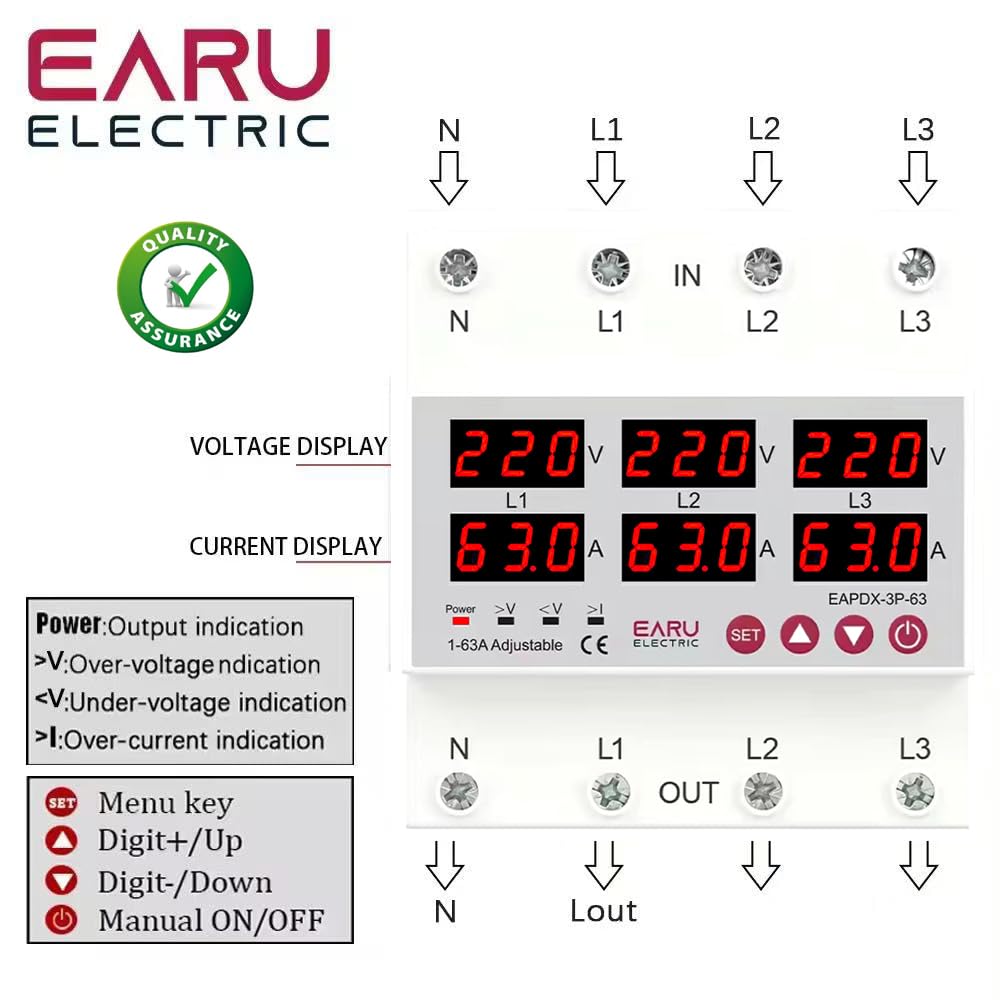
3.2.1 vaizdas: Priekyje view of the EARU Electric Voltage Protector, showing the LED display for L1, L2, L3 voltage and current, along with control buttons (SET, Up, Down, Power) and protection indicators. Terminal labels for N, L1, L2, L3 (IN and OUT) are also visible.

3.2.2 vaizdas: Perspektyva view highlighting the product features and the input/output terminals (N, L1, L2, L3) at the top and bottom of the device. This image emphasizes the physical layout and connection points.
4. Sąranka ir diegimas
4.1. Montavimas
The EARU-1008 is designed for DIN rail mounting. Securely attach the device to a standard 35mm DIN rail within an electrical enclosure.
4.2. Laidų jungtys
Refer to the wiring diagram below for correct connections. Ensure all connections are tight and properly insulated.
- Connect the incoming neutral (N) and phase lines (L1, L2, L3) to the 'IN' terminals.
- Connect the outgoing neutral (N) and phase lines (L1, L2, L3) to the 'OUT' terminals.
- Prieš įjungdami maitinimą, dar kartą patikrinkite visas jungtis.

4.2.1 vaizdas: Detailed wiring diagram for the EARU Electric Voltage Protector, showing connections for N, L1, L2, L3 for both input and output. The diagram illustrates how to integrate the protector into a 3-phase electrical system.
5. Naudojimo instrukcijos
5.1. Pradinis įjungimas
Once wired, apply power to the device. The LED display will illuminate, showing the real-time voltage and current for each phase.
5.2. Ekrano indikatoriai
- V: ttage ekranas.
- A: Dabartinis ekranas.
- Galia: Output indication.
- >V: Per tomastage indikacija.
- <V: Nepakankamas tomastage indikacija.
- >aš: Over-current indication.
5.3. Parametrų nustatymas
Use the 'SET' button to enter the configuration menu and the 'Up' and 'Down' keys to adjust values. Press 'SET' again to confirm and move to the next parameter. Hold 'SET' for 3 seconds to enter settings mode.

5.3.1 vaizdas: A detailed guide to setting various protection parameters on the EARU Electric Voltage Protector. This includes overvoltage, nesuprantamatage, overcurrent, and recovery delay settings, with default values and adjustment ranges.
Key adjustable parameters include:
- Overvoltage apsaugos nustatymas: Range 230-300V (Default 270V).
- Overvoltage Protection Recover Setting: Range 225-295V (Default 265V).
- Overvoltage Recovery Delay: Range 1-500s (Default 30s).
- Overvoltage Trip Delay: Range 0.1-30s (Default 1.0s).
- Undervoltage apsaugos nustatymas: Range 140-210V (Default 170V).
- Undervoltage Protection Recover Setting: Range 145-215V (Default 175V).
- Undervoltage Trip Delay: Range 0.1-30s (Default 1.0s).
- Apsaugos nuo viršsrovių nustatymas: Range 1-63A (Default 30A).
- Overcurrent Trip Delay: Range 0.1-30s (Default 1.0s).
- ttage & Current Manual Error Calibration: Adjust for accuracy, range -9.5% to +9.5% (Default 0%).
- Power-on Delay Setting: Adjustable Range: 1-500S (Default: 10s).
5.4. Rankinis įjungimas/išjungimas
The power button allows for manual switching of the device output.
6. Priežiūra
The EARU-1008 is designed for minimal maintenance. However, periodic checks are recommended:
- Laikykite prietaisą švarų ir be dulkių ir šiukšlių.
- Periodically inspect wiring connections for tightness and signs of wear.
- Užtikrinkite tinkamą vėdinimą aplink įrenginį, kad jis neperkaistų.
7. Problemų sprendimas
If the device is not functioning as expected, consider the following:
- Nėra ekrano / nėra maitinimo: Check the main power supply and all wiring connections.
- Apsaugos kelionė: Identify the active protection indicator (>V, <V, >I). Check the corresponding voltage or current levels. The device will automatically reset once conditions return to normal, based on configured recovery delays.
- Phase Failure: The device automatically detects and responds to phase failures, initiating a cut-off and auto-reset once the phase is restored.
- Neteisingi skaitymai: If readings appear inaccurate, consider performing a manual error calibration as described in Section 5.3.
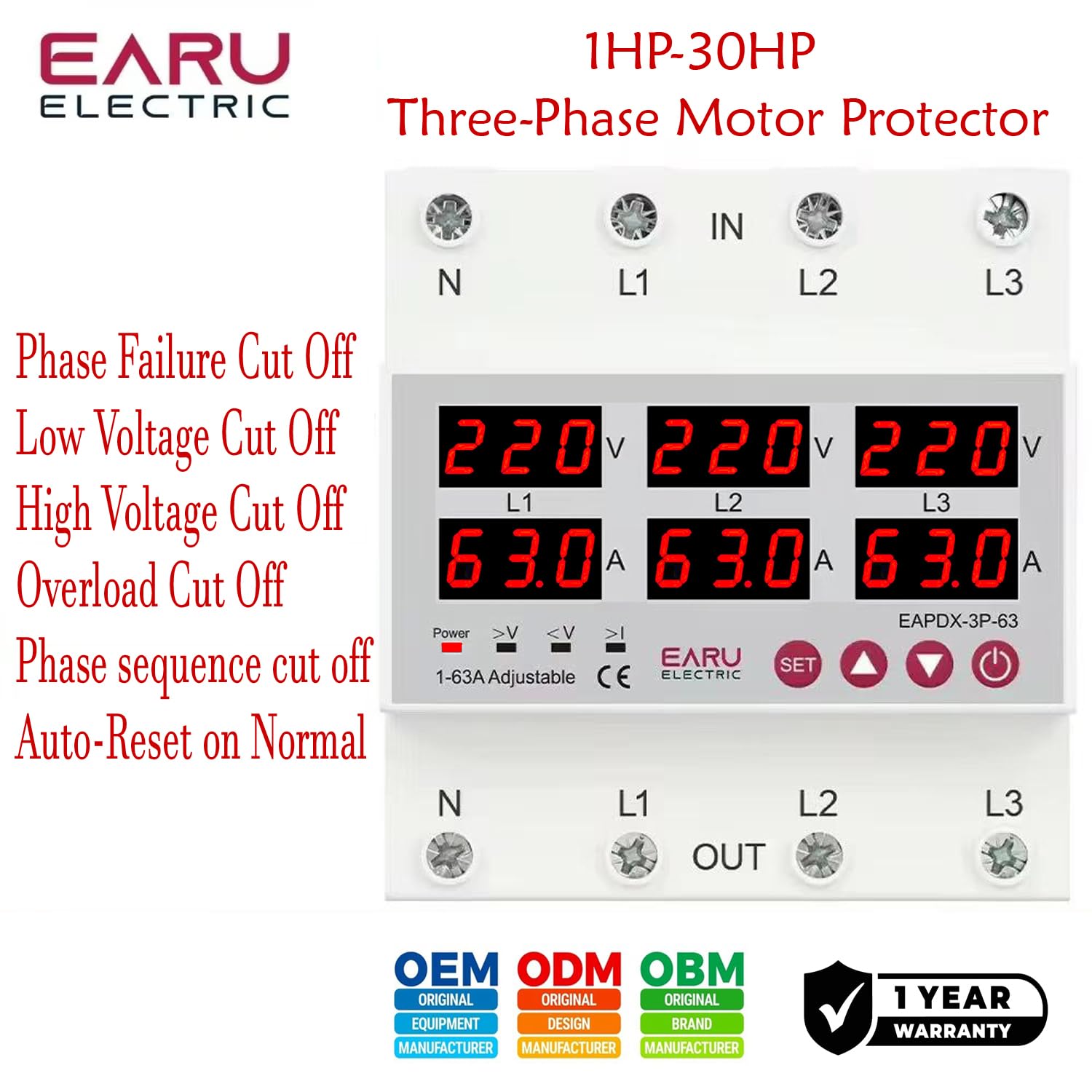
7.1 vaizdas: This image highlights the various protection features of the EARU Electric Voltage Protector, including phase failure cut-off, low voltage cut-off, high voltage cut-off, overload cut-off, phase sequence cut-off, and auto-reset on normal conditions. These are key aspects for troubleshooting protection trips.
8. Specifikacijos
| Parametras | Vertė |
|---|---|
| Prekės ženklas | EARU |
| Modelis | EARU-1008 |
| Vardinis tiekimas Voltage | AC 3*220V (N-L1/L2/L3) / 440V |
| Vardinis dažnis | 50/60Hz |
| Over Current Protection Setting Range | 1-63A (Default 30A) |
| Per ttage Protection Setting Range | 230-300V (Default 270V) |
| Pagal ttage Protection Setting Range | 140-210V (Default 170V) |
| Gaminio matmenys | 20 x 10 x 20 cm |
| Prekės svoris | 450 g |
| Montavimo tipas | DIN bėgis |

8.1 vaizdas: This image provides a visual representation of the EARU Electric Voltage Protector's dimensions and a table of key technical specifications, including voltage, frequency, and protection ranges.
9. Garantija ir palaikymas
9.1. Garantija
The EARU Electric Voltage Protector (Model EARU-1008) comes with a 1 metų gamintojo garantija nuo įsigijimo datos, apimanti medžiagų ir gamybos defektus įprasto naudojimo sąlygomis. Išsaugokite pirkimo įrodymą garantiniams reikalavimams.
9.2. Pagalba klientams
For technical assistance, troubleshooting, or warranty inquiries, please contact EARU customer support through your retailer or the official EARU website. Provide your model number (EARU-1008) and a detailed description of the issue for efficient service.