
Hisense DH5024KP1G
Hisense 50-Pint Dehumidifier
Vartotojo vadovas
Model: DH5024KP1G
1. Įvadas
Thank you for choosing the Hisense 50-Pint Dehumidifier. This manual provides important information for the proper operation, maintenance, and troubleshooting of your appliance. Please read it thoroughly before using the dehumidifier and retain it for future reference.
Svarbi saugos informacija
- Always place the dehumidifier on a level, stable surface to prevent tipping.
- Ensure adequate clearance around the unit (at least 8 inches) for proper airflow.
- Nenaudokite oro sausintuvo šalia degių dujų ar degių medžiagų.
- Prieš valydami ar atlikdami bet kokią techninę priežiūrą, atjunkite įrenginį nuo elektros tinklo.
- Neužblokuokite oro įleidimo ar išleidimo angos.
- Veikiant oro sausintuvui, laikykite vaikus ir naminius gyvūnus atokiau nuo jo.
- Use only the power cord provided and connect to a properly grounded outlet.
2. Produktas baigtasview
Komponentai
Familiarize yourself with the main components of your Hisense dehumidifier.
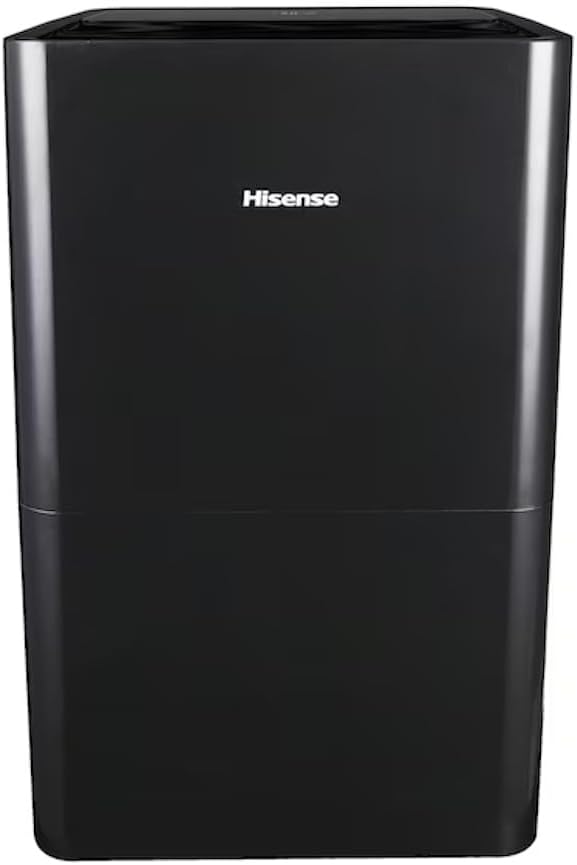
2.1 pav.: priekis view of the Hisense DH5024KP1G Dehumidifier.

Figure 2.2: Dehumidifier with water collection bucket partially removed.

2.3 pav.: šonas view showing handle and water level indicator.

2.4 pav.: galinis view with air filter and power cord.
Valdymo skydelis
Valdymo skydelis leidžia valdyti visas sausintuvo funkcijas.

2.5 pav.: Valdymo skydelio išdėstymas.
- 1. Skaitmeninis ekranas: Shows current humidity level, set humidity, or timer settings.
- 2. Humidity Up/Down Buttons (+/-): Reguliuoja norimą drėgmės lygį.
- 3. Laikmačio mygtukas: Nustato automatinio įjungimo arba automatinio išjungimo laiką.
- 4. Režimo mygtukas: Perjungia automatinio džiovinimo, nepertraukiamo ir rankinio nustatymo režimus.
- 5. Maitinimo mygtukas: Įjungia arba išjungia įrenginį.
- 6. Clean Filter Indicator: Šviečia, kai reikia valyti oro filtrą.
- 7. Fan Button: Reguliuoja ventiliatoriaus greitį (didelis/mažas).
- 8. Pump Button: Įjungia įmontuotą siurblį nuolatiniam drenažui.
- 9. Empty Bucket Indicator: Illuminates when the water collection bucket is full.
3. Sąranka
Įdėjimas
For optimal performance, place the dehumidifier in a location where the humidity is highest and air circulation is good. Ensure the unit is on a level surface and there is at least 8 inches of space around all sides for proper airflow.

3.1 pav. Pvzample of proper dehumidifier placement in a room.
Drenažo parinktys
Your Hisense dehumidifier offers multiple ways to remove collected water.
3.1 Manual Drainage (Bucket)
The dehumidifier will collect water in the internal bucket. When the bucket is full, the "Empty Bucket" indicator will illuminate, and the unit will automatically shut off. Carefully remove the bucket and empty the water. Replace the bucket securely to resume operation.
3.2 Continuous Drainage (Gravity)
For continuous operation without emptying the bucket, you can connect a standard garden hose (not included) to the gravity drain port. Ensure the hose is sloped downwards to allow water to drain by gravity into a floor drain or suitable receptacle.
3.3 Built-in Pump Drainage
This model features a built-in pump, allowing water to be pumped upwards or over a longer distance to a drain. Connect the included drain hose to the pump drain port. Ensure the hose is securely attached and directed to a sink, large bucket, or other suitable drain. Press the "Pump" button on the control panel to activate this function.

Figure 3.2: Built-in pump drainage system.
4. Naudojimo instrukcijos
4.1 Maitinimo įjungimas/išjungimas
Paspauskite Galia mygtuką, kad įjungtumėte arba išjungtumėte oro drėkintuvą.
4.2 Norimo drėgmės lygio nustatymas
When the unit is on, use the +/- buttons to set your desired humidity level. The display will show the set humidity for a few seconds, then revert to displaying the current room humidity. The recommended humidity range for comfort is 40% to 50%.
4.3 Darbo režimai
Paspauskite Režimas mygtuką, kad perjungtumėte galimus veikimo režimus:
- Automatinis džiovinimo režimas: The unit automatically controls humidity based on the ambient conditions.
- Nepertraukiamas režimas: The unit runs continuously regardless of the humidity level. Ideal for very damp conditions or drying clothes.
- Rankinio nustatymo režimas: Allows you to manually set a specific desired humidity level using the +/- buttons.
4.4 Laikmačio funkcija
Paspauskite Laikmatis button to set an auto-on or auto-off time (from 1 to 24 hours). Press the button repeatedly to cycle through hours or use the +/- buttons to adjust.
4.5 Ventiliatoriaus greičio valdymas
Paspauskite Ventiliatorius mygtuką, kad perjungtumėte didelį ir mažą ventiliatoriaus greičius.
4.6 Clean Filter Indicator
The Išvalykite filtrą indicator will light up after approximately 250 hours of operation, reminding you to clean the air filter. After cleaning, press and hold the Išvalykite filtrą mygtuką 3 sekundes, kad iš naujo nustatytumėte indikatorių.
5. Priežiūra
Regular maintenance ensures efficient operation and extends the lifespan of your dehumidifier. Always unplug the unit before performing any maintenance.
5.1 Oro filtro valymas
A dirty filter reduces airflow and efficiency. Clean the filter every two weeks or when the "Clean Filter" indicator illuminates.
- Išjunkite oro sausintuvą ir atjunkite jį nuo maitinimo lizdo.
- Nuimkite oro filtrą nuo įrenginio galinės dalies.
- Nuplaukite filtrą šiltu muiluotu vandeniu. Kruopščiai nuskalaukite.
- Prieš vėl įdėdami filtrą, leiskite jam visiškai išdžiūti. Saugokite nuo tiesioginių saulės spindulių ar karščio.
- Įstatykite filtrą atgal ir prijunkite įrenginį prie elektros tinklo.
- Paspauskite ir palaikykite Išvalykite filtrą mygtuką 3 sekundes, kad iš naujo nustatytumėte indikatorių.
5.2 Oro sausintuvo korpuso valymas
Nuvalykite įrenginio išorę minkšta, damp audiniu. Nenaudokite stiprių cheminių medžiagų, abrazyvinių medžiagų ar tirpiklių.
5.3 Saugykla
Jei oro sausintuvas bus laikomas ilgesnį laiką:
- Empty the water collection bucket and ensure it is completely dry.
- Išvalykite oro filtrą.
- Tvarkingai suvyniokite maitinimo laidą.
- Laikykite įrenginį vertikaliai vėsioje, sausoje vietoje, toliau nuo tiesioginių saulės spindulių ir ekstremalių temperatūrų.
6. Problemų sprendimas
Prieš kreipdamiesi į klientų aptarnavimo tarnybą, peržiūrėkite toliau pateiktą lentelę, kurioje pateikiamos dažniausiai pasitaikančios problemos ir jų sprendimai.
| Problema | Galima priežastis | Sprendimas |
|---|---|---|
| Oro sausintuvas neįsijungia. | No power; Power cord not plugged in; Bucket full or not properly seated. | Check power outlet; Ensure power cord is securely plugged in; Empty and properly reseat the water bucket. |
| Vanduo nesurinktas. | Humidity level too low; Room temperature too low; Air filter clogged; Unit in fan-only mode. | Adjust desired humidity lower; Ensure room temperature is above 38°F (3°C); Clean air filter; Select a dehumidifying mode (Auto Dry, Continuous, Manual Set). |
| Įrenginys veikia nuolat. | Unit in Continuous mode; Desired humidity set too low; Room is very large or very humid. | Switch to Auto Dry or Manual Set mode; Increase desired humidity level; Consider using multiple units for very large spaces. |
| Didelis triukšmas veikimo metu. | Įrenginys nestatytas ant lygaus paviršiaus; užsikimšęs oro filtras; kliūtis ventiliatoriuje. | Place unit on a firm, level surface; Clean air filter; Check for and remove any obstructions. |
| "Empty Bucket" indicator is on, but bucket is not full. | Bucket not properly seated; Float switch malfunction. | Ensure bucket is fully inserted and aligned; If issue persists, contact customer support. |
7. Specifikacijos
Technical data for the Hisense DH5024KP1G Dehumidifier.
| Funkcija | Vertė |
|---|---|
| Modelio pavadinimas | DH5024KP1G |
| Prekės ženklas | Hisense |
| Talpa | 50 pintų per dieną |
| Aprėpties sritis | Iki 4500 kv. |
| Spalva | Pilka |
| Ypatingos savybės | Energy Efficient, Drain Free Hose, Built-In Pump, Simple Controls, Low-temperature Operation (38°F) |
| Įtraukti komponentai | Dehumidifier, AC power cord, User Guide |
| Prekės svoris | 41 svaro |
| Gaminio matmenys (I x P x A) | 15.1 x 10.7 x 24.8 colio |
| UPC | 724129246377 |
8. Garantija ir palaikymas
Išsamesnės informacijos apie garantiją ieškokite prie gaminio pridėtoje garantijos kortelėje arba apsilankykite oficialioje „Hisense“ svetainėje. websvetainėje. Išsaugokite pirkimo kvitą kaip pirkimo įrodymą.
If you encounter any issues not covered in the troubleshooting section or require further assistance, please contact Hisense Customer Support:
- Websvetainė: www.hisense-usa.com/support. (Pvzampnuoroda, tikroji nuoroda gali skirtis)
- Telefonas: Naujausią kontaktinį numerį rasite savo produkto dokumentacijoje.
Ask a question about this manual
Ask about setup, troubleshooting, compatibility, parts, safety, or missing instructions. Manuals+ will review the question and use this page’s manual context to help answer it.