
1. Įvadas ir pabaigaview
The Zendure SolarFlow 2400 AC is an advanced home energy storage system designed to optimize solar power usage and reduce electricity costs. It integrates AI-powered energy management to intelligently store and distribute energy from your solar panels. This system is compatible with various rooftop inverters and offers expandable battery capacity to meet diverse household energy needs.

Figure 1.1: Zendure SolarFlow 2400 AC system installed at a modern home with solar panels on the roof.
2. Saugos informacija
Please read and understand all safety instructions before installing or operating the Zendure SolarFlow 2400 AC system. Failure to follow these instructions may result in electric shock, fire, serious injury, or property damage.
- Profesionalus montavimas: For discharge power exceeding 800W, professional electrician installation on a dedicated line is required.
- Vanduo ir drėgmė: Do not expose the system to rain or moisture. Ensure the installation area is dry and well-ventilated.
- Vėdinimas: Palaikykite pakankamą atstumą aplink įrenginį, kad būtų užtikrinta tinkama ventiliacija ir išvengta perkaitimo.
- Vaikai ir augintiniai: Sistemą laikykite vaikams ir naminiams gyvūnėliams nepasiekiamoje vietoje.
- Žalos patikrinimas: Before each use, inspect the system for any signs of damage. Do not operate if damaged.
- Avarinis išjungimas: Familiarize yourself with the emergency shutdown procedures for the system and your home's electrical panel.
3. Pakuotės turinys
Patikrinkite, ar pakuotėje yra visi reikalingi daiktai:
- SolarFlow 2400 AC Unit (x1)
- AB3000X Battery (x3)
- Montavimo priedai
- Vartotojo vadovas
4. Produkto ypatybės
- „Plug and Play“ diegimas: The SolarFlow 2400 AC is designed for easy installation, compatible with all rooftop inverters. For grid connection exceeding 800W discharge, professional electrical installation is required.
- AI Power Management System: Features machine learning capabilities to recommend optimal energy consumption plans based on production, consumption data, weather conditions, and electricity prices. Supports multiple smart meters (Zendure 3CT/TIC, Shelly Pro 3EM/3EM, EverHome EcoTracker).
- 2400 W kintamosios srovės išvestis: Supports 2400W grid-connected power with rapid conversion from 0 to 2400W in 3 seconds. Output power can be adjusted in 1W increments if above 50W.
- Expandable Capacity up to 17.28 kWh: The SolarFlow 2400 AC can be combined with up to 6 AB3000X batteries, allowing for a maximum storage capacity of 17.28 kWh. This enables storing excess solar energy during the day for use at night.

Figure 4.1: Expandable capacity of the SolarFlow system with AB3000X batteries.
5. Sąrankos instrukcijos
Follow these steps for initial setup of your Zendure SolarFlow system:
- Išpakavimas: Atsargiai išimkite visus komponentus iš pakuotės ir patikrinkite juos pagal pakuotės turinio sąrašą.
- Vieta: Choose a suitable location for the SolarFlow 2400 AC unit and AB3000X batteries. Ensure the area is dry, well-ventilated, and protected from direct sunlight and extreme temperatures. The system has an IP65 rating for outdoor use.
- Baterijos prijungimas: Connect the AB3000X batteries to the SolarFlow 2400 AC unit using the provided cables. Ensure secure connections.
- Saulės skydo jungtis: Connect your existing solar panels or micro-inverter to the SolarFlow 2400 AC unit. Refer to the detailed wiring diagrams in the full manual for specific connections.
- Grid Connection (Plug and Play): For basic 800W grid output, plug the SolarFlow 2400 AC into a standard AC outlet.
- Advanced Grid Connection (Professional Installation): If you require more than 800W discharge to the grid, consult a qualified electrician to install the system on a dedicated electrical line. This ensures compliance with local regulations and safe operation.
- Programos sąranka: Download the Zendure app and follow the on-screen instructions to connect your SolarFlow system. This enables monitoring and AI-powered energy management.

Figure 5.1: SolarFlow 2400 AC connected to an AC outlet.

Figure 5.2: Energy flow diagram during daytime operation.
6. Naudojimo instrukcijos
Once installed, the SolarFlow 2400 AC system operates largely autonomously, managed by its AI system. Use the Zendure app for monitoring and advanced settings.
6.1 AI Power Management
The integrated AI system continuously learns your energy patterns. It collects data on historical electricity production and consumption, weather forecasts, dynamic electricity prices, and battery levels to optimize energy storage and discharge. This intelligent management aims to maximize self-consumption of solar energy and minimize reliance on the grid during peak pricing periods.

Figure 6.1: AI Power Management System Overview.
6.2 Energy Flow and Usage
- Dienos metu: Solar panels generate electricity. This power is first used by household appliances. Excess power is stored in the AB3000X batteries. If batteries are full, remaining excess power can be fed back into the grid (subject to local regulations and professional installation for higher power).
- Nighttime/Low Solar Production: When solar production is low or absent, the system automatically draws power from the stored energy in the AB3000X batteries to power your home. This reduces reliance on grid electricity, especially during expensive peak hours.
- Atsarginė galia: The system can provide up to 2400W of off-grid backup power to critical appliances during grid outages.

Figure 6.2: System providing backup power to a refrigerator.

Figure 6.3: Energy flow diagram during nighttime operation.
6.3 Monitoring with the Zendure App
The Zendure app provides real-time monitoring of your system's status, energy production, consumption, and battery levels. You can also adjust settings and view energy reports to understand your usage patterns.
7. Priežiūra
Regular maintenance ensures the longevity and optimal performance of your SolarFlow system.
- Valymas: Keep the SolarFlow unit and batteries clean and free from dust and debris. Use a soft, dry cloth for cleaning. Do not use liquid cleaners.
- Ryšio patikrinimai: Periodically inspect all cables and connections for wear, damage, or looseness. Ensure they are securely fastened.
- Vėdinimas: Ensure that the ventilation openings on the unit are not blocked.
- Programinės įrangos atnaujinimai: Keep the Zendure app and system firmware updated to benefit from the latest features and improvements.
- Baterijos būklė: The system's AI manages battery health. Avoid fully discharging the batteries frequently to prolong their lifespan.
8. Problemų sprendimas
If you encounter issues with your SolarFlow system, refer to the following common troubleshooting steps:
| Problema | Galima priežastis | Sprendimas |
|---|---|---|
| Sistema neįsijungia | Loose power connection, discharged battery, system fault. | Check all power cables. Ensure batteries are charged. If problem persists, contact support. |
| Nėra išvesties galios | Overload, battery low, output port disabled. | Reduce connected load. Check battery level in app. Ensure output ports are enabled. |
| Solar panels not charging batteries | Poor solar input, incorrect connection, inverter issue. | Check solar panel connections. Ensure sufficient sunlight. Verify inverter operation. |
| App not connecting to system | Wi-Fi issue, Bluetooth issue, system offline. | Ensure system is powered on and within Wi-Fi/Bluetooth range. Restart app and system. |
For more detailed troubleshooting or issues not listed here, please refer to the comprehensive troubleshooting guide in the Zendure app or contact Zendure customer support.
9. Specifikacijos
| Funkcija | Detalė |
|---|---|
| Gamintojas | Zendure |
| Modelio nuoroda | SF2400 & 3*AB3000X |
| Stilius | SolarFlow 2400 AC + 3 AB3000X |
| AC įvestis | 2400W |
| AC išvestis | 2400W |
| Battery Capacity (Expandable) | Up to 17.28 kWh (with 6 AB3000X batteries) |
| Įtraukti komponentai | SF2400 and 3 AB3000X |
| Efektyvumas | Up to 93% (AC input and output) |
| AI Management | Yes, with machine learning for energy optimization |
| Smart Meter Compatibility | Zendure 3CT/TIC, Shelly Pro 3EM/3EM, EverHome EcoTracker |
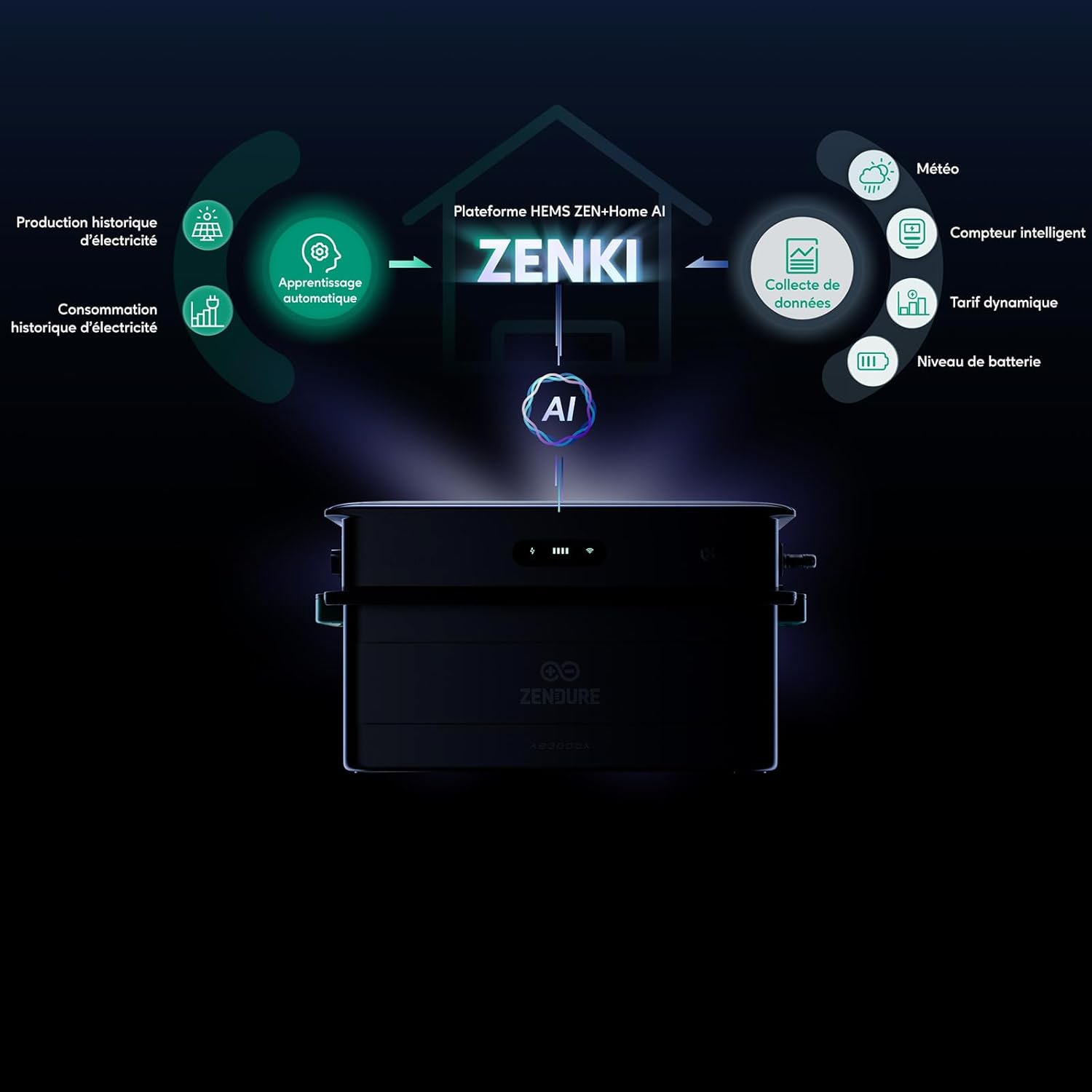
Figure 9.1: Key specifications and energy savings.

Figure 9.2: System efficiency details.
10. Garantija ir palaikymas
Zendure products are designed for reliability and performance. For warranty information, please refer to the warranty card included with your product or visit the official Zendure website. For technical support, troubleshooting assistance, or any inquiries, please contact Zendure customer service through their official channels.
Zendure is committed to providing innovative energy solutions and customer satisfaction.