
1. Įvadas
Welcome to the user manual for your new XIAOMI Redmi Note 14 Pro+ 5G Smartphone. This guide provides essential information on setting up, operating, and maintaining your device. Please read it carefully to ensure optimal performance and longevity of your smartphone.
2. Pakuotės turinys
Patikrinkite, ar jūsų pakuotėje yra šie elementai:
- XIAOMI Redmi Note 14 Pro+ 5G Smartphone
- USB kabelis
- Greito paleidimo vadovas (gali skirtis priklausomai nuo regiono)
- SIM kortelės išstūmimo įrankis (gali skirtis priklausomai nuo regiono)
Note: A charger is not included in the package. Please use a compatible 120W HyperCharge adapter for optimal charging.
3. Įrenginys baigtasview
Familiarize yourself with the physical components of your Redmi Note 14 Pro+ 5G.
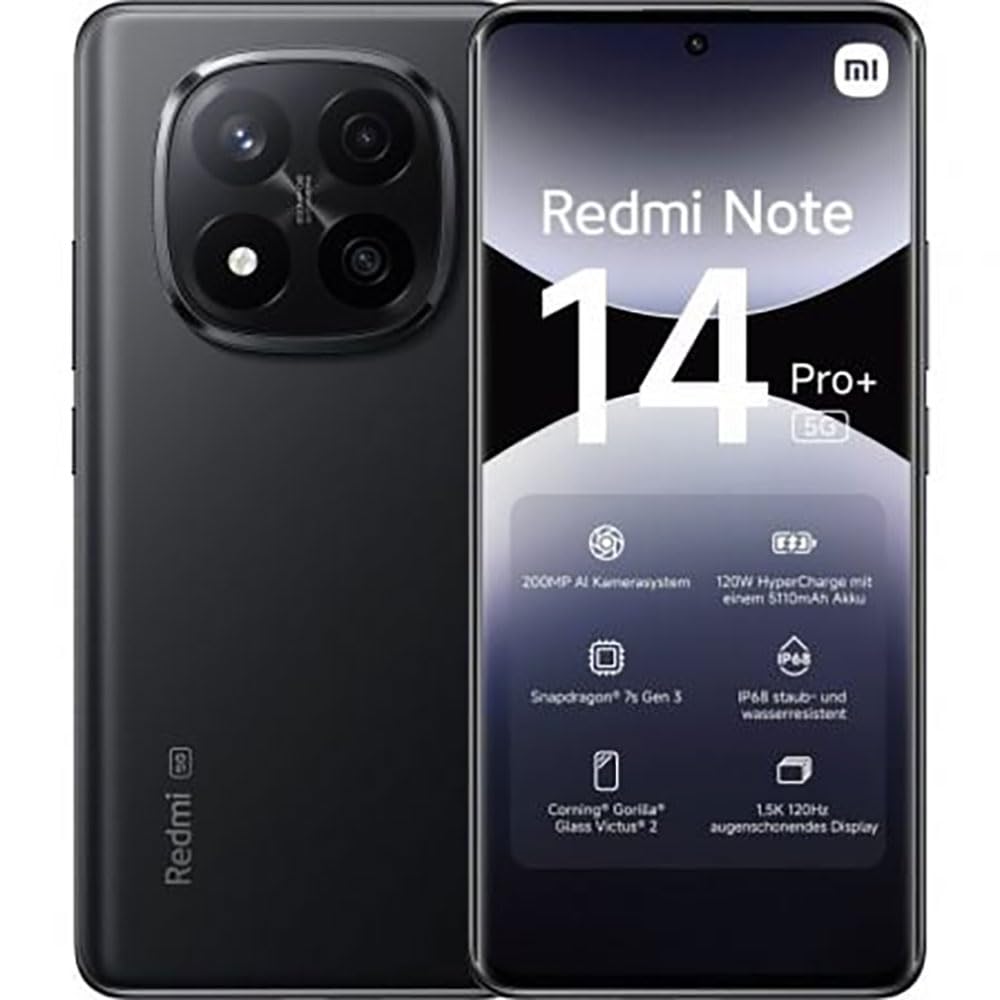
The image displays the front and back of the XIAOMI Redmi Note 14 Pro+ 5G smartphone. The front shows the display with 'Redmi Note 14 Pro+ 5G', '200 Megapixels', and '256 GB' text. The back features a prominent camera module with multiple lenses and the 'Redmi 5G' branding.
Pagrindiniai komponentai:
- Priekinis ekranas: 6.67-inch 1.5K 120Hz AMOLED display with Corning Gorilla Glass Victus 2.
- Galinio vaizdo kameros modulis: Houses the 200MP Pro-Grade AI Camera system.
- Maitinimo mygtukas: Located on the side, used to power on/off and wake/sleep the device.
- Garsumo mygtukai: Įsikūręs šone, naudojamas medijos ir skambučių garsumui reguliuoti.
- C tipo USB prievadas: Įkrovimui ir duomenų perdavimui.
- SIM kortelės lizdas: Supports Dual SIM Nano SIM cards.
- Garsiakalbiai: Stereo speakers for audio output.
4. Sąranka
4.1. SIM kortelės įdėjimas
- Suraskite SIM kortelės dėklą savo įrenginio šone.
- Įkiškite SIM kortelės išstūmimo įrankį į mažą skylutę šalia dėklo ir tvirtai spauskite, kol dėklas iššoks.
- Place your Nano SIM card(s) into the tray with the gold contacts facing down. Ensure proper orientation.
- Švelniai stumkite dėklą atgal į angą, kol jis spragtelėdamas užsifiksuos savo vietoje.
4.2. Įrenginio įjungimas
Paspauskite ir palaikykite Maitinimo mygtukas on the side of the phone until the XIAOMI logo appears on the screen. Follow the on-screen instructions to complete the initial setup, including connecting to Wi-Fi, setting up your Google account, and configuring security features like fingerprint recognition.
4.3. Pradinis mokestis
It is recommended to fully charge your device before first use. Connect the USB Type-C cable to the phone and a compatible 120W HyperCharge adapter (not included) to a power outlet.
5. Išmaniojo telefono valdymas
5.1. Pagrindinė navigacija
- Jutiklinis ekranas: Palieskite, kad pasirinktumėte, braukite, kad slinktumėte, suspauskite, kad priartintumėte.
- Pagrindinis ekranas: Jūsų pagrindinis programėlių ir valdiklių centras.
- Pranešimų skydelis: Braukite žemyn nuo ekrano viršaus, kad pasiektumėte pranešimus ir greituosius nustatymus.
- Programėlių stalčius: Braukite aukštyn nuo ekrano apačios (arba palieskite programėlių stalčiaus piktogramą), kad view visos įdiegtos programos.
5.2. Įjungimas / išjungimas ir paleidimas iš naujo
- Į Išjungti: Press and hold the Power Button until the power menu appears, then select "Power off."
- Į Paleisti iš naujo: Press and hold the Power Button until the power menu appears, then select "Restart."
5.3. Apsaugos priemonės
Your device supports various security options:
- Pirštų atspaudų atpažinimas: Užregistruokite pirštų atspaudus, kad galėtumėte greitai ir saugiai atrakinti.
- Atrakinimas pagal veidą: Įrenginį atrakinkite veidu.
- PIN kodas / šablonas / slaptažodis: Standard security methods.
Pasiekite šiuos nustatymus per Nustatymai > Saugumas ir privatumas.
6. Kameros funkcijos
The Redmi Note 14 Pro+ 5G features a powerful 200MP Pro-Grade AI Camera system designed to enhance your photography experience.
- 200MP pagrindinė kamera: Capture highly detailed images with optical image stabilization (OIS).
- Multiple Camera Modes: Includes automatic, scene, portrait, and manual modes for versatile shooting.
- Dual LED Flash: Provides enhanced lighting in low-light conditions.
- Priekinė kamera: A 20MP front sensor for high-quality selfies and video calls.
- Vaizdo įrašymas: Supports up to 8K video capture at 120 fps.
7. Dirbtinio intelekto funkcijos
Leverage the integrated AI functionalities for a smarter user experience:
- AI Erase Pro: Intelligently remove unwanted objects or people from your photos.
- DI vaizdo išplėtimas: Expand the boundaries of your images using AI.
- DI pastabos: Smart note-taking capabilities.
- DI subtitrai: Generate subtitles for videos or audio in real-time.
- Dirbtinio intelekto įrašymo įrenginys: Enhanced voice recording with AI features.
- DI vertėjas: Kalbos vertimas realiuoju laiku.
- Dvyniai: Integrated AI assistant.
- Apibraukite, kad galėtumėte ieškoti „Google“: Greitai ieškokite informacijos apibraukdami objektus ekrane.
8. Įkrovimas
Your Redmi Note 14 Pro+ 5G supports 120W HyperCharge technology for rapid charging.
- Baterijos talpa: 5110mAh Lithium-polymer battery.
- Įkrovimas: Use the provided USB Type-C cable with a compatible 120W power adapter (sold separately) for optimal charging speeds.
- Baterijos veikimo laikas: Expect up to 20 hours of talk time. Actual battery life may vary based on usage.
Always use certified charging accessories to prevent damage to your device.
9. Priežiūra
9.1. Atsparumas vandeniui ir dulkėms
Įrenginyje yra IP68 reitingas for dust and water resistance. This means it is protected against dust ingress and can withstand immersion in water up to 1.5 meters for 30 minutes. However, this resistance is not permanent and may decrease over time with normal wear. Avoid exposing the device to hot water, saltwater, or other liquids.
9.2. Įrenginio valymas
- Ekranui ir korpusui valyti naudokite minkštą, nepūkuotą šluostę.
- Venkite naudoti abrazyvinius valiklius, tirpiklius ar aerozolinius purškalus.
- If the device gets wet, wipe it thoroughly with a clean, dry cloth before charging or using ports.
9.3. Programinės įrangos atnaujinimai
Reguliariai tikrinkite, ar yra programinės įrangos atnaujinimų, ir juos įdiekite, kad jūsų įrenginyje būtų naujausios funkcijos, saugos pataisymai ir našumo patobulinimai. Eikite į Nustatymai > Apie telefoną > MIUI versija norėdami patikrinti, ar nėra atnaujinimų.
10. Problemų sprendimas
Jei kyla problemų dėl įrenginio, išbandykite šiuos įprastus sprendimus:
- Įrenginys neįsijungia: Įsitikinkite, kad akumuliatorius įkrautas. Prijunkite prie įkroviklio bent 15 minučių, tada pabandykite įjungti.
- Programėlės stringa arba užstringa: Uždarykite probleminę programėlę ir vėl ją atidarykite. Jei problema išlieka, paleiskite telefoną iš naujo.
- Prastas tinklo ryšys: Check your SIM card is correctly inserted. Try toggling Airplane Mode on and off. If the issue persists, contact your network provider.
- Baterija greitai išsikrauna: Sumažinkite ekrano ryškumą, uždarykite nenaudojamas programas ir išjunkite nereikalingas funkcijas, pvz., GPS ar „Bluetooth“, kai jų nenaudojate.
- Ekranas nereaguoja: Force restart your device by holding the Power Button for approximately 10-15 seconds.
Dėl sudėtingesnių problemų kreipkitės į oficialią „XIAOMI“ pagalbos tarnybą. websvetainėje arba susisiekite su klientų aptarnavimo tarnyba.
11. Specifikacijos
| Funkcija | Specifikacija |
|---|---|
| Prekės ženklas | XIAOMI |
| Modelio pavadinimas | Redmi Note 14 Pro+ 5G |
| Operacinė sistema | Android 14 |
| CPU modelis | Snapdragon 7 Gen 3 |
| RAM | 8 GB |
| Sandėliavimo talpa | 256 GB |
| Ekrano dydis | 6.67 colių |
| Ekrano raiška | 2712 x 1220 pikselių |
| Atnaujinimo dažnis | 120 Hz |
| Galinės kameros skiriamoji geba | 200 Megapixels (with OIS) |
| Priekinės kameros skiriamoji geba | 20 megapikselio |
| Baterijos talpa | 5110 mAh |
| Įkrovimo technologija | 120 W „HyperCharge“ |
| Atsparumas vandeniui | IP68 |
| Korinio ryšio technologija | 5G |
| SIM kortelės tipas | Nano SIM (Dual SIM) |
| Ryšys | C tipo USB |
12. Garantija ir palaikymas
12.1. Gamintojo garantija
Your XIAOMI Redmi Note 14 Pro+ 5G Smartphone comes with a 2 metų gamintojo garantijaŠi garantija taikoma medžiagų ir gamybos defektams, atsiradusiems įprasto naudojimo sąlygomis. Išsaugokite pirkimo įrodymą, jei galėtumėte pateikti pretenzijas dėl garantijos.
The warranty does not cover damage caused by accidents, misuse, unauthorized modifications, or normal wear and tear.
12.2. Pagalba klientams
For technical assistance, warranty claims, or further information, please visit the official XIAOMI support website or contact their customer service department. Contact details can typically be found on the XIAOMI websvetainėje arba garantijos kortelėje, pridėtoje prie jūsų gaminio.