
NEEWER X12II
Neewer X12II Teleprompter User Manual
Model: X12II | Brand: NEEWER
Įvadas
The NEEWER X12 II Teleprompter is designed to enhance video production, live streaming, and vlogging by allowing users to read scripts naturally while maintaining eye contact with the camera. This all-in-one teleprompter requires no assembly and comes with a hard aluminum case for storage and transport. It features a 12-inch ultra-clear beamsplitter, an Arca-type quick release camera mount, and intelligent remote control via the NEEWER Teleprompter App.

Image: The Neewer X12II Teleprompter set up with a camera and tablet, showcasing its compact design and ease of use.
Pakuotės turinys
Upon opening your NEEWER X12II Teleprompter package, please verify that all the following items are included:
- 1 x X12 II teleprompteris
- 1 x RT113 nuotolinio valdymo pultas
- 1 x Valymo šluostė
- 1 x nešiojimo dėklas

Image: A visual representation of the teleprompter, RT113 remote, cleaning cloth, and hard carrying case included in the package.
Sąranka
The NEEWER X12 II Teleprompter is designed for quick and easy setup with no assembly required. Follow these steps to prepare your teleprompter for use:
- Unpack the Teleprompter: Carefully remove the teleprompter from its hard aluminum carrying case. The unit is pre-assembled and ready to unfold.
- Tvirtinimas ant trikojo: Secure the teleprompter to a sturdy tripod using the multiple 1/4" and 3/8" threads on its base. Ensure the tripod can support the combined weight of the teleprompter, camera, and tablet (up to 22lb/10kg).
- Adjust Beamsplitter Angle: Unfold and adjust the beamsplitter glass to the desired angle, typically 40 degrees, for optimal viewing.
- Įdiekite kamerą: The teleprompter features a 4-sided Arca-type dovetail quick release plate for rapid camera mounting. Simply snap your camera onto the plate. The 1/4" screw suits cameras and camcorders up to 22lb/10kg. Adjust the camera's horizontal position (up to 14.6cm) and vertical position (up to 2.6cm) for optimal alignment with the beamsplitter.
- Insert Tablet/Phone: Place your tablet or smartphone (up to 7.9"/20cm wide) into the designated slot below the beamsplitter. Ensure it is securely seated.
- Pritvirtinkite priedus: Utilize the three cold shoes and two 1/4" threads on the teleprompter's rigid aluminum alloy structure to attach accessories such as LED lights, microphones, or magic arms as needed.

Image: Visual guide demonstrating the assembly-free setup process, including unpacking, tripod mounting, and beamsplitter adjustment.
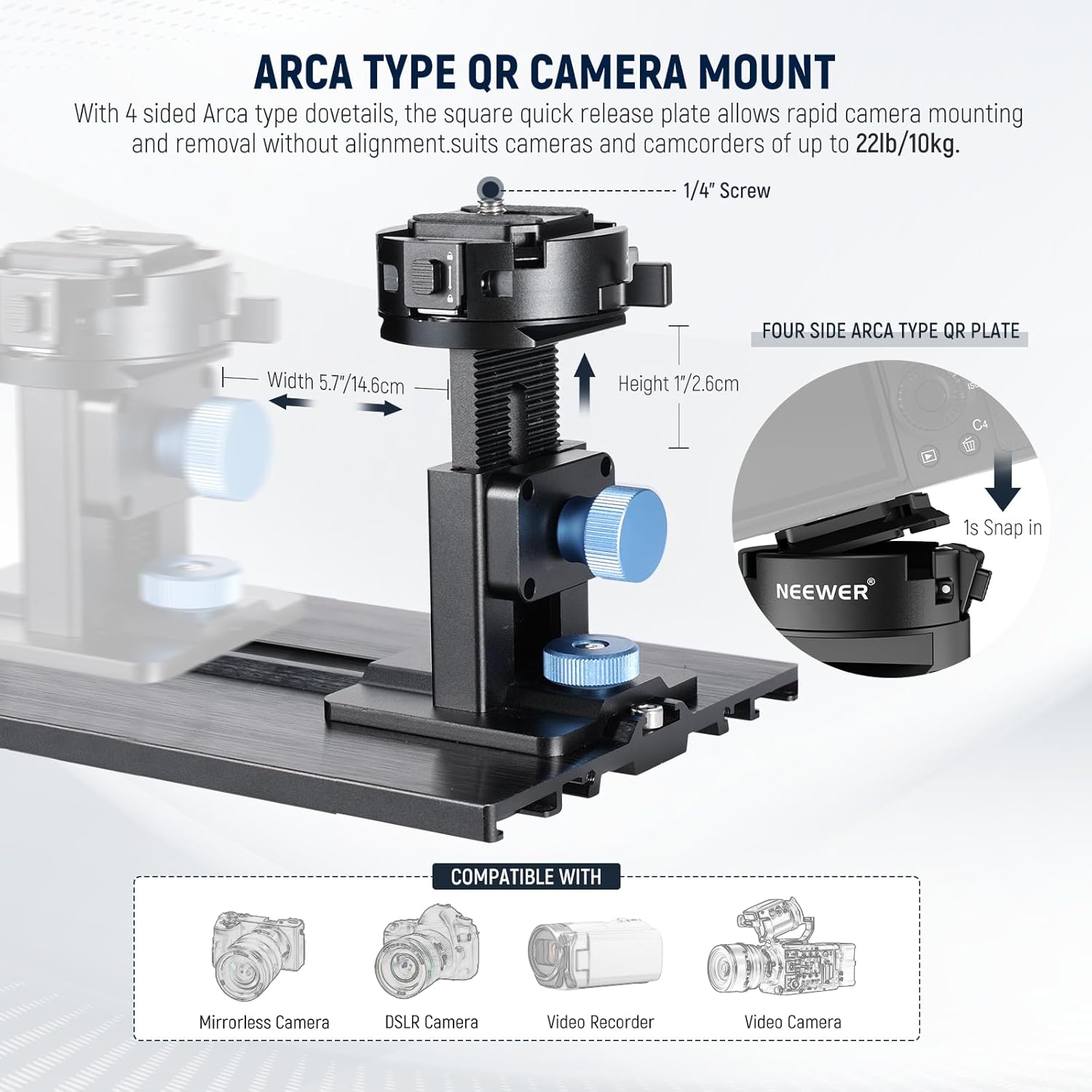
Vaizdas: Išsamus view of the Arca Type QR Camera Mount, highlighting its quick release mechanism and adjustable features for various cameras.

Image: Illustration of the teleprompter's wide compatibility with various tablet and phone sizes, supporting devices up to 7.9 inches (20cm) wide.

Image: The teleprompter demonstrating its accessory expansion capabilities, with LED lights and microphones attached to its cold shoes and 1/4" threads.
Demonstracinio vaizdo įrašo sąranka
Video: A comprehensive demonstration of the Neewer Teleprompter with Arca Type Camera Mount, showing unboxing, setup, and various features in action.
Naudojimo instrukcijos
The NEEWER X12 II Teleprompter is designed for intuitive operation, primarily controlled via the dedicated app and remote.
- Download the NEEWER Teleprompter App:
Download the official NEEWER Teleprompter App on your tablet or smartphone. The app is compatible with iOS 11.0 and Android 6.0 or later versions.
- Pair the RT113 Remote:
Insert AAA batteries (not included) into the RT113 remote. Pair the remote with your tablet via Bluetooth connection within the NEEWER Teleprompter App or directly through your device's Bluetooth settings.
- Įkelkite savo scenarijų:
Input or import your script into the NEEWER Teleprompter App. Ensure the text is clearly visible and formatted as desired.
- Control Script Playback:
Use the RT113 remote to control the script. The quiet buttons allow you to:
- Play/Pause the script scrolling.
- Adjust the scroll speed to match your speaking pace.
- Turn script pages (forward/backward).
- Change font size for optimal readability.
- Beamsplitter Display:
The 12-inch multicoated beamsplitter glass with 71% light transmittance ensures clear reflection of your script, allowing for a reading range of up to 10ft/3m. The reflected text will appear in reverse on the tablet, but correctly oriented when viewed through the beamsplitter.

Image: The RT113 remote control and the NEEWER Teleprompter App interface, illustrating the various functions for script management.

Image: A visual representation of the 12-inch ultra-clear beamsplitter, demonstrating its high light transmittance and clear text reflection for easy reading.
Priežiūra
Proper maintenance will ensure the longevity and optimal performance of your NEEWER X12 II Teleprompter:
- Spindulių skirstytuvo valymas: Use the provided cleaning cloth or a soft, lint-free microfiber cloth to gently wipe the beamsplitter glass. For stubborn smudges, a small amount of lens cleaning solution can be applied to the cloth (not directly to the glass). Avoid abrasive materials or harsh chemicals.
- Bendras valymas: Wipe down the aluminum alloy structure and fabric components with a dry, soft cloth to remove dust and fingerprints.
- Saugykla: When not in use, store the teleprompter in its hard aluminum carrying case to protect it from dust, moisture, and physical damage.
- Baterijos keitimas: Replace the AAA batteries in the RT113 remote when its performance degrades or it stops responding.
Trikčių šalinimas
If you encounter issues with your NEEWER X12 II Teleprompter, refer to the following common troubleshooting tips:
- Text is blurry or unclear:
- Ensure the protective film has been removed from the beamsplitter glass.
- Clean the beamsplitter glass with the provided cleaning cloth.
- Adjust the brightness and contrast settings on your tablet/smartphone.
- Ensure your camera lens is properly aligned and focused through the beamsplitter.
- Nuotolinio valdymo pultas nereaguoja:
- Check if the batteries in the RT113 remote are correctly inserted and have sufficient charge. Replace if necessary.
- Ensure the remote is properly paired with your tablet/smartphone via Bluetooth. Try re-pairing if connection is lost.
- Make sure there are no obstructions between the remote and your device.
- Tablet/phone not fitting or unstable:
- Verify that your device's width is within the supported range (up to 7.9"/20cm).
- Ensure the tablet/phone is securely placed in the holder and the locking mechanism (if any) is engaged.
- Camera not stable or difficult to mount:
- Ensure the camera is properly seated on the Arca-type quick release plate and the locking lever is engaged.
- Check that your camera's weight does not exceed the maximum load capacity of 22lb/10kg.
- Confirm the tripod is stable and capable of supporting the total setup weight.
Dėl papildomos pagalbos kreipkitės į NEEWER klientų aptarnavimo tarnybą.
Specifikacijos
| Prekės tipas | Teleprompteris |
| Pagrindinė medžiaga | Aliuminio lydinys |
| Suderinamumas | Camera / Phone / Tablet |
| Apkrova | 22 svaro / 10 kg |
| Taikymas | Speech / Vlogging |
| Montavimo taškai | Cold Shoe, 1/4", 3/8" |
| Pagrindinės savybės | Jokios asamblėjos |
| Svoris | 3.8 svaro / 1.7 kg |
| Sulenktas dydis | 14" (ilgis) x 11.2" (plotis) x 4.5" (aukštis) |
| Pakuotės matmenys | 17.8 x 16.18 x 6.65 colio |
Garantija ir palaikymas
NEEWER products are designed for reliability and performance. For information regarding warranty coverage, product registration, and technical support, please refer to the official NEEWER websvetainėje arba susisiekite tiesiogiai su jų klientų aptarnavimo tarnyba.
Galite aplankyti NEEWER parduotuvė „Amazon“ platformoje daugiau informacijos apie produktą ir pagalbos išteklių.
Susiję dokumentai - X12II
 |
Desview DT serijos teleprompteris transliavimui vartotojo vadovas Išsamus „Des“ naudotojo vadovasview DT serijos teleprompteris, apimantis transliavimo programų diegimą, programinės įrangos sąranką, veikimą ir trikčių šalinimą. |
 |
„Neewer X17“ teleprompteris: naudojimo instrukcija ir sąrankos vadovas Sužinokite, kaip nustatyti ir naudoti „Neewer X17“ teleprompterį, naudodamiesi šia išsamia naudojimo instrukcija. Jame pateikiami diegimo veiksmai, nuotolinio valdymo pulto veikimas ir produkto specifikacijos. |
 |
„FEELWORLD TP2/TP2A“ teleprompterio naudotojo vadovas Išsami „FEELWORLD TP2 DSLR“ fotoaparato versijos ir „TP2A Smartphone + DSLR“ universalios versijos teleprompterio naudojimo instrukcija, apimanti pakavimo sąrašus, struktūrą, diegimą, programos atsisiuntimą ir nuotolinio valdymo pulto naudojimą. |
 |
Ikan PT4900-V2 Professional 19-inch High-Bright Beam Splitter Teleprompter Quick Start Guide Quick start guide for the Ikan PT4900-V2, a professional 19-inch high-bright beam splitter teleprompter. Includes setup instructions, specifications, and warranty information. |
 |
Ikan HS-PT700-RC HomeStream Teleprompter Quick Start Guide Quick start guide for the Ikan HS-PT700-RC HomeStream Teleprompter system, featuring a 7" monitor, Elite remote, and PrompterPro 4 software. Includes setup instructions for DSLR, mirrorless, and smartphone cameras, and remote controller details. |
 |
„Ikan PT-Elite-UL“ universalus didelių planšetinių kompiuterių teleprompteris – greito paleidimo vadovas Šiame „ikan Corporation“ greito paleidimo vadove išsamiai aprašomas universalaus didelio planšetinio kompiuterio teleprompterio „PT-Elite-UL“ surinkimas ir naudojimas. Sužinokite apie pridedamus komponentus, nustatymo veiksmus ir profesionalios teleprompterijos garantijos sąlygas. |
Ask a question about this manual
Ask about setup, troubleshooting, compatibility, parts, safety, or missing instructions. Manuals+ will review the question and use this page’s manual context to help answer it.