
1. Įvadas
This manual provides detailed instructions for the installation, operation, and maintenance of the Yitouniu EWeLink 2-Channel Smart WiFi Switch Relay. This device enables remote control of household appliances and electronic devices via a mobile application, RF remote control, and voice commands through smart assistants like Alexa and Google Home. It supports various operating modes and timing functions to enhance smart home automation.
2. Saugos informacija
- Prieš montuodami ar atlikdami techninę priežiūrą, įsitikinkite, kad maitinimas yra atjungtas, kad išvengtumėte elektros smūgio.
- Installation should be performed by qualified personnel or under strict adherence to electrical safety guidelines.
- Neviršykite didžiausios srovės ir tūriotagĮrenginiui nurodyti e įvertinimai.
- Saugokite įrenginį nuo vandens, drėgmės ir ekstremalių temperatūrų.
- Prieš atkurdami elektros tiekimą, patikrinkite, ar visos laidų jungtys yra tvirtos ir tinkamos.
3. Produktas baigtasview
The Yitouniu EWeLink Smart WiFi Switch Relay is a compact, 2-channel device designed for integrating traditional appliances into a smart home system. It features WiFi and Bluetooth connectivity for app control and supports RF 433MHz for remote control.

3.1 vaizdas: priekis view of the Yitouniu EWeLink Smart WiFi Switch Relay. The device is white with branding and connection labels visible.

3.2 paveikslėlis: Stambus planas view of the Yitouniu EWeLink Smart WiFi Switch Relay, showing input terminals (N, L), output terminals (NO, COM, NC), and model information.

Image 3.3: The compact size of the Yitouniu EWeLink Smart WiFi Switch Relay, held in a hand for scale.
4. Specifikacijos
| Parametras | Vertė |
|---|---|
| Įvesties tomastage | AC/DC 85-250V, Micro USB 5V input |
| Maksimali srovė | 10A |
| Maksimali galia | 2200W |
| WiFi standartas | WiFi 2.4GHz b/n/g + Bluetooth (IEEE 802.11b/g/n) |
| Darbinė temperatūra | -20°C iki 70°C |
| Medžiaga | Antipirenas ABS |
| Gaminio matmenys | 2.76 x 1.77 x 1.1 colio |
| Prekės svoris | 1.76 uncijos |
| Kontakto tipas | Paprastai atidarytas |
| Tarptautinis apsaugos įvertinimas | IP65 |
| Sertifikavimas | FCC |
5. Sąranka ir diegimas
5.1 Laidų prijungimo instrukcijos
The device supports both AC/DC 85-250V input and Micro USB 5V input. Ensure correct wiring based on your application. The relay has Normally Open (NO), Common (COM), and Normally Closed (NC) contacts for controlling external devices.
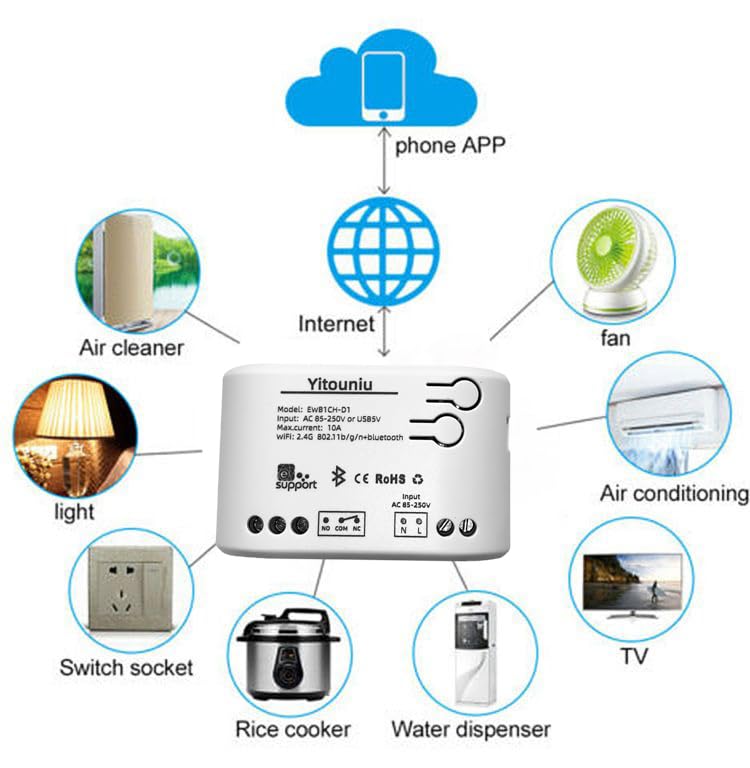
Image 5.1: Diagram illustrating the connectivity of the Yitouniu EWeLink Smart WiFi Switch Relay to various household appliances like lights, fans, and air conditioners, all controlled via a phone app and the internet.
5.2 Programėlės atsisiuntimas ir susiejimas
- Atsisiųskite eWeLink programėlę iš Apple App Store arba Google Play Store.
- Užregistruokite paskyrą ir prisijunkite.
- Power on the Smart WiFi Switch Relay.
- Open the eWeLink app, tap the '+' icon to add a device.
- Follow the on-screen instructions to connect the device to your 2.4GHz WiFi network.

Image 5.2: Screenshots of the eWeLink app interface, showing controls for a garage door (ON/OFF) and a scheduling function for setting specific times.
6. Veikimo režimai
The device supports three operating modes: self-locking, interlocking, and inching (micromotion). These modes can typically be configured within the eWeLink app or via physical buttons on the device, depending on the specific model variant.
- Savaiminio užsifiksavimo režimas: Each channel operates independently. Pressing the button (or app control) turns the relay ON, pressing it again turns it OFF.
- Interlocking Mode: When one channel is turned ON, all other channels are automatically turned OFF. This is useful for applications where only one device should be active at a time.
- Inching (Micromotion) Mode: The relay turns ON for a set duration (e.g., 0.5 seconds to 1 hour) and then automatically turns OFF. This is suitable for momentary actions like garage door openers or pulse controls.
7. Valdymas programėle ir balsu
7.1 eWeLink App Features
The eWeLink app provides comprehensive control over your Smart WiFi Switch Relay:
- Nuotolinis įjungimas / išjungimas: Control connected devices from anywhere with an internet connection.
- Laiko funkcijos: Set schedules, countdowns, or recurring timers for automatic on/off operations.
- Nepriklausoma kontrolė: Each of the two channels can be controlled independently.
- Įrenginio bendrinimas: Bendrinkite savo įrenginių valdymą su šeimos nariais.
- Grupės valdymas: Organize multiple smart devices into groups for simultaneous control.

Image 7.1: A user remotely controlling home lighting via the eWeLink mobile application, demonstrating the convenience of app-based control.

Image 7.2: Illustration of the eWeLink app's group control and sharing functions, allowing multiple users to manage devices across different rooms.

Image 7.3: The timing function interface within the eWeLink app, enabling users to set specific on/off times for connected appliances.
7.2 Balso valdymo integravimas
The Yitouniu Smart WiFi Switch Relay is compatible with popular voice assistants, including Amazon Alexa and Google Home/Nest. To enable voice control:
- Ensure your Smart WiFi Switch Relay is successfully paired with the eWeLink app.
- Atidarykite „Alexa“ arba „Google Home“ programėlę.
- Eikite į skyrių „Įgūdžiai“ arba „Darbas su „Google“.
- Ieškokite and enable the 'eWeLink Smart Home' skill/service.
- Link your eWeLink account when prompted.
- Discover devices. Your Smart WiFi Switch Relay should now be controllable via voice commands.
Example komandos:
- „Alexa, įjunk šviesą svetainėje.“
- „Ei, Google, išjunk ventiliatorių.“

Image 7.4: A user interacting with voice assistants like Amazon Alexa and Google Home to control smart devices, highlighting the voice control capability of the relay.
8. Priežiūra
The Yitouniu Smart WiFi Switch Relay requires minimal maintenance. Follow these guidelines:
- Valymas: Wipe the device with a dry, soft cloth. Do not use liquid cleaners or solvents.
- Ryšio patikrinimas: Periodiškai tikrinkite laidų jungtis, kad įsitikintumėte, jog jos yra saugios.
- Firmware atnaujinimai: Keep the eWeLink app updated to receive the latest firmware for the device, which may include performance improvements and new features.
9. Problemų sprendimas
- Įrenginys neprisijungia prie „Wi-Fi“:
- Ensure your WiFi network is 2.4GHz. The device does not support 5GHz networks.
- Check if the WiFi password entered in the app is correct.
- Perkelkite įrenginį arčiau „Wi-Fi“ maršrutizatoriaus.
- Paleiskite įrenginį ir maršrutizatorių iš naujo.
- Įrenginys neprisijungęs programėlėje:
- Verify your home internet connection is active.
- Patikrinkite, ar įrenginyje yra maitinimo.
- Iš naujo paleiskite įrenginį.
- Balso valdymas neveikia:
- Confirm the eWeLink skill/service is enabled and linked in your Alexa or Google Home app.
- Ensure the device is named clearly in the eWeLink app and discovered by your voice assistant.
- Patikrinkite savo interneto ryšį.
- Device not responding to RF remote:
- Ensure the RF remote is paired with the switch. Refer to the RF pairing instructions (if applicable to your specific remote).
- Check the battery in the RF remote.
10. Kas yra dėžutėje
Atidarius produkto pakuotę, turėtumėte rasti šiuos daiktus:
- 1 x Yitouniu Wifi 2-Channel Relay Switch
- 1 x naudojimo instrukcija (šis dokumentas)
11. Garantija ir palaikymas
This product comes with a standard manufacturer's warranty. For specific warranty terms, conditions, and duration, please refer to the documentation included with your purchase or contact Yitouniu customer support. For technical assistance or further inquiries, please visit the official Yitouniu websvetainėje arba susisiekite su jų klientų aptarnavimo kanalais.