
1. Įvadas
The LAUNCH Millennium Master 2.0 is an advanced OBD2 diagnostic scan tool designed to assist vehicle owners and technicians in identifying and resolving automotive issues. This device offers comprehensive diagnostics for four main vehicle systems: Engine, Anti-lock Braking System (ABS), Supplemental Restraint System (SRS), and Transmission. It also includes 13 commonly used reset service functions and supports battery health, starting, and charging tests. Featuring a 5-inch touchable HD screen and Auto VIN capabilities, the Millennium Master 2.0 provides clear data display and efficient vehicle information retrieval. This manual provides essential information for setting up, operating, maintaining, and troubleshooting your device.
2. Saugos informacija
Before operating the LAUNCH Millennium Master 2.0, please read and understand all safety instructions. Failure to do so may result in injury or damage to the device or vehicle. Always perform diagnostic tests in a well-ventilated area. Ensure the vehicle is in Park (P) or Neutral (N) with the parking brake engaged. Do not wear loose clothing or jewelry that could get caught in moving engine parts. Keep the device away from heat, sparks, and open flames. This device is intended for use by qualified individuals or under their supervision. Always refer to your vehicle's service manual for specific procedures and warnings.
3. Produktas baigtasview
The LAUNCH Millennium Master 2.0 is a versatile diagnostic tool equipped with a 5-inch touchscreen and an intuitive interface. It is designed to provide accurate and efficient vehicle diagnostics.
3.1 Pagrindinės savybės
- 4-sistemos diagnostika: Comprehensive scanning for Engine, ABS, SRS, and Transmission systems.
- 13 Atstatymo funkcijos: Includes Oil Reset, ETS Reset, SAS Reset, Brake Reset, Injector Coding, BMS Reset, TPMS Reset, A/F Reset, ABS Bleeding, IMMO Reset, AFS Reset, AdBlue Reset.
- Visos OBD2 funkcijos: Read/clear codes, view live data, freeze frame, I/M readiness, On-board monitor test, EVAP test, Auto VIN, and built-in DTC lookup library.
- Baterijos testas: Supports battery health, starting, and charging system tests via Bluetooth with BST360 battery tester.
- Nemokami atnaujinimai visą gyvenimą: Online software updates via Wi-Fi to ensure compatibility with the latest vehicle models and features.
- Platus transporto priemonių aprėptis: Compatible with most 1996 and newer American, European, and Asian vehicles supporting OBD2 Protocol.
3.2 Įrenginio komponentai

Figure 1: 4-System Diagnostics Overview. This image illustrates the device's capability to diagnose four critical vehicle systems: Engine, Transmission, SRS (Supplemental Restraint System), and ABS (Anti-lock Braking System). The screen shows options to Read Fault Codes, Clear Fault Codes, Read Data Stream, and Read ECU Information.

Figure 2: 13 Hot Service Functions. This image highlights the 13 most frequently used special reset functions available on the device, such as Oil Reset, SAS Reset, BMS Reset, and TPMS Reset, designed to maintain various vehicle systems.

Figure 3: Full OBDII Diagnoses. The device's screen displays a comprehensive set of OBDII diagnostic functions, including reading and erasing fault codes, checking I/M readiness, and accessing live data streams.

Figure 4: Battery Test Functionality. This image shows the device's interface for performing battery health tests, including start system and charging health tests, with a detailed detection results report.

Figure 5: Advanced Features Overview. This composite image demonstrates several advanced features: lifetime free updates, automatic VIN scanning, DTC lookup, 4-in-1 live data stream display, diagnostic feedback, and multiple language support.
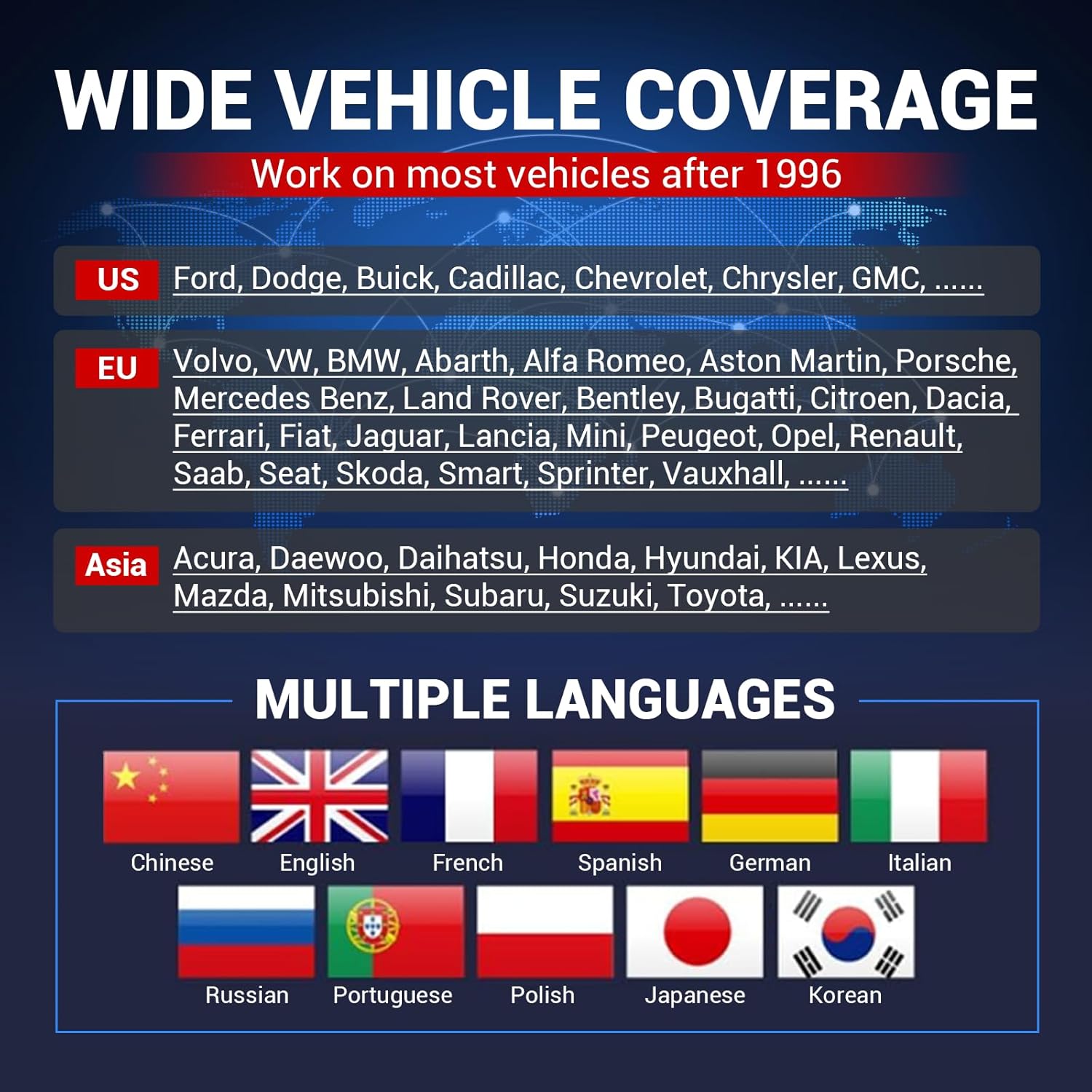
Figure 6: Vehicle Coverage and Language Support. This image highlights the extensive vehicle coverage for American, European, and Asian brands, along with the device's support for multiple languages, indicated by various national flags.
3.3 Išpakavimas ir komponentai
Video 1: What's in the box of LAUNCH CRP919E LITE? This video provides an unboxing experience, showcasing the contents of the product package, including the diagnostic tool, main cable, power adapters, and user manual. While the video title refers to a different model, the unboxing process and included accessories are generally representative of LAUNCH diagnostic tools.
4. Sąranka
4.1 Pradinė įrenginio sąranka
- Maitinimas: Paspauskite ir palaikykite maitinimo mygtuką, kad įjungtumėte įrenginį.
- Kalbos pasirinkimas: Follow the on-screen prompts to select your preferred language (e.g., English).
- Laiko juostos nustatymas: Pasirinkite vietinę laiko juostą.
- Tinklo prisijungimas: Connect the device to a Wi-Fi network to enable software updates and online features. Enter the Wi-Fi password when prompted.
- Vartotojo sutartis: Review and agree to the user agreement, privacy policy, and service agreement.
- Workshop Information: Optionally enter your workshop details.
4.2 Prijungimas prie transporto priemonės
- Raskite transporto priemonės OBD2 prievadą, kuris paprastai yra po prietaisų skydeliu vairuotojo pusėje.
- Connect the diagnostic cable to the device and then to the vehicle's OBD2 port.
- Pasukite automobilio uždegimo raktelį į „ON“ padėtį (variklis išjungtas).
4.3 Registration and Updates
To ensure your device has the latest software and vehicle coverage, it is crucial to register and perform updates. The Millennium Master 2.0 offers lifetime free updates.
Video 2: LAUNCH CRP123X V2.0 How to Register & Upgrade. This video demonstrates the step-by-step process of registering your LAUNCH diagnostic tool and performing software updates via Wi-Fi. This ensures your device has the latest features and vehicle compatibility.
5. Naudojimo instrukcijos
5.1 Diagnostikos atlikimas
- Automatinis VIN nuskaitymas: From the main menu, select 'Diagnose' and then 'AutoDetect' to automatically identify the vehicle's VIN and retrieve basic information.
- Sistemos nuskaitymas: After Auto VIN, proceed with a full system scan to check for fault codes across Engine, ABS, SRS, and Transmission.
- Read/Clear Fault Codes: Once the scan is complete, the device will display any detected Diagnostic Trouble Codes (DTCs). Select 'Read Fault Code' to view details and 'Clear Fault Code' to erase them after repairs.
- Tiesioginis duomenų srautas: Select 'Data Stream' to view real-time data parameters from various sensors in text or graph format. This helps in monitoring vehicle performance and identifying intermittent issues.
Video 3: Launch CRP129X Diagnostic Video. This video demonstrates the diagnostic capabilities of a LAUNCH CRP series tool, including VIN scanning, system scanning, and reading fault codes. The process shown is similar to the Millennium Master 2.0's diagnostic workflow.
Video 4: What does the AD500 do? Actual operation. This video illustrates the practical application of a diagnostic tool, showing how to perform a VIN scan, conduct a system scan, and interpret fault codes and live data streams. Although for a different model, the operational steps are comparable to the Millennium Master 2.0.
5.2 Atkūrimo funkcijos
The Millennium Master 2.0 supports 13 common reset functions. To access these, navigate to the 'Reset' menu from the home screen and select the desired function. Follow the on-screen instructions to complete the reset procedure.
5.3 Akumuliatoriaus testas
To perform a battery test, ensure the device is connected to the vehicle and a compatible BST360 battery tester (sold separately) is connected via Bluetooth. Select 'Battery Voltage' from the home screen and follow the prompts to conduct battery health, starting, and charging system tests.
6. Priežiūra
6.1 Programinės įrangos naujiniai
The device offers lifetime free software updates. Connect the device to a stable Wi-Fi network. From the home screen, select 'Upgrade' to check for and download available updates. Regular updates ensure optimal performance and compatibility with new vehicle models.
6.2 Valymas ir laikymas
Prietaisą valykite minkšta, damp cloth. Do not use abrasive cleaners or solvents. Store the device in a cool, dry place away from direct sunlight and extreme temperatures. Disconnect all cables when not in use.
7. Problemų sprendimas
If you encounter issues with your LAUNCH Millennium Master 2.0, refer to the following common troubleshooting steps:
- Įrenginys neįsijungia: Ensure the device is properly connected to the vehicle's OBD2 port or a power source. Check the power button.
- Ryšio klaida: Verify that the diagnostic cable is securely connected to both the device and the vehicle. Ensure the vehicle's ignition is in the 'ON' position. Try restarting the device and the vehicle.
- Programinės įrangos trūkumai: Perform a software update to resolve potential bugs. If issues persist, consider a firmware fix.
Video 5: Firmware Fix. This video demonstrates how to perform a firmware fix on a LAUNCH diagnostic tool. If you experience technical problems such as device prompt code errors or incorrect VIN recognition, a firmware update can often resolve these issues.
8. Specifikacijos
- Modelio numeris: 301050822
- Ekrano dydis: 5 colių
- Operacinė sistema: Android 8.1
- Maitinimo šaltinis: Maitinamas baterijomis
- Gamintojas: PALEIDIMAS
- Siuntinio matmenys: 25.4 x 20.32 x 7.62 cm; 997.9 g
9. Garantija ir palaikymas
For warranty information and technical support, please refer to the documentation included with your product or visit the official LAUNCH website. Online feedback options are available through the device's interface to submit diagnostic reports or seek assistance from LAUNCH technicians.