
Įvadas
This manual provides essential instructions for the safe and efficient operation of your JCL 32HDDTV2023 32-inch HD Ready Television. Please read this manual thoroughly before using your TV and retain it for future reference.
The JCL 32HDDTV2023 features a 32-inch HD Ready display, integrated tuners for ATV, DVB-T/T2/C/S/S2 signals, multiple connectivity options including HDMI and USB, and Dolby Digital Plus audio support.
Svarbi saugos informacija
- Saugokite televizorių nuo lietaus ar drėgmės, kad išvengtumėte gaisro ar elektros smūgio.
- Neužblokuokite ventiliacijos angų. Užtikrinkite pakankamai vietos aplink televizorių tinkamam oro cirkuliavimui.
- Naudokite tik prie televizoriaus pridėtą maitinimo laidą.
- Nestatykite televizoriaus ant nestabilaus vežimėlio, stovo, trikojo, laikiklio ar stalo.
- Atjunkite televizorių nuo elektros tinklo žaibuojant arba kai jis ilgą laiką nenaudojamas.
- Visus techninės priežiūros darbus patikėkite kvalifikuotam techninės priežiūros personalui.
Pakuotės turinys
Patikrinkite, ar pakuotėje yra visi reikalingi daiktai:
- JCL 32HDDTV2023 32-inch HD Ready TV
- Nuotolinio valdymo pultas
- TV stovas (2 vnt.)
- Vartotojo vadovas (šis dokumentas)
- Maitinimo laidas
Sąranka
1. Stovo pritvirtinimas
Carefully place the TV face-down on a soft, clean surface to prevent screen damage. Align the stand pieces with the corresponding slots on the bottom of the TV and secure them with the provided screws.
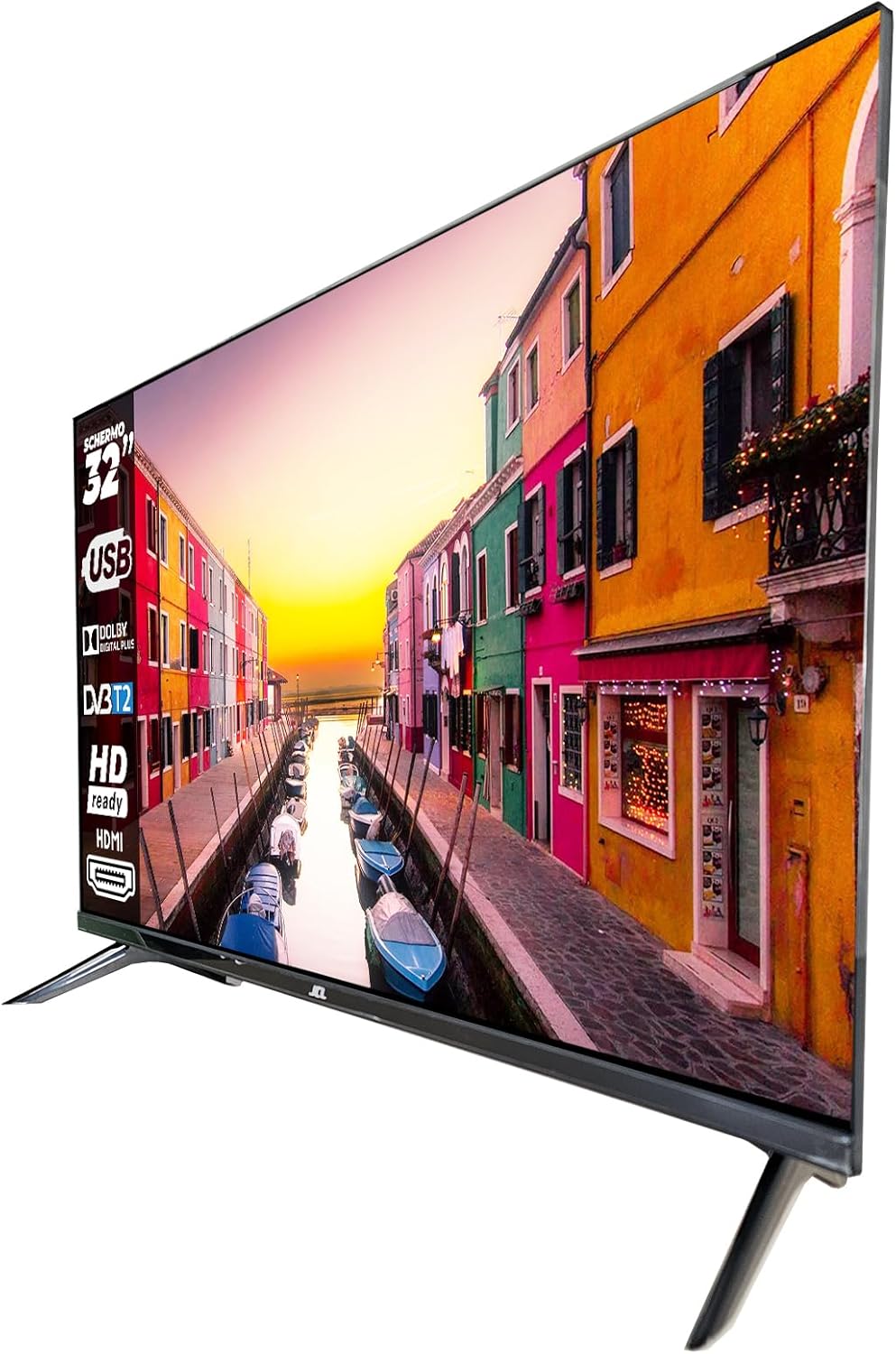
Image: The JCL 32HDDTV2023 television shown with its two-piece stand attached, viewed iš kampo.
2. Tvirtinimas prie sienos (neprivaloma)
This TV supports VESA 100 x 100mm wall mounts. Ensure you use a compatible wall mount bracket and follow the instructions provided with the wall mount. Remove the stand before wall mounting.

Vaizdas: Galinis view of the JCL 32HDDTV2023 television, highlighting the VESA mounting points and various input/output ports.
3. Išorinių įrenginių prijungimas
The TV offers various connection ports:

Vaizdas: Stambus planas view of the connectivity panel on the JCL 32HDDTV2023 TV, showing ports such as USB, Antenna, HDMI, and Composite Video/Audio inputs.
- Antenna/Cable (RF IN): Connect an antenna or cable TV signal to the RF input.
- Satellite (RF IN): Connect a satellite dish cable to the dedicated satellite RF input.
- HDMI: Connect devices like Blu-ray players, game consoles, or set-top boxes using an HDMI cable. The TV has 2 HDMI ports.
- USB: Connect USB storage devices for media playback. The TV has 1 USB 2.0 port.
- Composite Video/Audio (Mini AV): Connect older devices using the composite video and audio inputs (mini-jack type).
- CI/CI+ Slot: Insert a Conditional Access Module (CAM) for encrypted digital channels.
- SPDIF (Coaxial): Connect to an external audio receiver for digital audio output.
- Audio Jack (Headphone): Prijunkite ausines, kad galėtumėte klausytis privačiai.
4. Maitinimo prijungimas
Prijunkite maitinimo laidą prie televizoriaus maitinimo įvesties, o kitą galą – prie sieninio lizdo. Televizorius persijungs į budėjimo režimą.
5. Pradinės sąrankos vedlys
Pirmą kartą įjungus televizorių, bus atliekami pradiniai nustatymai. Paprastai tai apima:
- Kalbos pasirinkimas.
- Šalies / regiono pasirinkimas.
- Laiko juostos nustatymas.
- Channel scanning (for ATV, DVB-T/T2/C, DVB-S/S2 signals).
Vykdykite ekrane pateikiamus nurodymus, kad užbaigtumėte sąranką.
Naudojimo instrukcijos
Nuotolinio valdymo pulto funkcijos
Nuotolinio valdymo pultas leidžia pasiekti visas televizoriaus funkcijas. Įdėkite dvi AAA baterijas (nepridedamos) į nuotolinio valdymo pultą, stebėdami poliškumą.
- Maitinimo mygtukas: Turns the TV on or off (standby mode).
- Skaičių mygtukai (0–9): Select channels directly.
- CH +/-: Change channels sequentially.
- VOL +/-: Adjust volume level.
- Nutildyti: Mute or unmute the sound.
- Šaltinis / įvestis: Select input source (HDMI1, HDMI2, AV, DTV, ATV, SAT).
- Meniu: Access the main menu for settings.
- Naršymo mygtukai (aukštyn / žemyn / kairėn / dešinėn): naršykite meniu ir parinktis.
- OK/Enter: Patvirtinkite pasirinkimus.
- Išeiti/Atgal: Exit menus or go back to the previous screen.
- EPG: Display the Electronic Program Guide (for digital channels).
- Informacija: Display current channel information.
- Tekstas: Access Teletext (if available on the broadcast).
- Subtitrai: Enable or disable subtitles.
- Media/USB: Access media playback from a USB device.
Pagrindinės televizoriaus funkcijos
- Maitinimo įjungimas/išjungimas: Press the Power button on the remote or the TV's control panel.
- Kanalo pasirinkimas: Use CH +/- or number buttons.
- Garsumo reguliavimas: Use VOL +/-.
- Įvesties šaltinio pasirinkimas: Press the Source button and select the desired input (e.g., HDMI 1 for a game console, DTV for digital broadcast).
Meniu naršymas
Press the Menu button to access various settings categories:
- Vaizdo nustatymai: Adjust brightness, contrast, color, sharpness, picture mode (Standard, Dynamic, Movie, User).
- Garso nustatymai: Adjust bass, treble, balance, sound mode (Standard, Music, Movie, User), and enable/disable Dolby Digital Plus.
- Kanalo nustatymai: Perform auto/manual channel scans, edit channel lists, set favorite channels, and access parental control settings.
- Laiko nustatymai: Set current time, sleep timer, and auto standby.
- Option/General Settings: Language selection, OSD duration, factory reset.
Tėvų kontrolė
The TV includes parental control features to restrict access to certain channels or programs based on rating. Access this feature through the Channel Settings menu. A PIN code is required to activate and modify parental control settings.
Medijos atkūrimas per USB
Insert a USB storage device into the USB port. Press the Media/USB button on the remote or select USB from the input source menu. You can browse and play compatible photo, music, and video files.
Priežiūra
- Ekrano valymas: Gently wipe the screen with a soft, lint-free cloth. For stubborn marks, use a screen cleaning solution specifically designed for TVs, applied to the cloth, not directly to the screen.
- Kabineto valymas: Wipe the TV cabinet with a soft, dry cloth. Do not use abrasive cleaners or solvents.
- Vėdinimas: Įsitikinkite, kad televizoriaus gale esančios ventiliacijos angos nėra užblokuotos, kad jis neperkaistų.
- Maitinimo laidas: Regularly check the power cord for any damage. If damaged, replace it with an authorized replacement.
Trikčių šalinimas
| Problema | Galima priežastis / sprendimas |
|---|---|
| Nėra galios |
|
| Nėra vaizdo, bet yra garsas |
|
| Nėra garso, bet vaizdas yra |
|
| Nuotolinio valdymo pultas neveikia |
|
| Cannot find channels during scan |
|
Jei problema išlieka ir išbandžius šiuos sprendimus, susisiekite su klientų aptarnavimo tarnyba.
Specifikacijos
| Funkcija | Detalė |
|---|---|
| Modelio numeris | 32HDDTV2023 |
| Ekrano dydis | 32 colių |
| Ekrano raiška | 1366 x 768 (HD paruoštas) |
| Backlight Module | DLED (OD35) |
| Ryškumas | 200 nitų (cd/m2) |
| Atnaujinimo dažnis | 60 Hz |
| TV priėmimo sistema | ATV / DVB-T / T2 / C / S / S2 |
| HDMI prievadai | 2 (HDCP 1.4) |
| USB prievadai | 1 2.0 (USB XNUMX) |
| Sudėtinio vaizdo įvestis | 1 (mini) |
| Composite Audio Input | 2 (Mini, R/L) |
| CI/CI+ Slot | Taip |
| SPDIF išvestis | 1 (bendraašis) |
| Garso išvestis | 2 x 8 W |
| Garso technologija | Dolby Digital Plus (DD+) |
| VESA suderinamumas | 100 x 100 mm |
| Dimensions with Stand (W x D x H) | 720 x 188.5 x 480.7 mm |
| Matmenys be stovo (P x G x A) | 720 x 81 x 423.4 mm |
| Maitinimo šaltinis | AC 100-240 V, 50/60 Hz, 60 W |
| Energijos vartojimo efektyvumo klasė | E (A-G scale) |
| Energijos suvartojimas | 26 kWh/1000h |
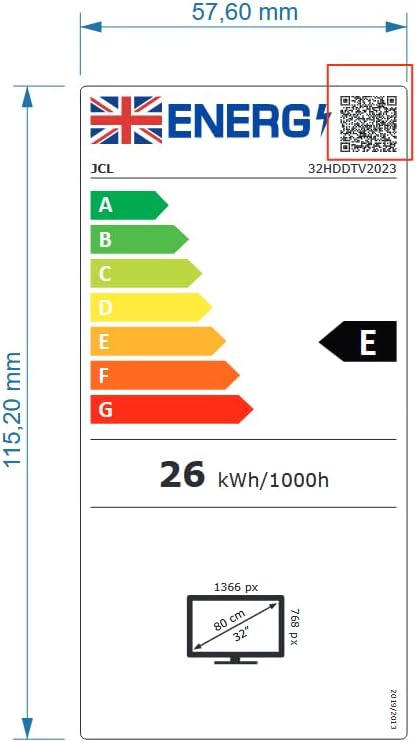
Image: The energy efficiency label for the JCL 32HDDTV2023 TV, indicating an 'E' rating and 26 kWh/1000h power consumption.
Garantija ir palaikymas
Your JCL 32HDDTV2023 Television is covered by a manufacturer's warranty. Please refer to the warranty card included with your product for specific terms and conditions, including the warranty period and coverage details.
For technical support, service inquiries, or to obtain replacement parts, please contact JCL customer service. Contact information can typically be found on the manufacturer's official websvetainėje arba garantijos kortelėje.
Please have your model number (32HDDTV2023) and purchase date ready when contacting support.