
FOREVER GSM169761
FOREVER išmaniojo laikrodžio SW-800 naudotojo vadovas
Model: SW-800 (GSM169761)
Įvadas
This manual provides essential information for the proper use and maintenance of your FOREVER Smartwatch SW-800. Please read it thoroughly before operating the device to ensure optimal performance and longevity. The SW-800 features a 1.3-inch AMOLED display, Bluetooth connectivity, and various fitness tracking capabilities.

Image: The FOREVER Smartwatch SW-800, showcasing its versatile design with both metal and silicone strap options, and various digital watch faces.
Sąranka
1. Išmaniojo laikrodžio įkrovimas
Before first use, fully charge your smartwatch. Connect the charging cable to the charging port on the back of the watch and plug the USB end into a power adapter (not included) or a computer's USB port. The watch display will indicate charging status.

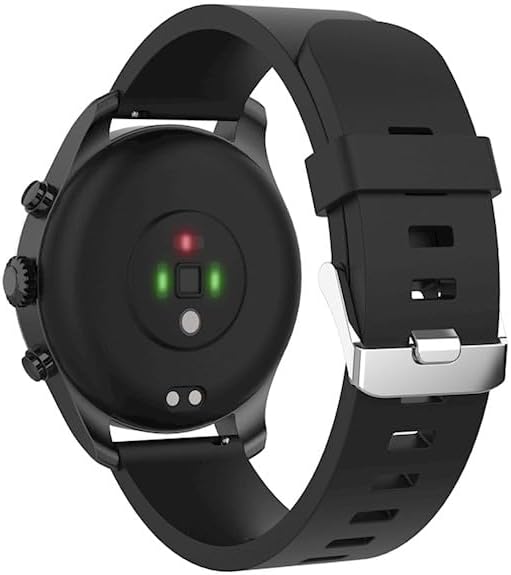
Paveikslėlis: Galinė dalis view of the smartwatch, highlighting the magnetic charging pins and the optical heart rate sensors.
2. Įjungimas/išjungimas
- To power on: Press and hold the side button until the FOREVER logo appears.
- To power off: Press and hold the side button, then select "Power Off" on the screen.
3. Susiejimas su išmaniuoju telefonu
- Download the companion application from the App Store (for iOS) or Google Play Store (for Android). Ieškokite "FOREVER Smartwatch" or refer to the QR code in the watch's settings.
- Įsitikinkite, kad jūsų išmaniajame telefone įjungtas „Bluetooth“.
- Atidarykite programą ir vykdykite ekrane pateikiamus nurodymus, kad sukurtumėte paskyrą arba prisijungtumėte.
- Select "Add Device" or "Pair Device" within the app.
- Iš galimų įrenginių sąrašo pasirinkite „SW-800“.
- Patvirtinkite susiejimo užklausą tiek išmaniajame telefone, tiek išmaniajame laikrodyje.

Image: A smartphone displaying the FOREVER companion app interface, with the smartwatch screen prompting the user to "Connect APP" via Bluetooth.
Išmaniojo laikrodžio valdymas
1. Pagrindinė navigacija
- Jutiklinis ekranas: Swipe left, right, up, or down to navigate through menus and notifications. Tap to select an item.
- Šoninis mygtukas: Paspauskite, kad grįžtumėte į pradinį ekraną arba pažadintumėte ekraną. Ilgai paspauskite, kad atidarytumėte maitinimo parinktis.
2. Pagrindinės savybės
- Širdies ritmo stebėjimas: The smartwatch continuously monitors your heart rate. Access the heart rate widget or app on the watch to view realaus laiko duomenys ir istorinės tendencijos.
- Pedometras: Stebi jūsų kasdienius žingsnius, atstumą ir sudegintas kalorijas.
- Sporto režimai: The SW-800 supports 14 different sports modes, including running, cycling, and walking. Select a mode before starting an activity to track specific metrics.
- Miego stebėjimas: Stebi jūsų miego įpročius, įskaitant gilų miegą, lengvą miegą ir pabudimo laiką.
- Kraujo deguonies (SpO2) stebėjimas: Išmatuokite kraujo prisotinimo deguonimi lygį.
- Temperatūros stebėjimas: Pateikia kūno temperatūros rodmenis.
- Muzikos valdymas: Control music playback on your connected smartphone directly from the watch.
- Pranešimai: Receive call, message, and app notifications from your smartphone.

Image: A collage of watch faces illustrating the various health and fitness tracking features, including heart rate, step count, calorie burn, sleep analysis, body temperature, and blood oxygen levels.

Image: The smartwatch displaying a graph of body temperature measurements over time, indicating current and historical readings.

Image: The smartwatch screen showing a blood oxygen saturation (SpO2) reading of 97%, along with a trend graph.

Image: The smartwatch worn by a runner, actively tracking fitness metrics during an outdoor exercise session.
Priežiūra
1. Valymas
Regularly clean your smartwatch and strap to prevent skin irritation and maintain device functionality. Use a soft, lint-free cloth. If necessary, slightly dampNuvalykite šluostę vandeniu. Venkite naudoti stiprias chemines medžiagas ar abrazyvines medžiagas.
2. Atsparumas vandeniui (IP68)
The SW-800 is rated IP68, meaning it is resistant to dust and can withstand immersion in water up to 1.5 meters for up to 30 minutes. It is suitable for daily use, such as hand washing or light rain. However, it is not recommended for swimming, diving, or high-pressure water activities.
3. Akumuliatoriaus priežiūra
- Venkite dažnai visiškai iškrauti akumuliatorių.
- Nelaikykite prietaiso ekstremaliose temperatūrose.
- Naudokite tik pateiktą įkrovimo laidą.
Trikčių šalinimas
1. Laikrodis neįsijungia
- Įsitikinkite, kad laikrodis yra visiškai įkrautas. Prijunkite jį prie įkroviklio bent 30 minučių.
- Pabandykite paspausti ir palaikyti šoninį mygtuką 10–15 sekundžių, kad priverstumėte įrenginį paleisti iš naujo.
2. Ryšio problemos („Bluetooth“)
- Įsitikinkite, kad „Bluetooth“ įjungtas ir išmaniajame laikrodyje, ir išmaniajame telefone.
- Make sure the smartwatch is within the Bluetooth range of your phone.
- Perkraukite ir išmanųjį laikrodį, ir išmanųjį telefoną.
- Unpair the device from your phone's Bluetooth settings and re-pair it through the companion app.
3. Netikslūs sveikatos rodmenys
- Įsitikinkite, kad laikrodis tvirtai prigludęs prie riešo, bet ne per stipriai.
- Nuvalykite jutiklius laikrodžio gale.
- Matavimo metu venkite per didelio judėjimo.
- Note that these devices are not medical instruments and readings are for reference only.
4. App Not Syncing Data
- Patikrinkite interneto ryšį savo išmaniajame telefone.
- Ensure the companion app has all necessary permissions enabled in your phone's settings.
- Close and reopen the app, or restart your phone.
Specifikacijos
| Modelio pavadinimas | SW-800 (GSM169761) |
| Ekranas | 1.3 colio AMOLED, 360 x 360 pikselių |
| Ryšys | Bluetooth |
| Atsparumas vandeniui | IP68 |
| Jutikliai | Heart Rate Monitor, Pedometer, SpO2, Temperature |
| Baterijos tipas | Ličio jonas |
| Suderinami įrenginiai | Išmanusis telefonas |
| Žmogaus sąsajos įvestis | Mygtukai, Jutiklinis ekranas |
| Matmenys (paketas) | 11.2 x 9.2 x 7.1 cm |
| Svoris (pakuotės) | 240 g |
Paveikslėlis: detalus view of the smartwatch, emphasizing its 1.3-inch display with 360x360 pixel resolution, and the sleek design of the metal band.
Garantija ir palaikymas
Your FOREVER Smartwatch SW-800 comes with a standard manufacturer's warranty. Please refer to the warranty card included in your product packaging for specific terms and conditions, including the warranty period and coverage details.
For technical support, troubleshooting assistance, or warranty claims, please contact FOREVER customer service. Contact information can typically be found on the official FOREVER websvetainėje arba ant produkto pakuotės.
Ask a question about this manual
Ask about setup, troubleshooting, compatibility, parts, safety, or missing instructions. Manuals+ will review the question and use this page’s manual context to help answer it.